

TL;DR / Summary
On-screen takeoff works. The real bottleneck isn't digitizing plans or counting symbols, it's connecting that takeoff data to pricing, scheduling, RFI resolution, and field coordination without manual re-entry. A takeoff sitting in one tool and pricing in another is a breakdown waiting to happen.
What you'll learn:
- Why isolated on-screen takeoff tools create downstream chaos, not faster bidding
- The five critical workflows that depend on takeoff data being accessible and clean
- How integration failures force rework and kill margin protection
- What a friction-free on-screen takeoff actually looks like in practice
- Where Ruh AI's orchestration approach differs from point-solution vendors
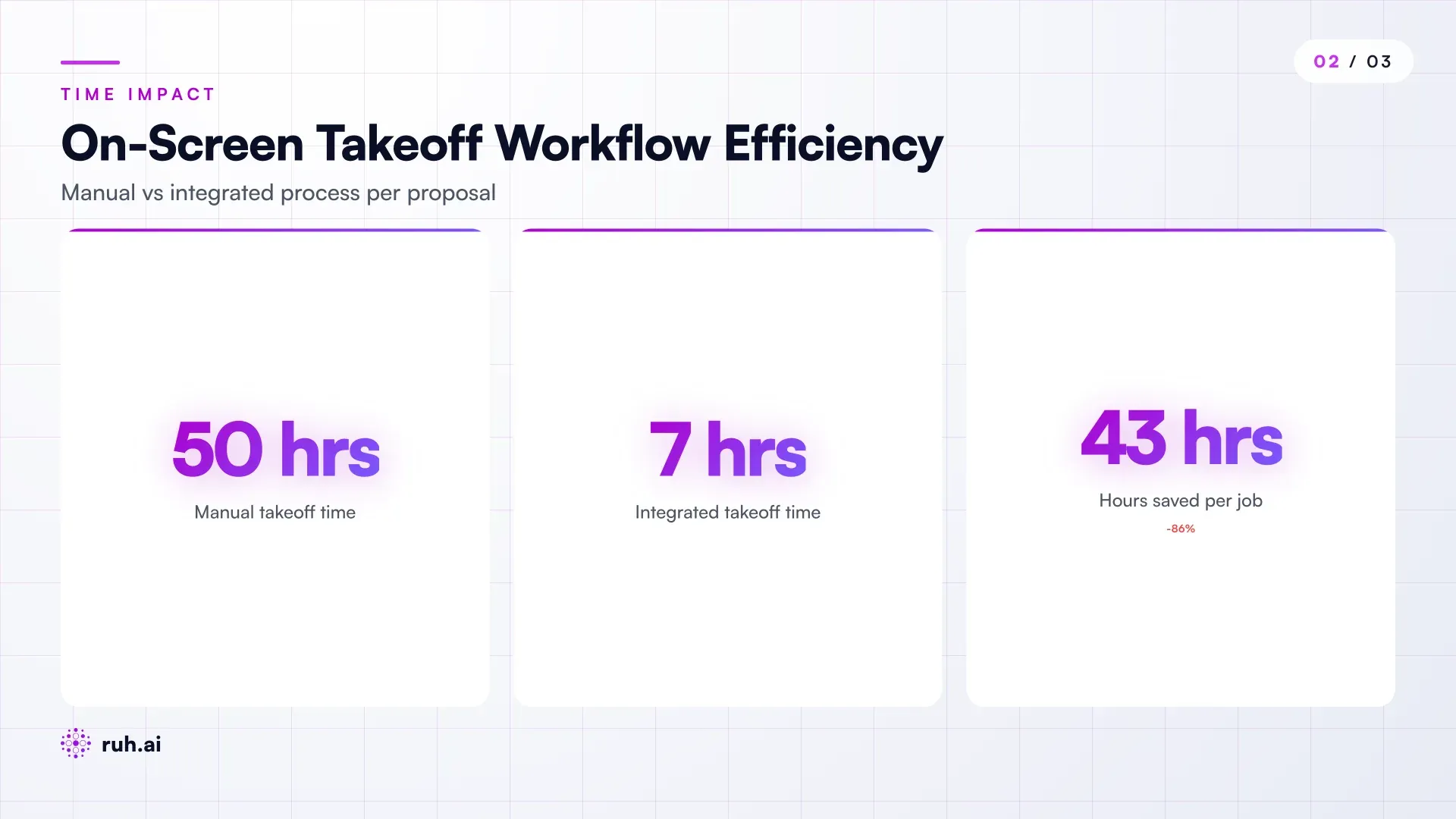
The numbers upfront: Teams using on-screen takeoff still spend 40-60 hours on a typical bid when the takeoff data gets trapped in a single tool and must be manually re-keyed or validated across pricing, scheduling, and proposal assembly. When takeoff data flows end-to-end without friction, that same bid tightens to 6-8 hours.
On-Screen Takeoff Isn't New, Integration Is Still Missing
On-screen takeoff solved a real problem. Before it, quantity surveyors and estimators sat with physical prints, scaled rulers, and calculators. They drew boxes, counted scales, checked dimensions. Mistakes compounded. Time bloated. Now, a plan PDF opens on screen, quantities are marked, dimensions are extracted, and a spreadsheet materializes.
But here's what contractors discovered in practice: the takeoff is only the first step.
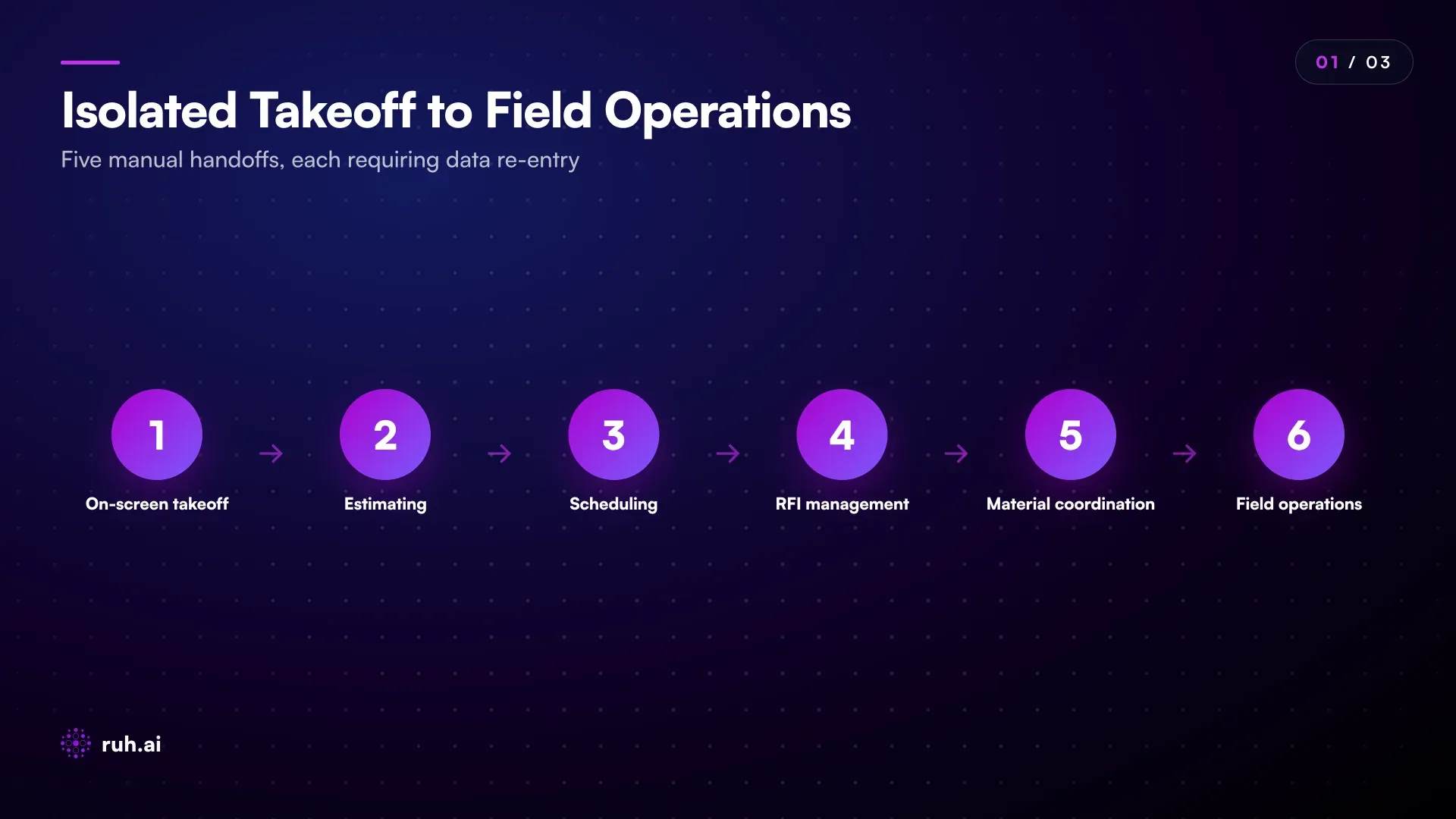
The takeoff produces data. Lots of it. Quantities, assemblies, scope notes, sketches. But where does that data go next? Into an Excel file that lives on a shared drive? Into a vendor's proprietary database that doesn't talk to anything else? Somewhere that forces a coordinator to re-key costs by hand into the estimating software, which then forces a project manager to manually cross-check it against the schedule, which then forces a field superintendent to reconcile it against material lists on day one of construction?
That's not efficiency. That's a data pipeline with friction at every joint.
The takeoff is a starting point, not a finish line. The real win is what happens after the quantities are locked.
The Integration Problem: Why Isolated Takeoff Tools Fail
On-screen takeoff tools come in three flavors. Some are specialized, Bluebeam, STACK, PlanGrid, and do one thing very well: markup and extract quantities. Others are built into estimating platforms, Autodesk's offerings, ProEst, RSMeans, and integrate takeoff into a pricing engine. And a few are completely standalone, cloud-based, and try to do takeoff plus a little bit of everything else.
Each one has an integration wall.
Specialized takeoff tools give you clean quantity data. But you still need to export it, validate it, load it into estimating software, check that the assembly mappings match your cost database, then push finalized line items into a proposal template. That's minimum four hand-offs and four failure points.
Takeoff-plus-estimating tools lock you in. They tie quantities to their cost library and their unit price structure. If your company wants to use your own pricing rules, regional labor rates, preferred subcontractors, in-house material agreements, you're fighting the software, not using it.
Standalone cloud tools promise flexibility. They don't. They typically export to CSV or PDF, which means anyone downstream, a scheduler, a pre-buy coordinator, a controller prepping a project budget, has to manually interpret and re-enter the data. And every time that data passes through a manual gate, the chance of error multiplies.
The problem is that on-screen takeoff exists in isolation. It doesn't automatically sync with your pricing engine. It doesn't feed the schedule. It doesn't validate against your standard assemblies. It doesn't trigger RFI creation when scope ambiguities are flagged. It doesn't pre-load the project budget in your accounting system. It sits alone, generating quantities that then require manual choreography to reach the workflows that actually depend on them.
What Breaks When Takeoff and Downstream Workflows Aren't Connected
A commercial contractor bids a $2.3M mixed-use building. The estimator runs the takeoff on screen, marks up windows, doors, structural elements, mechanical rough-in. Quantities extract. Good. Cost line items populate. Estimating looks solid. Bid goes out, bid wins. Project moves to execution.
Day one: the superintendent gets a material list and schedule. The schedule was built off a rough first-pass, not the detailed takeoff. It assumes 40 structural columns; the actual count is 43. The spec says cast stone; the takeoff shows EIFS with a note. The RFI pile starts immediately. The pre-buy coordinator had costs but no actual BOQ (bill of quantities), so material ordering was guessed. Short delivery. Cost overrun. The AP controller receives invoices that don't match either the estimate or the purchase order because no one ever confirmed the exact quantities that were actually built.
That cascade starts at one point: the takeoff data was never connected to scheduling, specification clarification, field coordination, or accounting workflows.
On-screen takeoff tools don't do this. They can't. They're not designed to integrate with your schedule, your RFI system, your subcontractor BOQs, your pre-buy workflow, your change-order tracking, or your cost reporting. They output data, and then it's your problem to get that data where it needs to go.
The Honest Assessment: On-Screen Takeoff Isn't Broken, It's Incomplete
On-screen takeoff itself works fine. The tech is mature. Marking up a PDF and extracting quantities is a solved problem. The tools that do it, some of them, do it well.
What's broken is the assumption that on-screen takeoff + export = solved preconstruction. It doesn't. Every takeoff tool exists in a vacuum. They all output data that then requires manual processing to reach the workflows that actually drive project success: bid accuracy, schedule realism, field clarity, cost control.
The "friction" in on-screen takeoff isn't symbol counting. It's every moment after the quantities are locked. It's the export. It's the re-mapping. It's the re-entry. It's the coordinator discovering three days before material show-up that the actual quantities differ from the estimate by 15%. It's the superintendent getting a schedule that contradicts the actual scope. It's the invoice landing in AP and not matching either the PO or the actual deliverable.
Friction compounds with every disconnected tool. One tool = some friction. Five disconnected tools = a pipeline that bleeds time and accuracy.
What a Friction-Free On-Screen Takeoff Actually Requires
A real solution doesn't replace on-screen takeoff, it extends it.
First, the takeoff tool needs to be intelligent about what it extracts. A smart takeoff doesn't just count windows; it notes the assembly type, the specification reference, any ambiguities in the plan notes. It tags scope questions. It flags items that contradict the spec or prior takeoffs (window type changes mid-plan without callout).
Second, quantities need to be immediately accessible to downstream systems. Not export-then-re-import. Not CSV conversion. Direct connectivity. An estimator marks up a plan, quantities are locked, and the scheduling engine can immediately see: here are 43 structural columns, 127 linear feet of MEP runs, 1,200 SF of exterior closure. The scheduler can assign durations. The pre-buy coordinator can request quotes from vendors without re-entering takeoff line items. The project manager can load it into a project budget without re-keying. The field team sees the actual scope on their tablet.
Third, ambiguities need to trigger RFI creation, not field surprises. If the takeoff tool flags something unclear, material type, dimension discrepancy, assembly conflict, it needs to automatically draft an RFI, route it through your approval workflow, and update quantities when clarity arrives.
Fourth, pricing needs to be part of the system from the start, not a separate step. Takeoff + pricing + assembly validation happen in one orchestrated workflow. If the estimator runs quantities and your standard assembly pricing applies cleanly, great, it happens automatically. If quantities don't map to standard assemblies, the system flags it so pricing review happens before the bid leaves.
This isn't a luxury. This is what "friction-free" actually means.
The Real Constraint: Data Governance, Not Tool Capability
Most contractors have standardized their assemblies. The estimator knows: a window assembly = frame + glass + trim + install labor at rate X per unit. A structural column = rebar + concrete + labor at rate Y. Cost database built. This is the real asset.
The problem isn't the takeoff tool figuring out "what is a window." The problem is the takeoff tool's data never reaching your assembly library. It generates quantities as generic line items. Then an estimator manually maps them: "This is a window, match it to assembly W-3." Manually. Every single line item. Every single bid.
That's the friction point. Not the on-screen markup. Not symbol counting. The friction is between the takeoff tool's output and your internal cost standards.
A real solution needs to:
- Know your standard assemblies (not the vendor's generic list)
- Suggest assembly matches as the takeoff happens, so mapping is done during markup, not after
- Lock quantities to YOUR assemblies, so downstream systems (schedule, pre-buy, field) all reference the same definition
This isn't technically hard. But it requires the tool to be integrated with your operational workflows, not sold as a standalone product.
How Ruh AI Fits Into This Picture
Ruh Estimator isn't on-screen takeoff in isolation. It's an orchestrator. The takeoff is the entry point, but the orchestration doesn't end there.
A team uploads a plan. Ruh's takeoff engine marks it up, extracts quantities. But then, this is where it differs, those quantities immediately flow through a validation step against your standard assemblies (loaded from your cost database or Ruh's library). Assembly mapping happens in real time, not after export. Quantities that don't fit standard assemblies get flagged for review so the estimator knows why something needs manual pricing attention, not just "this line item exists."
From there, the workflow branches. Scheduling: quantities and assembly definitions feed into a preliminary schedule so durations and logic are grounded in actual scope, not guesses. RFI resolution: scope ambiguities found during takeoff automatically become RFI drafts, which route to the design team and lock into the bid once answered. Pre-buy: material coordinators see real BOQs, not re-keyed estimates, so quotation requests go out with complete, accurate data. Field operations: when the project starts, the superintendent has a scope document derived from the actual takeoff, not a separate plan the GC has to interpret.
The outcome: on-screen takeoff becomes a starting point for the entire preconstruction workflow, not an isolated step. Data flows once. Downstream workflows read that single source of truth. Rework drops dramatically.
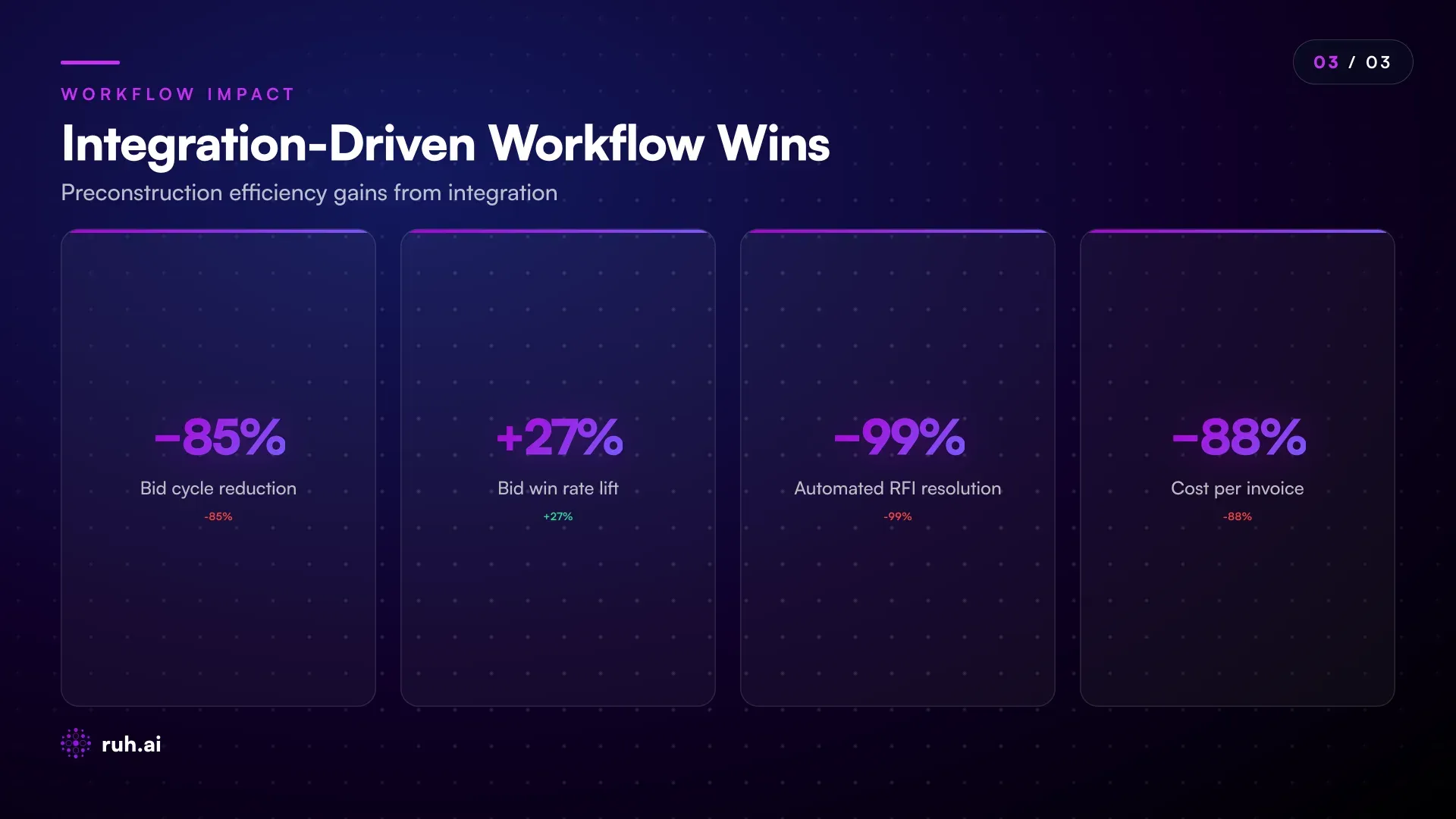
Teams using Ruh Estimator report bid cycles tightening from 40-60 hours to 6-8 hours, with bid win rates up 22-31%. That's not faster symbol counting. That's integrated preconstruction, takeoff connected to pricing, scheduling, coordination, and field prep, all flowing from one plan, one pass.
If you're building with Ruh Work-Lab, you can also build custom agents on top of this. An RFI agent that automatically routes scope questions. A scheduling agent that builds preliminary phasing based on the takeoff. A material-requisition agent that pre-populates quotes based on actual quantities. These aren't separate tools. They're agents built on top of your takeoff data, orchestrating downstream work.
Frequently Asked Questions
Q: Is on-screen takeoff faster than manual takeoff with ruler and scale? A: Yes, dramatically. But speed isn't the real win. Accuracy is. On-screen takeoff eliminates scale-reading errors and reduces the chance of missing a line item because you couldn't see the detail on a small-scale print. The speed improvement, usually 60-70% reduction in pure quantity extraction time, is real, but the accuracy gain is what protects margin.
Q: Can I use on-screen takeoff without integrating it to pricing and scheduling? A: Technically, yes. Functionally, no. Isolated on-screen takeoff will give you quantities, but every downstream workflow, estimating, scheduling, RFI management, material coordination, has to re-interpret that data. You get speed in one step and friction in five others. The math doesn't work.
Q: Which on-screen takeoff tools integrate best with Quickbooks and Procore? A: Most specialized takeoff tools (Bluebeam, STACK, PlanGrid) have basic integrations with these platforms, usually through export-and-import connectors or direct API links. But "integration" here often just means "exports a file your accounting software can read." Real integration means live data flow, automated mapping, and zero manual re-entry, which most tools still don't do. Ruh Estimator connects through direct API integration and handles assembly mapping as part of the workflow, not as a post-export step.
Q: What happens if the on-screen takeoff misses something or miscounts? A: Manual validation is still required, especially for complex projects. The value of on-screen takeoff isn't eliminating QA, it's making QA faster and more targeted. An estimator can do a second pass over the digital markup in a fraction of the time it takes to re-measure a physical print. And when the takeoff data flows downstream, discrepancies surface faster (schedule doesn't match quantity, RFI gets triggered, field coordination catches misalignment early).
Q: Can subcontractors use the same on-screen takeoff data the general contractor generated? A: Only if the takeoff system allows data export and sharing. Most GCs guard their takeoffs; it's proprietary cost information. But when takeoff feeds into an RFI system or a specification-clarification workflow, subcontractors can see the relevant scope questions and contribute to RFI responses. That's often more valuable than the raw takeoff.
Q: How do I know if my current on-screen takeoff tool is creating friction downstream? A: Ask three questions: (1) After takeoff is done, how much time does an estimator spend re-mapping quantities to your standard assemblies? (2) Does the schedule get built independently of the takeoff, or does it reference actual scope? (3) When a field issue arises (quantities wrong, spec unclear, scope mismatch), how much rework does it trigger? If any of those answers involve re-entry, manual coordination, or "we build the schedule separately," you have friction. Integrated on-screen takeoff eliminates that.
What To Do Now
On-screen takeoff is table stakes. Every bid system has it or should. The question isn't "Do we use digital takeoff?" It's "Does our takeoff data actually drive our downstream workflows, or does it sit in a silo?"
If your current setup requires manual re-entry after takeoff, you have friction. If your schedule is built independently of scope, you have friction. If your field team doesn't see the actual takeoff-driven scope until day one, you have friction.
Friction compounds. Five hours of re-entry per bid adds up. Friction kills margin protection. A schedule that doesn't match actual scope creates cost overruns. Friction wastes the speed gain on-screen takeoff gave you.
The move is to connect it. Make on-screen takeoff the entry point to a workflow where quantities flow to pricing, scheduling, RFI management, and field coordination without manual hands-off.
Explore Ruh Estimator and run an integrated takeoff-to-field workflow →
Build a custom preconstruction agent with Ruh Work-Lab →
Talk to the Ruh AI team about preconstruction orchestration →