

TL;DR / Summary
Takeoff calculators extract quantities from plans and price them. That's where they stop. Once the project starts, hidden costs emerge, crew downtime from site layout, scope interpretation gaps (RFIs), labor productivity variance, waste that exceeds industry averages, permit delays, overlapping work sequences. The result: constant change orders and cost variance that could have been predicted before contract signature. AI agents close this gap by moving from "extract quantities" to "predict actual cost given site conditions, scope ambiguity, and historical project data."
What you'll learn:
- The four cost categories calculators systematically underestimate
- Why labor productivity assumptions are almost always wrong at project start
- How scope ambiguity transforms into change orders worth thousands
- The real estimating workflow: takeoff + scope modeling + labor prediction + contingency intelligence
- How AI agents reduce cost variance before mobilization
The Honest Reality: What Calculators Actually Do
A construction calculator does one job: extract line items and price them. Procore's on-screen takeoff, Bluebeam, simple spreadsheets, they all follow the same pattern. Find quantity, apply unit price, sum the total. Fast. Quantifiable. Auditable.
But here's what they don't do: they don't predict cost. They predict line-item spend, which is different. A calculator tells you "40 cubic yards of concrete at $150/CY = $6,000." It doesn't tell you the concrete will arrive three days late, requiring the crew to work nights to stay on schedule. It doesn't tell you the site layout wastes two hours per day to material handling. It doesn't tell you the general contractor will issue six RFIs during excavation that each delay the schedule by a day.
Most construction estimators know this gap exists. They add 10% contingency, round up the labor rates, and hope it covers the unknowns. By the third change order, they're out of contingency. By the end of the project, the estimate is off by 20-40% from close-out. The calculator was correct. The estimate was incomplete.
The Four Cost Buckets Calculators Miss
Construction cost lives in four buckets. Calculators see one. Here's what they miss:
Bucket 1: Labor Productivity Variance. A calculator might assume a bricklayer produces 400 units per day based on industry averages. But on your site, the crew is new-to-the-company (slower), the weather has been wet (slower), the scaffold staging puts them 30 feet up (slower). Real productivity might be 250 units per day. That's a 37% cost swing on the entire masonry line item, and the calculator is invisible to it.
Bucket 2: Scope Ambiguity. The plans show a concrete slab. The notes are quiet on whether the slab is reinforced, post-tensioned, or conventional. The sub bids conventional (less cost). During RFI clarification, the structural engineer specifies post-tensioned (more cost, longer schedule). The calculator had no ambiguity to resolve, it just priced what you asked it to price.
Bucket 3: Site Logistics. Material handling, crew coordination, overlap inefficiency. If the site is 90 minutes from the supplier, concrete loses slump in the truck. If three trades need the same corner of the building on the same week, one waits. If the building is in a dense urban lot with no staging area, crane costs double and cycle times triple. Calculators assume "standard site", frictionless, flat, unlimited space.
Bucket 4: Soft Costs and Contingency. Permit inspections, expediting fees, administrative overhead, waste factors beyond industry norms, superintendent time for coordination. These are rarely line-itemized in a calculator and almost always underestimated when added as a lump sum.
Why Labor Productivity Guesses Fail
Estimators pull labor rates from RS Means, Gordian, or internal historical data. Those sources give you an average. But average assumes average conditions, average crew experience, average site layout. Your project is not average.
Consider two scenarios. Same project, same concrete work:
Scenario A: Site is suburban, site supervisor is experienced with this crew, material delivery is predictable, no weather delays in the forecast window. Crew productivity tracks close to published rates.
Scenario B: Same project, but the crew has 40% turnover since the last job, the site is downtown with no lay-down area, material delivery windows are 3 hours wide, weather has delayed schedule by two weeks already. Crew productivity is 25-35% below published rates.
A calculator sees the same line item in both scenarios and prices it identically. The difference in actual labor cost between Scenario A and B might be $50K on a $200K concrete line. The calculator generated identical output. The actual cost will differ by 25%.
This is not a failure of the calculator. It's a failure of the workflow. The calculator was asked to do something it was never designed to do: predict cost under uncertainty.
Scope Ambiguity as a Cost Driver
RFIs exist because plans are incomplete. This is normal. What's not normal is that most estimates are priced before RFIs are resolved. The estimator sees a detail that could be interpreted two ways, conventional drywall or fire-rated, 3-hour or 2-hour concrete, primed or painted finish, and splits the difference or assumes the cheaper option. When the RFI comes back, it's the expensive option.
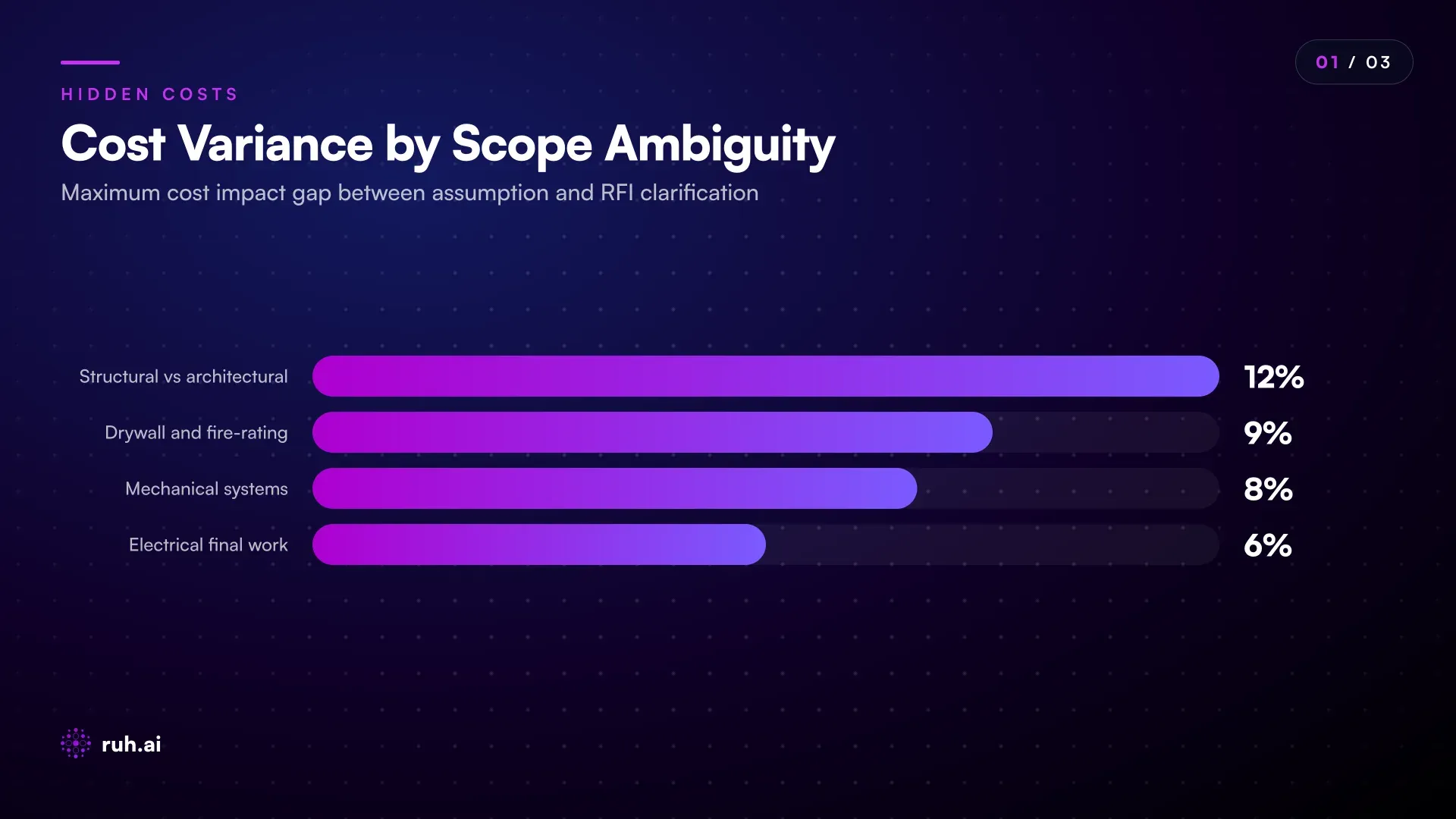
Scope ambiguity also drives schedule compression, which drives labor premium. If the estimate assumed 8 weeks for a phase and the RFI clarification eats 2 weeks, the remaining work gets front-loaded. Overtime, double-shifts, expediting. The labor rate was correct. The schedule assumption was wrong.
Resolving scope before pricing is not optional, it's the difference between an estimate and a guess. Yet most calculators have no mechanism to flag ambiguity or track RFI-driven changes backward to the estimate.
Site Logistics: The Invisible Cost Multiplier
Material handling on a constrained site costs 3-4x material handling on a clean site. This is not an opinion. It's physics and scheduling.
A downtown high-rise concrete pour: no staging area. Concrete truck queues form. Each truck waits 45 minutes for its turn, losing slump. Some concrete is rejected. Pump time extends. Finishing crew works into the evening. Labor hours climb 20-30% above spec. The calculator assumed standard on-grade concrete. The project is the 15th floor with a postage-stamp deck. Cost is structurally different.
Crew overlap is another killer. If the framing crew expects the MEP trades to be done two weeks before they arrive, and MEP is one week late, framing either waits (schedule slip, overhead bloats) or compresses their scope to overlap (productivity collapse, safety risk). The calculator priced both trades independently. Reality priced them as a system.
Site logistics isn't a line item. It's a schedule problem that cascades into labor cost. Calculators see line items. They don't see schedule, site constraints, or overlap dynamics.
Soft Costs and the Contingency Blindspot
Most contractors add contingency as a line item: "10% for unknowns." Some use a range: 7-12% depending on how well-defined the scope is. But contingency is a number. It doesn't predict where the overrun will hit.
Soft costs include permit and inspection fees (known, but often forgotten in the line-item list), superintendent time for RFI resolution and change order tracking (not burdened onto labor rates), expediting fees if something is on the critical path (unpredictable), site overhead for extended schedule (contingent on delays), waste above industry average (site-specific, not industry averages).
A well-run estimate tries to distribute soft costs across line items (superintendent time into general labor burden, inspection time into phase schedule). A quick estimate lumps it all into contingency and hopes. Neither approach is precise because soft costs are schedule-dependent and scope-dependent. They're not revealed until the project is live.
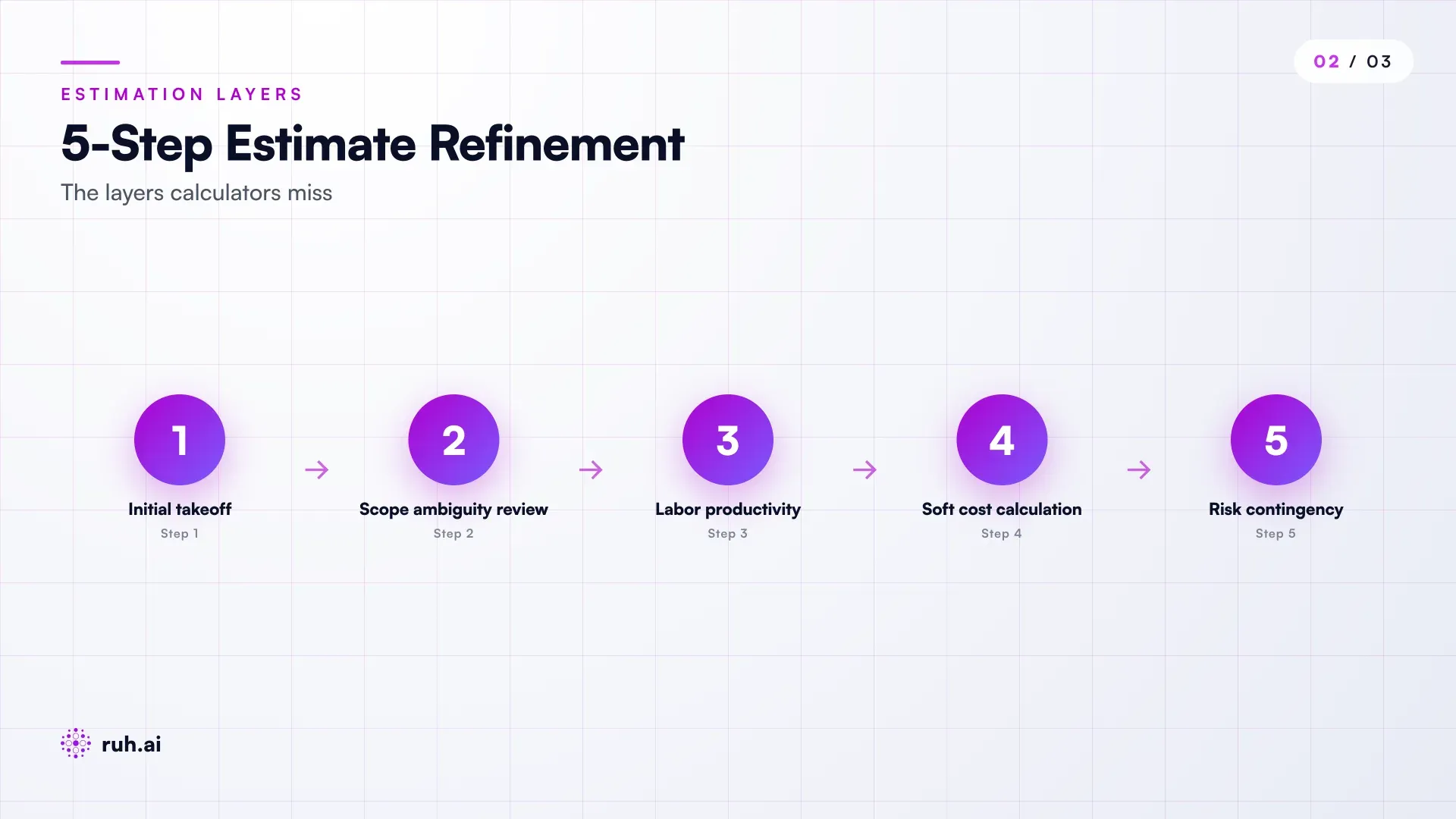
From Takeoff to Cost Prediction: The Real Workflow
The gap between calculator output and actual cost has a cause. It's not that calculators are bad. It's that they're answering the wrong question. They answer "what are the quantities?" when the business needs to know "what will this actually cost?"
Closing the gap requires a workflow that does five things simultaneously:
- Extract quantities (what calculators do today)
- Flag scope ambiguity (resolve interpretation gaps before pricing)
- Model labor productivity (adjust rate based on crew, site, and schedule)
- Calculate soft costs (tied to schedule, not a fixed percentage)
- Allocate intelligent contingency (risk-stratified, not one-size-fits-all)
Most contractors do this in their head, in spreadsheets, or by rule of thumb. The experienced estimator reads the plans, pulls out quantities, then manually adjusts based on site knowledge. This works if the estimator is experienced. It fails if they're new, overloaded, or inheriting work from someone else.
AI agents automate this workflow. They extract quantities (like a calculator), but they also ingest historical project data (your previous jobs), flag plan ambiguity, model labor productivity based on crew composition and site constraints, and recommend contingency levels based on risk factors specific to this project, not a generic percentage.
Historical Job Data as the Leverage Point
The single most predictive input to cost is your own historical job data. Not published rates. Not industry averages. Your data.
If your crews completed five similar concrete projects, that historical data tells you:
- Actual labor productivity (units per day, accounting for site variables)
- Crew composition that worked (superintendent-to-worker ratio, experience mix)
- Schedule outcomes (how long did concrete actually take vs. bid)
- Cost variance (where overruns happened, where savings materialized)
- Material waste (scrap, spoilage, miscuts)
A calculator has no access to this data. An AI agent that ingests your historical jobs can surface a recommendation: "Based on the last three similar projects, labor productivity for this scope is 15% below published rates due to site density. Your estimate should assume 345 units/day, not 400."
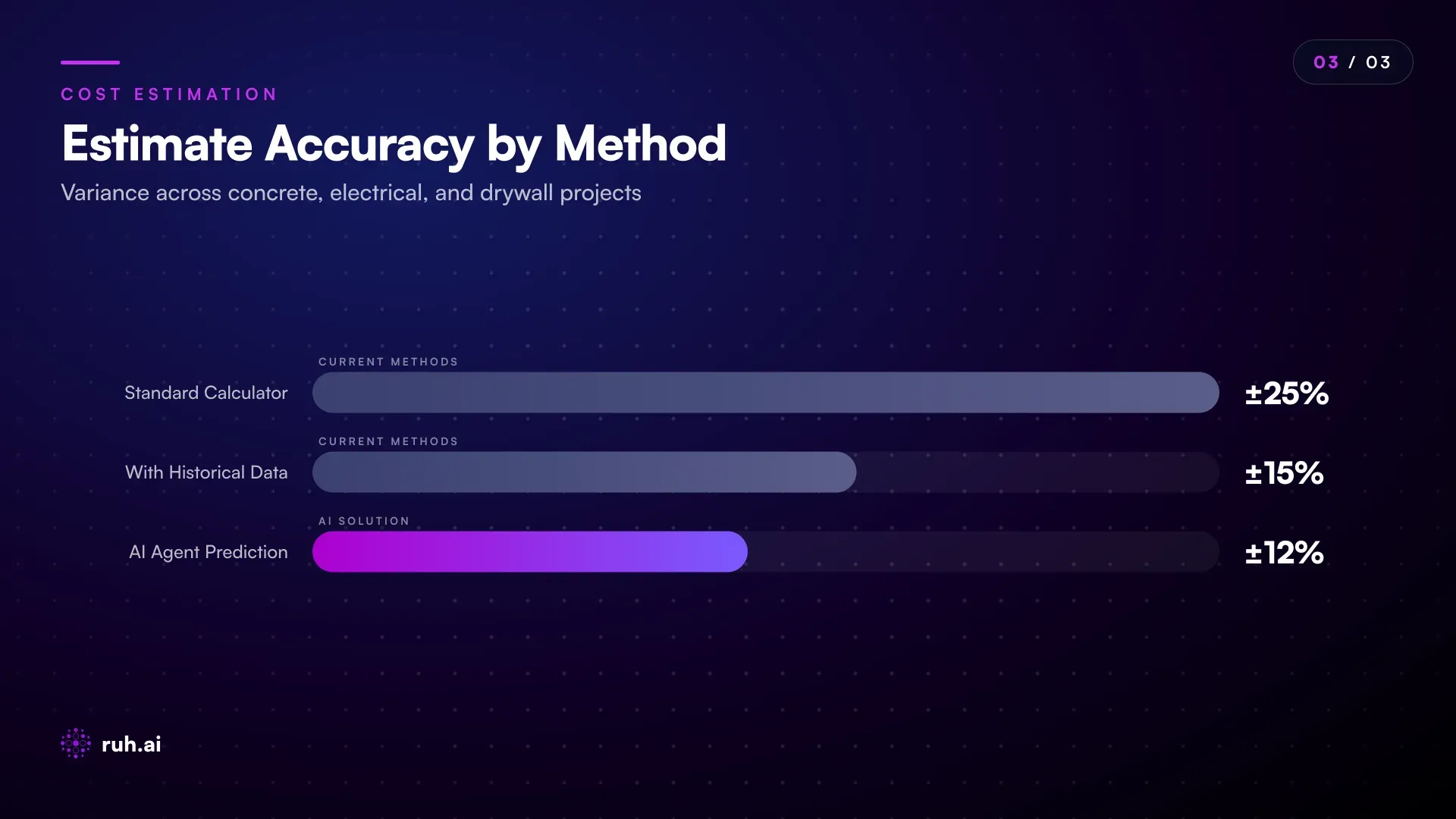
This is not guessing. It's statistical inference from your own track record.
Real-Time Cost Tracking and Change Order Prevention
Once the project starts, cost intelligence has a second act. Early warning. If the concrete crew is running 20% behind your modeled productivity by week two, that's a data point. Extrapolate it forward and the labor line item will overrun by $30K. The superintendent sees it. The estimator doesn't, unless the data is flowing in real-time from the field.
AI agents solve this by connecting site data (crew timesheets, material receipts, schedule updates, RFI logs) to the original estimate. If actual productivity diverges from prediction, the agent flags the variance and calculates the impact. This gives the PM time to adjust, add crew, compress schedule, modify scope, instead of discovering the overrun at close-out.
Change orders become visible earlier because scope creep is measured against the original agreed scope, not memory or email threads. RFI resolution is tied back to the estimate: "This RFI clarification adds $12K to the structural line item and compresses schedule by 3 days."
The Honest Assessment: What Still Falls Short
AI agents excel at cost prediction when the project is well-defined. They falter when scope is genuinely ambiguous or when external factors (supply chain, labor market, regulatory change) move faster than data can react.
An agent cannot predict cost if the scope document is incomplete. If the specifications are vague, the plans are inconsistent, or the budget is untethered from reality, the agent's output will reflect that garbage input. The agent is smarter about handling ambiguity than a calculator, it flags the ambiguity instead of ignoring it. But it cannot resolve what isn't there.
External shocks are still opaque. If steel prices move 30% in six months due to tariffs, or if labor markets shift and crew wages spike, historical data becomes stale. The agent learns from the past. It doesn't predict geopolitics or commodity markets. This is why contingency still exists, to absorb the unknowns beyond the data.
Soft costs remain schedule-dependent. An agent can calculate soft costs tied to schedule variables. But if the schedule is compressed by an external event (weather, permit delay, supply shortage), soft cost assumptions may diverge from reality. The agent recalculates as new data arrives, but it cannot predict novel delays.
The gain from AI agents is not perfect cost prediction. It's moving from "guess and contingency" to "predict and measure." The estimate is still wrong sometimes. It's wrong for reasons you understand and can defend, not reasons buried in assumption.
How Ruh AI Fits Into This
Ruh Estimator handles the workflow end-to-end. It starts with your plans and specification, extracts quantities via the Takeoff Agent (not a calculator, an agent that reasons about scope), flags ambiguities that need RFI resolution, ingests your historical job data, models labor productivity based on crew and site variables, and generates a cost estimate with stratified contingency.
The workflow doesn't stop at estimate handoff. Once the project is active, Pay Application Agent tracks invoices and spending against the estimate. If a trade is running hot (overspending their line), the agent surfaces it. If RFIs cascade cost changes, the agent tracks them. The feedback loop teaches Ruh Estimator: "On the next similar project, adjust productivity assumption based on what we learned here."
Ruh Work-Lab lets you build agents custom to your cost workflows if Ruh Estimator's standard path doesn't fit your company. Need to model crew productivity differently? Integrate a labor scheduler? Track material waste? Build it without code.
The core insight: estimation is not a calculator task. It's a reasoning task. Calculators extract. Agents predict. And prediction, updated in real-time from actual project data, closes the gap between what you bid and what the project actually costs.
Frequently Asked Questions
Q: Can a calculator be upgraded to do what an AI agent does? A: A calculator can add more features (scope tagging, labor rate adjustments, soft cost line items), but it will still be you driving the inputs. An agent differs in kind: it ingests your historical project data and generates recommendations automatically. You can override the recommendation, but you don't have to generate it from scratch. Upgrading a calculator to do reasoning is building an agent.
Q: Why do contractors still use calculators if agents are better? A: Calculators are still faster for rough estimates and bid lists. Agents shine on detailed estimates where you have time to ingest data and refine scope. Most contractors use both: calculator for quick takeoff, agent for bid estimates where precision matters.
Q: How much does it cost to set up historical data for an AI agent? A: If your historical jobs are in spreadsheets or accounting software, the agent can ingest them with minimal setup. If they're scattered across emails, PDFs, and memory, setup takes time. Most contractors see ROI on the first three estimates, the time saved on labor-rate adjustment and contingency modeling alone pays for the setup.
Q: Can an agent predict cost if I've never built a similar project before? A: Yes, but with less precision. The agent uses industry benchmarks (published rates, historical data from similar contractor profiles) as the baseline, then adjusts for your site and scope specifics. Your historical data makes the prediction better, but absence of data doesn't disable the agent, it just increases uncertainty.
Q: What if my projects are all unique? A: Even unique projects share underlying components, concrete, framing, MEP, finishes. An agent learns labor productivity patterns at the component level, not the project level. A commercial high-rise and a warehouse are different, but their concrete sequences are comparable. The agent surfaces what's comparable.
Q: How does an agent handle scope creep during the project? A: The agent compares actual work (tracked from timesheets, material receipts, RFI logs) to the estimated scope. If work exceeds the estimate, the agent flags it and calculates the cost impact. This lets the PM adjust schedule or budget before overrun becomes crisis.
Q: Do I need to replace my current estimating software to use an agent? A: No. Agents integrate with your existing tools. Ruh Estimator works alongside Procore, QuickBooks, or any other platform you use. The agent pulls data from those sources and surfaces cost predictions without requiring a full software migration.
Close the Gap Before Mobilization
Construction calculators will keep doing what they do: extract quantities, apply unit prices, sum totals. For rough estimates, that's enough. For bids that commit capital and schedule, it's incomplete.
The shift to AI-driven cost prediction isn't about replacing calculators. It's about moving the estimating workflow upstream, resolving scope ambiguity, modeling labor productivity, and predicting soft costs before the project starts bleeding overruns.
The contractors winning margins in 2026 are the ones who estimate like they operate: with data, pattern recognition, and contingency rooted in risk, not rule of thumb.
Explore Ruh Estimator and close the gap between bid and actual cost →