

Quick Answer
AI quantity takeoff is software that reads a PDF drawing set, finds the scale, detects standard elements and drafts the counts, lengths, areas and volumes an estimate needs, so the estimator reviews and corrects quantities instead of measuring every line. Below are a comparison of manual, on-screen and AI takeoff, a worked example of the bid hours it frees, published research on how far two takeoff methods differ on the same building, a checklist for testing any automated takeoff on your own plans, and our view on what estimators get wrong.
What you'll find below:
- A table of what a quantity takeoff must capture, from counts to volumes
- Manual, on-screen and AI takeoff compared on speed, effort and checkability
- A worked example: from 2 bids a week to about 3.6, illustrative
- A 2026 study showing a 6.13% formwork gap between two takeoff methods
- A checklist for testing an automated takeoff on your own PDF plans
Why Does Manual Quantity Takeoff Limit How Many Jobs You Bid?
Manual quantity takeoff limits how many jobs you bid because every bid needs its quantities measured before pricing can start, and the measuring falls on the same few estimators who also price, chase sub quotes and write proposals. When the measuring fills their week, the bid list shrinks to what they have time to measure.
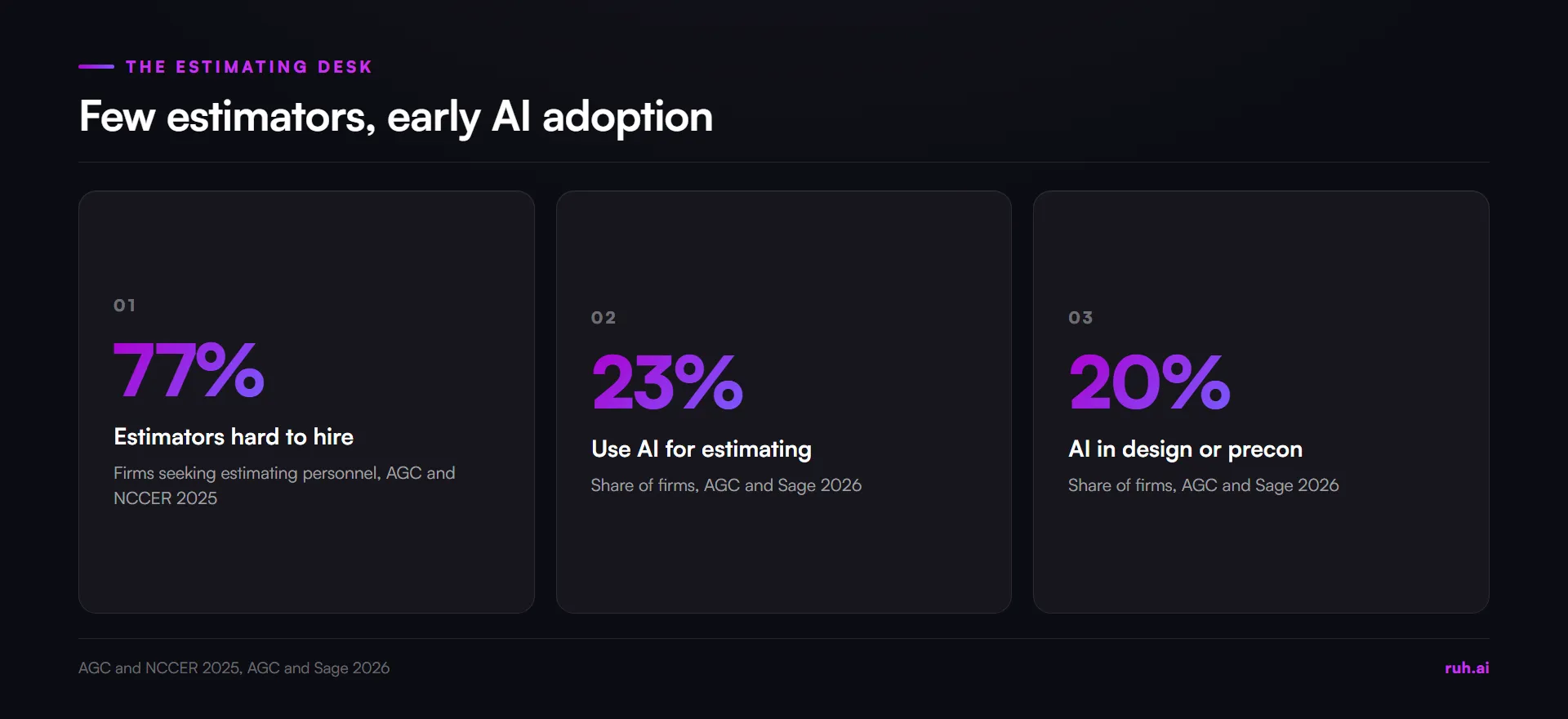
The bottleneck is people, and they are hard to add. The Associated General Contractors of America and NCCER found in their 2025 Workforce Survey that 77% of firms seeking estimating personnel had difficulty filling those roles. A firm that cannot hire another estimator has to get more bids out of the ones it has.
Manual takeoff also lets errors in. A misread dimension, a missed scope note or a run counted twice does not show up until the field finds a material shortage or a scope gap after award. FMI and Autodesk's 2021 study, reported by Construction Dive, estimated that bad data was behind 14% of avoidable rework in 2020.
Adoption is still early. The AGC and Sage 2026 Construction Hiring and Business Outlook found that 23% of firms use AI for estimating and 20% for design or preconstruction, so most estimating desks are still measuring by hand or click by click.
What Does a Quantity Takeoff Have to Capture?
A quantity takeoff has to capture every count, length, area and volume the estimate will price, each tied to the sheet and scope item it came from, so a reviewer can check any line against the drawings. A quantity takeoff is only as useful as that trail.
The four kinds of quantity, and where each one comes from:
| Quantity type | Unit | Typical items | What it depends on |
|---|---|---|---|
| Count | each | Doors, windows, fixtures, devices, panels | Every sheet and every legend symbol read |
| Length | linear feet | Walls, pipe, duct, conduit, trim, curbs | The sheet's scale, and runs that cross sheets |
| Area | square feet | Flooring, drywall, roofing, paint, slabs | The scale, and the rules for openings |
| Volume | cubic yards | Concrete, excavation, fill | Area plus depth from sections and details |
Counts survive a missing scale, because a door is a door at any size. Lengths, areas and volumes do not. A sheet without a reliable scale cannot give you a true length, however confident the number on screen looks.
Manual, On-Screen and AI Takeoff: How Do They Compare?
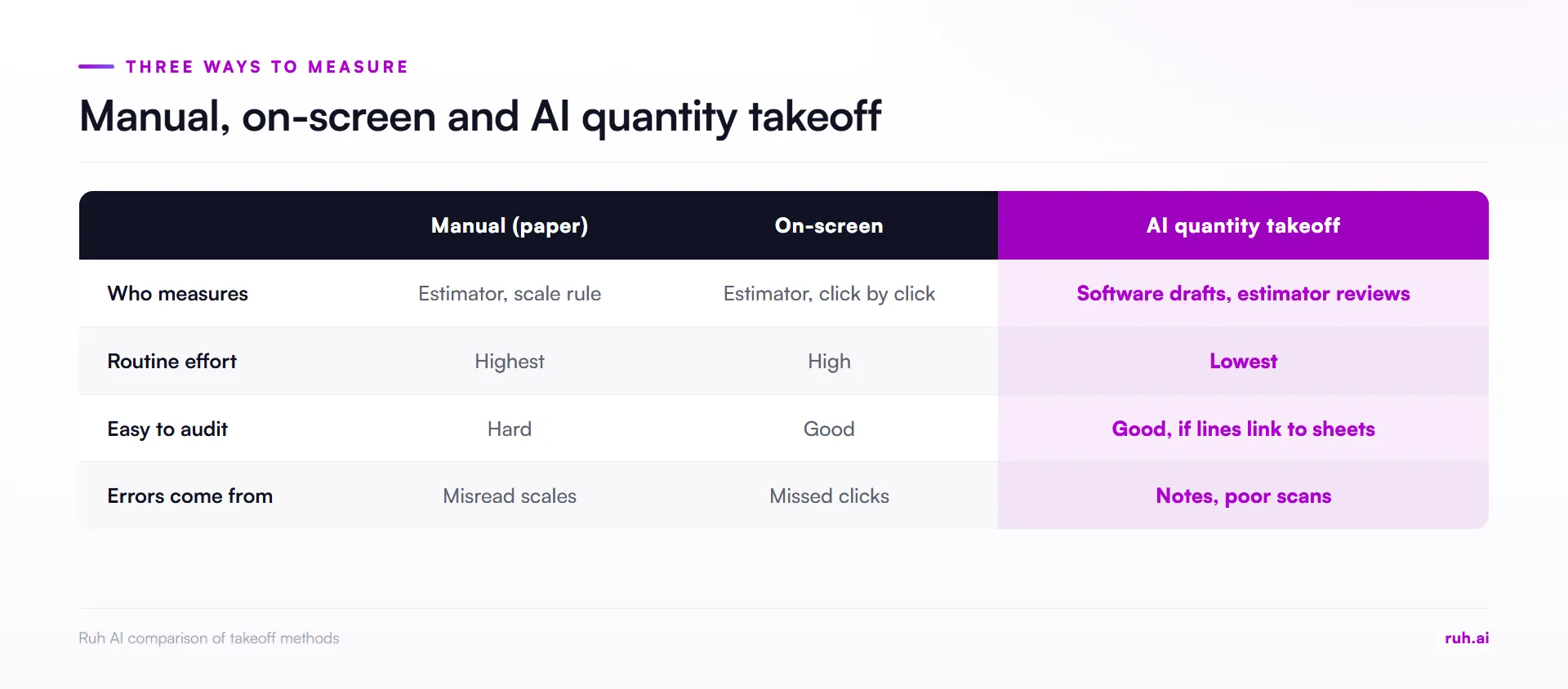
Manual takeoff measures from paper with a scale rule, on-screen takeoff measures the same way on a monitor, and AI quantity takeoff detects standard elements and drafts the quantities for the estimator to review. The estimator checks the result in all three, but only AI changes who does the routine measuring.
How the three methods compare:
| Manual (paper) | On-screen takeoff | AI quantity takeoff | |
|---|---|---|---|
| Who measures | The estimator, with a scale rule | The estimator, click by click | The software drafts, the estimator reviews |
| Effort on routine items | Highest | High | Lowest |
| Easy to audit | Hard: marks on paper | Good: markups saved per sheet | Good, if each quantity links to its sheet |
| Where errors come from | Misread scales, missed sheets | Missed clicks, wrong scale set | Unusual details, notes, poor scans |
| Human judgment needed | Throughout | Throughout | On exceptions, notes and final review |
On-screen takeoff is the step most teams already took. Tools such as Bluebeam Revu moved measuring from paper to the monitor, with saved markups that make review easier. The estimator still selects every wall, area and run. Our page on Ruh vs Bluebeam compares the two workflows.
AI takeoff removes most of the clicking, not the checking. The software proposes quantities across standard elements, and the estimator spends the time on scope notes, unusual assemblies and anything the drawings do not state cleanly.
How Does AI Quantity Takeoff Work on PDF Plans?
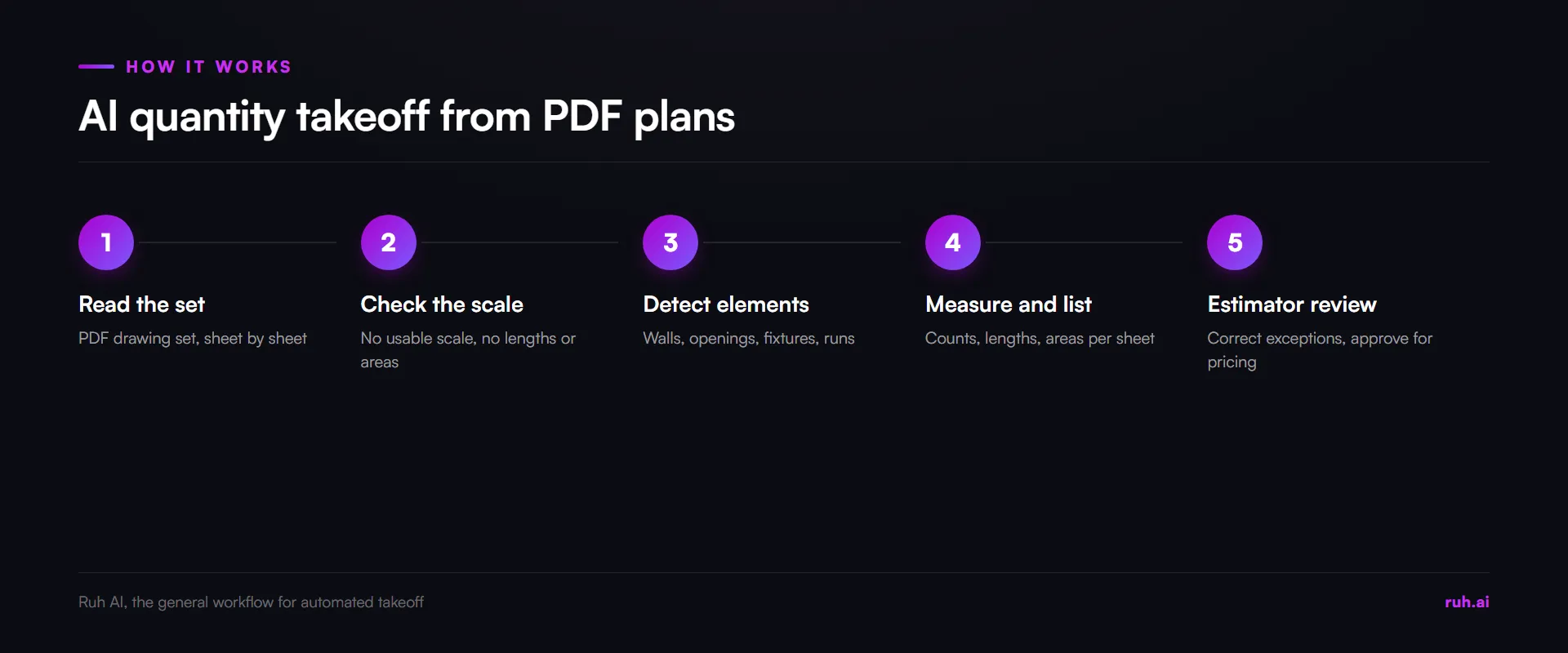
AI quantity takeoff works on PDF plans by reading each sheet's scale, detecting standard elements such as walls, openings, fixtures and runs, measuring them, and drafting a quantity list that links each line back to the sheet it came from. The estimator then reviews, corrects and approves.
The steps, in order:
- Read the set. The PDF drawing set goes in, sheet by sheet.
- Check the scale. Each sheet's scale is read from the title block or a dimension. A sheet with no usable scale should not produce lengths or areas.
- Detect elements. Patterns, edges and symbols are matched to element types. The software does not understand "this is a wall" the way an estimator does. It recognises shapes that usually are walls.
- Measure and list. Counts, lengths and areas are drafted per element and per sheet.
- Review. The estimator checks the list against scope notes and details, corrects exceptions and approves the quantities for pricing.
Worked example: what faster takeoff does to bid capacity (illustrative)
The numbers below are illustrative, not a measured result from any tool. Replace them with your own hours from two weeks of time logs.
Before. An estimator has 40 hours a week for bids. Each bid takes 14 hours of takeoff and 6 hours of pricing, 20 hours in total.
- Bids a week: 40 divided by 20 = 2
After. The takeoff becomes a 5-hour review of drafted quantities. Pricing stays at 6 hours, so each bid takes 11 hours.
- Bids a week: 40 divided by 11 = about 3.6
That is roughly 1.6 more bids a week from the same person. The gain only counts if the review is real: an estimator who skims the drafted quantities has traded measuring time for risk. Our guide to how to bid more construction jobs covers turning freed hours into more bids worth winning.
How Accurate Is AI Quantity Takeoff, and How Do You Check It?
AI quantity takeoff is accurate enough to trust only after you have tested it against your own takeoffs on your own drawings, because accuracy depends on the trade, the drawing quality and the measuring rules the software applies. Two careful methods can still disagree on the same building.
Published research shows how far two takeoff methods can differ. Sarju, Hakim and Sukindrawati's 2026 study at Universitas Janabadra measured the same building's structural work from a BIM model and from a manual bill of quantities. In that 2026 study, formwork differed by 6.13%, concrete by about 1.8% and reinforcement by 0.23%. The gaps came from rules: how the model trimmed geometry, which elements were separated out, and how reinforcement laps were counted by hand.
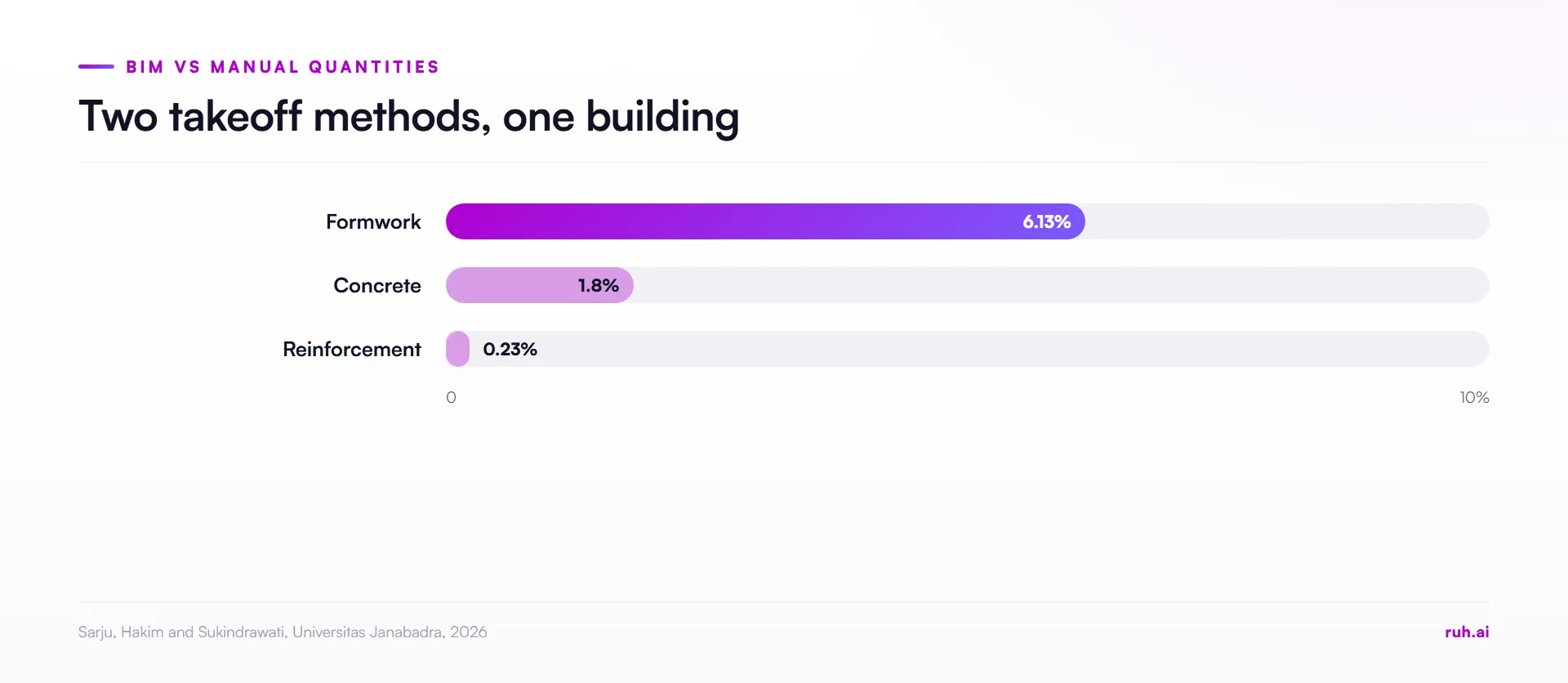
The lesson for any automated takeoff is the same: agree the measuring rules, then test. Our guide to takeoff accuracy goes further on checking quantities before you price.
Checklist: test an automated takeoff on your own PDF plans
- Pick 5 recent bids you already measured by hand, across your main trades.
- Run each through the tool without telling it the answers.
- Compare line by line against your own takeoff, not just the totals.
- Check what it does with a sheet that has no scale. It should refuse to measure, not guess.
- Check notes and details: owner-supplied items, alternates, "by others" scope.
- Time the review honestly, including corrections.
- Check that every quantity links back to its sheet, so a reviewer can find it.
Compare cost per takeoff, not per user. Pricing models vary from per-seat subscriptions to usage fees. Divide the yearly cost by the takeoffs you run in a year, then set that against the review hours you measured in the trial. For quick quantity checks while you test, Ruh's free construction calculators cover common items.
Where Is AI Quantity Takeoff Strongest, Trade by Trade?
AI quantity takeoff is strongest on repetitive, clearly drawn elements, such as walls, openings, floor finishes and device counts, and weakest where the scope lives in notes, details and specifications. Plan the review time accordingly.
- Drywall and framing: wall lengths and heights are repetitive and well drawn. Check wall types, heights from sections and deductions.
- Flooring, ceilings and paint: areas are a good fit. Check finish schedules and the rules for openings.
- Electrical and low voltage: device counts suit detection well. Conduit and wire runs need more review, because routing is often schematic.
- Concrete: slab areas are straightforward. Volumes need depths from sections, and reinforcement needs the detailing rules.
- Mechanical and plumbing: fixture counts are reliable. Duct and pipe runs that cross sheets need checking at every break.
What Estimators Get Wrong About AI Takeoff
In our view, estimators who try AI takeoff make the same four mistakes. These are our positions, not survey findings.
They test on easy drawings. A clean architectural set flatters any tool. Test on the scanned, revised, badly scaled set you actually get on bid day.
They compare totals instead of lines. Two takeoffs can agree on a total and disagree on every line underneath. Price comes from lines.
They skip the review to bank the time. The saved hours are only real if the review stays. A drafted quantity nobody checked is a guess with a decimal point.
They let the tool decide the scope. The software measures what is drawn. The estimator decides what is in the bid, what is excluded and what the notes change.
The Honest Assessment: Where AI Takeoff Still Falls Short
AI quantity takeoff is fast at routine extraction, and it is not a decision-maker. The judgment calls stay with the estimator.
Detection will not catch a note that says the customer provides all light fixtures, a specification that calls for higher-grade equipment than the plans suggest, or a remote site that changes delivery costs. Those live in words, not shapes.
Poor inputs stay poor. A low-resolution scan, a sheet with no scale or a set with conflicting revisions limits what any tool can measure. And research comparing takeoff methods, such as the 2026 Universitas Janabadra study, shows that measuring rules drive differences as much as the method does.
Automation that removes people from drudgery is useful. Automation that removes them from decisions is dangerous. The right division of labor is software on the routine measuring and the estimator on scope, exceptions and price.
How Ruh AI Fits Into This
Ruh's AI takeoff software carries the takeoff into a priced estimate. The Takeoff Agent measures the drawing set and withholds a figure when a sheet has no scale instead of guessing. Your estimator approves every scope line before Ruh measures it, can edit every quantity and price, and approves each stage before the next one opens.
The Estimating Agent prices the quantities from your company's own rate book and history, and a person approves the budget before the next stage. Ruh's accuracy data (October 2026): across trades since September, the median line item came in less than 1% off the contractor's own takeoff, where contractors checked our quantities against their own. Ruh works with your stack, built per customer.
Frequently Asked Questions
Q: What is AI quantity takeoff? A: AI quantity takeoff is software that reads a PDF drawing set, finds each sheet's scale and drafts the counts, lengths, areas and volumes for an estimate. The estimator reviews and corrects the quantities instead of measuring every line.
Q: Can AI do a takeoff from PDF plans? A: Yes, on standard elements in a vector or clean scanned PDF with a readable scale. Sheets with no scale, poor scans and scope written in notes still need an estimator's review.
Q: Will AI takeoff replace estimators? A: No. It takes over routine measuring, and the estimator keeps the scope decisions, exceptions, pricing and final approval. The time saved goes into judgment and more bids.
Q: How accurate is AI takeoff? A: Accuracy depends on the trade, the drawings and the measuring rules, so test any tool against your own takeoffs on 5 recent bids. Ruh's accuracy data (October 2026): across trades since September, the median line item came in less than 1% off the contractor's own takeoff, where contractors checked our quantities against their own.
Q: What happens if a drawing has no scale? A: A sheet without a usable scale cannot give true lengths or areas. A careful tool counts items but refuses to measure, and flags the sheet for the estimator instead of guessing.
Q: How do I compare takeoff tools? A: Run the same 5 real bids through each tool, compare line by line against your own takeoff, time the review and divide the yearly cost by your takeoffs per year. Check that each quantity links back to its sheet.
The Bottom Line
AI quantity takeoff turns measuring into reviewing. The hours it frees are real only if the review stays, the measuring rules are agreed and the tool is tested on your own plans. Do that, and the same estimators can price more of the bids you are invited to.
See the Takeoff Agent on your own drawings, or book a 15-minute review of your takeoff workflow.
Sources
- AGC and NCCER, 2025 Workforce Survey Analysis: agc.org
- AGC and Sage, 2026 Construction Hiring and Business Outlook: agc.org
- Sarju, Hakim and Sukindrawati, "Comparative Analysis of BIM-Based Quantity Take Off and Manual BOQ in Building Structural Work", Jurnal Konstruksi dan Infrastruktur, 2026: jurnal.ugj.ac.id
- FMI and Autodesk study, reported by Construction Dive, 22 September 2021 (constructiondive.com)