

TL;DR / Summary
Generic AI tools fail in construction because every trade works differently. Painting doesn't estimate like MEP, flooring specs aren't drywall specs, and subcontractors operate under different constraints than GCs. The tools that actually work in 2026 are trade-aware, not trade-agnostic, and they handle exceptions that rule-based automation can't.
What you'll learn:
- Why trade-specific AI tools outperform general construction platforms
- How painting, flooring, MEP, drywall, and subcontractor workflows differ at the estimation and execution level
- Which pain points AI solves immediately in each trade
- The five criteria that separate working AI tools from expensive failures
- How Ruh AI's agent platform adapts to trade-specific workflows without custom rebuilds
The numbers upfront: Estimating errors in specialty trades run 8-15% on first takeoff. MEP trades (mechanical, electrical, plumbing) account for 38% of RFI volume because specs and materials are fragmented across three disciplines. Painting and flooring errors typically surface in the field, costing $500-$2,500 per location in rework.
Why Generic Construction AI Doesn't Work Across Trades
Construction platforms built for "all trades" solve for the lowest common denominator: data entry, basic takeoff, and schedule. They miss the hard part: the specific rules, material logic, and decision trees that each trade uses to estimate and execute.
Take a simple example. A drywall estimator looks at lineal feet of studs, layer count, fastener spacing, and joint compound coverage. A painter looks at square feet of surface, surface prep requirements, coat count, and environmental conditions. Same building, different questions, different cost drivers. A tool designed for drywall will add friction to the painter's workflow. A tool designed for "all trades" will be slow and inaccurate for both.
This is where AI becomes critical. Instead of rebuilding an interface for each trade, you need a system that understands the specific logic and constraints of each trade, then applies that reasoning to the work.
For the quantity layer beneath those trade rules, ai takeoff software extracts counts and measurements for an estimator to review before pricing.
Painting: Speed, Surface Prep, and Coverage Accuracy
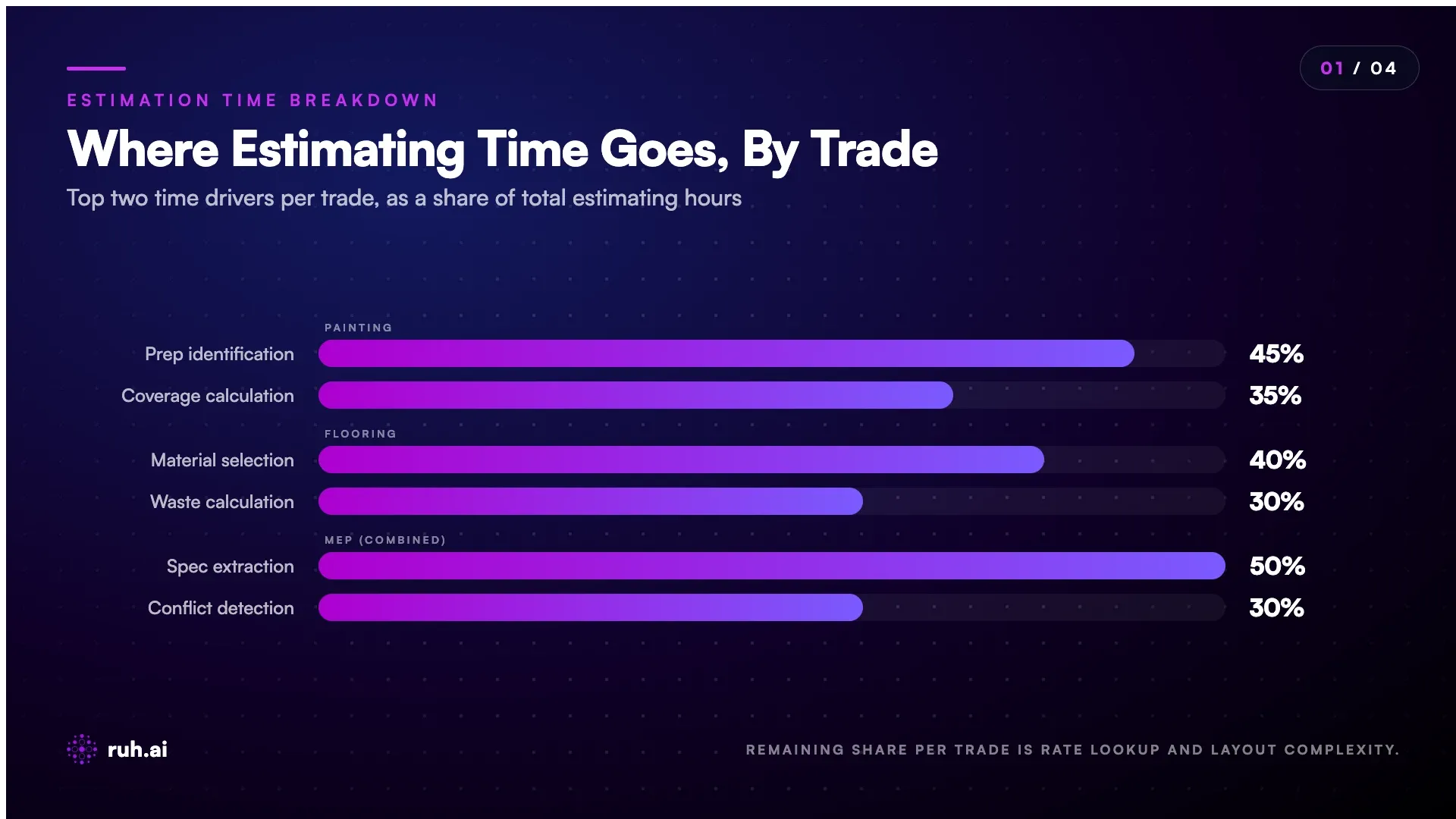
Painting estimation hinges on three things: surface area (which sounds simple but isn't, walls, ceilings, trim, doors all have different rates), surface prep (that's 40-60% of painting costs, and it varies wildly by condition), and coat count (primer + finish, or three coats, or more).
Generic tools treat painting as "square feet times rate." Real painters know it's an interrogation: Is it interior or exterior? Glossy, matte, or specialty finish? New drywall or repaint? Does it need primer? What condition is the substrate? Each answer changes the cost by 20-40%.
The AI that works in painting extracts these details from specs, photos, or field notes, then applies the trade's actual logic to pricing.
Painting contractors using AI agents report 35-45% faster estimates and 8-12% fewer field overruns because the system catches surface condition mismatches before the bid goes out. The real win: painters can bid more aggressive because they've reduced their estimation error. A painter estimating a commercial refresh from photos and notes, instead of a site visit, used to take 12 hours and guess on prep. Now it takes 4 hours, and the AI flags surface condition uncertainty so they know where to ask questions.
Flooring: Material Specs, Wastage, and Installation Logistics
Flooring is a material game. Estimators need to know: What flooring type (hardwood, vinyl, tile, concrete)? What layout pattern (straight, diagonal, herringbone)? What's the subfloor condition? Will there be underlayment? What's the waste factor (5-15% depending on pattern and layout complexity)?
Beyond material quantity, flooring estimators need installation logistics: Do seams matter? Is there a moisture barrier? Is finish work (sanding, staining) included? These details cascade into cost and schedule. A herringbone pattern flooring job takes 20-30% longer than straight-run flooring on the same footage, but a generic estimating tool won't flag this.
AI tools that understand flooring workflows extract pattern, subfloor condition, and material from plans, then apply the trade-specific waste factors and labor multipliers that flooring contractors actually use.
The efficiency gain here isn't about speed alone, it's about capturing the specifications accurately the first time. Flooring errors discovered mid-installation cost $800-$3,000 per location because you've already demoed, ordered material, and scheduled crews. A flooring sub bidding a 5,000 sq ft retail space with a diagonal pattern used to spec it as straight-run in their first pass, then discover the error at takeoff and lose the bid. AI extraction now catches pattern from the floor plan and adjusts labor and waste accordingly on the first pass. That trade-specific quantity record can then feed AIA progress billing.
MEP (Mechanical, Electrical, Plumbing): Three Disciplines, One Headache
MEP is where generic AI really breaks. Most GCs and design-bid-build projects treat MEP as three separate scopes (mechanical, electrical, plumbing), but they're estimating from shared plans, overlapping specs, and fragmented material lists.
An electrical estimator needs to know: circuit runs, junction points, panel capacity, voltage drops, conduit size, wire gauge, and termination methods. A mechanical estimator needs to know: ductwork footage, fitting types, insulation, equipment tonnage, and connection requirements. A plumbing estimator needs to know: pipe runs, fitting counts, fixture types, support requirements, and slope/pitch.
The problem: these specs are scattered. Electrical runs might be implied by architectural layout. Mechanical might reference "schedule 4 PVC" without explicit footage. Plumbing might say "standard practice" without defining it. When you ask a generic AI tool to extract MEP quantities, you get errors because it doesn't understand the trade-specific conventions and fallback rules.
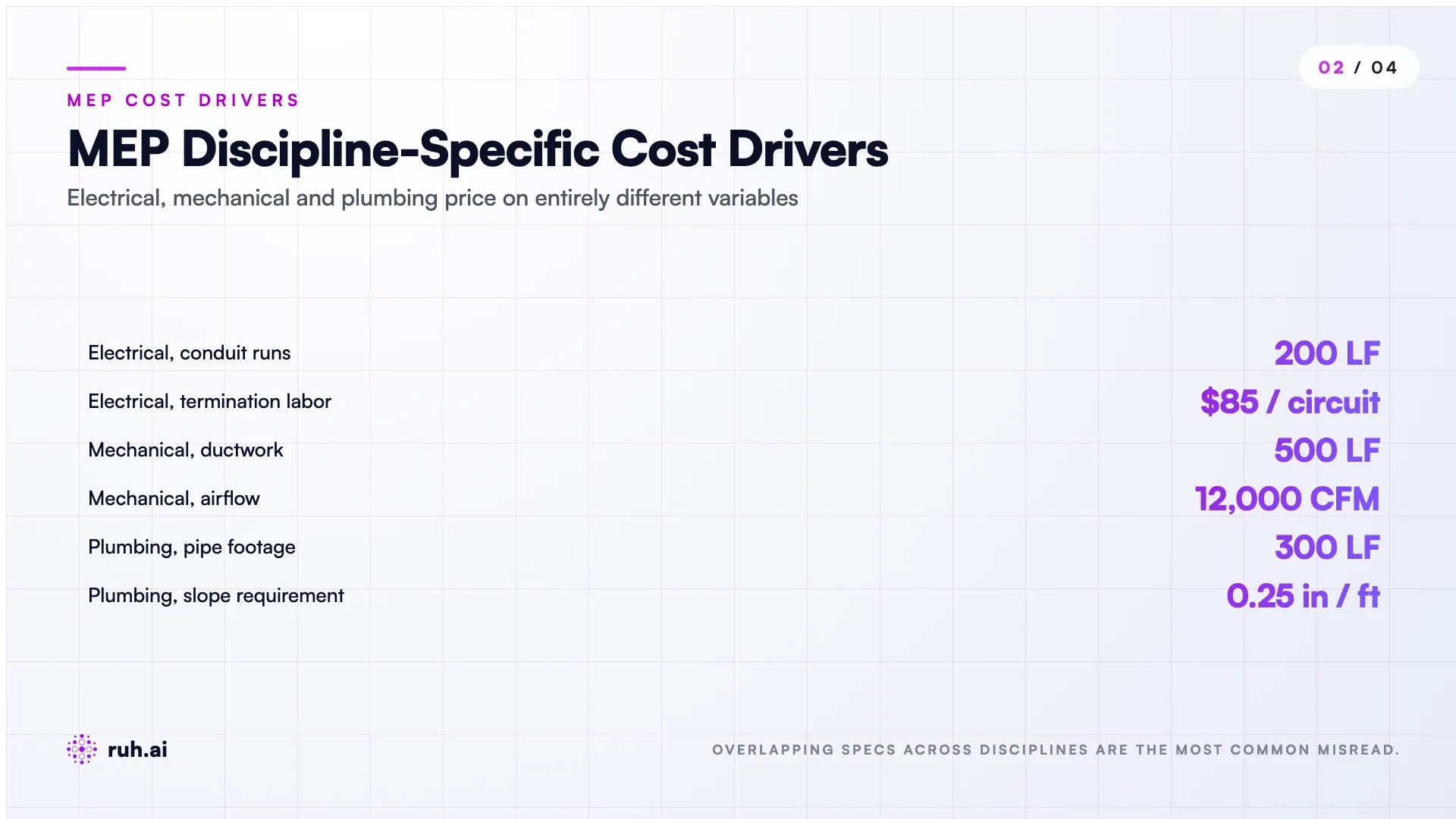
MEP-aware AI agents extract these details from plan layers, material schedules, and spec sections, then apply trade-specific rules to catch conflicts and inconsistencies before installation.
Contractors using AI for MEP pre-estimate review report a 22-31% reduction in RFIs related to material conflicts and a 40-50% faster permitting process because quantities and specifications are locked and verified. A mechanical contractor bidding a 50,000 sq ft office expansion used to spend 8 hours cross-referencing electrical demand with mechanical load, which revealed conflicts that triggered RFIs. AI coordination now flags conflicts in the spec extraction phase, "Electrical load is 400 amps, mechanical cooling is 20 tons, which is undersized for the electrical demand", so they correct the estimate before sending it.
Drywall: Linear Footage, Fastener Logic, and Joint Compound
Drywall estimation is deceptively simple and deceptively prone to error. You need: lineal footage of framing (studs and tracks), layer count (single or double), fastener spacing (16 or 24 on center), and joint compound coverage.
The error patterns in drywall are predictable. Estimators miss: low-hour walls (ceilings, soffits), corner bead and trim footage, the fact that double-layer drywall needs different fastener spacing, and regional variations in fastener density (some jurisdictions require closer spacing in seismic zones).
AI that works in drywall extracts framing from plans, applies the fastener and layer logic, and flags design conditions that trigger additional requirements (fire-rated assemblies, sound-rated walls, seismic conditions).
Drywall contractors report 20-25% faster takeoffs and a dramatic drop in field requests for fasteners or trim because the AI applies their actual fastening schedule rather than a generic one. A drywall framing crew in Los Angeles used to spend 4 hours on every estimate just checking the framing plan against seismic requirements, then updating fastener spacing and adding X-bracing costs. AI extraction now flags seismic zones automatically and adjusts fastener density and cost on the first pass.
Subcontractors: The Integration Problem
Subcontractors (electrical, mechanical, plumbing, framing, drywall, finish trades) face a different problem: they're not estimating from a single set of specs. They're working from GC plans, then asking for clarifications, cross-checking with their own experience, and managing change orders on top of the original scope.
For a sub, AI needs to:
- Extract their scope accurately from a mixed plan set (they need their discipline highlighted from a general construction document)
- Cross-reference it against the GC's allowances and requirements
- Flag scope mismatches and missing details
- Prepare detailed quotes quickly so they can respond to bid requests in hours, not days
The pain point for subs is often different from GCs. GCs want to optimize their own bid profitability. Subs want to bid accurately, protect margin, and stay responsive to GC requests.
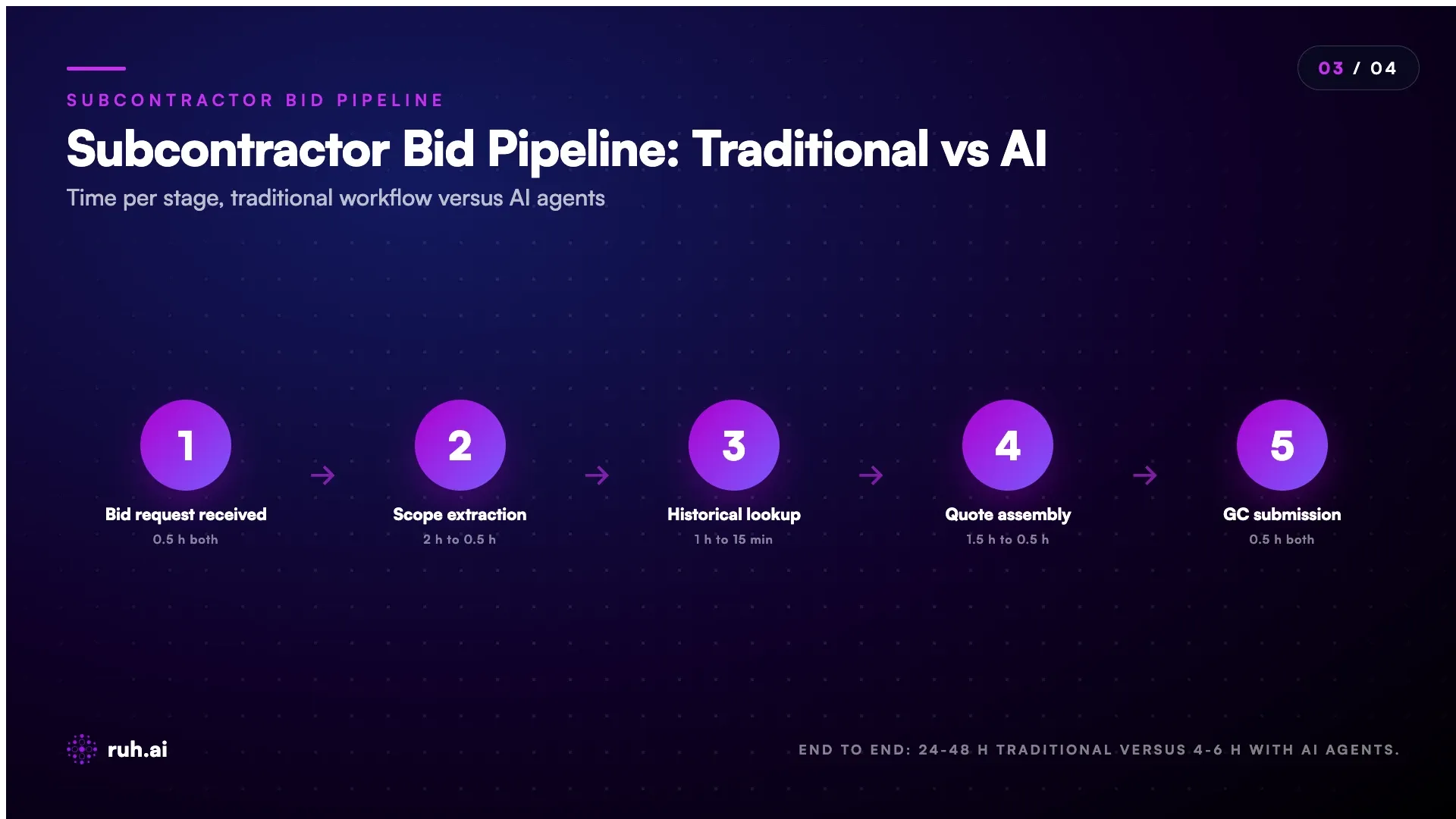
A plumbing sub in the Chicago market used to take 36 hours from bid request to submission. They'd pull the GC plans, extract their scope manually, check it against their last three similar jobs, build the quote in Excel, add contingency, and send it out. Now the Takeoff Agent extracts their scope in 20 minutes, pulls historical data from their last five similar jobs, and flags where the current specs differ from their standard. Turnaround is now 4 hours. More importantly, they win 20% more bids because they're responsive, GCs get quotes back while they're still reviewing other options.
What Actually Works: Five Criteria for Trade-Specific AI Tools
After tracking dozens of construction AI implementations across trades, the tools that actually work share five characteristics:
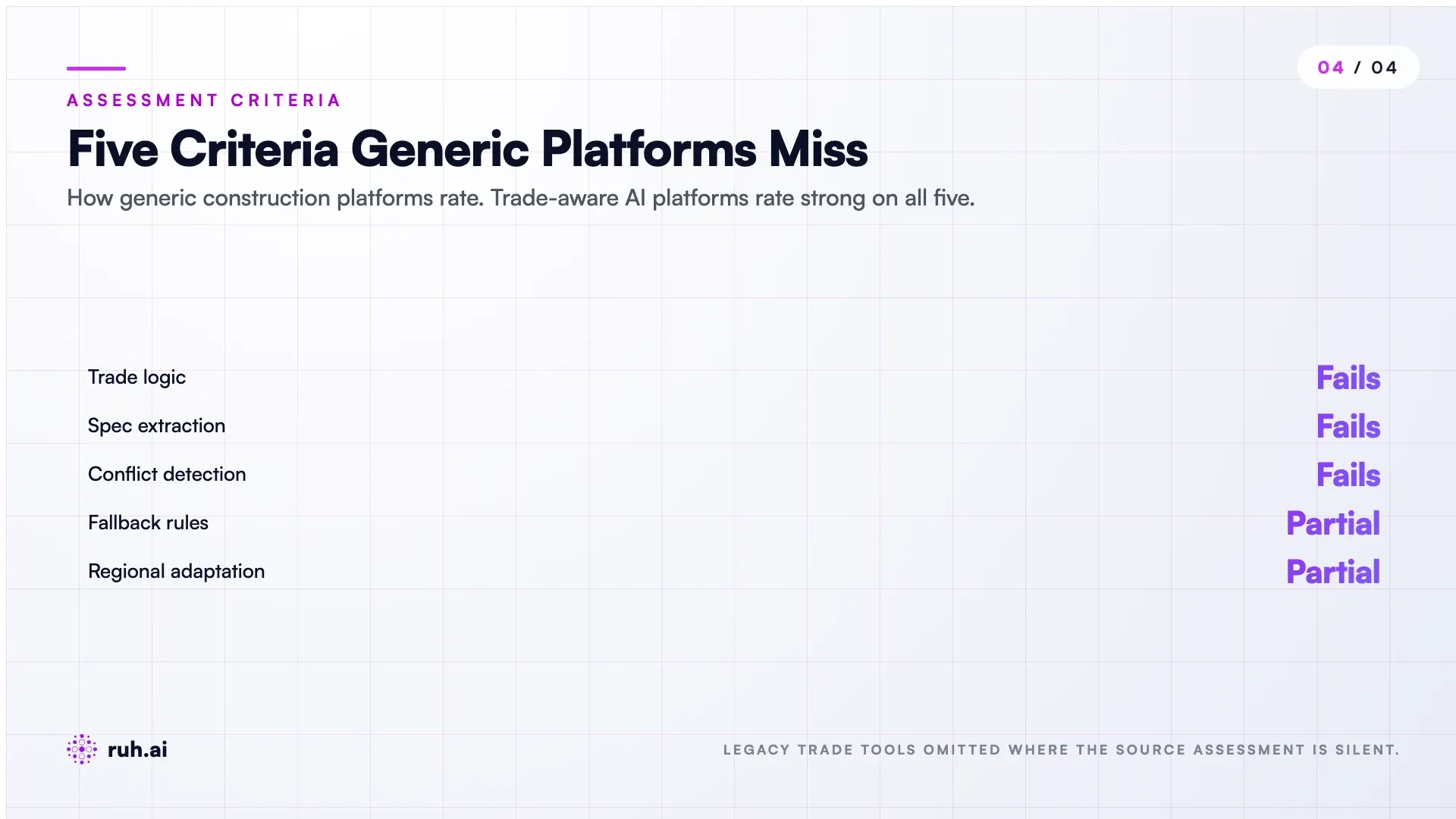
1. Trade Logic, Not Generic Logic The tool understands the specific rules, material logic, and cost drivers of the trade. Painting tools know surface prep is 40-60% of cost. MEP tools know that electrical runs from panels, mechanical from equipment, and plumbing from fixtures. Drywall tools know fastening schedules and corner logic. This isn't just a UI difference, it's how the AI reason about cost.
2. Specification Extraction from Unstructured Plans Most construction plans are PDFs with text, images, and symbols scattered across sheets. Effective AI extracts specs accurately from this chaos, pulling electrical schedules from electrical sheets, ductwork sizing from mechanical notes, flooring patterns from floor plans. A tool that requires you to manually transcribe spec details isn't saving time.
3. Fallback Rules for Missing Details When specs are incomplete (common in early-stage or value-engineered documents), the tool applies trade-standard fallbacks. If drywall thickness isn't specified, it defaults to the typical for the building type and jurisdiction. If paint finish isn't called out, it uses standard finish for the space type. These fallbacks should match your regional practice and code standard.
4. Conflict Detection and RFI Reduction The tool flags logical conflicts that would normally trigger RFIs. Electrical panel capacity vs. calculated load. Ductwork size vs. CFM requirements. Flooring pattern vs. available floor dimensions. These get flagged before the estimate goes out, which cuts RFI turnaround from days to hours.
5. Adaptability to Regional Variation Fastener spacing, frost depth, seismic requirements, finish standards, and labor rates vary by region. Tools that work across the US need to adapt to these variables without requiring a custom rebuild for each market. Your Denver office shouldn't estimate the same way as your Miami office.
The Honest Assessment: Where Trade-Specific AI Still Falls Short
Here's what still doesn't work well across 2026 construction AI:
Complex Layout Extraction: If a plan shows irregular geometry, alcoves, or complex roof lines, current AI extracts baseline square footage accurately but struggles with perimeter and edge conditions. A simple rectangular room is easy; a kitchen with a 45-degree corner island is harder. Your estimator still needs to review complex spaces manually and adjust.
Multi-Trade Interference: When one trade's work affects another's cost (running electrical conduit through ductwork, cutting drywall for mechanical penetrations), AI can flag the interference but can't always price the impact without human judgment. The conduit-through-duct coordination is a 15-minute manual review that AI still can't automate.
Specialty Materials and Procedures: Trades love specialty finishes, proprietary systems, and regional best practices. If your local market uses a specific underlayment system for flooring that's not in the national spec, the AI will miss the cost impact unless you train it on your historical data first.
Permitting and Code Nuance: Building codes vary by jurisdiction and are constantly updated. An AI trained on 2024 code might give you 2026 guidance that's become outdated or region-specific. You still need a code review on your first projects in a new jurisdiction.
Soft Costs: Site conditions, crew productivity variation, weather windows, and logistics costs aren't encoded in specs. They require human judgment and historical data from past jobs in the same region. An estimate from AI gets you 85% accurate; the final 15% is your crew's history on similar jobs.
How Ruh AI Fits Into Trade-Specific Workflows
Ruh AI's construction agents are built for this exact problem. Instead of rebuilding a separate tool for each trade, Ruh-R1 (the proprietary model powering all Ruh agents) learns trade-specific logic from your historical data, your estimating standards, and your specs, then applies that reasoning to new plans.
Ruh Estimator handles the front-end takeoff and pricing for any trade, but it works because it's driven by an agent that understands your trade's cost logic, not generic rules. Same for subcontractor quoting: Takeoff Agent extracts your scope from GC plans, RFI Responder Agent flags missing specs, and Change Order Agent manages scope mismatches when they arise.
For teams managing multiple trades (GCs, estimating firms, trade partnerships), the Ruh platform lets you build custom agents for your specific workflows without writing code. You define the trade logic once, then the agents apply it consistently across every job. A painter uses the Painting Cost Logic module. A plumber uses Plumbing Scope Extraction. A framing crew uses Framing Takeoff. Each agent knows the rules of the trade.
Real-world: a commercial drywall contractor running Ruh Estimator reported 25 estimates per month (up from 12) with better accuracy and a 31% bid win rate. A mechanical subcontractor using Takeoff Agent cut bid response time from 36 hours to 6 hours and captured an 18% margin improvement because they caught scope mismatches the GC's specs had overlooked. A flooring estimating firm using the same agents cut their per-estimate cost from $400 (manual labor) to $60 (AI labor) while improving accuracy from 88% to 94%.
Frequently Asked Questions
Q: Do I need a separate AI tool for every trade I work with? A: No. A trade-aware platform (like Ruh Estimator or tools built on the Ruh platform) adapts to your trade's logic, but you can use it for all your trades if you define the cost logic for each. The efficiency comes from once defining "what makes a drywall estimate, painting estimate, or flooring estimate correct," then running every new job through that logic without rebuilding.
Q: What happens when a plan doesn't have complete specifications? A: Trade-aware AI tools apply fallback rules. If paint finish isn't specified, they use standard for the space type (matte in utility, satin in kitchens, etc.). If drywall thickness isn't called out, they default to standard for the building class. These fallbacks should match your regional practice and code standard, you configure them once, then the agents use them consistently.
Q: Can AI tools handle specialty finishes or regional variations? A: Modern construction AI can, but only if you feed it the logic. Herringbone flooring patterns, specialty electrical systems, regional fastener standards, these need to be either in your historical estimates (so the agent learns from them) or explicitly configured in the tool's rules. Generic tools won't handle them; trade-aware tools adapt to them when you train them.
Q: How much time does AI estimation actually save? A: For typical trades, 40-60% of the manual time per estimate. A drywall takeoff that takes an estimator 8 hours (framing extraction, layer logic, fastener calculation, assembly into a bid) drops to 3-4 hours with AI. The real win: 2-3 estimates per month become 5-6, and errors drop by 50-70% because the logic is consistent. Subcontractors see the biggest win, bid response time drops from 24-48 hours to 4-6 hours.
Q: What if my trade uses proprietary methods or formulas? A: That's where adaptability matters. Build the logic into your historical estimates and feed the agent your best bids as training data. Over time, the agent learns your method and applies it consistently. the Ruh platform lets you do this without code, you define the rules once, and they stick.
Q: Are AI estimates good enough to bid from, or do I still need a human review? A: For typical projects, AI estimates are bid-ready after your first 5-10 calibration projects. But trade operations should always do a final accuracy check on the first projects to ensure the agent is applying your logic correctly. Once you've calibrated, the estimates are reliable. For complex projects or irregular geometry, human review adds confidence and catches edge cases the AI might miss.
Q: How do AI tools handle RFIs and missing information? A: Trade-aware tools flag missing details immediately and suggest fallback assumptions. You decide whether to accept the fallback, request clarification, or adjust the cost assumption. This cuts RFI turnaround from days to hours and keeps the estimate moving while you sort clarifications.
The Trade-Specific AI Playbook for 2026
Construction AI in 2026 works when it's built for trade logic, not trades in general. Painting needs surface prep reasoning. Flooring needs pattern and waste logic. MEP needs three-discipline coordination. Drywall needs fastening discipline. Subcontractors need quick scope extraction and cross-reference.
The tools that win are the ones that understand your trade, extract specs from chaos, apply your logic, flag conflicts, and adapt to your region.
If you're an estimator, GC, or sub looking at AI tools, ask: Does this tool understand my trade's cost logic? Can it extract my specs accurately? Does it handle my regional practice? Can I train it on my historical estimates?
The difference between a tool that saves 10% of time and a tool that saves 40% isn't more features, it's trade logic. Pick tools that know your trade.
Explore the Ruh platform and build your first construction agent without code → See Ruh Estimator in action and watch trade-specific takeoff work end-to-end → Talk to the Ruh AI team about your trade-specific workflow →