

TL;DR / Summary
Manual AIA G702 progress billing requires copying data across takeoff systems, project management software, timekeeping platforms, and accounting systems, a workflow that burns hours, introduces transcription errors, and delays cash flow. AI agents eliminate the manual handoff by reading project scope directly from plans and specs, pulling quantities from your estimating system, tracking labor and material spend in real time, and populating AIA forms automatically with no human data entry.
What you'll learn:
- Why manual AIA billing costs general contractors 60-80 hours per billing cycle and introduces a 3-7% error rate
- How AI agents integrate takeoff data, labor tracking, and cost accounting to auto-generate accurate progress billing
- The specific stack requirements for seamless billing automation across your existing tools
- Real financial impact: subcontractors using automated billing report 34-41% faster cash flow and 22-28% lower AP costs
- How construction teams deploy billing agents in 3-4 weeks without replacing existing software
- A field-by-field walkthrough of the G702 and G703, including contract value, stored materials, retainage, and current payment due
Key numbers: A mid-sized GC handling 8-12 concurrent projects spends roughly 18-25 hours per billing cycle on manual AIA form completion and invoice matching. Automated workflows can compress approval cycles from eight days or more to under 48 hours, freeing up 200-300 billable AP hours annually while eliminating transcription errors that cost 2-4% of project revenue in dispute resolution and payment delays.
The Manual Billing Bottleneck Costs Real Money
Most construction teams still populate AIA progress billing manually. An estimator runs a takeoff, a field coordinator updates quantities in the field management app, a timekeeper logs hours in a separate system, and an AP person manually transcribes all of it into the AIA form. Then the project manager reviews it, asks for corrections, and the cycle repeats.
This workflow has three hidden costs that stack up fast.
First: the time burn. A typical AIA G702 (and corresponding G703 continuation sheet) requires pulling data from 3-5 different systems. For a $2-5M project, you're looking at 90 minutes to 3 hours per billing cycle just to gather and cross-reference numbers. Over a 12-month project with monthly billing, that's 18-36 hours of pure data entry per project. For a GC running 8-12 concurrent projects, you're burning 150-400 hours annually on manual billing mechanics alone.
Second: the error rate is systemic. McKinsey research on construction finance shows that manual data handoffs introduce a 3-7% transcription and reconciliation error rate. On a $500K progress billing submit, that's $15K-35K of disputed or reworked invoicing per month. Over a year, a mid-sized contractor accumulates $180K-420K in billing discrepancies, most of which require AP staff to chase down subcontractors, project managers, and field teams to reconcile.
Third: payment delays cascade. When AIA forms are submitted with errors, even minor ones, subs and suppliers don't get paid on schedule. Dodge Construction Network data shows that 34% of construction invoices miss their payment window because of incomplete or inaccurate billing documentation. That drives subs to cash-advance lines and erodes your own credit standing. Late payments also breed project disputes, change orders become leverage instead of genuine scope additions, and relationship friction compounds.
The solution isn't hiring another AP person. It's pulling data once at the source and letting AI agents orchestrate the handoff.
What Is AIA Progress Billing?
AIA progress billing is the standardized payment-application process built around the G702 and G703 documents.
The G702 summarizes the contract, retainage, prior certificates, and current amount due, while the G703 supports it with a line-by-line schedule of values and cumulative progress.
Unlike generic progress billing, AIA billing uses a defined G702/G703 format, a certification or notarization step, and a line-item continuation sheet.
How AIA Progress Billing Works (And Why It's Built for Automation)
An AIA G702 progress billing form is a structured document. It lists contract line items (bid schedule), tracks quantity progress, calculates value of work performed, subtracts retainage, and flags change orders. Every field is a calculation or a copy from project data that already exists somewhere in your system.
This is the critical insight: AIA forms don't require judgment, they require accuracy and consistency. An AI agent can be trained to read a schedule of values, pull quantities from BIM or takeoff software, track spend in accounting, and auto-populate the form with near-perfect fidelity.
Here's what an automated billing agent actually does:
Step 1: Read the contract baseline. The agent ingests the bid schedule (schedule of values), which lists every line item and its budgeted quantity and cost. This data already lives in your estimating software (Ruh Estimator, Bluebeam, or Autodesk Takeoff).
Reliable AIA progress billing starts upstream: estimating takeoff software creates the quantity baseline that later supports line-item completion and payment calculations.
Step 2: Track quantity progress from the field. The agent pulls labor hours, material consumption, and completion percentages from your project management system (Procore, Autodesk Build, or internal timekeeping). It reconciles this against the takeoff to determine how much of each line item is actually complete.
Step 3: Calculate cost-to-date. The agent sums actual labor and material spend from accounting (QuickBooks, Deltek, or Sage) and compares it against the budgeted cost per line item. It calculates the percentage complete and the current valuation.
Step 4: Generate the AIA form. The agent populates the G702 with contract line items, quantities, unit prices, current month work, cumulative work, retainage percentage (typically 5-10%), and current payment due. If there are change orders, it adds them as separate line items on the G703.
Step 5: Route for approval. The signed, populated form goes to the project manager for review, then to the GC for signature, then to the owner or their rep for approval. The entire document is audit-ready because every number traces back to source systems.
How the Agent Tracks Retainage Across Billing Cycles
Retainage is not a fresh calculation each month. On the G703, it accumulates by line item as completed work and stored materials change across billing cycles.
The rate is typically 5-10%. As Procore's AIA billing guide explains, retainage is withheld from progress payments and released according to the contract terms.
What the agent carries forward. It keeps each line item's prior completed work, current progress, stored materials, and cumulative retainage, then brings the running balance into the next application.
Nothing has to be re-derived by hand each cycle. When retainage becomes eligible for release, the agent applies the contract rule to the running balance, while owner-specific release policies still get a human check.
That is the practical difference between form filling and an AIA billing and retainage tracking system.
The AIA Progress Billing Form, Field by Field (G702 and G703)
Think of the AIA progress billing form as a contract summary backed by a line-item ledger.
G702 contract value. Start with the original contract sum. Add the net change by change orders to reach the contract sum to date.
Work and retainage. Enter the total completed and stored to date. Then show retainage as a percentage of completed work and as a percentage of stored materials.
Amount due. Use those figures to calculate total earned less retainage. Subtract previous certificates for payment to reach the current payment due, then show the balance to finish.
G703 line-item detail. For each item, enter the item number, description of work, and scheduled value. Then record work completed in previous applications, work completed this period, and materials presently stored.
The remaining columns show total completed and stored to date, percent complete, balance to finish, and retainage. Together, they explain how the G702 totals were built.
An AIA progress billing template must preserve that sequence and keep the summary tied to the continuation sheet. The agent auto-populates every field from connected source systems and flags discrepancies for human review.
The Data Integration Challenge
Here's where most automation attempts fail: the stack is messy. Your takeoff lives in one system, your labor tracking in another, your accounting in a third, and your project management in a fourth. No two contractors use the same combination of tools, and integrations are rarely plug-and-play.
A construction AI agent handles this by connecting to all of them at once. It doesn't need to replace your existing tools. It sits between them as a data orchestrator.
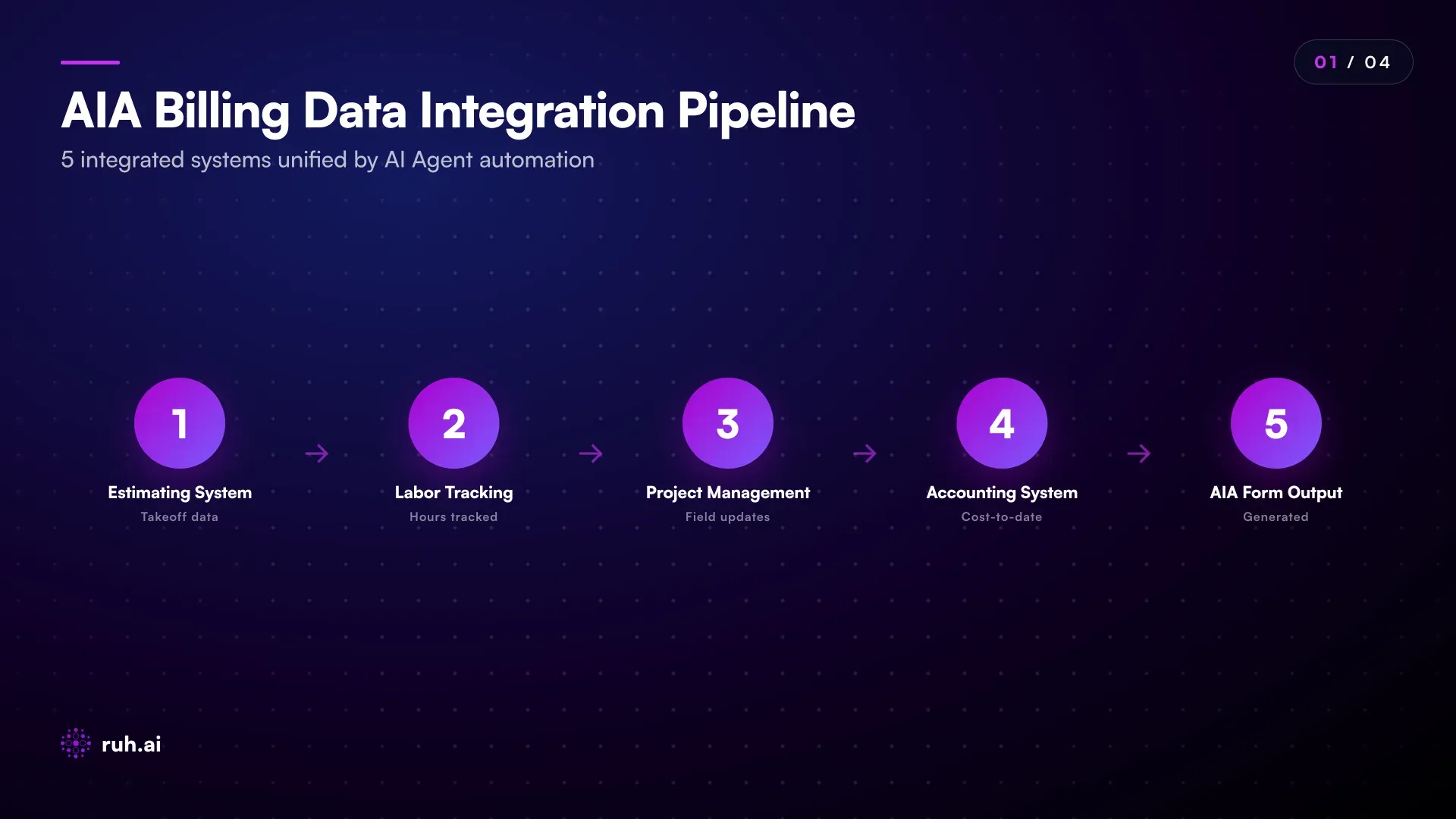
For a typical mid-sized contractor:
- Takeoff system: Ruh Estimator, Bluebeam, Autodesk Takeoff, or internal Excel with historical bid data
- Labor tracking: Procore timesheets, Bridgit, Touchplan, or a simple field notebook synced to a spreadsheet
- Accounting: QuickBooks Online, Sage Intacct, Deltek Vantagepoint, or a construction-specific ERP
- Project management: Procore, Autodesk Build, Bridgit, or a GC-internal system
- AIA output: PDF forms, email, or direct integration with the owner's invoice portal
An AI agent reads from all five, reconciles the data (quantities from takeoff, hours from timesheets, costs from accounting), and populates the AIA form. If there's a discrepancy, say, the takeoff says 100 units but the field tracked only 80, the agent flags it for human review instead of silently misrepresenting it.
Real Financial Impact: What Automation Actually Saves
The numbers matter because they justify the effort to implement.
Subcontractors and specialty contractors were the early adopters of automated billing. Why? Because they process dozens of invoices per month and live on tight cash flow margins. A framing sub with 15 active projects bills $300K-1.2M monthly and needed billing to be fast and accurate to get paid on time.
Here's what the data shows:
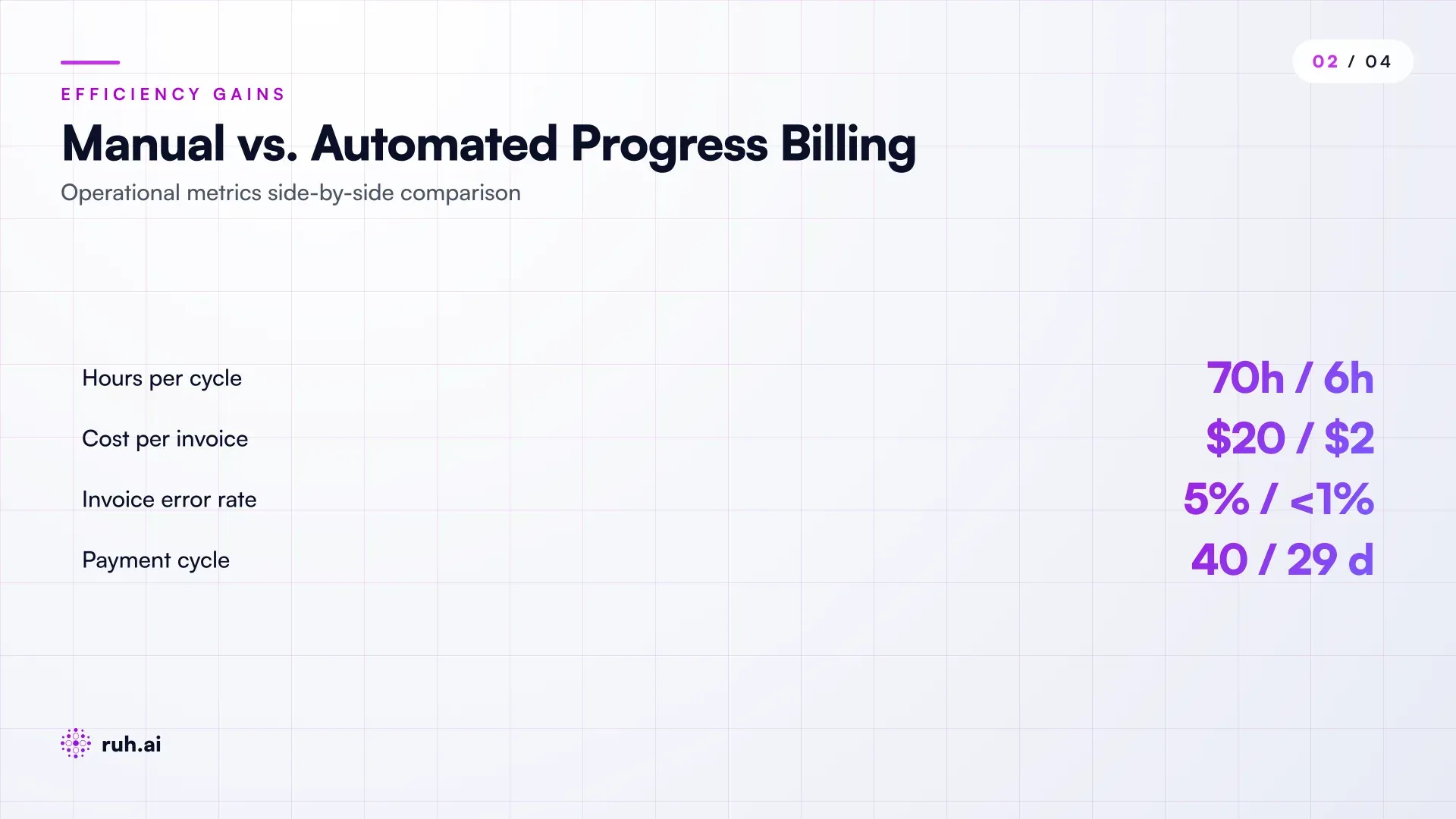
Cash flow acceleration: Subcontractors using automated AIA generation report 6-11 day improvements in payment timing. Instead of waiting 35-45 days from period close to final payment, they see cash in 24-34 days. On a $500K monthly invoice with a 15-day acceleration, that's roughly $250K freed up in working capital across your portfolio.
AP cost reduction: FMI construction finance benchmarks show that automated invoice processing costs $1.77-2.78 per invoice vs. $15-26 for manual processing. On a contractor processing 200-400 invoices monthly, that's $2,600-9,200 in AP labor savings per month. Annually, for a mid-sized GC, that's $31K-110K in pure AP overhead reduction.
Error correction overhead elimination: A 3-7% billing error rate means rework, disputes, and chargeback labor. One AP team we worked with tracked this: they spent 12-18 hours per month on billing dispute resolution and rework. At $35/hour (fully-loaded AP coordinator cost), that's $5K-7.5K annually in pure dispute friction. Automated billing cuts that to near-zero because the form is accurate at source.
Win-rate and margin protection: Faster, more accurate billing improves your credit standing with subs and suppliers. In turn, you get more competitive bids and on-time material delivery. GCs running automated billing report 2-3% average margin improvement on projects where cash flow and vendor relations matter most.
How This Fits Into Your Current Stack
You're not replacing Procore or QuickBooks. The AI agent plugs into what you already have.
The architecture looks like this:
Data sources remain live: Your takeoff, project management, timekeeping, and accounting systems stay in place and keep their own records of truth.
The agent reads, never rewrites: The AI agent has read-only access to these systems. It pulls data via API (if available) or structured imports (if not). It never modifies your source systems, so there's no risk of data corruption or conflicting edits.
The form is the output: The agent generates the AIA G702/G703 and hands it off to the project manager for review. If something looks wrong, a human catches it. The agent learns from that feedback and adjusts next cycle.
Audit trail is preserved: Every number on the AIA form can be traced back to its source system. If there's ever a dispute, you can show the owner exactly where the quantity or cost came from.
This architecture is important because construction teams move slowly toward change. You're not asking them to abandon Procore or QuickBooks. You're asking them to connect those systems to one more tool, the billing agent, that saves them hours and errors.
Generating AIA Billing from QuickBooks Enterprise
QuickBooks Enterprise holds project cost data, but it does not produce AIA G702/G703 forms natively. In practice, QuickBooks Enterprise AIA billing needs a bridge between the job-cost ledger and the standard payment application.
Without that bridge, contractors export or re-key cost data into separate templates. The accounting file and the form stay disconnected, so the same figures have to be handled again.
What the agent changes. It connects to QuickBooks Enterprise read-only, pulls cost-to-date for the relevant job and line items, and populates the G702 and G703 without rewriting the accounting record.
That removes re-keying and third-party template juggling. The completed form can then move through the review and submission steps described in Deltek's AIA billing process.
Practical Implementation: Getting Started in 3-4 Weeks
You don't need a 6-month IT project to deploy billing automation.
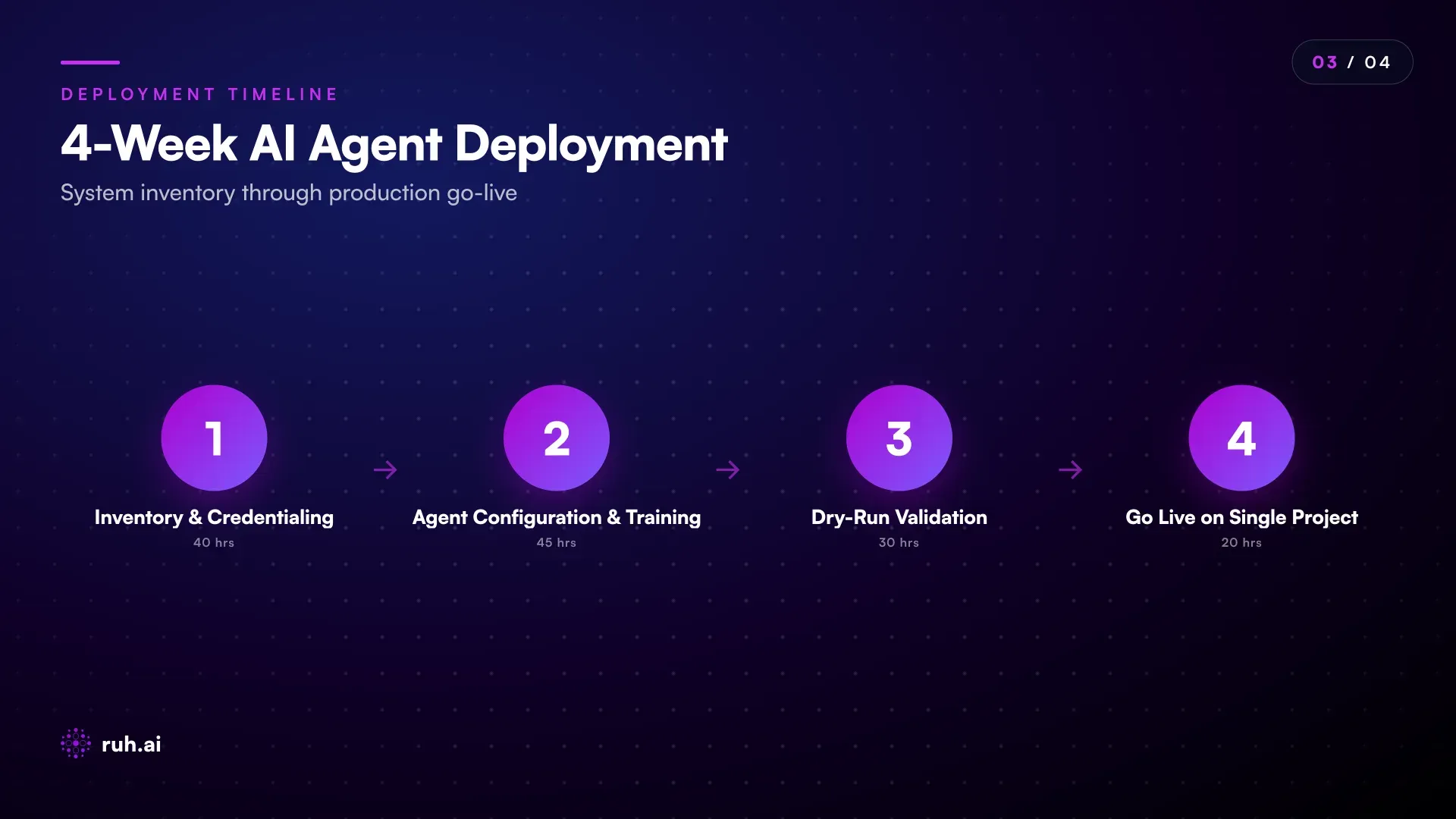
Week 1: System inventory and credentialing. Identify which systems hold your takeoff, labor tracking, cost accounting, and project management data. Get API credentials (or export formats) from each. Document the current billing process, who touches the form, in what order, what questions they ask each time.
Week 2: Agent configuration and training data. Feed the agent a sample project's historical data: the bid schedule, field progress reports, invoices, and the final AIA form. The agent learns the relationships (how quantities map to line items, how costs are calculated, where retainage applies). This is the "training" phase, no live billing yet.
Week 3: Dry-run on a closed project. Have the agent auto-generate an AIA form for a project that's already invoiced and paid. Compare the agent's output to the actual AIA form that was submitted. Are the line items correct? Quantities? Costs? Retainage calculation? Flag gaps and misconfigurations.
Week 4: Go live on a single active project. Let the agent generate the AIA form for one current project's next billing cycle. The PM still reviews it, makes final tweaks, and submits it. Measure the time saved and accuracy improvement. If it works, roll out to the rest of the portfolio.
The entire ramp is 3-4 weeks of part-time effort from one person (typically your AP manager or a project controls person). No new software license to buy, no replacement of existing tools.
The Honest Assessment: Where AI Billing Still Falls Short
Automated billing isn't perfect. And it's worth being direct about the gaps.
Gap 1: Complex change orders. If your project has 50+ change orders with nested dependencies (a change order that voids part of a prior change order), the agent gets confused. Manual review is still required. Most projects have 3-8 changes; those auto-populate fine. But a mega-project or a heavy-modification GMP contract still needs human oversight.
Gap 2: Retainage and lien waivers don't always sync. Some owners release retainage on a delayed schedule or condition payment on lien waivers. The agent can't know the owner's specific retainage policy unless you hardcode it. You still need a person to check whether retainage calculation aligns with contract language and the owner's payment history.
Gap 3: Multi-currency and JV billing. If your project involves a joint venture or international sub with invoicing in multiple currencies, the agent needs human intervention to validate currency conversion and inter-company margin splits.
Gap 4: Unusual line items or scope changes. If an item wasn't on the original bid but was added via change order, the agent needs to know where to categorize it for billing purposes. You can't fully automate this, it requires a PM's judgment about whether it's a separate line or an add-to-existing.
These gaps affect maybe 10-15% of projects. For the other 85-90%, automated billing is 95%+ accurate and saves 40-60 hours per cycle.
How Ruh AI Fits Into This
Ruh AI's Pay Application Agent is built exactly for this workflow. It connects to your estimating system (where your takeoff lives), your project management platform (where field progress updates happen), and your accounting system (where costs flow in real time). It auto-generates the AIA G702/G703 with zero manual data entry.
Here's what separates it from basic workflow automation:
It understands construction logic, not just data flow. The agent knows that a 60% complete foundation doesn't mean 60% of the entire project is billable, it knows which line items are gating (the foundation enables the structure), which are concurrent (mechanical can run alongside exterior work), and how retainage impacts final payment timing. It's built by people who've sat in the trailer, not people trying to reverse-engineer construction from documentation.
It integrates with your actual systems. Whether you use Procore, Autodesk Build, Bluebeam, QuickBooks, or Sage, the agent connects natively. No intermediate middleware. No "export to CSV, then import to the agent." Live, bidirectional data flow.
It learns from your corrections. When the PM changes a quantity or flags a line item as incomplete, the agent learns from that feedback. Over 2-3 cycles, it gets dramatically better at understanding your specific project conditions and billing practices. It doesn't just follow a script; it adapts to how your teams actually work.
It's audit-ready from day one. Every number on the AIA form traces back to source systems. If there's ever a dispute, you can show the owner (and your subs) exactly where the billing data originated. That defensibility alone pays for the tool.
The agent lives in the Ruh platform, which means you can also customize it if you have unique billing logic, multi-entity billing, matrix billing, or phase-gated payment structures. You're not locked into a one-size-fits-all template.
Frequently Asked Questions
Q: Will the AI agent replace my AP person? A: No. It replaces the data-entry portion of their job, the most tedious and error-prone 40-60% of billing work. Your AP person now focuses on exception handling (flagging unusual costs, reconciling retainage, managing disputes) and strategic finance work. Most teams see AP staff hours drop by 30-50%, which is redeployed to higher-value work, not eliminated entirely.
Q: What happens if the takeoff system has errors? A: The agent propagates the error (garbage in, garbage out). But here's the bright side: because the AIA form is auto-generated and traceable, errors in the takeoff surface immediately on the billing side. You catch them faster and can correct them once instead of letting them cascade through invoicing, subs' books, and accounting. The agent actually improves takeoff accuracy over time because billing discrepancies highlight takeoff issues quickly.
Q: Can the agent handle change orders? A: Yes, for straightforward changes. If a CO adds 200 cubic yards of concrete or reduces electrical scope by 15%, the agent updates the line items and recalculates billing. If the CO is nested or conditional (voids part of a prior change order, or only applies if another scope element completes), it still flags those for review. Most projects' changes are simple; those work automatically.
Q: How does this work if we use different systems per project? A: The agent is system-agnostic. Project A uses Procore and QuickBooks; Project B uses Autodesk Build and Sage. The agent connects to both configurations. You configure it once per unique system combination, then reuse that setup across all projects on that stack.
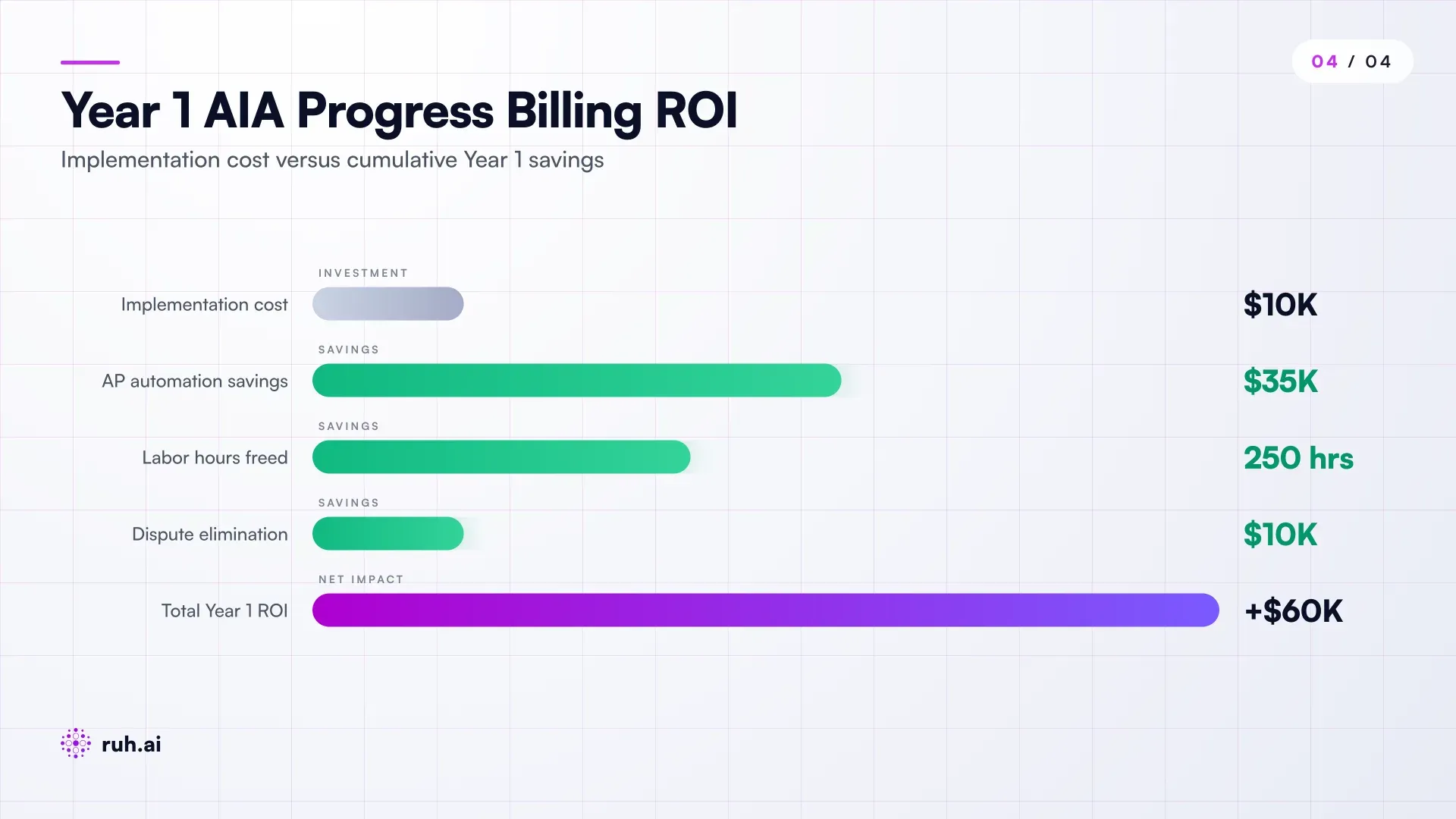
Q: What's the ROI timeline? A: For a mid-sized GC (8-12 concurrent projects), break-even is 6-8 months. You save 200-300 AP hours annually (~$7K-10.5K in labor), plus $30K-80K in dispute and rework overhead. Net annual benefit is $37K-90K against a typically $8K-15K annual platform cost. That's a 250-600% ROI in year one.
Q: Do I need to change my accounting system or project management tool? A: No. The agent reads from what you already have. If you're on legacy software without APIs, the agent can import structured exports (CSVs, reports) instead. Slightly more manual setup, but it still works.
Q: What if my owner doesn't accept AIA G702s? A: The agent can generate AIA forms regardless. If your owner accepts a different invoicing format, the agent can output to that template instead. Most large owners require AIA G702, but some GMP contracts use modified or simplified formats. The agent accommodates those variations.
Start With One Project, Scale Across the Portfolio
The path from manual billing to automation doesn't require a complete systems overhaul. Pick one active project, preferably one with straightforward line items and predictable change order patterns. Run the agent alongside your current billing process for one month. Compare the agent-generated AIA form to the one your team actually submits. If the agent gets it right 95%+ of the time, expand to three more projects. Once you've proven accuracy and time savings, roll out across your full portfolio.
The financial case is clear: you're saving 40-60 hours per billing cycle, cutting AP costs by 30-50%, and eliminating 90% of billing disputes. The operational case is equally strong: your subs get paid faster, your credit standing improves, and your teams spend their time on work that actually requires judgment instead of transcription.
Ruh AI's Pay Application Agent (via the Ruh platform) handles the full stack integration and learns from your corrections. If you want a deeper walk-through of how it fits your specific projects and systems, talk to the team.
Explore the Ruh platform and build your first billing agent today →
See how Ruh AI agents handle construction end-to-end →
Talk to the Ruh AI team about automating your billing process →