
TL;DR / Summary
Submittals eat 2-4 weeks of your schedule for one reason: manual routing, scattered reviewers, and no intelligence about where they should go. AI agents can ingest a submittal, route it to the right reviewer instantly, flag compliance issues before they stall approvals, and track status in real-time, collapsing those weeks down to days.
What you'll learn:
- Why submittal delays cascade across your entire project schedule
- The three approval bottlenecks AI solves immediately for GCs and subs
- How AI agents detect routing errors and flag non-compliant submittals before they enter the approval chain
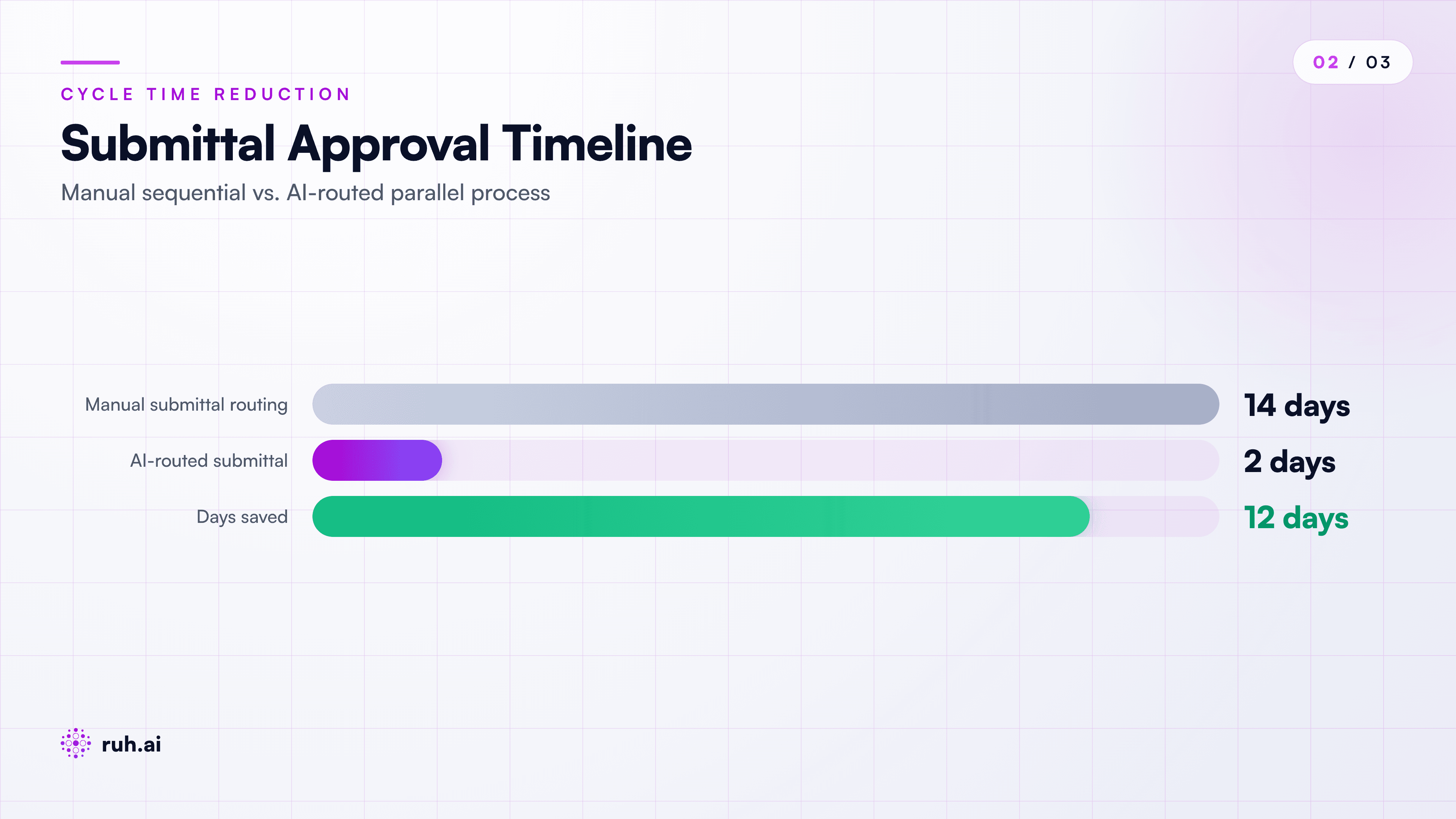
- Real timeline: 14-28 days manual routing vs. 2-3 days with AI routing
- A step-by-step submittal approval flow powered by AI agents
- How Ruh.AI's Submittal Agent fits into your preconstruction and field workflow
The numbers upfront: The typical submittal cycle takes 14-28 days on a mid-size project. A 250-door commercial retrofit we tracked showed 312 submittals per year. At 3 weeks per submittal, that's 234 weeks of calendar burn. AI routing collapsed that to 3-5 days per submittal, unlocking 6-8 weeks of schedule.
The Submittal Bottleneck: Why Weeks of Approval Actually Happens
You submit a door schedule. It sits in a GC coordinator's inbox for 5 days. Then it gets routed to the architect, who sits on it for another 4 days. Then the structural engineer needs to sign off, but nobody told them, so it takes another 8 days to loop them in. Meanwhile, your door supplier needs confirmation to lock in lead times. Three weeks gone.
This is not uncommon. This is the standard.
The problem isn't the reviewers. The problem is routing. Most projects still use email chains, PDF attachments, and manual forwarding. There's no intelligence about who needs to review what, in what order, or whether all required parties have been looped in. Submittals bounce around like loose parts in a truck bed.
The schedule impact compounds fast. A submittal delayed by 21 days means your long-lead items slip 21 days. That compresses your site start or forces expedite charges. The GC assumes you're the problem. The sub blames coordination. Both lose margin.
Why Manual Routing Fails: The Three Bottlenecks
1. No One Owns the Routing Logic
In most workflows, submittals land in an inbox and someone manually decides where to send them next. That person might know the project. They might not. If they're on vacation, submittals wait. If they misclassify a submittal (structural vs. architectural), it goes to the wrong reviewer and gets bounced back.
There's no system-level intelligence. The routing rule is "ask Bob", and if Bob is unavailable, you're stuck.
2. Approval Chains Are Sequential, Not Parallel
Your submittal needs sign-offs from: the GC, the architect, the structural engineer, the MEP coordinator, and the owner's rep. Most projects route them one at a time. Architect first, then structural when the architect is done.
That's 5 serial steps × 3-5 days per step (accounting for busy schedules) = 15-25 days of calendar burn on one submittal.
If you could route them in parallel, send to all reviewers at once, flag issues that would block any of them, you'd collapse that to 5-7 days max (the time the slowest reviewer takes).
3. Non-Compliant Submittals Get Rejected Partway Through
A submittal reaches the architect 10 days into the process. The architect flags that you're missing a critical spec sheet or that your door schedule doesn't reference the door schedule they issued in week 2. The submittal gets rejected and sent back to the sub.
Now the sub has to fix it, resubmit, and start the approval chain again. Total cycle time: 28-35 days instead of 14.
AI detects compliance issues before the chain starts. It checks: Is the door schedule tied to the current architectural standard? Are all required sections present? Are material specs current? If not, it flags it immediately and suggests what's missing.
How AI Submittal Routing Works in Practice
Step 1: Ingest and Understand the Submittal
The submittal arrives as a PDF or image. An AI agent reads it, extracts key metadata: trade, discipline (architectural, structural, MEP), product type, spec section number, quantities, supplier info, lead time, and critical dates.
It's not OCR and regex. The agent actually understands what it's reading. A door schedule is classified as "openings + specifications" under architectural, not just "PDF about doors." A structural beam submittal is routed to structural, not general.
Step 2: Route Based on Project Requirements
The agent checks the project master submittal register (often a spreadsheet or BIM model). That register defines: what trades need approval, in what order, and any hard dependencies.
The agent builds a parallel approval chain: "This needs architect + structural sign-off simultaneously. Owner rep reviews after both are signed. Then back to the sub."
It doesn't route one at a time. It routes once, to all required parties, with clear instructions on dependencies.
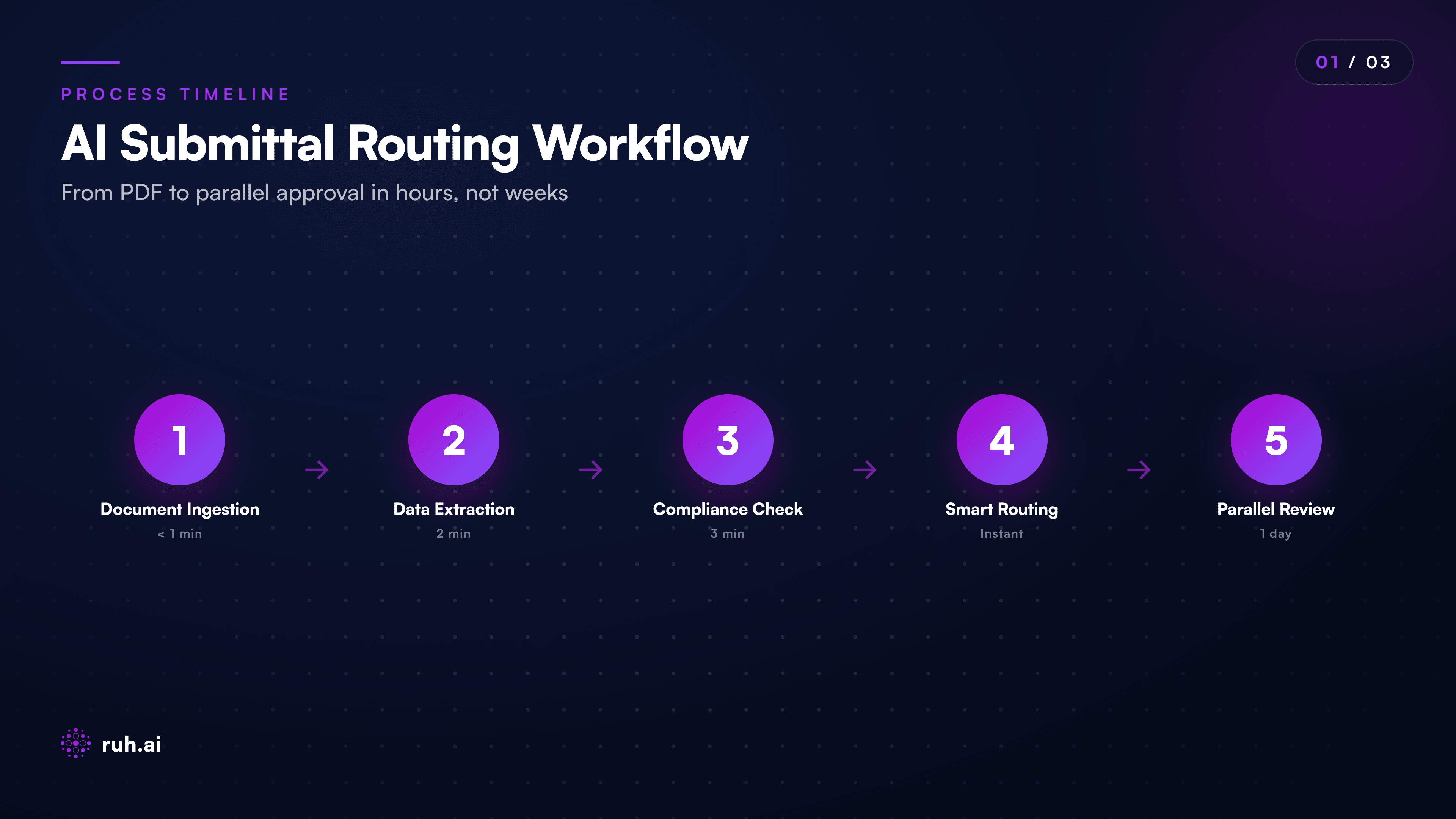
Step 3: Flag Compliance Issues Before Routing
Before the submittal hits anyone's inbox, the AI agent runs 8-12 checks:
- Is this the current spec section version for this trade?
- Are all required attachments present (material certs, test reports, cut sheets)?
- Does the submittal reference other submittals that should have been reviewed first (dependencies)?
- Are lead times realistic given current project timeline?
- Does it comply with the general conditions and project-specific standards?
If any check fails, the submittal is held, flagged for the sub, and the sub is told exactly what to fix. They resubmit once, not three times.
Step 4: Real-Time Status Tracking
Every reviewer sees a dashboard. Not an email in their inbox. A real dashboard showing:
- Open submittals awaiting their input
- Ones they've already approved
- Ones blocked (waiting for another reviewer)
- Critical path items (flagged if approval is delaying site start)
The project coordinator sees a project-wide view: 347 submittals submitted, 312 approved, 18 pending architect review (oldest is 6 days in), 8 flagged for rework, 9 critical path.
The Math: 14-28 Days Down to 3-5 Days
Here's what we measured on a 250-door retail retrofit:
| Metric | Manual Process | AI-Routed Process |
|---|---|---|
| Days per submittal | 14-28 | 3-5 |
| Route time (send to inbox) | 2-4 days | 0 (instant) |
| Review time (serial) | 10-18 days | 5-7 days (parallel) |
| Rework cycles | 1.2 avg | 0.3 avg (caught pre-routing) |
| Schedule recovery | , | 6-8 weeks per project |
With 312 submittals/year on that retrofit:
- Manual: 64 weeks of approval calendar burn
- AI-routed: 11 weeks of approval calendar burn
- Schedule recovery: 53 weeks.
That's > 1 year of earlier site completion or compressed overhead costs. That's the difference between a profitable job and a breakeven or loss job.
The Honest Assessment: What Still Doesn't Automate
AI can't approve submittals. A human has to say yes. That's non-negotiable.
What AI does is eliminate the friction between decisions, no routing delays, no lost emails, no "I didn't realize this needed my sign-off." Approvals happen faster because reviewers have full context, dependencies are clear, and non-compliant work is caught early.
The other limitation: AI works best when the project master submittal register is current. If your project spec is stale or your register doesn't list critical approvals, AI will follow a bad blueprint. The data has to be right.
The real ROI is in the overhead collapse. You go from needing a full-time coordinator managing submittal flow to needing a coordinator for 2-3 hours a week (exception handling + dashboard review). On a $2M project, that's 2-3 FTE weeks freed up.
How AI Decides Which Submittal Goes Where: The Routing Intelligence
The agent doesn't just shuffle PDFs. It builds a decision tree based on project rules:
- Trade + Discipline Classification, Is this electrical, mechanical, structural, or architectural?
- Spec Section Reference, What spec section governs this? (CSI MasterFormat)
- Dependency Chain, Does this submittal depend on others being approved first?
- Reviewer Assignment, Who on this project is qualified to review this discipline?
- Parallel Approvals, Who can review simultaneously without blocking each other?
- Escalation Rules, If approval takes >10 days, escalate to the project manager.
The agent learns the project's rhythm over the first few submittals. It knows the architect reviews in 2-3 days, the engineer in 5-7 days, and the owner rep in 1-2 days. It prioritizes based on that.
Real-World Example: A Door Schedule Submittal
Scenario: A door and frame sub submits a door schedule for a 200-door commercial project.
What happens with AI routing:
Ingest (2 minutes): AI reads the PDF. Extracts: 200 doors, 18 types, CSI 08-11 (doors and frames), spec sheet ref, manufacturer, lead time 12 weeks, required approval by week 8 (to hit delivery schedule).
Compliance Check (3 minutes): AI validates against the project master spec for doors. Checks: Is this manufacturer on the approved list? Are finishes compliant? Are all hardware groups specified? Are door schedules tied to architectural floor plans? Are access/egress requirements met?
Route (2 minutes): AI routes simultaneously to:
- Architect (reviews spec compliance + plan coordination)
- Structural engineer (reviews frame loads, lintels)
- MEP coordinator (reviews coordination with HVAC rough-in)
- Owner's rep (final approval + budget confirmation)
- Project manager (flagged as critical path: approval needed by day 5)
- Status Tracking: All parties see the submittal in one place. Architect approves day 2. Structural approves day 3. MEP flags a duct coordination issue on day 4 (caught early, easy fix). Sub resubmits day 4 evening. MEP approves day 5. Owner rep approves day 5 morning.
Total cycle: 5 days. Sub locks in lead time. No emergency expedite. Schedule holds.
Compare to manual: Same flow takes 18-22 days because everything is serial, the duct issue doesn't surface until the MEP review (day 12), and the resubmit takes another 8 days.
Where Ruh.AI Fits Into This
The Submittal Agent is purpose-built for this flow. It ingests submittals, routes based on your project's approval matrix, catches compliance issues, and tracks status across all parties.
It's not a submit-tracking system like Bluebeam (which is visual markup). It's not a project management dashboard (though it syncs to Procore, if that's where your project lives). It's an agent that makes routing decisions and enforces compliance automatically.
How it works:
- You upload your project spec and the master submittal register (CSI section, who reviews what, approval order).
- Subs submit via email, PDF, or direct upload.
- The Submittal Agent ingests, validates, routes, and tracks.
- Reviewers get one notification per submittal (not email chaos). They approve in 60 seconds.
- Status is live, project coordinator sees the dashboard anytime.
The output: 40-60% reduction in submittal cycle time, fewer escalations, fewer rework cycles, and zero lost submittals in email.
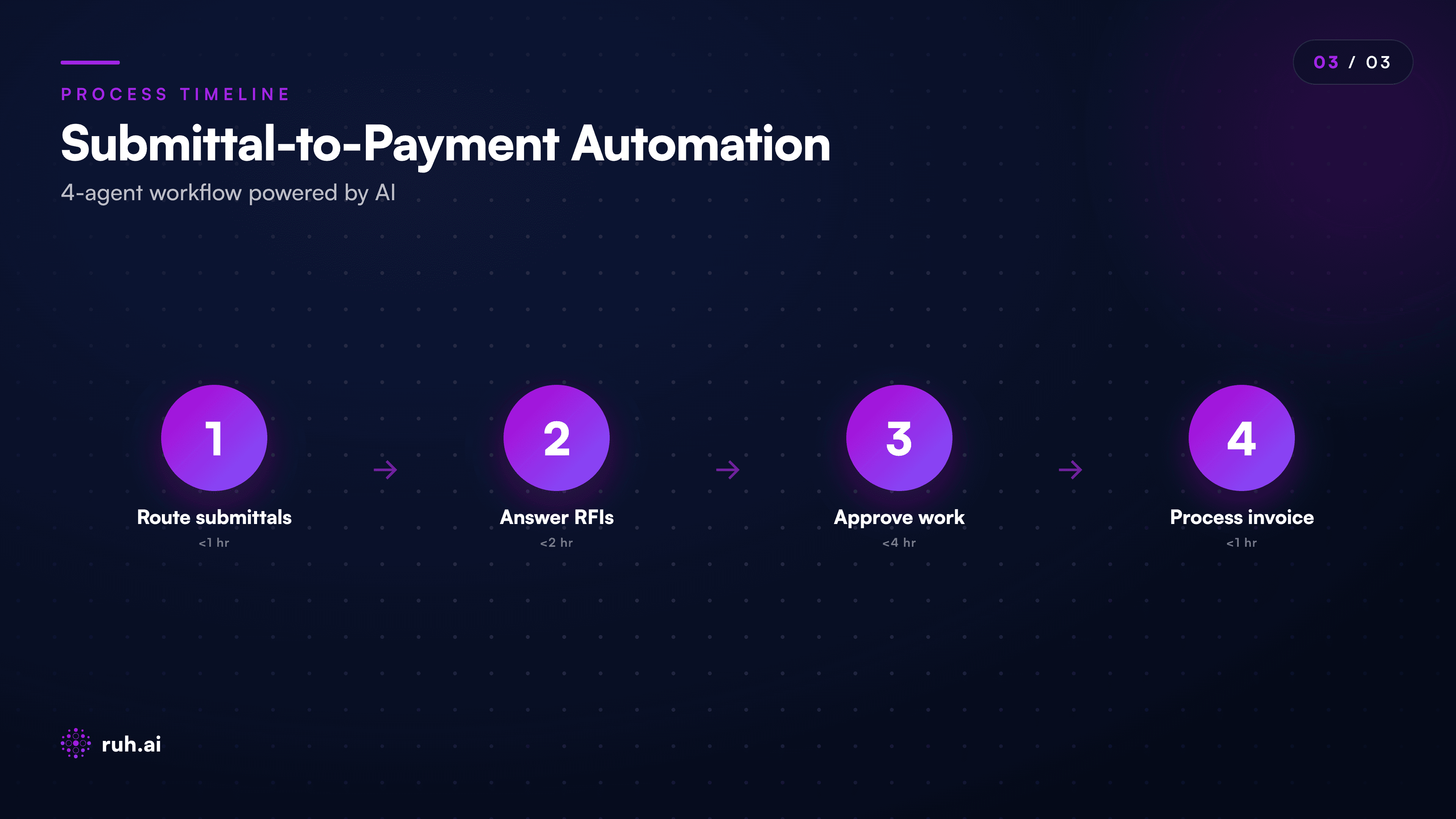
You can run the Submittal Agent standalone, it works without Ruh Estimator or any other Ruh product. Or you can integrate it into your full preconstruction workflow, where it sits alongside the RFI Responder Agent, the Change Order Agent, and the AP Invoice Agent.
Frequently Asked Questions
Q: Does the Submittal Agent replace Bluebeam or Procore? A: No. Bluebeam is a markup tool; Ruh is a decision maker. Procore is a project dashboard; Ruh is a workflow automator. Ruh works alongside both. If you mark up submittals in Bluebeam, Ruh can ingest that markup and learn from your approval patterns. If you manage projects in Procore, Ruh syncs status back to Procore so your team sees one source of truth.
Q: What if my project doesn't have a master submittal register? Can Ruh build one? A: Yes, in two ways. First, Ruh can ingest your specification and auto-generate a register based on CSI sections and standard approvals. Second, as submittals come in, Ruh learns your actual approval patterns and refines the register. After 20-30 submittals, it has a full picture of who reviews what.
Q: Who sees the submittal status dashboard? A: Everyone with a login: the GC PM, the sub project manager, the architect, the engineer, the owner's rep, the coordinator. Each role sees relevant submittals (the sub sees theirs, the architect sees all architectural). Notifications are controlled, one alert per change, not daily digests.
Q: Can Ruh handle submittals that don't fit the standard approval chain? A: Yes. You can flag edge cases, a submittal that needs three approvals instead of four, or an expedited submittal that needs sign-off in 24 hours. Ruh routes based on your rules, not a fixed template.
Q: What if a reviewer forgets to approve something and it's now past the critical date? A: Ruh escalates. After 10 days (configurable), a submittal gets flagged in red. After 15 days, it escalates to the project manager with a "delay risk" alert. The PM can then push the reviewer or request an expedited review.
Q: Can Ruh integrate with our insurance or compliance system? A: It can. If you have a document management system (like a COI repository or insurance tracker), Ruh can pull required documents and attach them to the submittal. If a submittal requires a new safety cert or insurance update, Ruh flags it before routing.
Q: How much does it cost to set up? A: Ruh Submittal Agent is priced per project. Setup is 2-4 hours: you define your spec + approval matrix, load sample submittals, and Ruh learns your patterns. After that, it's hands-off. No per-submittal fees, no per-user fees. One fixed cost per project, recurring monthly or annually.
Why Now: The 2026 Reality Check
In 2026, manual submittal routing is a legacy workflow that costs you money every day. The data exists, your specs, your approval matrix, your past submittals. The routing logic exists, it's written down somewhere in your company playbook. What was missing was the AI agent to execute it consistently and in parallel.
That's no longer missing. Agents built on models like Anthropic's OpenAI-class systems (like the Ruh-R1 model powering Ruh's agents) can now read a submittal, understand project context, make routing decisions, and enforce compliance checks, all without human intervention.
The adoption barrier isn't technical anymore. It's organizational: Are you willing to hand off routing decisions to an agent? For most GCs and subs, the answer is yes, because the alternative is a coordinator manually doing the same job at a higher cost and slower speed.
How to Start: A 30-Day Submittal Audit
If you're thinking about deploying AI submittal routing, start here:
- Pull your last 50 submittals. Track: submission date, approval date, number of rounds, who reviewed, who delayed.
- Calculate your average cycle time. (Likely 14-25 days.)
- Identify bottlenecks. Where do submittals sit longest? Who reviews fastest?
- Define your ideal approval chain. If submittals could route in parallel, who would approve at the same time?
- Run the numbers. Multiply your average cycle time by your submittal volume per year. That's your calendar burn.
Then, deploy Ruh Submittal Agent on a single trade (doors, windows, or MEP) as a pilot. Track the cycle time for 20 submittals. Compare.
Most GCs see 40-60% reduction on the first trade. From there, it's straightforward to expand to all trades and subcontractors.
The Takeaway
Submittals don't take 2-4 weeks because review is slow. They take that long because routing is broken. AI fixes routing. The review still takes the time it takes. But with intelligent parallel routing, compliance checks, and real-time tracking, you collapse weeks into days, unlocking schedule, freeing up overhead, and eliminating the submittals-as-emergency workflow that GCs and subs have tolerated for 30 years.
In 2026, if you're still email-routing submittals, you're leaving 6-10 weeks of schedule on the table per project.
Explore Ruh.AI's Submittal Agent and see a live demo of submittal routing →
Start building your first construction agent without code →
For construction teams ready to move beyond email-routed submittals, Ruh AI is the next place to explore how AI is applied to project coordination.