
Quick Answer
Construction software vendor lock-in is the situation where leaving a tool costs more than staying, because your drawings, takeoffs, prices and project history are stuck in its formats or its contract, so the vendor, not your team, decides when you can switch. This guide sets out how fast contractors are adopting AI tools, works through what one abandoned rollout costs, and gives a lock-in risk table and a buyer's checklist to use before you sign.
What you'll find below:
- AGC's 2026 figures on how contractors are using AI, by function
- A worked example of what a tool abandoned after three months really costs
- A table of lock-in risks, what to ask and the red flag for each
- An eight-point buyer's checklist for reliable construction software
- Our view on what contractors get wrong when they choose software
Why Do Construction Teams Abandon New Software?
Construction teams abandon software when they stop trusting it, and trust goes for three reasons: the tool is unreliable on real work, it takes too long to learn, or the data that comes out of it needs checking by hand. Once an estimator has to double-check every number, the old spreadsheet is faster again.
Contractors name the same obstacles themselves. In the Associated General Contractors of America and Sage 2025 Construction Hiring and Business Outlook, 39% of contractors said finding the time to implement and train on new technology was one of their biggest IT challenges, 36% cited employee resistance to technology, and 28% cited integration between the software used inside the firm.
Shelfware rarely fails on features. It fails in the first busy bid week, when the team falls back on what it knows and the new tool never gets a second chance. The licence keeps renewing while nobody opens it.
Bad data is part of the cost. An FMI and Autodesk study published in 2021 and reported by Construction Dive estimated that bad data may have been responsible for 14% of avoidable rework, about $88 billion, in 2020, based on a survey of 3,900 construction professionals. A tool that produces numbers nobody trusts adds to that problem instead of solving it.
How Fast Is Construction Adopting AI Tools?
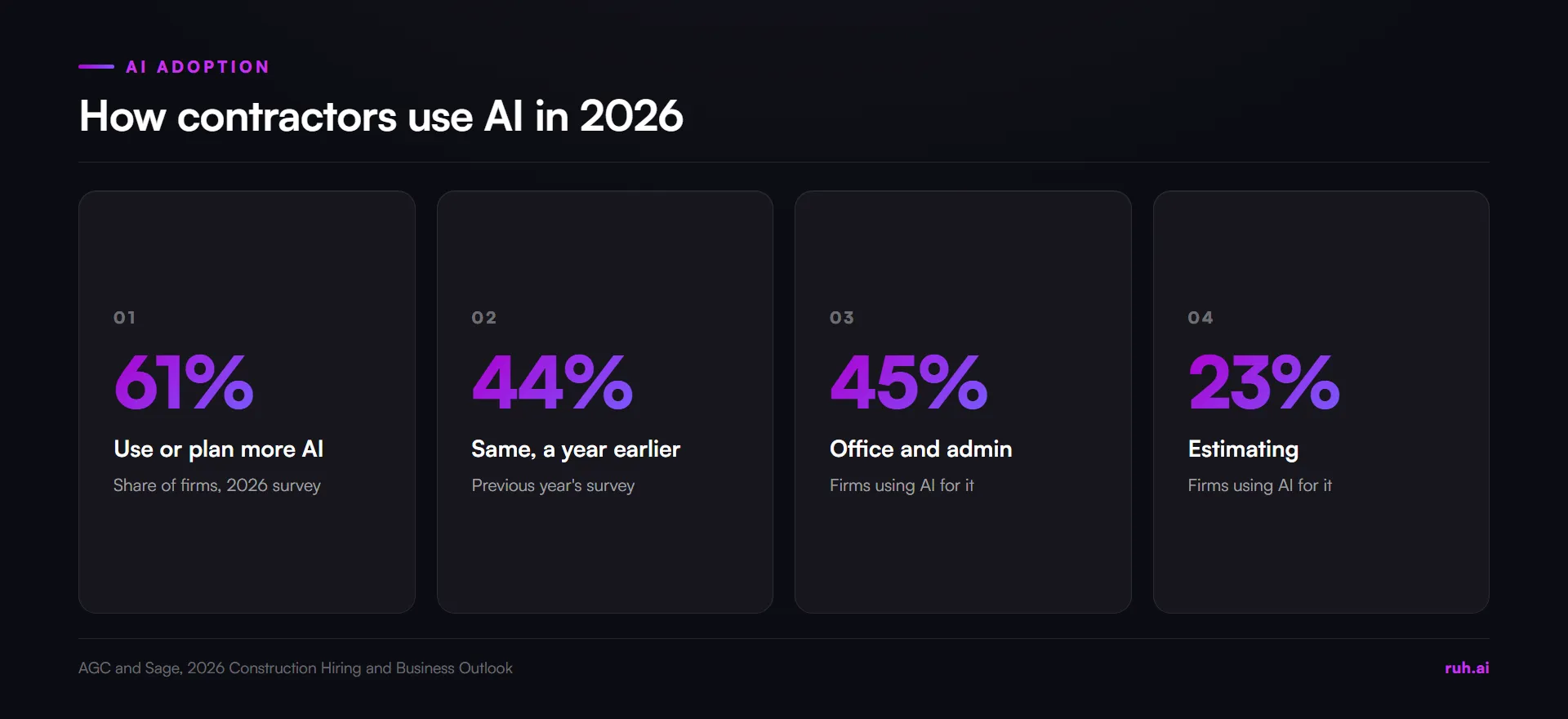
Contractors are adopting AI quickly, which makes choosing well more important, not less. The Associated General Contractors of America and Sage reported in their 2026 Construction Hiring and Business Outlook that 61% of firms use AI or plan to increase their investment in it, up from 44% in the previous year's survey.
Most of that use is in the office. The same 2026 AGC survey of 951 firms found 45% use AI for office and administrative work, 23% for estimating, 20% for design or preconstruction and 16% for recruitment, training or HR.
More tools in more hands means more chances to get locked in. Each new tool holds a little more of your company's data, and each one has its own export rules and contract terms.
What Does a Failed Rollout Really Cost?
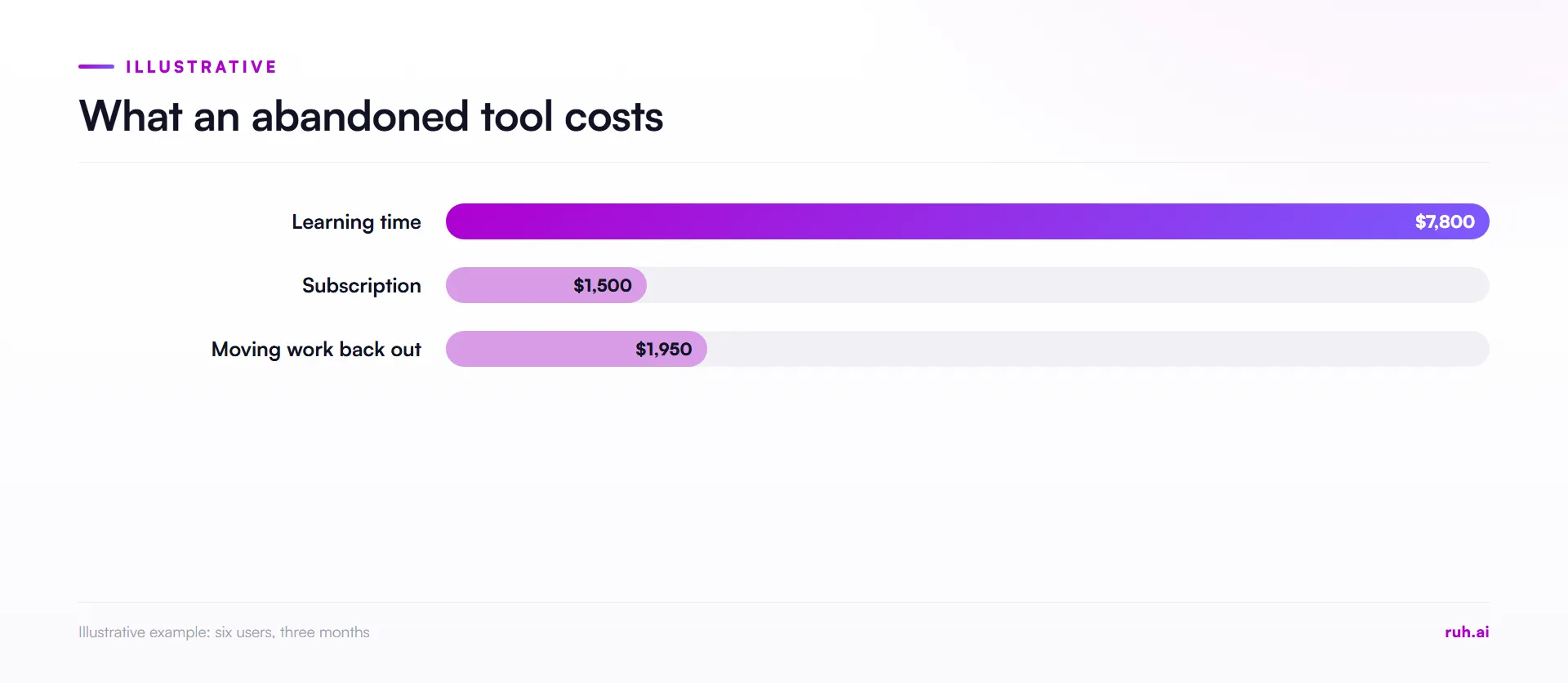
A failed rollout costs far more than the subscription, because the biggest costs are the hours your team spent learning it and the hours spent moving work back out. The worked example below shows the size of it. Every input is illustrative, so swap in your own.
- Learning time. Six people, two estimators, two project managers and two office staff, each spend 20 hours learning the tool at a loaded rate of $65 an hour: 6 × 20 × $65 = $7,800.
- Subscription. $500 a month for three months before the team gives up: 3 × $500 = $1,500.
- Moving back out. Re-entering live work into spreadsheets takes 30 hours: 30 × $65 = $1,950.
- Total. $7,800 + $1,500 + $1,950 = $11,250 for a tool nobody uses.
The subscription is the smallest line. Learning time is more than five times the licence cost here, which is why onboarding belongs in the buying decision, not after it.
How Do You Test Reliability Before You Buy?
Test reliability on your own drawings and your own past bids, not on the vendor's demo set. A demo is chosen to work. Your last lump-sum job, with its half-size prints and conflicting details, is the test that matters.
- Use a job you already know. Pick a past bid where you know the true quantities and prices, so you can see exactly where the tool is right and wrong.
- Check what it does when it can't measure. A sheet with no scale should produce a gap you can see, not a confident number.
- Trace a number back. Pick any quantity and ask where it came from. If nobody can show you the sheet, you cannot check it.
- Time the corrections. If fixing the output takes longer than doing the work yourself, the tool will become shelfware.
The takeoff accuracy guide sets out how to check quantities against the drawings, which is the same check you should run on any tool's output.
What Is Vendor Lock-In, and How Do You Avoid It?
You avoid vendor lock-in by asking how you leave before you agree to join: what you can export, in what format, who owns it, and what the contract charges you to go. Lock-in is rarely a single clause. It builds up from small defaults nobody checked.
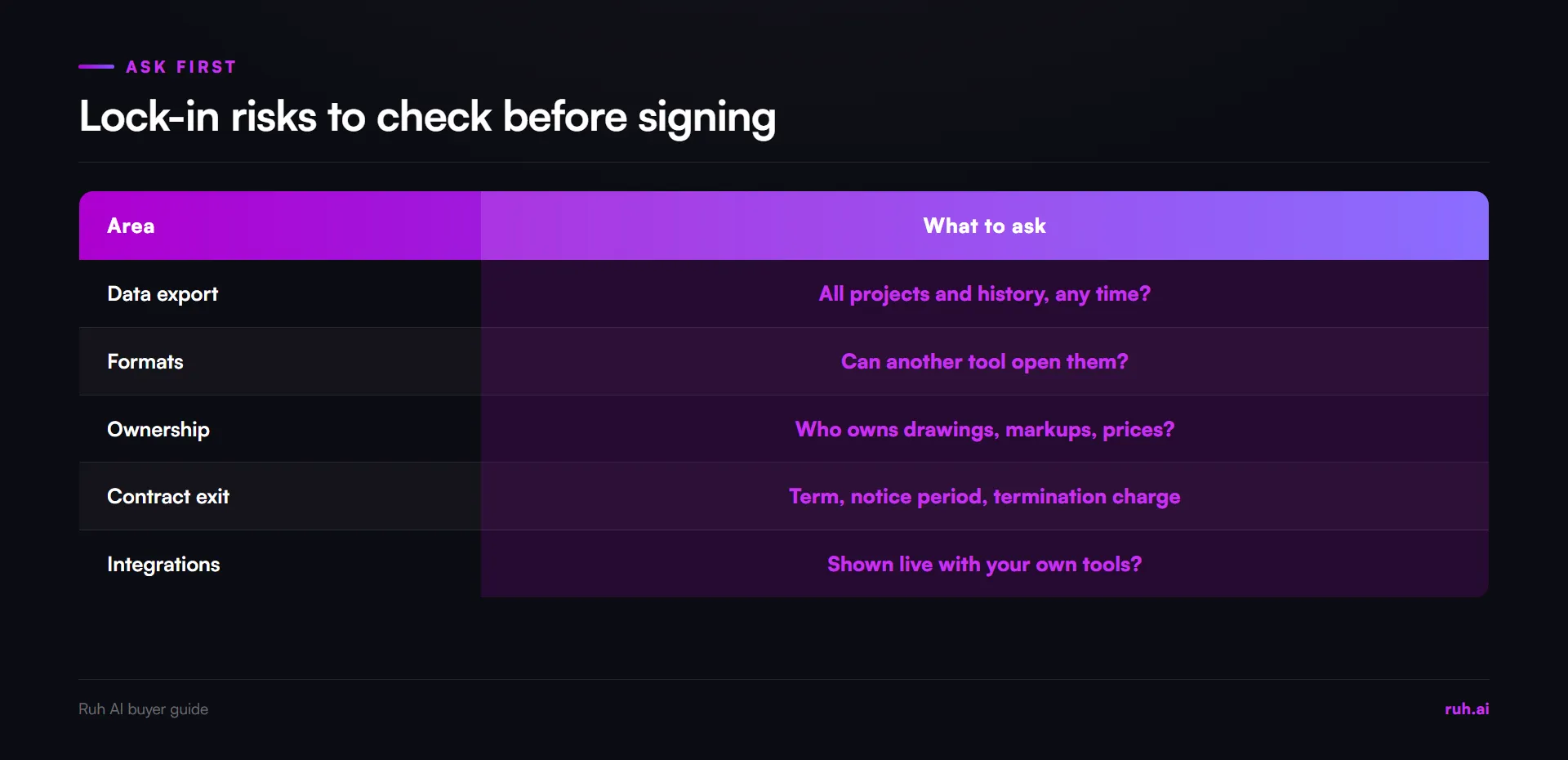
Lock-in risks in construction software, what to ask and the red flag:
| Area | What to ask before signing | Red flag |
|---|---|---|
| Data export | Can we export all our projects, quantities and prices, including history, whenever we want? | Export only on request, or only the current project |
| Formats | Which formats, and can another tool open them? | A format only this vendor reads |
| Ownership | Who owns our drawings, markups, takeoffs and rate data? | Vague terms, or the vendor owns derived data |
| Contract term and exit | What is the term, the notice period and any early termination charge? | Automatic multi-year renewal with a short notice window |
| Integrations | Can you show the connection working live, with our tools? | Logos on a slide, with no live demo |
| Onboarding | Who trains us, for how long, and what happens if adoption stalls? | Training sold as an extra after signing |
Get the answers in writing. A sales call is not a contract. Whatever matters to you about export, ownership and exit belongs in the order form or the terms you sign.
Which Data Is Hardest to Get Back Out?
The hardest data to get back out of a construction tool is the data you built up over years: your rate book, your past bids with their actual costs, and the markups on every drawing set. Project files can be re-exported. Your pricing history cannot be rebuilt from memory.
- Rate data. Unit prices, crew rates and assemblies your estimators have tuned over many jobs. Ask for them in a spreadsheet-readable format, with every field, not a summary.
- Bid history. Past bids, what you won and lost, and how the final cost compared with the estimate. This is what lets you price the next job better.
- Drawing markups. Takeoff measurements and notes on the sheets. Ask whether they export with the drawings or stay behind in the tool.
- Decisions and assumptions. Exclusions, clarifications and the questions you sent. They protect you when a dispute comes back after award.
Run the export test on these four, not on a sample project. If the rate book comes out as a flat PDF, you do not really own it.
What Should a Construction Software Buyer's Checklist Include?
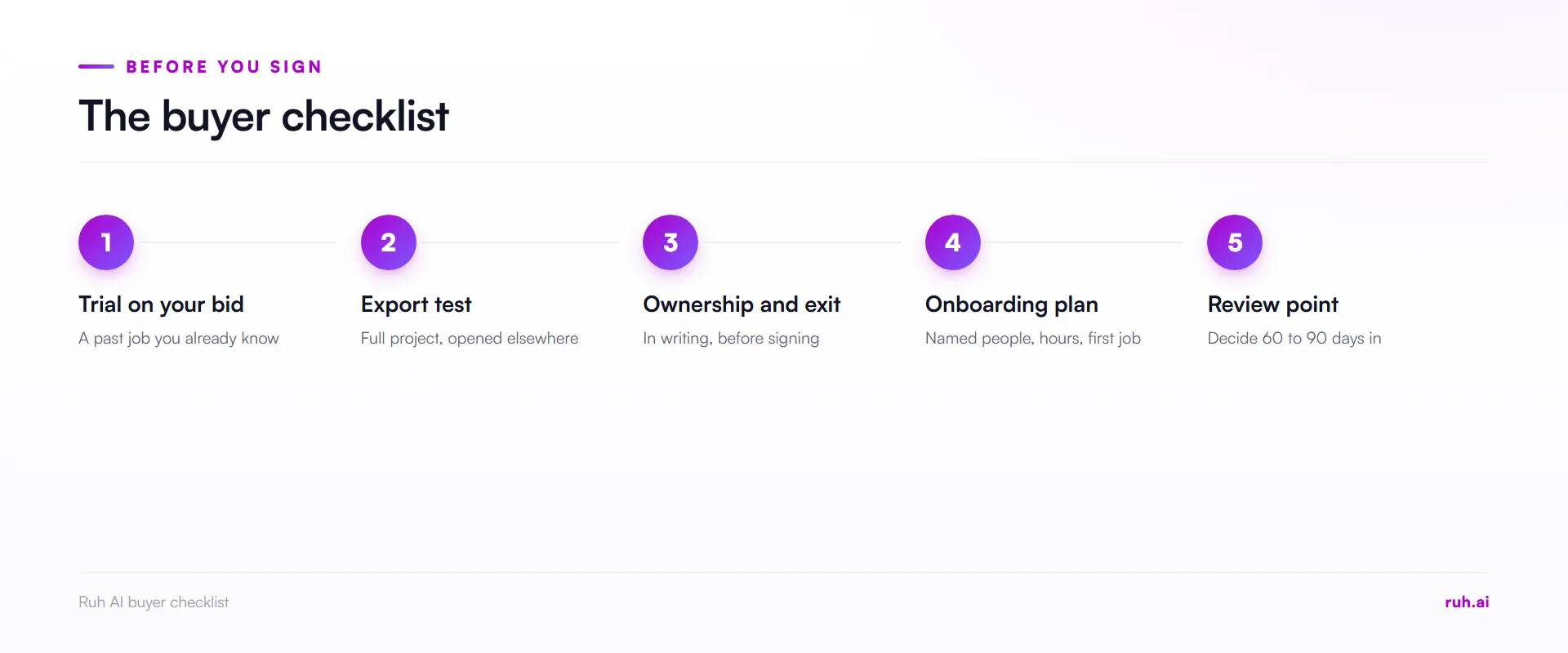
A construction software buyer's checklist should cover reliability on your own work, onboarding effort, data export and contract exit, and it should be finished before anyone signs. Copy the list below into your buying process.
| # | Check | Done when |
|---|---|---|
| 1 | Trial on your data | The tool has been run on a past bid you know |
| 2 | Scale and gaps | It shows a gap on an unscaled sheet instead of guessing |
| 3 | Traceability | Any number can be traced to its sheet or source |
| 4 | Export test | You have exported a full project and opened it elsewhere |
| 5 | Ownership | The terms say you own your drawings, markups and prices |
| 6 | Exit terms | Term, notice period and termination charges are written down |
| 7 | Onboarding plan | Named people, hours and a date for the first real job |
| 8 | Review point | A date, 60 to 90 days in, to decide whether it stays |
For something to try on your own numbers today, Ruh has free construction calculators.
What Contractors Get Wrong About Choosing Construction Software
In Ruh's opinion, contractors get four things wrong about choosing construction software. These are our positions, not survey findings.
They judge the demo, not their own drawings. A tool that shines on clean sample sheets can stumble on the half-size, revised and conflicting set you actually bid.
They compare prices, not exit costs. The cheapest subscription can be the most expensive tool to leave once three years of projects are inside it.
They buy features, not adoption. A tool with fewer features that the whole team uses beats a powerful one nobody opens after the first month.
They trust integration logos. A logo on a slide is a claim. A connection working live with your own tools is evidence.
The Honest Assessment: What a Checklist Cannot Protect You From
A buyer's checklist reduces the risk of a bad choice, and it cannot make a good tool fit a team that has no time to learn it. Four limits are worth stating.
- It cannot create time. If nobody is given hours to learn the tool, it will fail however well it was chosen.
- It cannot predict the vendor. Companies change prices, products and owners after you sign.
- It cannot replace references. A contractor of your size and trade who has used the tool for a year knows things no checklist asks.
- It takes effort up front. A real trial on your own bid costs days. That is still cheaper than the worked example above.
How Ruh AI Fits Into This
Ruh AI's Takeoff Agent withholds a figure when a sheet has no scale instead of guessing, so a sheet it cannot measure shows up as a gap you can see, which is the behaviour this checklist asks you to test for.
The Estimating Agent prices from your company's own rate book and history. Your estimator can change any price or add their own costs, and a person approves the budget before the next stage. If you are new to the method, the guide to estimating construction costs and the quantity takeoff glossary entry cover the basics.
Frequently Asked Questions
Q: What is vendor lock-in in construction software? A: Vendor lock-in is when leaving a tool costs more than staying, because your drawings, takeoffs, prices and history are stuck in its formats or contract. The vendor, not your team, ends up deciding when you can switch.
Q: How do you avoid construction software vendor lock-in? A: Ask how you leave before you join. Test a full data export, confirm you own your drawings and prices, and get the term, notice period and termination charges in writing before signing.
Q: What should you ask about data export? A: Ask whether you can export every project, including history, whenever you want, in a format another tool can open. Then test it during the trial rather than taking the answer on trust.
Q: Why does construction software become shelfware? A: Software becomes shelfware when the team stops trusting it, usually because it is unreliable on real work, slow to learn or produces numbers that need checking by hand.
Q: Are AI construction tools reliable? A: Some are and some are not, and a demo will not tell you which. Run the tool on a past bid where you know the right answers, and check what it does on a sheet it cannot measure.
Q: How should you plan construction software onboarding? A: Name the people, book the hours and set a date for the first real job. Add a review point 60 to 90 days in to decide whether the tool stays.
The Bottom Line
Choose construction software the way you would choose a subcontractor: on proof from your own work, with the exit terms written down. Test it on a past bid, export a full project, read the contract's term and notice period, and plan the onboarding before you sign. The tool you can leave easily is the one you will be happy to keep.
See how Ruh AI supports the estimating team. Explore Ruh AI for estimators and precon.
Sources
- Associated General Contractors of America and Sage, 2026 Construction Hiring and Business Outlook: agc.org
- Associated General Contractors of America and Sage, 2025 Construction Hiring and Business Outlook: agc.org
- FMI and Autodesk study on bad data, reported by Construction Dive ("Contractors lost $1.8 trillion globally in 2020 due to bad data"), 22 September 2021