

Quick Answer
A unit cost database for contractors is a structured record of what each unit of work has cost the company, such as dollars per square foot of hung board, with the date, source, quantity and conditions behind every price, so estimators price from evidence instead of memory. Below are ABC's 2026 price figures that show how fast rates go stale, a map of where cost data hides, the fields every unit cost record needs, a drywall sub bid turned into an aged unit cost with the arithmetic shown, a checklist, and our view on what contractors get wrong.
What you'll find below:
- How much construction input prices moved in 2026, from Associated Builders and Contractors' analysis of federal price data
- The six places your cost history is hiding, and what each one is missing
- The 13 fields every unit cost record needs before you can trust it
- Two drywall sub bids turned into one unit cost, then aged to today's prices
- Published cost books against your own rates, compared side by side
- A checklist for whether your cost data is ready to estimate from
Why Do Most Contractors Have No Usable Cost History?
Most contractors have years of cost history but no usable record of it, because the prices were never stored in a form anyone can price from. Every bid produced numbers. They went into a bid tab, a sub's lump-sum proposal or a supplier email, and the next estimate started from scratch.
The knowledge exists, but it sits in the wrong places. A senior estimator remembers that the last tilt-up job ran heavy on rebar, or that a particular drywall sub always bids high on high ceilings. That memory is real cost data. It just isn't written down, so it leaves when the estimator does.
That risk is not small right now. The AGC and NCCER 2025 Workforce Survey found that 77% of firms looking for estimating personnel had difficulty filling those roles. When estimators are that hard to hire, a company that keeps its pricing knowledge in people's heads is one resignation away from rebuilding it.
Construction job cost data for estimating is different from what accounting tracks. Accounting records what a job cost in total and by cost code. Estimating needs what a unit of work cost: per square foot, per linear foot, per each. The two only meet when someone divides the cost by the quantity, and in most firms nobody does.
Where Does Construction Cost Data Hide?
Construction cost data hides in six places, and each holds part of the price without the rest of the story. A bid tab has the number but not the conditions. A sub bid has the total but not the quantity. A job cost report has the actual spend but not the unit.
| Source | What it holds | What is missing | How to clean it |
|---|---|---|---|
| Old bid tabs | Your priced line items for past bids | Whether you won, and what the job really cost | Keep lines from awarded jobs, mark the rest as unconfirmed |
| Lump-sum sub bids | The total a sub charged for a scope | The quantity, and the labour and material split | Divide by your own measured quantity for that scope |
| Supplier quotes | Material prices on a date | Freight, waste and whether the price held | Record the quote date and the delivered price you paid |
| Job cost reports from accounting | What the job actually spent by cost code | Quantities installed, so no unit cost | Pair each cost code total with the takeoff quantity |
| Estimators' own spreadsheets | Personal rates and adjustments | Sources, dates, and anyone else's access | Pull the rates into one shared record with a source each |
| Published cost books | National or regional averages | Your crews, your subs, your market | Use for benchmarking, never as your rate |
The pattern is the same in every row. The price exists, but the context that makes it reusable does not. A unit cost only means something when you know the quantity it was spread over, when it was paid, and on what kind of job.
What Does Stale or Messy Cost Data Cost?
Stale or messy cost data costs a contractor in bids priced on last year's numbers and in errors carried from spreadsheet to spreadsheet. In 2026 the stale-price risk has been unusually sharp.
Why cost data goes stale and goes bad, from the research:
| Finding | Figure | Source |
|---|---|---|
| Construction input prices, September 2025 to September 2026 | up 11.2% | Associated Builders and Contractors, 2026 |
| Construction input prices in September 2026 alone | up 2.2% | Associated Builders and Contractors, 2026 |
| Rise in the first four months of 2026, against the prior three years combined | 6.2% vs 4.8% | Associated Builders and Contractors, 2026 |
| Firms seeking estimating personnel that had difficulty hiring | 77% | AGC and NCCER, 2025 |
| Audited spreadsheets found to contain errors | at least 86% | Raymond Panko, University of Hawaii, 2000 |
| Avoidable rework caused by bad data, 2020 | 14%, about $88 billion | FMI and Autodesk, 2021 |
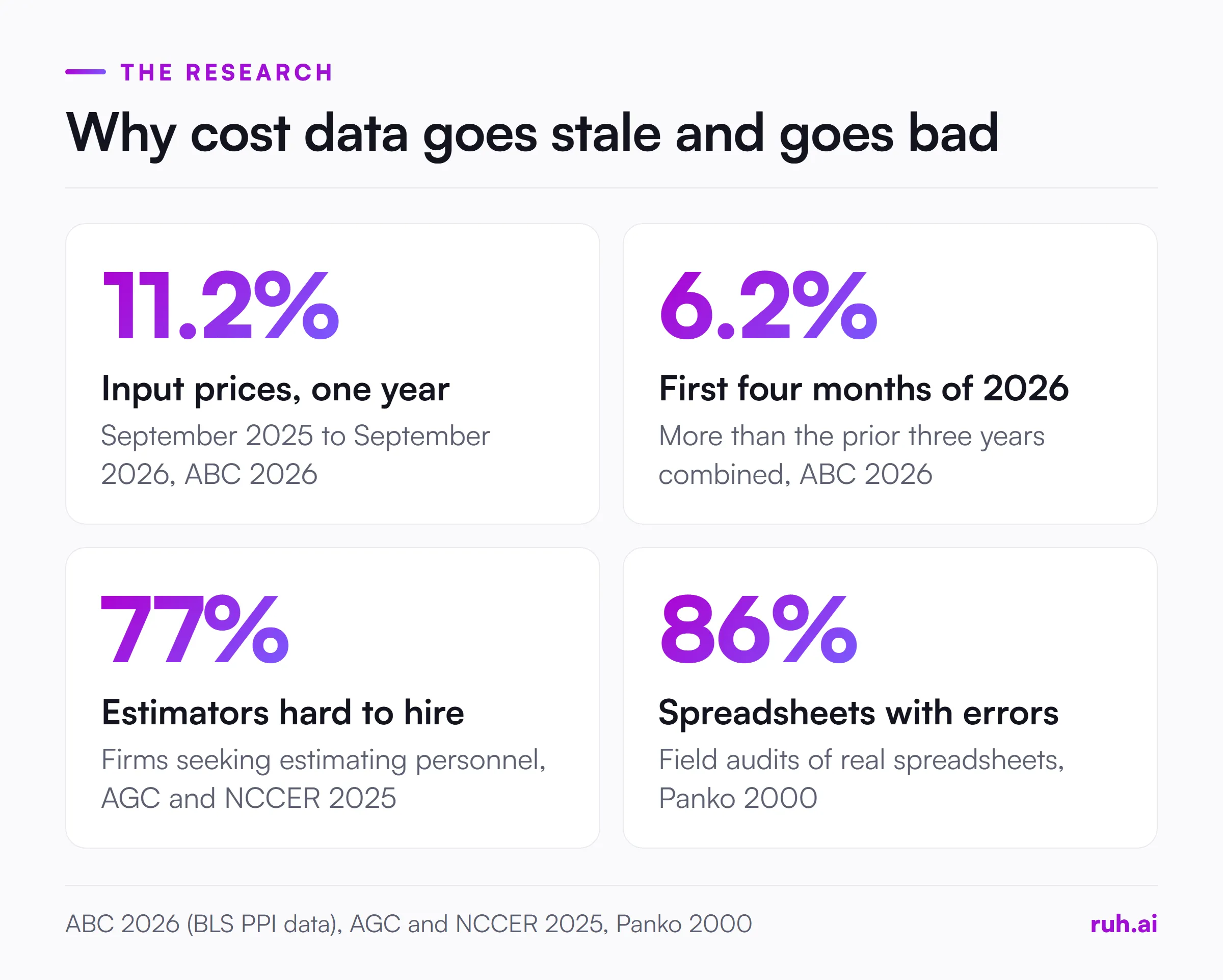
Prices moved fast in 2026. Associated Builders and Contractors' analysis of Bureau of Labor Statistics Producer Price Index data, released on 15 October 2026, found construction input prices up 11.2% between September 2025 and September 2026, and up 2.2% in September alone. In ABC's May 2026 release, chief economist Anirban Basu noted that input prices rose more in the first four months of 2026 (6.2%) than over the prior three years (4.8%). A material rate copied from a year-old bid tab is not a neutral starting point.
Spreadsheets carry errors forward. Raymond Panko's 2000 review of field audits found errors in at least 86% of the real spreadsheets audited. A cost history spread across a dozen estimators' files inherits every one of those mistakes, and nobody can see which number came from where.
Bad data turns into rework. FMI and Autodesk's 2021 study, reported by Construction Dive, estimated that bad data may have caused 14% of avoidable rework in 2020, about $88 billion. Not all of that starts in estimating, but a wrong unit cost becomes a wrong budget that the field has to work against.
What Should a Unit Cost Record Contain?
A unit cost record should contain the price and everything needed to decide whether that price still applies to the next job. Without the date, the source and the conditions, a number in a database is no better than a number in someone's memory.
The 13 fields every record needs:
- Item description. Plain words a new estimator would understand, such as "5/8 in. Type X board, hung and finished, level 4."
- Cost code. The same code accounting uses, so actuals and estimates line up. Our construction cost codes guide covers how to set the list.
- Unit of measure. Square foot, linear foot, each, cubic yard. One unit per record.
- Unit cost. The installed price per unit.
- Split. Labour, material, equipment and subcontract shares, even if estimated.
- Source type. Bid tab, sub bid, supplier quote or job actual.
- Project. Which job the price came from.
- Price date. When the price was paid or quoted, not when it was entered.
- Location. City or region, since labour and delivery costs vary.
- Quantity basis. The quantity the price was spread over, because small jobs cost more per unit.
- Conditions. Height, access, occupied building, night work, anything that moved the price.
- Confirmed by. The person who checked the price against what was actually paid.
- Review date. When the price must be checked again before use.
Fields 5, 8 and 12 are the ones most firms skip, and they matter most. Without a split you cannot age a price properly. Without a date you cannot tell a current price from an old one. Without a confirmation, a bid you lost sits next to a price you actually paid as if they were equal.
How Do You Build a Unit Cost Database for Contractors?
You build a unit cost database for contractors one confirmed price at a time, starting with the trades you bid most often and the jobs you actually won. Trying to load ten years of history in one go produces a large file nobody trusts.
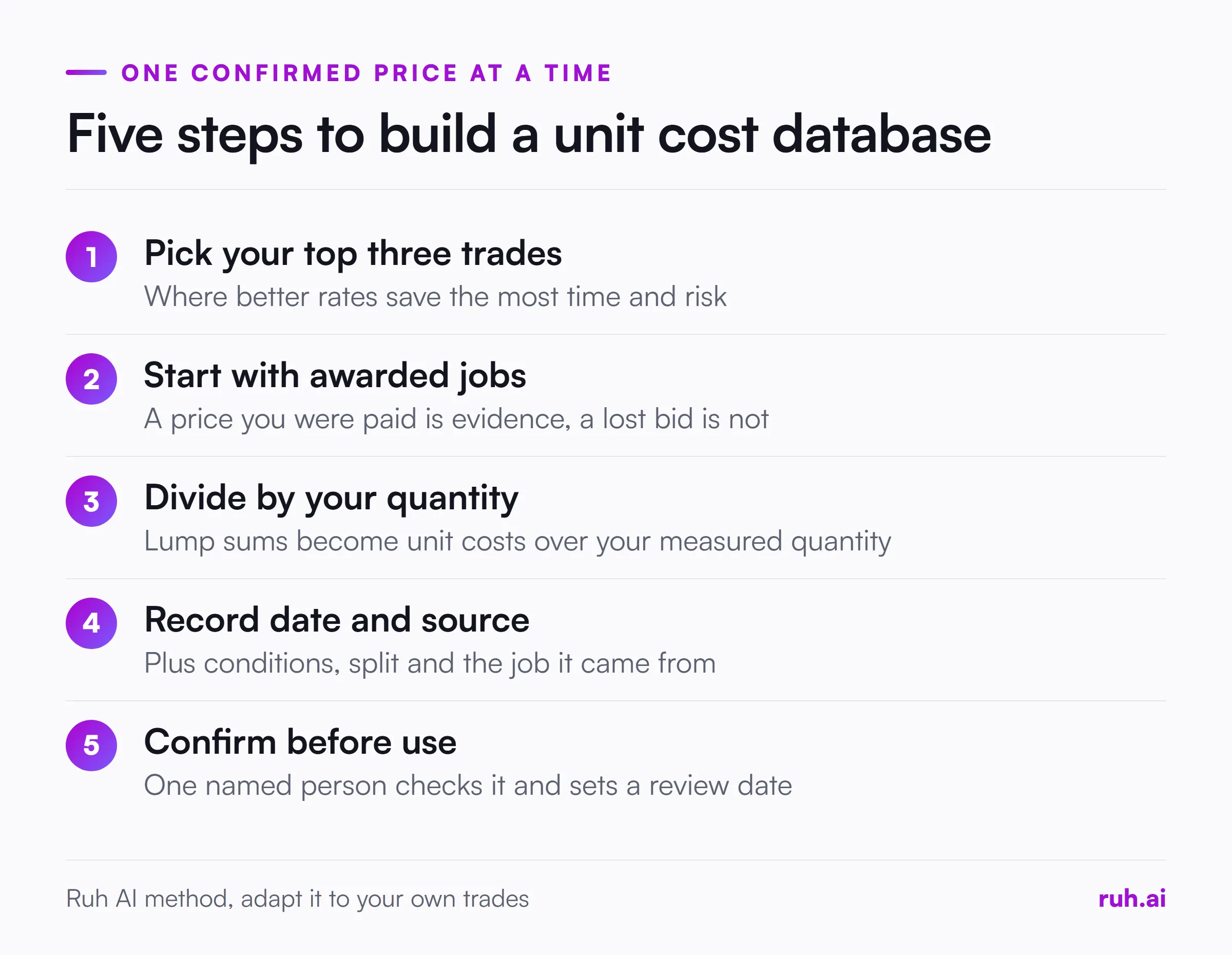
- Pick the three trades you bid most often. That is where a better rate saves the most estimating time and the most pricing risk.
- Collect sources from awarded jobs first. A price you were paid is evidence. A price on a lost bid is only an opinion about the market.
- Divide each cost by your own measured quantity. Lump-sum sub bids and job cost totals only become unit costs when you divide them by the quantity from your takeoff.
- Record the date, the source and the conditions. Fill in the fields above, even roughly. A rough date is far better than none.
- Review and confirm before anyone prices from it. One named person checks each new record against what was actually paid, and sets the review date.
If your cost data lives across several systems, the same discipline applies to moving it. Our piece on connecting NetSuite to estimating data covers why one agreed cost code list matters more than any connector. And if your field quantities start as notes, turning field notes into a construction estimate shows how to keep them checkable.
Worked Example: Turning a Lump-Sum Sub Bid Into a Unit Cost
Two old drywall sub bids show how a lump sum becomes a unit cost you can reuse, and why aging it takes more than one multiplication. The numbers below are illustrative. Swap in two awarded jobs from your own files.
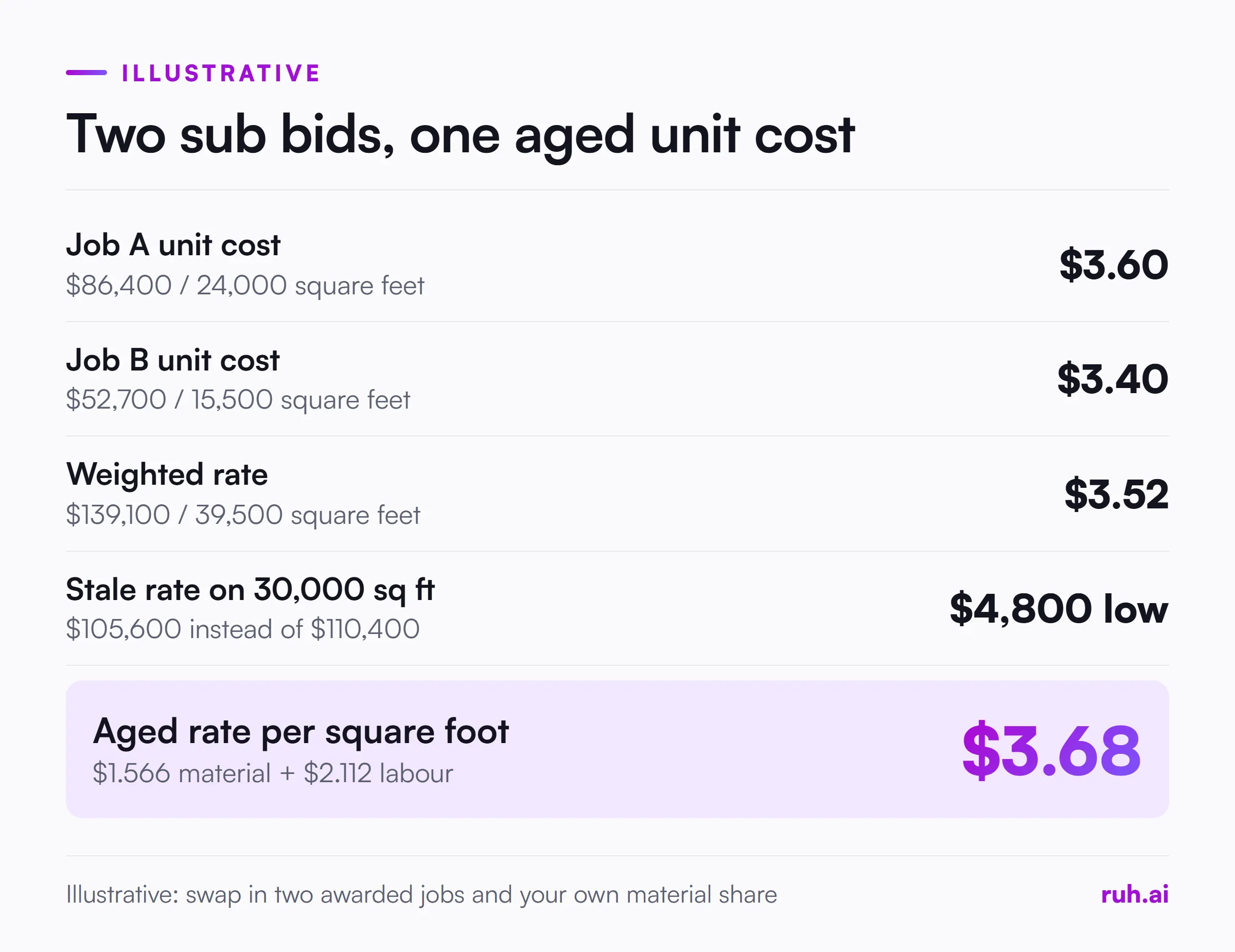
The sources. Your drywall sub priced two awarded jobs about a year ago. Job A was $86,400 for a scope your takeoff measured at 24,000 square feet of board. Job B was $52,700 for 15,500 square feet.
Step 1: unit cost per job.
- Job A: $86,400 / 24,000 = $3.60 per square foot
- Job B: $52,700 / 15,500 = $3.40 per square foot
Step 2: one weighted rate. Add the dollars and the quantities, then divide: $139,100 / 39,500 = $3.52 per square foot. Weighting by quantity stops the smaller job from pulling the rate as hard as the larger one.
Step 3: age it to today. These prices are about a year old, and ABC's October 2026 release puts construction input prices 11.2% higher than a year earlier. That index covers materials and other inputs, not labour. So split the rate first. Assume material is 40% of the installed price, an illustrative share you should confirm with your sub.
- Material: $3.52 x 0.40 = $1.408, aged by 11.2%: $1.408 x 1.112 = $1.566
- Labour: $3.52 x 0.60 = $2.112, kept until you check current wage rates with the sub
- Aged rate: $1.566 + $2.112 = $3.68 per square foot
Step 4: what the shortcut would have cost. On a new job of 30,000 square feet:
- At the aged rate of $3.68: $110,400
- At the stale rate of $3.52: $105,600, which is $4,800 low
- At $3.91, the result of applying 11.2% to the whole rate: $117,300, which is $6,900 high
Published cost book vs your own unit costs
| Question | Published cost book | Your own unit costs |
|---|---|---|
| Where the price comes from | National or regional averages | Jobs you priced, won and built |
| What it reflects | Typical crews, typical conditions | Your crews, your subs, your market |
| How current it is | Updated on the publisher's cycle | As current as your last review date |
| What it is good for | Benchmarking and unfamiliar work | Pricing the next bid |
| What it cannot tell you | How your company actually performs | How the wider market moved |
Source: Ruh AI comparison, general guidance
The lesson is in Step 3. A price index tells you how inputs moved, and labour moves on its own schedule. Store the split with every record, and aging a rate becomes a two-minute job instead of a guess.
How Do You Keep Unit Costs Current?
You keep unit costs current by giving every record a review date and by aging the material share with a published index between reviews. A database that is never updated becomes another stale bid tab within a year, faster in a year like 2026.
Three habits keep it alive:
- Review on a calendar, not when someone remembers. Set review dates by trade. Materials with volatile prices need shorter cycles than labour-heavy finishes.
- Close the loop after every job. When a job closes, compare the estimated unit cost with the actual from the job cost report, and update the record with the real number.
- Age only what an index covers. Use input price data for the material share and your own wage data for labour, as in the worked example.
Published Cost Books or Your Own Rates?
Use published cost books to benchmark and your own rates to price. A cost book tells you what work costs on average. Your own records tell you what it costs your company, with your crews, your subs and your market.
A large gap between the two is information, not a problem. If your drywall rate sits well above the published average, either your conditions are harder, your sub is expensive, or your records are wrong. Each answer is worth knowing before the next bid.
What Contractors Get Wrong About Cost Databases
Contractors building a cost database tend to make the same five mistakes, in our view. These are opinions from watching estimating teams, not survey results.
1. Building it from estimates instead of confirmed prices. A bid tab line is what you thought the work would cost. A paid sub bid or a job actual is what it did cost. Mixing them without a label makes every number suspect.
2. Storing totals without quantities. In the illustrative worked example above, Job B's $52,700 drywall line tells you nothing next year. $3.40 per square foot over 15,500 square feet tells you almost everything.
3. Keeping prices with no date. In a year when ABC measured input prices up 11.2% over twelve months, an undated price is a guess with a decimal point.
4. Treating published cost books as the answer. They are a useful second opinion. They are not your crews, and pricing from them alone gives away the advantage your own history should give you.
5. Waiting for a complete database. Three trades with confirmed, dated unit costs beat a ten-year archive nobody trusts. Start small and let every closed job add to it.
Checklist: Is Your Cost Data Ready to Estimate From?
Run this on the three trades you bid most. If a trade fails more than three lines, fix that trade before you trust its rates.
- Every unit cost has a unit of measure and the quantity it was spread over
- Every price has a date, and you can see which prices are more than a year old
- Prices from awarded jobs are marked separately from prices on lost bids
- Lump-sum sub bids have been divided by your own measured quantities
- Each record shows the labour and material split, even if estimated
- Cost codes in the database match the ones accounting uses
- Conditions that moved a price (height, access, night work) are written down
- One named person confirms new records before they are used
- Every record has a review date, and someone owns the review calendar
- Closed jobs feed their actual unit costs back into the records
- Published cost book rates are stored as benchmarks, not as your rates
- A new estimator could find and understand a rate without asking anyone
The Honest Assessment: What Still Falls Short
A unit cost database does not make pricing automatic, and it does not replace judgement. A good rate from a flat, open warehouse job is a bad rate for a congested hospital renovation. The conditions field helps, but someone still has to decide how much they matter.
It also takes ongoing work. Someone has to divide sub bids by quantities, confirm prices and keep review dates. Firms that treat it as a one-off project end up with a database that is accurate for a year and misleading after that.
And the inputs have limits. ABC's index covers construction inputs broadly, not your sub's labour or your local market, so aging with it is an approximation. Panko's audit findings are from 2000. Both describe how data behaves in general, not how good your own records are.
How Ruh Fits
Ruh's Estimating Agent works from the kind of record this article describes. It prices each line from your company's own rate book and history, not from a national average.
Your estimator can change any price or add their own costs, approves every scope line before Ruh measures it, and a person approves the budget before the next stage. Upstream, the Takeoff Agent measures quantities from the drawing set and withholds a figure when a sheet has no scale, so the quantity side of every unit cost starts from the drawings. Ruh works with your stack, built per customer.
Frequently Asked Questions
Q: What is a unit cost database in construction? A: It is a structured record of what each unit of work has cost your company, such as dollars per square foot of drywall, stored with the date, source, quantity and conditions behind each price. Estimators use it to price new bids from evidence instead of memory.
Q: How do you calculate unit cost from a lump-sum sub bid? A: Divide the sub's total by the quantity your own takeoff measured for that scope. In the illustrative example above, an $86,400 drywall bid over 24,000 square feet of board is $3.60 per square foot. Record the date and conditions with it.
Q: How often should contractors update unit costs? A: Set a review date on every record, shorter for volatile materials and longer for labour-heavy work. Between reviews, age the material share with published input price data, and update the record with actuals when each job closes.
Q: Should I use RSMeans or my own cost data? A: Use your own data to price and a published cost book such as RSMeans to benchmark. A cost book reflects averages, while your records reflect your crews, subs and market. A big gap between them is worth investigating.
Q: What is the difference between job cost data and a unit cost database? A: Job cost data records what a job spent, in total and by cost code. A unit cost database records what a unit of work cost, which needs the quantity installed as well. You build one from the other by dividing cost by quantity.
Q: How many past jobs do I need before a unit cost is reliable? A: There is no fixed number. Two or three awarded jobs with similar conditions give a usable starting rate, as long as each record shows its date and quantity. Every closed job after that makes the rate stronger.
See how estimating and precon teams use Ruh on the estimators and precon page.