


Quick Answer
How to implement AI in construction comes down to putting one AI tool into a live workflow, such as quantity takeoff, with a named owner, a baseline from your own past jobs, and a person who approves every output before it moves on. Below are the latest adoption figures from RICS and AGC, a scoring table for picking the first workflow, a 90-day takeoff pilot worked through with sample numbers, a one-page pilot plan, and our view on what contractors get wrong.
What you'll find below:
- Where construction AI adoption actually stands, stage by stage, from the RICS 2025 survey of more than 2,200 professionals
- The three barriers firms name most, and what each one means for your first pilot
- A scoring table for five candidate workflows, with the totals worked in the open
- A 90-day takeoff pilot measured against 10 of your own past bids
- A first-workflow pilot plan you can fill in this week
- A 12-month AI adoption plan for contractors, one workflow per quarter
Why Do Construction AI Projects Stall Before Production?
Construction AI projects stall because the tool sits beside the work instead of inside it. A pilot runs on sample files, nobody owns the result, and the estimator still does the job the old way on the live bid. When the pilot ends, nothing in the real workflow has changed, so there is nothing to keep.
Stalled pilots are not a construction problem alone. MIT NANDA's 2025 study, The GenAI Divide, as reported by Fortune in August 2025, found that for 95% of companies in its dataset, generative AI implementation was falling short. The same Fortune report says the cause was not the quality of the AI models but a "learning gap": generic tools that never adapt to how a team actually works.
Construction adds its own barriers. In the RICS Artificial Intelligence in Construction report 2025, the most cited obstacles were a lack of skilled personnel (46%), integration with existing systems (37%) and data quality and availability (30%). Another 28% in that RICS 2025 survey named unclear return on investment.
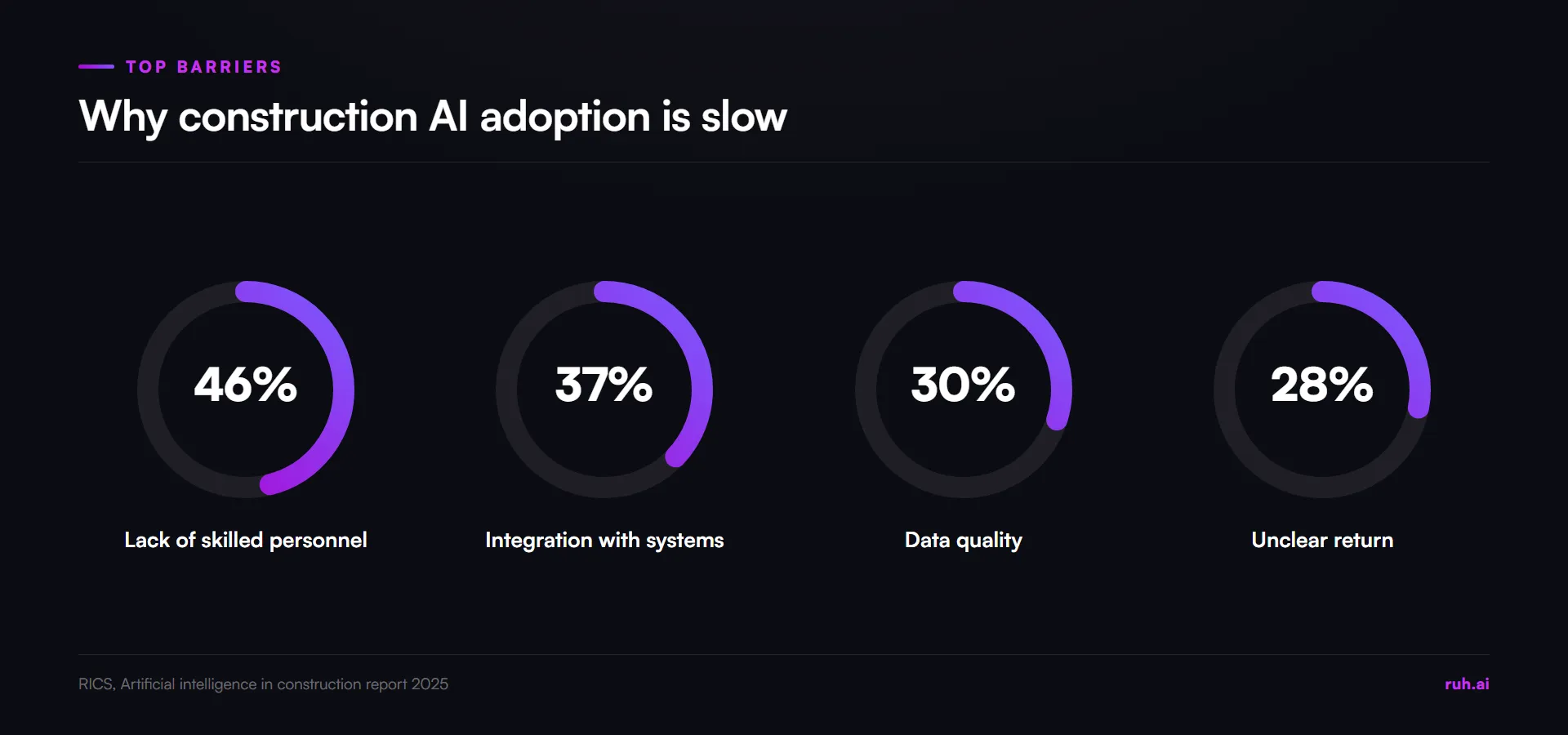
Each barrier points at the same fix. A small pilot needs one trained owner, not a team of data scientists. A workflow that runs on files you already have, like a PDF drawing set, avoids most of the integration work. A baseline from your own jobs answers the return question with your numbers instead of a vendor's.
How Far Along Is Construction AI Adoption?
Most construction firms have not moved past the pilot stage, so a contractor starting now is not late. The gap that matters is between running a pilot and using AI as a regular part of one process, and very few firms have crossed it.
The RICS 2025 report, built on more than 2,200 responses to its Q1 2025 Global Construction Monitor, breaks adoption into stages:
| Stage of AI adoption | Share of organisations | Source |
|---|---|---|
| No AI implementation | about 45% | RICS, AI in construction report 2025 |
| Early pilot phases | 34% | RICS, AI in construction report 2025 |
| Regular use in specific processes | just under 12% | RICS, AI in construction report 2025 |
| Use across multiple processes | 1.5% | RICS, AI in construction report 2025 |
| Fully embedded, organisation-wide | under 1% | RICS, AI in construction report 2025 |
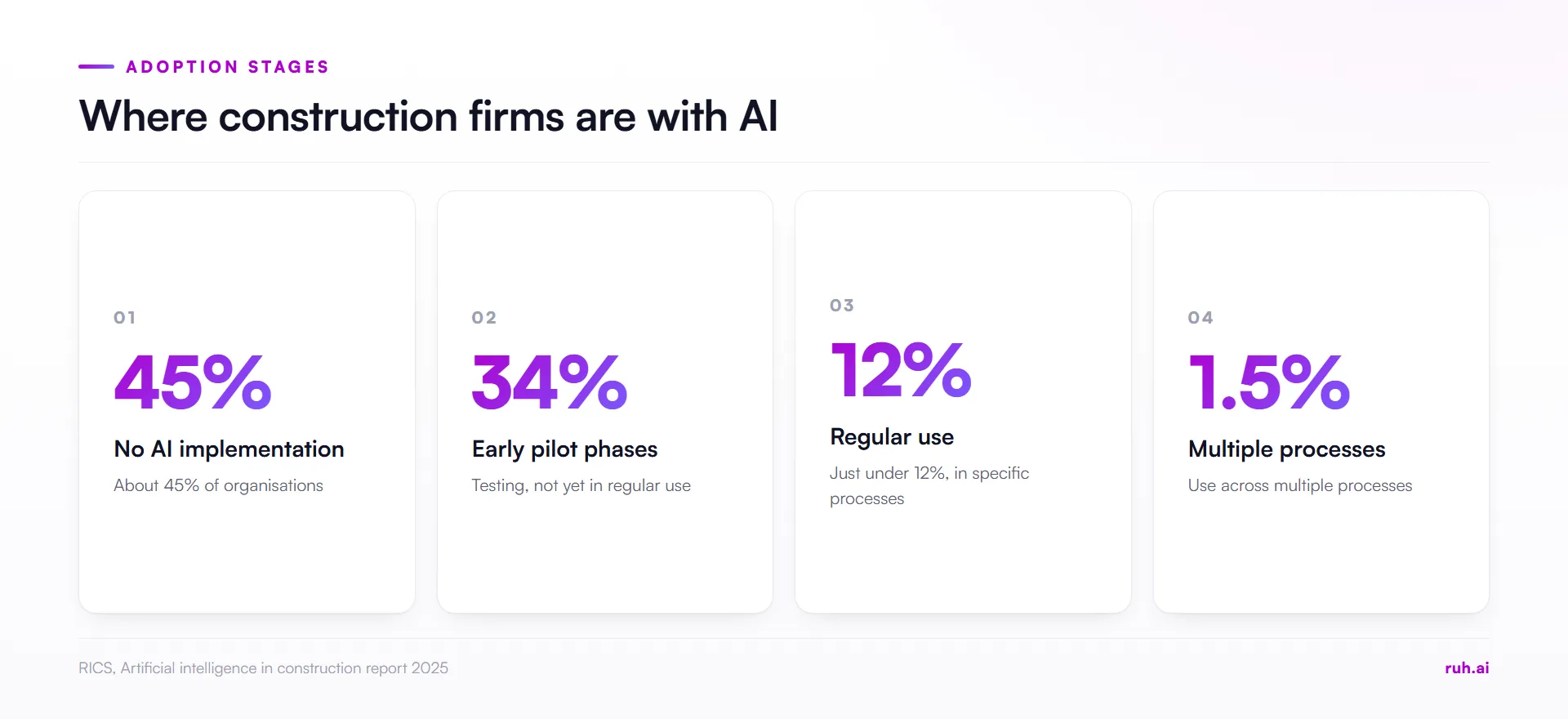
The same RICS 2025 report puts 78% of organisations at no implementation or pilot stage only, and under 5% with approved budgets and detailed AI roadmaps. In the RICS 2025 data, the step from 34% piloting to just under 12% in regular use is where most firms are stuck.
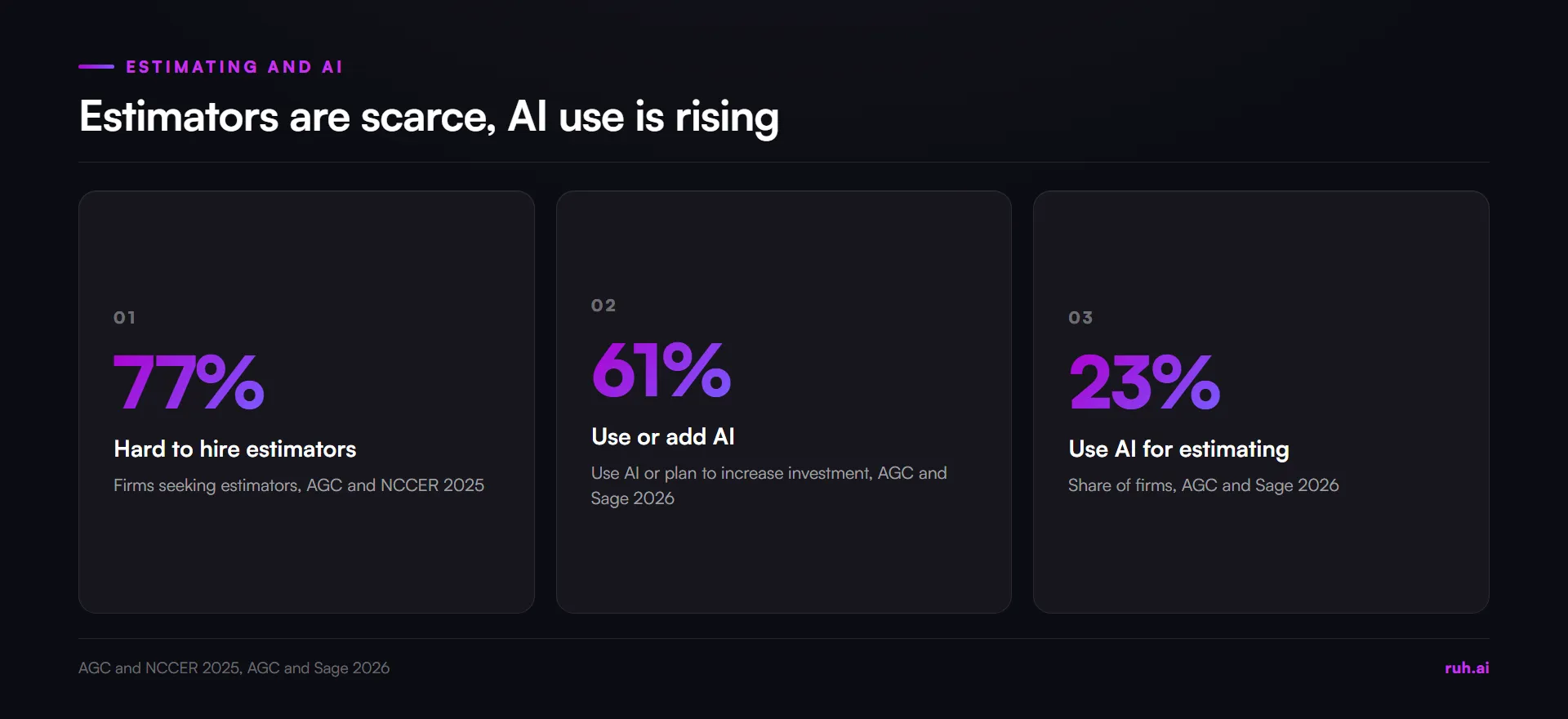
The RICS 2025 sample leans British: 48% of responses came from the UK and 10% from the Americas. For US contractors, the AGC and Sage 2026 Construction Hiring and Business Outlook found that 61% of firms use AI or plan to increase AI investment, up from 44% in the previous year's survey. That AGC and Sage 2026 report puts estimating use at 23%, behind office and administrative work at 45%.
Anil Sawhney, Head of Sustainability at RICS, put the gap plainly when the report came out in September 2025: "To achieve tangible progress, our sector must focus on high-quality data, compelling value propositions, organisational readiness and strong leadership to champion the responsible use of AI." Every item on that list is easier to deliver for one workflow than for a whole company.
Where Should a Contractor Start With AI?
A contractor should start with one workflow, not a platform. Pick a single task that repeats on every job, has a clear output you can check, and belongs to one person. Get that task into regular use on live work, then add the next one.
A platform rollout asks every department to change at once. Project managers, estimators, the field and accounting all get new screens in the same quarter, and nobody has time to learn any of them properly. One workflow asks one team to change one habit, with a result they can see inside a month.
The first workflow also teaches the company how to adopt AI at all. You learn who has to approve what, how to set a baseline, what to log and when to stop a pilot that isn't working. The second workflow goes faster because those answers already exist.
How Do You Pick the First AI Workflow?
Score each candidate workflow on four tests: it repeats on every job, it runs on documents you already have, its output can be checked against your own records, and one person clearly owns it. The workflow with the highest score goes first. A tie goes to the one closest to revenue.
Here is how we score five common candidates for a contractor that bids its own work. This is our judgement, scored 1 (weak) to 3 (strong). Change the scores to fit your company.
| Workflow | Repeats on every job | Runs on documents you have | Checkable against your records | One clear owner | Total (out of 12) |
|---|---|---|---|---|---|
| Quantity takeoff | 3 | 3 | 3 | 3 | 12 |
| Estimate prep from your rate book | 3 | 3 | 3 | 2 | 11 |
| Bid document review | 3 | 3 | 2 | 2 | 10 |
| Daily reports | 3 | 2 | 1 | 2 | 8 |
| Schedule updates | 2 | 2 | 2 | 1 | 7 |
Quantity takeoff wins on every test. Every bid needs one, the input is the drawing set you already receive, and your past takeoffs give you a ready answer key. Daily reports score lower because there is no record to check an AI summary against, only the superintendent's memory of the day. Schedule updates score lowest because ownership is spread across the PM, the superintendent and the subs.
Why Are Takeoff and Estimate Prep Strong First Candidates?
Takeoff and estimate prep are strong first candidates because they are bounded, checkable and done by the people who are hardest to hire. The task starts with a drawing set and ends with quantities and prices an estimator can verify line by line against jobs the company has already bid.
The staffing pressure is real. In the AGC and NCCER 2025 Workforce Survey Analysis, 77% of firms seeking estimating personnel had difficulty filling those roles. Every hour an estimator spends tracing walls on a PDF is an hour not spent on scope, risk and pricing judgement, which is the work only they can do.
Takeoff also has a clean definition of done. Either the quantity matches what the drawings show or it doesn't, and your estimator already knows what a good takeoff looks like. That makes the pilot easy to judge, which is the point of a first workflow. If your team wants a deeper look at how quantities get checked, our piece on takeoff accuracy covers the common miss points.
How Do You Keep a Person in the Loop?
You keep a person in the loop by putting an approval step at each stage of the workflow, so nothing moves forward until a named person has checked it. For takeoff, that means the estimator approves the scope before anything is measured, reviews the quantities before pricing, and signs off the priced estimate before it goes into a bid.
Approval steps do two jobs. They catch errors where they are cheapest to fix, before a wrong quantity is priced and carried into a proposal. They also build the trust that turns a pilot into a habit, because the estimator sees every output and can correct it.
Write the approval steps down before the pilot starts:
- Scope approval. The estimator confirms which sheets, trades and items are in scope before measuring starts.
- Quantity review. The estimator checks the measured quantities against the drawings and corrects what's wrong.
- Price review. The estimator reviews every priced line and changes any price that doesn't fit the job.
- Final sign-off. The person who signs bids today signs this one.
What Should You Check Before You Trust AI Output?
Before you trust AI output on a bid, check that every figure points back to its source, that missing inputs are flagged instead of guessed, that gaps show as visible lines instead of zeros, and that your estimator can edit anything. These four checks apply to any AI tool, whichever vendor you pick.
| Check | What good looks like | Red flag |
|---|---|---|
| Traceable figures | Each quantity points to the sheet it came from | Totals with no way to see where they came from |
| Missing inputs | A sheet with no scale gets no measurement, and says so | A measurement on an unscaled sheet |
| Visible gaps | An unpriced trade shows as a labelled line | A trade quietly priced at zero |
| Editable output | The estimator can change any quantity or price | Locked figures or a black-box total |
The second row matters most on real drawing sets. Detail sheets, scanned addenda and marked "not to scale" sheets show up on almost every bid, and a tool that guesses a scale will produce a confident wrong number. For more on keeping estimates traceable when there are no drawings at all, see our method for going from field notes to a construction estimate.
Worked Example: A 90-Day Takeoff Pilot Against Your Own Bids
A takeoff pilot proves itself against your own past bids first, then on live work. Here is one way to run it, with every number illustrative. Swap in your own bids, line counts and hours.
The company is a drywall and framing contractor that bids about 10 jobs a month. It has final takeoffs on file for every past bid.
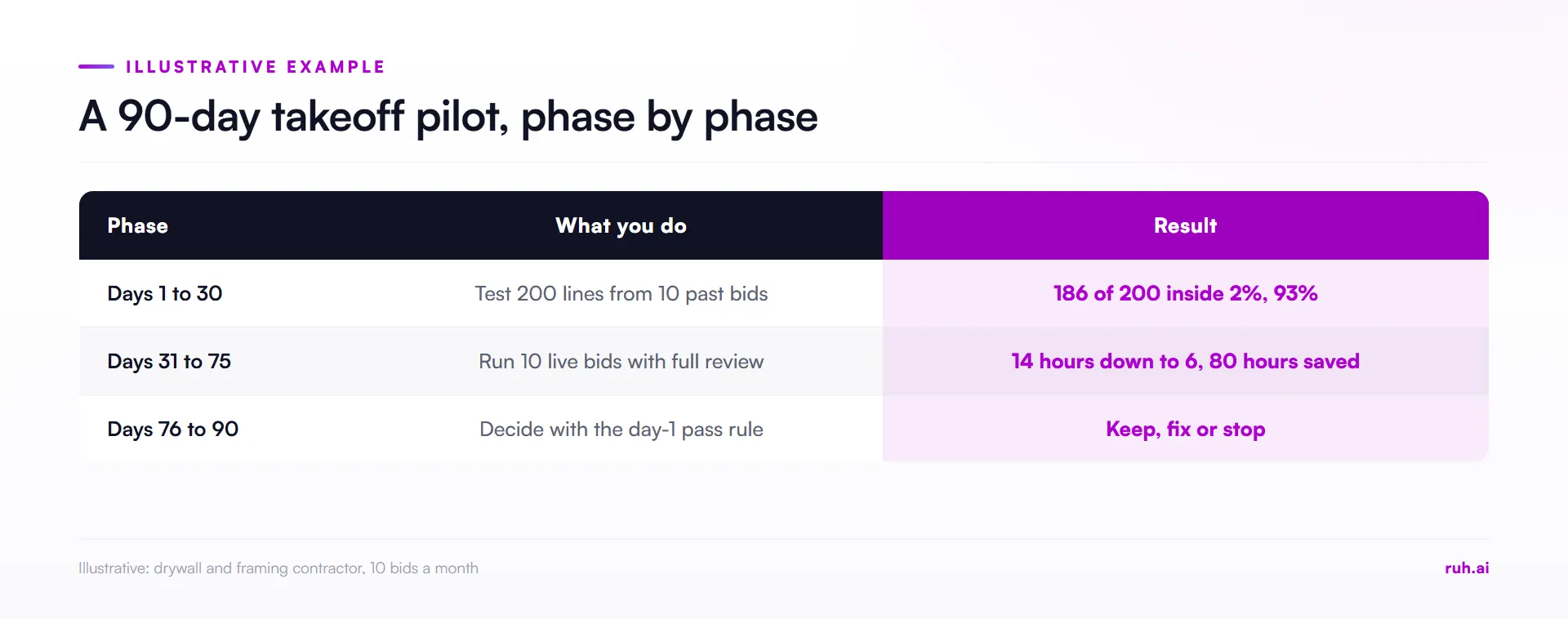
Days 1 to 30: test against 10 past bids. Pick 10 past bids with final takeoffs on file. Run each drawing set through the AI takeoff and compare the 20 largest line items on each bid with your own final numbers. Ten bids times 20 lines gives 200 lines. Set the tolerance before you look: in this illustration, a line passes if it lands within 2% of your own count, and the pilot passes if at least 90% of lines do.
Result in this illustration: 186 of 200 lines land inside 2%, which works out to 93%. The pilot passes. Then explain the 14 misses: 8 came from one detail sheet with no scale, 4 came from an addendum that was never loaded, and 2 were real measuring errors. Twelve of the 14 misses are process problems you can fix before live bids.
Days 31 to 75: run 10 live bids. The estimator approves scope, reviews every quantity and signs off as usual. Log two numbers per bid: hours spent and corrections made. In this illustration, manual takeoff averaged 14 hours per bid before the pilot and AI-assisted takeoff with full review averages 6 hours. That's 8 hours saved per bid, and 8 hours across 10 bids is 80 hours, two full 40-hour weeks of estimator time.
Days 76 to 90: decide. Keep it, fix it or stop it, using the pass rule you wrote on day 1. If the hours went into more bids, our guide to how to bid more construction jobs covers what to do with the capacity.
The arithmetic is simple on purpose. A pilot that needs a data analyst to judge it will not get judged.
The First-Workflow Pilot Plan
A first-workflow pilot plan fits on one page and answers nine questions before the pilot starts. Fill it in with the person who will own the workflow, not with the vendor. The right column shows the worked example above.
| Field | What to write | Example (illustrative) |
|---|---|---|
| Workflow | One task, named | Quantity takeoff, drywall and framing |
| Owner | One person whose work changes | Chief estimator |
| Baseline | Your numbers from past jobs | 14 hours per takeoff, final takeoffs from 10 past bids |
| Inputs | What the tool works from | PDF drawing sets and addenda as received |
| Review steps | Who approves what, in order | Scope, quantities, prices, final sign-off by the estimator |
| Tolerance and pass rule | Set before you look at results | 90% of the top 200 lines within 2% |
| Stop rule | When you end the pilot early | Pass rate under 80% after the first 5 past bids |
| What to log | Per bid | Hours, corrections, misses and their cause |
| Decision date | Fixed in advance | Day 90 |
Two fields get skipped most often: the stop rule and the decision date. Without them, a pilot that isn't working keeps running because nobody wants to call it, and a pilot that is working never gets a yes.
What Contractors Get Wrong About Implementing AI
Contractors get four things wrong about implementing AI more than any others. This is our view, from watching firms try to adopt AI in estimating, not a survey finding.
Buying a platform before choosing a workflow. A company-wide license feels like progress, but it spreads attention across a dozen features and gets none of them into daily use. Pick the workflow first, then find the tool that does it well.
Piloting on sample drawings. A clean demo set proves the tool can work on clean drawings. Your bids come with scanned addenda, unscaled details and missing sheets. Test on past bids you already know the answers to, then on live work.
Giving ownership to IT. IT can set up access, but the person whose work changes has to own the result. If the estimator doesn't own the pilot, the estimator won't trust its output, and the old process carries on beside it.
Measuring the vendor's numbers instead of your own. A vendor's case study tells you what happened at another company with other drawings. Your baseline, built from your own past takeoffs, is the only comparison that tells you whether to keep going.
How Do You Build a 12-Month AI Adoption Plan for Contractors?
A 12-month AI adoption plan for contractors adds one workflow per quarter, each starting only after the previous one is in regular use. Four quarters, four workflows at most, each with its own owner, baseline and pass rule.
| Quarter | Workflow | Starts when | Owner |
|---|---|---|---|
| Q1 | Quantity takeoff | Now | Chief estimator |
| Q2 | Estimate prep from your rate book | Takeoff passes its day-90 decision | Chief estimator |
| Q3 | Bid document review, scope and specs | Pricing in regular use | Precon lead |
| Q4 | Review, then the next workflow from the scoring table | Three workflows in regular use, or a pilot stopped and the cause fixed | Operations lead |
The order follows the scoring table and the flow of a bid. Each step uses the output of the one before: trusted quantities make pricing faster, and trusted pricing makes document review the next bottleneck. If a quarter's pilot fails its pass rule, fix the cause before moving on. A plan that keeps its calendar while its pilots fail is the stalled-pilot pattern again.
The Honest Assessment: What Still Falls Short
AI does not fix bad inputs. Poor scans, missing sheets and outdated rate books produce poor output faster. The RICS 2025 report found 30% of firms named data quality as a barrier, and a pilot will surface your data problems quickly, so plan time to fix them.
Skilled people are still the bottleneck. The tool removes measuring time, not judgement. You still need an estimator who can spot a wrong quantity, and the AGC and NCCER 2025 figure of 77% of firms struggling to hire estimators does not go away.
The first 90 days cost time. Running a pilot against past bids means doing extra work while the team is also bidding live jobs. Budget the owner's hours for it, or the pilot will be the first thing dropped in a busy month.
Not every workflow is ready. Tasks without a record to check against, like daily reports, are harder to judge, and a pilot you can't judge is a pilot you can't keep.
How Ruh AI Fits Into a First-Workflow Plan
Ruh starts at the top of the scoring table, with takeoff and estimating. Your estimator approves every scope line before Ruh measures it. Then the Takeoff Agent measures quantities from the drawing set, and when a sheet has no scale it withholds the figure instead of guessing.
The Estimating Agent prices those quantities from your own rate book and history. Your estimator can edit every quantity and price, and each stage is approved before the next one opens. Ruh works with your stack, built per customer. You can see how the Takeoff Agent works on a drawing set, or start with the free construction calculators if you want to check your own numbers first.
Frequently Asked Questions
Q: How do I start using AI in my construction company? A: Start with one workflow that repeats on every job, runs on documents you already have, and has one clear owner. Set a baseline from your own past jobs, write down the approval steps and a pass rule, and test against past work before running it on live bids.
Q: What is the best first AI use case for contractors? A: For contractors that bid their own work, quantity takeoff is usually the best first use case. It repeats on every bid, starts from the drawing set, and can be checked line by line against takeoffs you have already done.
Q: How long should a construction AI pilot run? A: Ninety days is enough for one workflow: about a month testing against past jobs, six weeks on live work, and two weeks to decide. Set the decision date before the pilot starts.
Q: Do I need an AI consultant to implement AI in construction? A: No, not for a first workflow. You need one owner from the team whose work changes, your own past jobs as a baseline, and a vendor willing to test on your drawings. Outside help is more useful later, when several workflows have to share data.
Q: Will AI replace estimators? A: No. AI takes on measuring and first-pass pricing, and the estimator still approves scope, reviews quantities, sets prices and signs the bid. The judgement about risk and price stays with people.
Q: What data do I need before implementing AI? A: For takeoff, you need drawing sets as you receive them and your final takeoffs from past bids. For estimate prep, you also need a current rate book. Clean, dated records make the baseline more reliable.
Put Your First AI Workflow Into Production
Pick the workflow, name the owner, write the pass rule, and test it against bids you already know. Ruh is built for estimators who want takeoff and pricing as that first workflow, with the estimator approving every line.