


Quick Answer
NetSuite construction integration is the work of connecting Oracle NetSuite to the takeoff, estimating and project tools a contractor already uses, so quantities, prices and budgets move between them without being retyped, with a person checking what crosses each handoff. Below are the research figures on what retyping costs, a map of the five handoffs where numbers get rebuilt, a comparison of the three ways to connect NetSuite, one revised drawing traced through four systems with the arithmetic shown, a checklist with vendor questions, and our view on what contractors get wrong.
What you'll find below:
- What field audits of real spreadsheets found, from Raymond Panko's research at the University of Hawaii
- A handoff map from drawing set to NetSuite job budget, with the retyping steps marked
- The three ways to connect NetSuite to estimating data, compared on effort and upkeep
- One revised partition layout traced through four systems, with a transposed number priced out
- A checklist for cutting manual rebuilds before your next bid
- Six questions to ask any vendor about NetSuite and ERP connections
Why Do NetSuite, Estimates and Excel Stop Agreeing?
NetSuite, the estimate and the spreadsheet stop agreeing because each one holds its own copy of the same number. The quantity starts in the takeoff, gets typed into the estimate, gets typed again into a bridge spreadsheet, and gets typed a third time into the job budget in NetSuite. When a revised drawing changes that quantity, every copy has to change, and someone has to remember all of them.
Nobody planned it this way. Estimating picked its tools for measuring and pricing, finance picked NetSuite for the books, and the spreadsheet in the middle started as a one-time fix that became the way every job moves to accounting. Now the estimator trusts the estimate, the controller trusts NetSuite, and nobody is looking at the same number.
The integration problem is common across the industry. In the RICS Artificial Intelligence in Construction report 2025, 37% of respondents named integration with existing systems as a barrier to adopting AI, second only to a lack of skilled people. That is why so many firms keep the spreadsheet.
What Does Rekeying Cost a Contractor?
Rekeying costs a contractor in errors that slip through and rework that follows, and the research on both is blunt. Most spreadsheets that have been audited contain mistakes, checking by eye catches few of them, and bad data shows up later as rework on site.
What the research says about retyping and disconnected systems:
| Finding | Figure | Source |
|---|---|---|
| Real spreadsheets found to contain errors in field audits | 86% | Raymond Panko, University of Hawaii, 2000 |
| Share of cells holding original errors in large audited spreadsheets | 1.1% to 2.5% | Raymond Panko, University of Hawaii, 2000 |
| Contractors who can integrate their own project system with the owner's | 14% | Dodge Data & Analytics and e-Builder, 2019 |
| Contractors who end up running two systems and entering data twice | about two-fifths | Dodge Data & Analytics and e-Builder, 2019 |
| Extra errors from visual checking compared with double entry | 2958% | Barchard and Pace, Computers in Human Behavior, 2011 |
| Avoidable rework caused by bad data, 2020 | 14%, about $88 billion | FMI and Autodesk, 2021 |
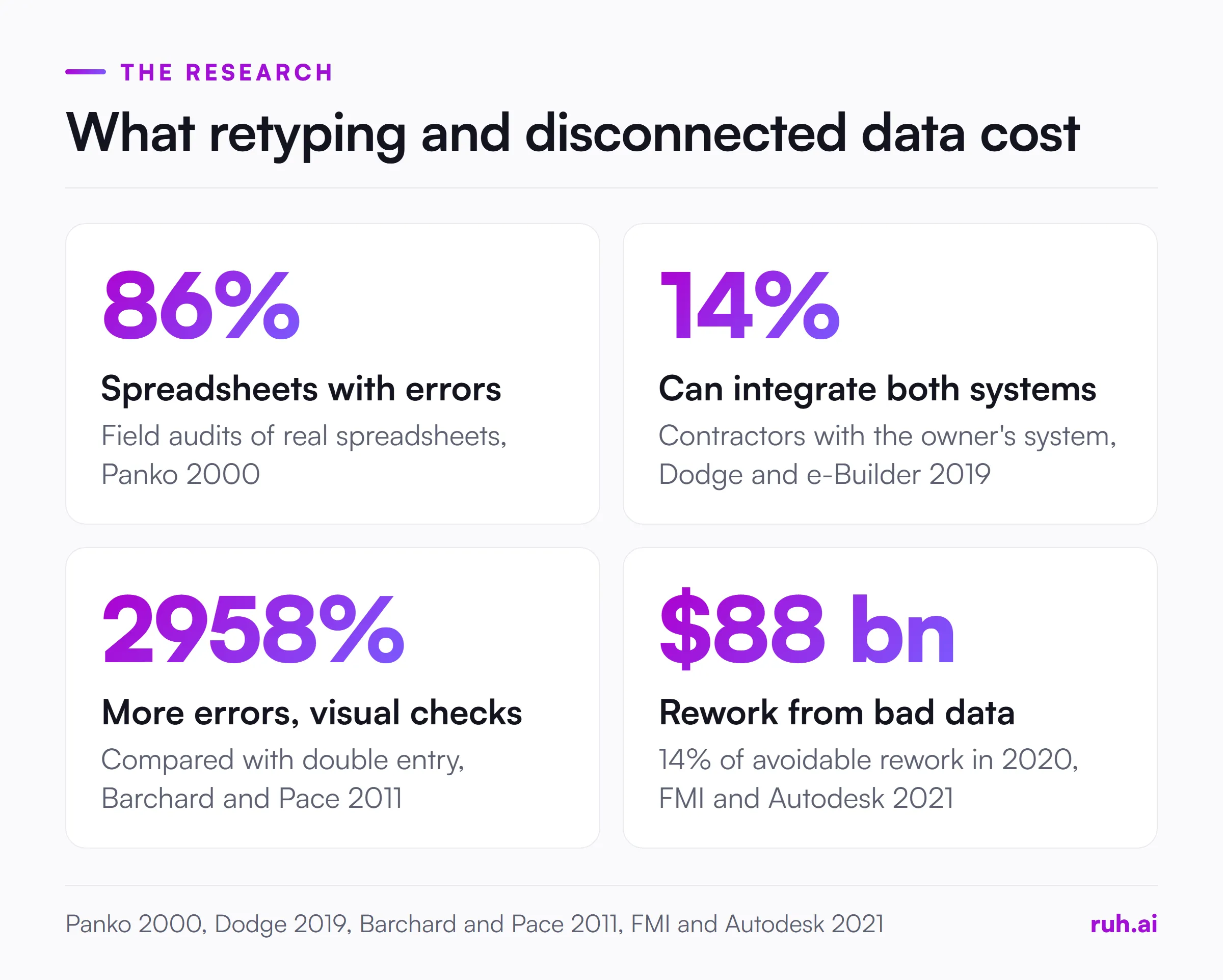
Spreadsheet errors are the norm, not the exception. Raymond Panko's 2000 review of field audits of real spreadsheets found errors in at least 86% of the spreadsheets audited, with 1.1% to 2.5% of cells holding original errors in large ones. A bridge sheet of quantities, rates and cost codes is exactly that kind of file.
Running two systems means typing everything twice. Dodge Data & Analytics and e-Builder's 2019 survey of 112 contractors, reported by Building Design + Construction, found only 14% of contractors could integrate their project system with the owner's. About two-fifths in that 2019 survey ended up using both, and the double data entry hurt productivity, accuracy, decision making and scheduling.
Reading it back does not catch it. Barchard and Pace's 2011 study in Computers in Human Behavior had 195 people enter 30 data sheets each, and visual checking produced 2958% more errors than double entry. Rereading a spreadsheet is not a control.
Bad data turns into rework. FMI and Autodesk's 2021 study of 3,900 construction professionals, reported by Construction Dive, estimated that bad data may have caused 14% of avoidable rework in 2020, about $88 billion. Our piece on turning field notes into a construction estimate shows how one transposed number travels into a priced bid.
Where Do the Gaps Open Between Takeoff, Estimate and NetSuite?
The gaps open at five handoffs between the drawing set and the reports finance reads, and three of them are pure retyping. At each retyping step, nothing is decided. Someone copies a number from one screen to another.
The handoff map, from drawings to reports:
| Handoff | What gets retyped | What breaks | The usual fix |
|---|---|---|---|
| Drawings to takeoff | Nothing retyped, quantities are measured | A revised sheet is missed, so the takeoff measures the old layout | A sheet log checked against every addendum |
| Takeoff to estimate | Every quantity, line by line | Quantities typed into the wrong line or the wrong unit | Export the takeoff into the estimate instead of typing |
| Estimate to bridge spreadsheet | Totals by cost code | Cost codes mapped by memory, rows sorted out of order | A fixed template with one row per agreed cost code |
| Spreadsheet to NetSuite job budget | Every budget line | Transposed figures, lines entered against the wrong job | A saved import mapping instead of manual entry |
| NetSuite to reports | Usually nothing, reports read NetSuite | Reports built from an old export disagree with the live numbers | Run reports from NetSuite, not from copies |
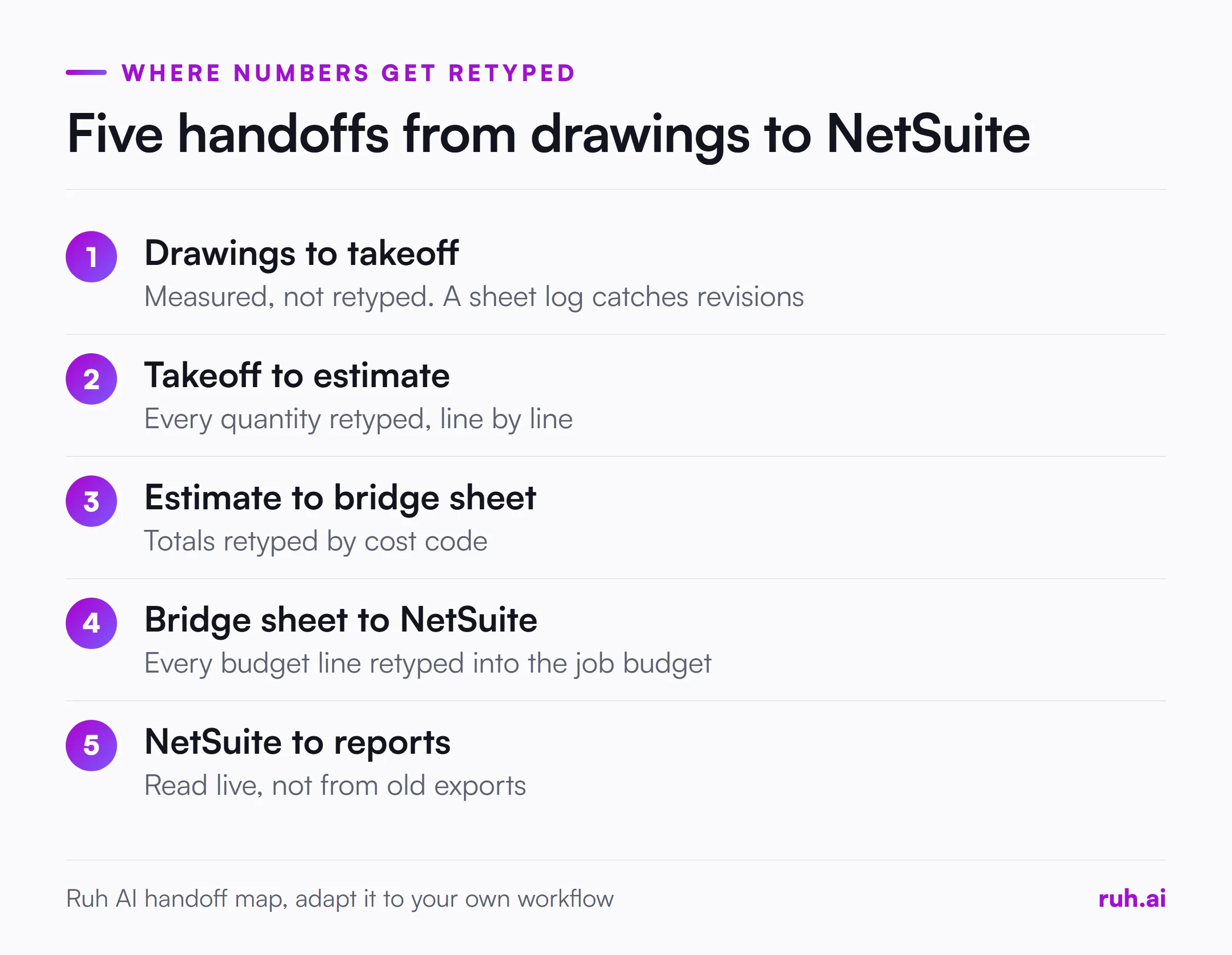
Drawings to takeoff is measurement, which needs an estimator's judgement. NetSuite to reports should read live data. The three handoffs in between only move numbers that already exist, and that is where the rebuilding happens.
The sheet log matters more than it looks. A missed revised sheet is not a retyping error, but it causes the same disagreement later. The takeoff accuracy piece covers how revised sheets and addenda slip past a measuring team.
What Should Move Into NetSuite, and What Should Stay Out?
NetSuite should receive the approved budget by cost code, not every line of the takeoff. The ERP needs to know what each job is expected to cost in each category, so finance can compare costs against it. It does not need the wall-by-wall quantities your estimator measured.
If the estimate rolls up to cost codes before anything leaves precon, the bridge spreadsheet carries a few dozen rows per job instead of hundreds. Fewer rows means fewer chances to transpose a figure, and a short file is one a person can actually check.
What usually belongs in NetSuite:
- the job or project the budget belongs to
- each cost code with its budgeted amount
- the labour, material and subcontract split if your cost reports use it
- the date the budget was approved and who approved it
What usually stays in the estimating tools:
- individual takeoff quantities and the sheets they came from
- crew assumptions, waste factors and productivity rates
- alternates and options that were not part of the awarded scope
If your team cannot agree on this split, stop there. Connecting systems before you know what crosses will only move the confusion faster.
How Can You Connect NetSuite to Estimating Data?
You can connect NetSuite to estimating data in three ways: the built-in CSV import, an integration platform, or a custom build on NetSuite's own interfaces. Each removes the manual entry step into NetSuite. They differ in how much they cost to set up, who keeps them running, and how often data needs to move.
The CSV Import Assistant is the place most contractors should start. Oracle's NetSuite help pages describe it at Setup > Import/Export > Import CSV Records, available to users with the Import CSV File permission, and it takes five steps: upload the file, choose import options, map files, map fields, then save the mapping and start the import. Oracle notes that you can run the job right away or save it to run later, and that the assistant checks each step and stops on errors.
Two details from Oracle's help pages matter for a budget import. The automatic mapping works best when your CSV column names match NetSuite's field names, so build your bridge template with those names from day one. And the CSV Import FAQ sets a limit of 25,000 records per file, far more than a budget by cost code will ever need.
An integration platform sits between your estimating tool and NetSuite and moves data on a schedule or when something changes. It suits firms that move data often across several tools. The cost is a subscription and an owner who updates the mapping whenever either side changes.
A custom build uses NetSuite's own interfaces. Oracle's overview of SuiteTalk REST web services says they let a program create, read, update and delete records, read record metadata and run queries, and that unlike RESTlets you do not need to write, deploy and run custom scripts. RESTlets give more control but need SuiteScript development. A custom build fits a firm with a developer, or a partner, and a workflow nobody else's connector handles.
Three ways to connect NetSuite to estimating data
| Method | How it works | Effort and upkeep | Fits when |
|---|---|---|---|
| CSV Import Assistant | A bridge template loaded with a saved mapping, up to 25,000 records per file | Low effort, someone runs the import per job | Budgets move once per job, after approval |
| Integration platform | Moves data on a schedule or when something changes | A subscription plus an owner who updates the mapping | Data moves often across several tools |
| Custom build | SuiteTalk REST web services, or RESTlets written in SuiteScript | Developer time, maintained through NetSuite updates | A workflow no connector covers |
Source: Oracle NetSuite help pages: CSV Import Assistant, SuiteTalk REST web services
Which Cost Codes and Fields Should Match Before You Connect Anything?
Before you connect anything, the estimate's cost codes and NetSuite's cost codes must be the same list, with the same names and the same roll-ups. If precon groups drywall under one code and finance splits it into framing, board and finish, no connection method can resolve that for you.
Start with three fields and agree them in writing:
- Job identifier. The job number precon uses has to be the one NetSuite uses, from the day the bid is awarded.
- Cost code. One list, owned by one person, with a rule for adding codes.
- Cost type. Labour, material, subcontract and equipment, split the same way on both sides.
Give the list one owner, usually the controller, with the chief estimator agreeing every change. Write it into the bridge template as fixed rows, so a missing code shows up as a blank row.
Worked Example: One Revised Drawing Through Four Systems
One revised partition layout shows where retyping turns into real money. The numbers below are illustrative, chosen to make the arithmetic easy to follow. Swap in a revision from your own last job.
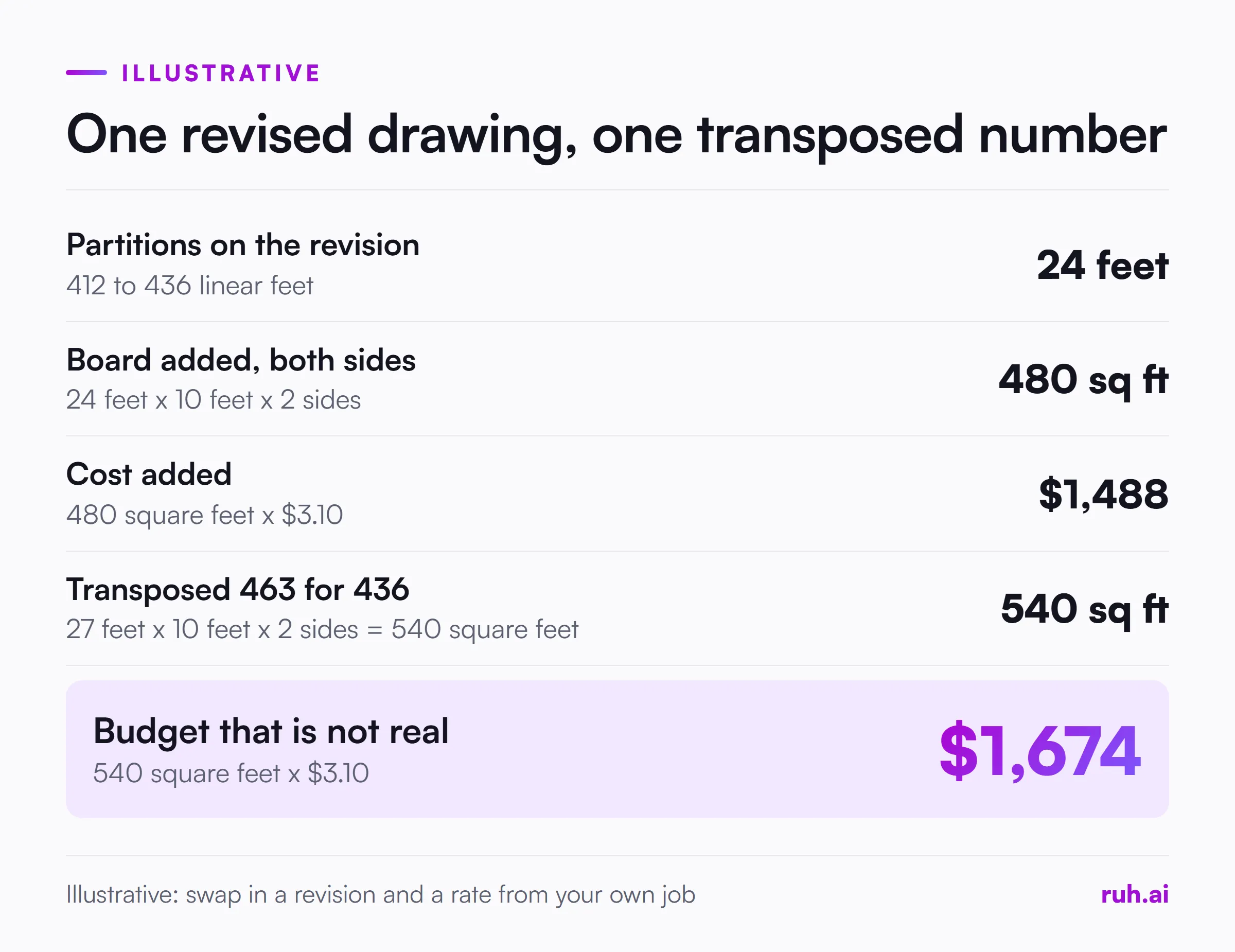
The change. A revised floor plan extends the interior partitions from 412 to 436 linear feet. Walls are 10 feet high with board on both sides. The company's installed rate for board is $3.10 per square foot, an illustrative figure from its own rate book.
The arithmetic.
- Added length: 436 minus 412 = 24 feet.
- Added board: 24 feet x 10 feet x 2 sides = 480 square feet.
- Added cost: 480 square feet x $3.10 = $1,488.
The retyping. In the disconnected setup, the new 436 is typed into the estimate, the bridge spreadsheet and the NetSuite job budget: three times by hand for one number.
The transposed figure. Suppose the person updating the bridge spreadsheet types 463 instead of 436. That adds 27 feet that do not exist: 27 feet x 10 feet x 2 sides = 540 square feet, and 540 x $3.10 = $1,674 of budget for board nobody will hang. The estimate is right, NetSuite is wrong, and the two will disagree until someone traces it back.
The connected version. Export the estimate's cost code totals straight into the bridge template, and the first retype is gone. Load that template into NetSuite with a saved CSV import mapping, and the second retype is gone. What is left is one check: board square feet in the estimate equals board square feet in NetSuite. One person checks one control total.
Run this with your own last revision: count how many times one changed number was typed by hand between the drawing and the job budget.
What Contractors Get Wrong About NetSuite Integration
Contractors connecting NetSuite to their estimating tools tend to make the same four mistakes, in our view. These are opinions from watching estimating and finance teams, not survey results.
1. Building another spreadsheet bridge. When the numbers disagree, the usual fix is a better spreadsheet: more tabs, a lookup, a macro. Each one adds a file to maintain and another copy of the same number, and Panko's 2000 audit findings apply to the new sheet as much as the old one. Remove a handoff instead of decorating it.
2. Syncing everything both ways on day one. Two-way sync doubles the rules you have to get right and makes every error harder to trace. Move the approved budget one way, estimate to NetSuite, until it works for every job.
3. Agreeing cost codes last. Teams buy a connector, start mapping, and only then find that precon and finance use different code lists. The cost code agreement is the integration. The software only carries it.
4. Removing the person along with the typing. Automating the retype is good. Removing the check is not. Barchard and Pace's 2011 finding says rereading is weak, so use a control total per handoff that a named person signs off.
What Should You Ask Any Vendor About NetSuite and ERP Connections?
Ask any vendor exactly which data moves, in which direction, and who checks it before it lands in NetSuite. A demo shows the happy path. These questions test a real job with a revised drawing.
- Which records does it create or update in NetSuite, and in which direction? You want a list, not "it syncs".
- What happens when a revised drawing changes a quantity after the budget is loaded? Update, new version, or wait for someone?
- Who maps our cost codes, and what happens when we add one? Ask who does it the second time.
- What does a person see and approve before data crosses? A review step, not a log you read afterwards.
- What breaks when NetSuite updates, and who fixes it?
- Is the connection built for our setup or shared across customers? Both can work, but you need to know which one you are buying.
Checklist: Cutting Manual Rebuilds Before Your Next Bid
Use this before your next awarded job moves from precon to finance. It works whichever connection method you choose.
- List every handoff from drawing set to NetSuite job budget for one recent job
- Mark each handoff where a number is typed by hand
- Agree one cost code list between the chief estimator and the controller
- Agree the job identifier precon and finance will both use
- Decide what moves into NetSuite (budget by cost code) and what stays in estimating
- Build one bridge template with NetSuite field names as column headers
- Set up and save a CSV import mapping for that template
- Pick one control total per handoff, such as total board square feet or total budget
- Name the person who checks each control total and signs off
- Keep a sheet log so revised drawings are caught before takeoff, not after
- Move data one way first, estimate to NetSuite, until it works on every job
- Review the setup after three jobs and remove any step nobody uses
If you are planning to bring AI into precon as well, start with one workflow at a time. Our guide on how to implement AI in construction uses the same idea: one bounded task, an owner and a baseline before anything grows.
The Honest Assessment: What Integration Won't Fix
Integration removes typing, not judgement. It will not catch a takeoff that measured the wrong revision, an outdated rate, or a cost code list two teams never agreed. It moves whatever you give it, right or wrong.
It also takes ownership. Someone has to run the saved import and update it when the cost code list changes, and a platform or custom build needs an owner for as long as you use it. Skip that, and the spreadsheet quietly comes back.
The figures above are not all recent either. Panko's audits are from 2000 and the Dodge Data & Analytics survey is from 2019. They show how spreadsheets and double entry behave, but your own count of retyped numbers is the figure that matters.
How Ruh Fits
Ruh works before the ERP, on takeoff and estimating, which is where the quantities in your NetSuite budget come from. Ruh's Takeoff Agent and Estimating Agent measure from the drawing set and price from your company's own rate book and history.
Your estimator approves every scope line before Ruh measures it, can edit every quantity and price, and approves each stage before the next opens. When a sheet has no scale, the Takeoff Agent withholds the figure instead of guessing. Ruh works with your stack, built per customer, so the hand-off into your other systems is set up around the tools you already run.
Frequently Asked Questions
Q: Can NetSuite import estimate data from Excel? A: Yes, through the CSV Import Assistant, after you save the Excel sheet as a CSV file. Oracle's help pages describe a five-step process at Setup > Import/Export > Import CSV Records, with a limit of 25,000 records per file, and the mapping can be saved and run again for the next job.
Q: What is the difference between NetSuite REST web services and RESTlets? A: REST web services are NetSuite's standard interface for creating, reading, updating and querying records, and they need no custom scripts. RESTlets are custom endpoints written in SuiteScript, which give more control but need a developer to write, deploy and maintain them.
Q: Do I need an integration platform to connect NetSuite to estimating software? A: Not to start. If budgets move once per job after approval, a bridge template and a saved CSV import mapping cover it. A platform earns its cost when data moves often across several tools.
Q: How do I stop retyping takeoff quantities into my estimate? A: Use a takeoff tool that exports quantities into your estimating tool, or one that measures and prices in the same place. Then keep one control total, such as square feet per trade, that a person checks.
Q: Does connecting systems remove the need to check numbers? A: No. It removes the typing, not the need to confirm the right revision was measured and the right rates were used. Use a control total per handoff that one named person signs off.
Q: What data should move from the estimate into NetSuite? A: The approved budget by cost code, tied to the job, with the cost type split your reports use and the approval date. Individual takeoff quantities, crew assumptions and unawarded alternates usually stay in the estimating tools.
See how estimating and precon teams use Ruh on the estimators and precon page, or browse the free construction tools for quick checks on your next bid.