Free construction template
Change Order Template
A change order is the signed agreement on a change in the work, and on any change to the contract sum and the contract time, between the owner, the contractor and, on AIA contracts, the architect. On this page: a free Excel change order request and log, a table of the three change documents, a worked example, and our view on keeping markups apart.
What is in the workbook
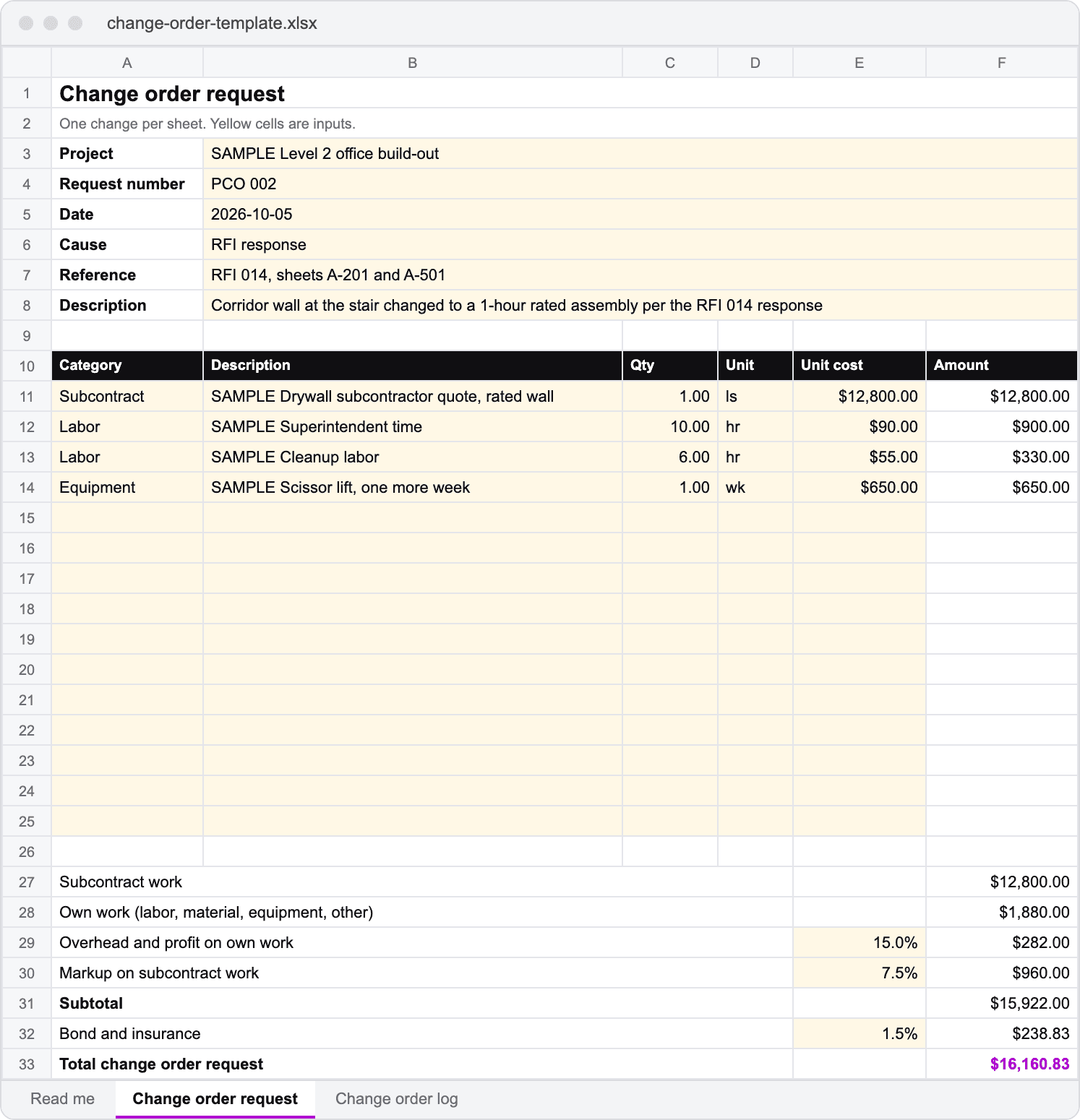
- Change order request: cause, reference, subcontract, labor, material and equipment lines priced as quantity times unit cost
- Overhead and profit on your own work, a separate markup on subcontract work, and bond and insurance on the subtotal
- Days requested and a response block for approved, approved as revised or rejected
- Change order log: status, approved amounts and days, days open, pending total and the revised contract sum
Pricing changes from the drawings? Get a takeoff on your own set, free.
Send one set of drawings from a job you are bidding and we take it off free, every quantity tied to the sheet it came from.
What a change order includes
A change order settles three things at once: the change in the work, the amount the contract sum moves and how many days the contract time moves. AIA A201-2017 defines it in section 7.2.1 as a written instrument signed by the owner, contractor and architect.
| Document | Who starts it | What it does |
|---|---|---|
| Change order request | Contractor | Prices a change and asks for time. Also called a potential change order or PCO |
| Change order | Owner, contractor and architect sign | Agrees the change, the price and the time. It changes the contract |
| Construction change directive | Owner and architect | Orders the work before price or time is agreed (A201-2017, section 7.3) |
The AIA's own change order form is G701. This template is our own layout, and the AIA G701 glossary entry explains what that form holds and when a contract requires it.
A worked change order example
In this illustrative example, an RFI response turns a corridor wall at the stair into a 1-hour rated assembly. The drywall subcontractor quotes $12,800. The general contractor adds its own superintendent time, cleanup and one more week of a scissor lift, then applies the contract's rates.
| Line | How it is figured | Amount |
|---|---|---|
| Subcontract | Drywall quote, rated wall | $12,800.00 |
| Own work | 10 hr x $90 + 6 hr x $55 + 1 wk x $650 | $1,880.00 |
| Overhead and profit | 15% of $1,880.00 | $282.00 |
| Markup on subcontract | 7.5% of $12,800.00 | $960.00 |
| Subtotal | $12,800 + $1,880 + $282 + $960 | $15,922.00 |
| Bond and insurance | 1.5% of $15,922.00 | $238.83 |
| Total requested | $15,922.00 + $238.83 | $16,160.83 |
| Days requested | Rated wall inspection and finish | 3 |
The rates are a sample. Use the ones your contract allows.
On the log, this request sits as pending. Two earlier changes were approved for $4,850 and $5,900, so the $2,450,000 contract stands at $2,460,750, with $16,160.83 pending and 1 day added.
Our view: keep the markups on separate lines
In our view, the two rates belong on separate lines. Contracts often allow one percentage on work you perform with your own forces and a lower one on subcontracted work, then bond and insurance on the total, and separate lines make each rate easy for the owner's reviewer to check against the contract.
For the arithmetic of a markup against a margin, use the markup and margin calculator or read the markup glossary entry.
How to track every change
- Open a request the day a change is known, even before it is priced. AIA A201-2017 section 15.1.3 gives 21 days to start a claim, and other contracts set their own deadlines.
- Attach the RFI, directive or sheets behind it, and the subcontractor quotes.
- Log the request with its number, amount and days.
- Update the status the day a response arrives, and record approved amounts as approved, not as requested.
- Carry approved changes into the next pay application so billing matches the revised contract sum.
Change order template FAQs
What is a change order in construction?+
A change order is a written agreement signed by the owner and the contractor, and under AIA contracts the architect, that changes the work and sets any change to the contract sum and the contract time.
Is this the AIA G701 change order form?+
No. This is Ruh's own template. If your contract requires the AIA G701 document, use the form licensed from AIA and keep this workbook as the pricing backup behind it.
What is the difference between a change order request and a change order?+
A change order request is the contractor's priced proposal for a change. It becomes a change order only when the owner signs it, often after the amount or days are revised.
What is a construction change directive?+
A construction change directive is a written order from the owner and architect to proceed with a change before the price or time is agreed. Under AIA A201-2017, section 7.3, the adjustment is settled afterward.
Who signs a change order?+
The owner and the contractor, and the architect on AIA contracts. Other contract forms name their own signers, so check yours before work starts.
Is the change order template free?+
Yes. It costs nothing. A work email unlocks the download, and you can copy the request sheet for every change on every job.
This template is a pricing and tracking tool, not legal advice or a contract form. Acceptance is by the change order your contract requires.