TL;DR:
Anthropic's key insight is that the real power of autonomous AI agents comes from the harness, not just the model. Instead of relying on one AI agent, they use a three-agent architecture: a Planner turns a simple prompt into a detailed product specification, a Generator builds the application in manageable chunks, and a skeptical Evaluator tests the live product using tools like Playwright and files precise bug reports. These agents coordinate through sprint contracts that define exactly what "done" means before coding starts. This structured plan-build-test-repair loop produces far more reliable applications than a solo agent, albeit at higher cost. The broader lesson is that harness design should evolve alongside model capabilities—removing unnecessary scaffolding as models improve while adding new layers that unlock more complex tasks. Ruh AI applies these same principles through multi-agent workflows, MCP-based tool access, step contracts, and enterprise-grade governance to help organizations deploy AI workers for real business operations.
Ready to see how it works:
- What Is Harness Design in AI Coding Agents?
- The 6 Layers of Harness Design: Plan, Build, Test, Reject, Repair, Improve
- Anthropic's Three-Role Agent Architecture: Planner, Generator, Evaluator
- The sprint contract: how the generator and evaluator agree on "done"
- The loop in action
- A worked example: building a retro game maker
- Why the harness made the difference
- What changes when the model gets stronger
- Key takeaways for engineers building agent harnesses
- How Ruh AI is putting harness design into practice
- Frequently asked questions
What Is Harness Design in AI Coding Agents?
A harness is the engineering layer that wraps a language model so it can complete work that no single context window can hold. It bundles the system prompts, tool integrations, file-based memory conventions, multi-agent orchestration, evaluation rubrics, and recovery logic that keep an autonomous agent on task across many sessions.
Anthropic's engineering team frames harness design this way: every component in a harness encodes an assumption about what the model cannot yet do on its own. That makes harness design less a fixed recipe and more an ongoing engineering practice. When a frontier model improves, some scaffolding becomes dead weight; other scaffolding suddenly becomes possible because the underlying capability is finally there.
For tasks like building a complete full-stack application from a single prompt, no model can one-shot the work. The agent has to plan, build incrementally, test what it built, reject mediocre output, repair bugs, and improve the result. The harness is what makes that loop reliable.
The 6 Layers of Harness Design: Plan, Build, Test, Reject, Repair, Improve
A well-designed harness for long-running coding agents has six layers, each addressing a specific failure mode that shows up when a model is left to run autonomously for hours.
Plan. The harness expands a vague user prompt into a concrete, ambitious product specification. Without this layer, the generator under-scopes, starts coding immediately, and ships a thin app. The plan layer commits the agent to a richer feature surface up front.
Build. The harness decomposes the spec into manageable chunks — features, sprints, or contracts — and instructs the agent to work on one chunk at a time. The single biggest failure mode for autonomous coding agents is trying to do too much at once and running out of context mid-implementation. Decomposition is the fix.
Test. The harness wires up real testing tools: a browser automation MCP (Puppeteer or Playwright) to click through the live UI, HTTP tooling to hit API endpoints, and database access to verify state. Without these, the agent will mark features "complete" based on unit tests passing while the actual product is broken.
Reject. The harness separates the agent doing the work from the agent judging it. Self-evaluation by the same model is unreliable — agents reliably skew positive when grading their own output. A standalone, skeptical evaluator agent gives the generator something concrete to push against.
Repair. When the evaluator files bugs, the harness routes them back to the generator with enough specificity to act on without re-investigation. The repair loop is what turns a one-shot generation into something that converges.
Improve. Across iterations, the harness lets the agent refine the current direction or pivot entirely. The generator is explicitly instructed to make a strategic choice after each evaluation: keep going if scores are trending up, or scrap the approach and try a different aesthetic or structure.
Anthropic's Three-Role Agent Architecture: Planner, Generator, Evaluator
Anthropic's full-stack coding harness assigns each of these responsibilities to a separate agent persona, each with its own prompt, its own tools, and its own job description. Inspiration came from Generative Adversarial Networks: by structurally separating the agent that produces output from the agent that grades it, you create a feedback loop the generator can iterate against.
The Planner Agent: From Prompt to Product Spec
The planner takes a 1-to-4 sentence prompt and expands it into a full product spec. It is prompted to be ambitious about scope and to stay focused on product context and high-level technical design — not granular implementation details.
The reasoning is deliberate: if the planner specifies low-level technical decisions upfront and gets one wrong, the error cascades through every downstream sprint. So the planner constrains what gets built and lets the generator figure out how. The planner is also asked to weave AI-powered features into the spec wherever sensible, so the resulting application is itself agentic rather than a static CRUD app.
For the prompt "Create a 2D retro game maker with features including a level editor, sprite editor, entity behaviors, and a playable test mode," the planner expanded the brief into a 16-feature spec spread across ten sprints — including a sprite animation system, behavior templates, sound and music, an AI-assisted level designer, and game export with shareable links.
The Generator Agent: Building Apps in Sprints
The generator is the builder. It reads the spec and works in sprints, picking up one feature at a time and implementing it on a React + Vite + FastAPI + SQLite or PostgreSQL stack. It uses git for version control, commits its progress, and is required to self-evaluate before handing the sprint off to the evaluator.
Working in sprints — rather than trying to build the full app in one continuous session — solves the most common failure mode for long-running coding agents: scope creep that fills the context window before any feature is finished.
The evaluator
The evaluator is the QA agent. It is given the Playwright MCP, which lets it drive the running application the way a human user would: clicking buttons, filling forms, watching state transitions, hitting API endpoints, and inspecting database rows. It does not grade screenshots — it interacts with the live app.
After exploring, the evaluator scores the sprint against a set of criteria adapted from earlier frontend-design experiments: product depth, functionality, visual design, and code quality. Each criterion has a hard threshold. If any one falls below it, the sprint fails and the generator gets specific, line-level feedback on what went wrong.
The evaluator's output is precise enough to act on directly. From a real run:
Contract criterion: Rectangle fill tool allows click-drag to fill a rectangular area with the selected tile. Evaluator finding: FAIL — Tool only places tiles at drag start/end points instead of filling the region. fillRectangle function exists but isn't triggered properly on mouseUp.
That level of specificity is not free. Out of the box, Claude is a poor QA agent — it will identify legitimate issues and then talk itself into approving the work anyway. Tuning the evaluator prompt to be reliably skeptical took multiple rounds of reading logs, finding cases where the evaluator's judgment diverged from a human's, and updating the prompt to close the gap.
The sprint contract: how the generator and evaluator agree on "done"
The sprint contract is the single most important coordination mechanism in the harness. It exists because the planner's spec is intentionally high-level — it describes user stories, not implementation details. The contract bridges the gap between a user story and a testable, verifiable build.
Here is how it works:
Before any code is written for a sprint, the generator drafts a proposal: here is what I will build for this feature, and here is how success will be verified.
The evaluator reads the proposal and pushes back where the scope is wrong, the test criteria are too loose, or the proposed implementation misses a requirement from the spec.
The two agents iterate on the contract until they agree.
Only then does the generator start writing code, building against the contract's testable behaviors.
When the sprint completes, the evaluator grades the implementation against the same contract it helped write.
Communication between the generator and evaluator is handled entirely through files. One agent writes a contract draft to disk; the other reads it and either edits the same file or writes a response file the original agent then reads. This file-based handoff keeps the conversation auditable and survives context resets.
A sprint contract for a level editor in the retro game maker example contained 27 individual criteria — the kind of granularity that lets the evaluator file bugs against specific user actions rather than vague "the editor doesn't feel right" complaints.
The loop in action
Once the spec is written and the first sprint contract is agreed, the harness runs a tight, repeatable loop. Each pass through the loop produces working, tested code or a detailed bug report — never silent failure.
- Spec — The planner produces the full product spec from a short prompt.
- Sprint contract — The generator and evaluator negotiate the contract for the next feature, including the specific behaviors that will be tested.
- Build — The generator implements the feature against the contract, commits to git, and self-evaluates before handing off.
- Run app — The evaluator boots the application using the init.sh script written during initialization.
- Browser test — The evaluator drives the UI through the Playwright MCP, exercising every behavior the contract calls out.
- API test — The evaluator hits backend endpoints and verifies responses match the contract.
- Database check — The evaluator inspects database state to confirm writes, reads, and migrations behave as specified.
- Bug report — Findings are written to a structured file with file paths, line numbers, and exact reproduction steps.
- Repair — The generator reads the bug report and fixes each issue, often re-running the contract's tests locally before submitting.
- Repeat — The next sprint begins, and the cycle restarts on the next feature in the spec.
This loop is what closes the gap between "the agent wrote a lot of code" and "the agent built a working application."
A worked example: building a retro game maker
The clearest illustration of why harness design matters comes from a head-to-head Anthropic ran on the same one-sentence prompt:
Create a 2D retro game maker with features including a level editor, sprite editor, entity behaviors, and a playable test mode.
The solo agent shipped a UI that looked plausible. Fixed-height panels wasted most of the viewport. The workflow was rigid — populating a level required sprites and entities, but nothing in the UI told the user that. Most damningly, the actual game was broken: entities appeared on screen, but nothing responded to keyboard input. Digging into the code revealed that the wiring between entity definitions and the game runtime had silently broken, with no surface indication of the failure.
The harness run was structurally different from the start. The planner expanded the one-sentence prompt into a 16-feature specification spread across ten sprints. It went well past the literal prompt: a sprite animation system, behavior templates, sound effects and music, an AI-assisted sprite generator, an AI-assisted level designer, and game export with shareable links. The planner had access to Anthropic's frontend design skill and used it to define a coherent visual language for the entire app.
For each of the ten sprints, the generator and evaluator negotiated a contract. The level-editor sprint alone had 27 contract criteria. The evaluator filed precise, actionable bugs against each one — including the rectangle-fill bug, the entity-deletion key-handler bug at LevelEditor.tsx:892, and a FastAPI route-ordering bug where PUT /frames/reorder was matching the literal string "reorder" as an integer frame ID.
The shipping app from the harness run was not perfect. Some clunkiness remained — the workflow still didn't explicitly guide users to build sprites before populating a level. The character sometimes overlapped platforms when jumping. But the central feature actually worked: the user could create sprites, build a level, and play the game. The solo run could not.
The harness also produced something the solo run did not even attempt: a built-in Claude integration that let the user generate sprites, levels, and behaviors through prompting. That feature was in the planner's spec because the planner was instructed to weave AI features in.
Why the harness made the difference
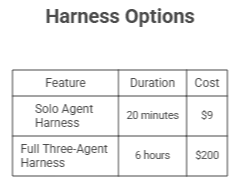
The 20× cost difference between solo and harness is real. So is the quality difference. Three structural choices in the harness explain the gap.
The planner committed the build to a feature surface the solo agent would never have attempted on its own. By expanding "retro game maker" into 16 features and ten sprints, the planner forced the generator to think about export, audio, AI integration, and animation — features that would otherwise be out-of-scope for a one-shot generation.
The sprint contract kept the implementation honest at every step. Without it, the generator would have built whatever interpretation of "level editor" felt convenient and declared victory. The contract pinned the generator to specific behaviors the evaluator could later test.
The evaluator's Playwright MCP access caught bugs that no static code review would have found. A code reviewer cannot tell you that the rectangle-fill tool fails to fire on mouseUp — but a Playwright agent click-dragging across the canvas finds out immediately.
What changes when the model gets stronger
When Anthropic's team moved the same harness from Opus 4.5 to Opus 4.6, parts of the scaffolding stopped earning their keep. Opus 4.5 exhibited "context anxiety" — a tendency to wrap up work prematurely as it neared what it believed was the context limit — which made context resets between sprints essential. Opus 4.6 largely eliminated that behavior, so context resets came out of the harness entirely. The team also dropped the sprint construct and moved the evaluator to a single end-of-run pass.
The result for a Web Audio API DAW prompt was a 4-hour, $124 run that produced a working browser-based digital audio workstation with a working arrangement view, mixer, transport, and AI agent that could autonomously set tempo and key, lay down a melody, build a drum track, adjust mixer levels, and add reverb through tool calls.
The principle Anthropic's team draws from this is general:
"Every component in a harness encodes an assumption about what the model can't do on its own, and those assumptions are worth stress testing — both because they may be incorrect, and because they can quickly go stale as models improve."
When a new model lands, re-examine the harness. Strip what is no longer load-bearing. Add new pieces that target capability you couldn't reach before.
Key takeaways for engineers building agent harnesses
Building autonomous agents that ship working applications is a different engineering discipline than building chatbots. The hard work happens in the harness, not the prompt. Decomposition turns ambitious work into tractable chunks. A separate evaluator with real tools turns subjective quality into something the generator can iterate against. And the sprint contract — the small, file-based agreement between two agents on what "done" means — is the coordination primitive that makes the rest of the system work.
When the next model lands, the right move is not to keep the harness as-is. The right move is to ask, for every component, whether it still earns its keep — and to use the slack the new model creates to push toward harder problems.
How Ruh AI is putting harness design into practice
The principles in this post — separating planning from building, using a skeptical evaluator, communicating through structured artifacts, and exposing real tools to agents — are exactly the pattern Ruh AI is operationalizing for enterprise teams.
Ruh AI is a digital workforce platform for building, deploying, and managing AI employees that handle real work across sales, marketing, support, HR, and engineering. The platform's design choices mirror Anthropic's harness research in a few concrete ways.
Multi-agent collaboration as a first-class primitive. Ruh AI's agent runtime is built around the same observation Anthropic's harness research starts from: a single agent with a single prompt can only go so far. Production work needs specialized roles — one agent that plans, one that executes, one that reviews — coordinating through shared state. Ruh AI's multi-agent collaboration builder exposes this directly, letting teams compose workflows where each agent has its own scoped tools and prompt, rather than overloading a single chatbot.
MCP-native tool access. The Anthropic harness gives the evaluator a Playwright MCP so it can drive a real browser. Ruh AI ships with native Model Context Protocol support across 40+ integrations out of the box, so any agent in a workflow can be granted scoped access to a CRM, a database, a ticketing system, or a custom internal tool. The same pattern that lets the Anthropic evaluator click through a live app lets a Ruh AI evaluator agent verify that a CRM record was actually updated — not just that the writing agent claimed it was.
Pre-built agents as productized harnesses. Ruh AI ships ready-to-deploy AI employees — an AI SDR, an AI blog writer, an AI support representative — that are themselves the output of careful harness engineering. The AI blog writer is not a one-shot prompt: it follows the same plan-build-test-repair loop, with research, drafting, fact-checking, and editing handled by separate roles inside the workflow.
Sprint-style step contracts in workflows. The sprint contract pattern — agents agreeing on what "done" looks like before any work starts — translates naturally into Ruh AI's no-code workflow builder, where each step has explicit input/output contracts and the next step doesn't run until verifiable conditions are met. This is the same coordination primitive Anthropic describes, exposed as a visual building block.
An enterprise wrapper around the harness. A research harness can run as a script. A production harness has to handle permissions, audit trails, integrations, and human-in-the-loop checkpoints. Ruh AI's developer platform — controlled access, versioning, observability, and agent monitoring — is the part that turns a clever multi-agent prompt chain into something an enterprise team can actually deploy.
The takeaway from Anthropic's research is that the space of useful harness designs keeps moving outward as models improve. The role of a platform like Ruh AI is to make that frontier accessible — so teams don't have to rebuild the planner-generator-evaluator scaffolding from scratch every time, and can instead focus on the parts of the harness that are unique to their business.
Frequently asked questions
What is a harness in the context of AI coding agents?
Ans: A harness is the engineering scaffold around a language model — prompts, tools, file conventions, multi-agent orchestration, and evaluation rubrics — that lets the model complete work spanning hours and many context windows. Without a harness, even a frontier coding model like Opus 4.5 will fail at building a production-quality app from a single high-level prompt.
What are the three agents in Anthropic's long-running coding harness?
Ans: The three agents are the planner, which expands a short prompt into a full product spec; the generator, which builds the app feature by feature in sprints; and the evaluator, which uses the Playwright MCP to drive the live application and grade each sprint against a contract.
What is a sprint contract?
Ans: A sprint contract is a written agreement between the generator and evaluator agents — produced before any code is written — that defines what "done" looks like for the next chunk of work. It includes the specific implementation details and the testable behaviors the evaluator will exercise to verify completion. A single sprint contract typically contains 20-30 individual criteria.
Why does Anthropic separate the generator and evaluator into different agents?
Ans: Self-evaluation is unreliable. Agents asked to grade their own work skew systematically positive — they will identify legitimate issues and then talk themselves into approving the work anyway. A separate, skeptical evaluator with its own prompt and tools produces the kind of concrete external feedback the generator can actually iterate against.
What is the Playwright MCP and why does the evaluator use it?
Ans: The Playwright MCP is a Model Context Protocol server that gives an agent browser-automation tools — clicking, typing, navigating, screenshotting, asserting on DOM state. The evaluator uses it to drive the running application the way a real user would, which catches bugs (broken event handlers, route-ordering issues, state desyncs) that no amount of static code review would surface.
How long does a full harness run take, and what does it cost?
Ans: In Anthropic's published examples, a full harness run on a complex full-stack application takes 4-6 hours and costs $124-$200 in token usage on Opus-class models. A solo agent on the same prompt takes around 20 minutes for $9, but produces a substantially less complete and often broken application.
When should I use a harness instead of a single agent?
Ans: Use a harness when the task is too large to fit in a single context window, when the output needs to be verifiable end-to-end (not just code-complete), or when the cost of the agent shipping silently broken work is high. For short, well-scoped, easily-verified tasks, the overhead of a multi-agent harness is not worth it.
How do I keep a harness from going stale as models improve?
Ans: Re-examine the harness with every model release. Remove components that the new model handles natively. Stress-test old assumptions about what the model cannot do. The space of useful harness designs does not shrink as models improve — it moves outward, opening up tasks that were previously out of reach.
How does Ruh AI's platform map to Anthropic's harness design pattern?
Ans: Ruh AI operationalizes the same principles for enterprise teams: multi-agent collaboration as a first-class primitive, native Model Context Protocol support across 40+ integrations, pre-built agents (AI SDR, AI blog writer, AI support rep) that are themselves productized harnesses, and a no-code workflow builder that exposes sprint-style step contracts as visual building blocks. Combined with permissions, audit trails, and observability, it turns the harness pattern into something teams can deploy in production without rebuilding the scaffolding from scratch.
Long-running agent harnesses depend on permissions, checkpoints, and oversight; Ruh AI provides a construction-oriented setting for considering how that scaffolding translates beyond general business automation.