
TL: DR / Summary
The way we work is changing — not slowly, not incrementally, but at a pace that is leaving whole categories of software obsolete within months. At the center of this shift is a new class of tool that does not advise, suggest, or draft for your review. It simply works.
Claude Cowork, launched by Anthropic in January 2026, is one of the most significant examples of this transition. It is not a chatbot. It is not a writing assistant. It is an autonomous AI agent that sits on your desktop, accesses your files, connects to your software stack, and delivers finished work — while you go do something else.
This blog covers everything: where Cowork came from, why it was built, what it actually does, which industries it is reshaping, where it genuinely helps, where it still falls short — and how forward-thinking AI companies like Ruh AI are already adapting it to build vertical-specific AI systems on top of the same agentic foundation.
Ready to see how it all works? Here’s a breakdown of the key elements:
- Why AI Chatbots Were Never Enough for Real Office Work
- Claude Cowork Origin Story: When, Why, and How Anthropic Built It
- What Is Claude Cowork? A Clear Definition for 2026
- How Claude Cowork Works: Architecture, VM Sandbox, and Sub-Agents
- Claude Cowork Features Explained: From File Access to Dispatch
- How Claude Cowork Is Disrupting the Tech Industry in 2026
- Claude Cowork Use Cases by Industry: Legal, Finance, HR, and More
- Claude Cowork Pros: Key Advantages for Knowledge Workers
- Claude Cowork Cons and Risks: Honest Limitations You Should Know
- Claude Cowork Safety and Control: What Anthropic Built In
- Claude Cowork vs Other AI Tools: Zapier, Copilot, Claude Code, and More
- How Ruh AI Is Adapting Claude Cowork for Vertical AI Deployment
- Who Should Use Claude Cowork in 2026?
- Claude Cowork Requirements and How to Get Started
- The Future of Knowledge Work: What Claude Cowork Signals for the Industry
- Frequently Asked Questions About Claude Cowork
Why AI Chatbots Were Never Enough for Real Office Work
Before examining what Claude Cowork is, it is worth understanding the gap it was built to fill — because the problem it solves is one that every office worker knows intimately.
For the past two years, AI tools have exploded in adoption. Millions of people use AI chatbots daily to help them draft emails, summarize documents, brainstorm ideas, and answer questions. This is genuinely useful. But there has always been a ceiling — an invisible wall between what the AI produces and what actually gets done.
Consider the typical workflow: you ask an AI to help you write a report. It gives you text. You copy it into Word. You format it yourself. You manually pull the data from your spreadsheet. You paste it in. You adjust the layout. You save it. You send it.
The AI did part of the work. You still did all the execution.
This is the gap that Anthropic identified: the last mile of knowledge work. The part where advice becomes action, where suggestions become files, where a plan becomes a deliverable sitting in someone's inbox. Traditional AI tools, no matter how capable, stop short of that last mile. They help you think; they do not help you finish.
For knowledge workers — analysts, legal professionals, operations teams, finance professionals, researchers, anyone whose job involves moving information from one form to another — this gap represents enormous amounts of time. Understanding how organizations should actually implement AI into their workflows is the first step to closing it — and tools like Claude Cowork are making that implementation genuinely accessible for the first time.
Claude Cowork was built to close that gap.
Claude Cowork Origin Story: When, Why, and How Anthropic Built It
Claude Code launched in early 2025 as a terminal-based coding agent for developers — and within six months grew to a billion-dollar run rate. What Anthropic noticed along the way was unexpected: non-developers had started adopting it too. Writers, analysts, and operations professionals were using a command-line tool to sort files, compile research, and draft reports from raw data, because an AI with direct file system access turned out to be useful for far more than code.
The demand was clear. The interface was wrong. Terminal literacy should not be a prerequisite for agentic productivity. So in late 2025, Anthropic built a solution — using Claude Code itself to do it, in two weeks — and wrapped the same autonomous architecture in a visual desktop experience anyone could use.
The result shipped as a research preview in January 2026, immediately rattling software markets as investors absorbed what a general-purpose desktop agent meant for the SaaS tools knowledge workers depend on. Enterprise connectors and private plugin marketplaces followed in February 2026. Dispatch (mobile-to-desktop task assignment) and Computer Use (screen navigation for apps without a connector, macOS only) arrived in March 2026.
According to Anthropic's own news release, Claude Code grew from a research preview to a billion-dollar product in six months — and Cowork is designed to follow the same trajectory for knowledge workers. As of now, Cowork remains a research preview — actively evolving, with features still rolling out gradually.
What Is Claude Cowork? A Clear Definition for 2026
Let us be precise about what Cowork is and what it is not, because the space is full of tools that make adjacent claims.
Claude Cowork is an agentic AI system for knowledge work. It runs on your desktop, connects to your local files and applications, and completes multi-step tasks from start to finish. You define the goal. Cowork figures out how to get there.
It is not a chatbot that gives you better answers. It is not a writing assistant that drafts text for you to paste elsewhere. It is not a workflow automation tool that requires you to build flowcharts and configure triggers.
The clearest way to understand it is through the contrast between two modes of AI interaction:
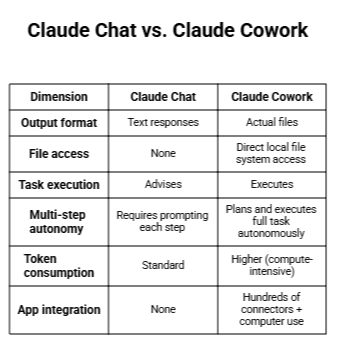
Conversational AI (Claude Chat): You ask. Claude responds. You take the response and do something with it. Claude stays in the chat window. It cannot access your files. It cannot produce a spreadsheet that lives on your hard drive. It cannot open your email client.
Agentic AI (Claude Cowork): You describe an outcome. Claude analyzes the request, plans an approach, executes the steps — reading files, creating documents, navigating applications, coordinating sub-tasks in parallel — and delivers the finished result directly to your file system. You come back to work that is done.
Anthropic's own product page puts it plainly: where Chat is a conversation, Cowork is a working session.
Where Claude Cowork Sits in the Anthropic Product Ecosystem
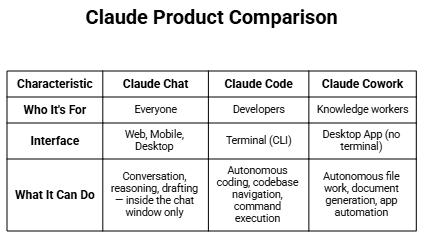
Cowork and Claude Code share the same underlying agentic architecture. The difference is interface and audience: Code is for developers comfortable in a terminal; Cowork is for anyone whose work happens in files, folders, and desktop apps.
How Claude Cowork Works: Architecture, VM Sandbox, and Sub-Agents
When you assign a task, Cowork follows a consistent loop: it analyzes the instruction, plans an approach, executes the work inside an isolated virtual machine (VM), synthesizes the outputs, and delivers a finished file to your file system. Progress is visible throughout — you can follow along, steer, or let it run. As Anthropic's official help documentation confirms, you maintain full visibility and can course-correct at any step.
For tool access, Cowork uses a strict hierarchy: connectors first (API-based integrations — fastest, most precise, run inside the VM), then direct browser control, and finally computer use (Claude navigating your actual screen via mouse and keyboard — the last resort, slower, outside the VM, and currently macOS only). When a connector exists for a task, it will always be faster and safer than screen navigation.
For large jobs, Cowork coordinates parallel sub-agents — each with independent context and full file access — that work simultaneously on separate parts of a task. Their outputs are synthesized by the main agent at the end, turning hour-long sequential jobs into minutes. The design of these self-coordinating agents draws on the same principles explored in research around self-improving AI agents and reinforcement learning from human feedback — a foundation that explains why sub-agent quality improves with usage patterns. The broader MLOps ecosystem that enables this kind of multi-agent architecture is covered in depth in Ruh AI's analysis of the AI and MLOps intelligence revolution.
Claude Cowork Features Explained: From File Access to Dispatch
Direct File System Access: Grant Cowork a folder and it can read, write, create, rename, sort, and deduplicate files based on content — not just filenames. Deletions always require explicit user approval via a permission prompt.
Professional Document Generation: Cowork produces actual files — Excel spreadsheets with working formulas, PowerPoint slides, formatted Word documents, and PDFs (including merging, splitting, and form-filling). Outputs can be further refined with Claude for Excel and Claude for PowerPoint.
Skills: Built-in Skills give Cowork native handling of .xlsx, .pptx, .docx, and .pdf formats. Custom Skills let you encode any repeatable multi-step process — invoice parsing, report formatting, batch renaming — and trigger it with a single command. Running a Skill costs significantly fewer tokens than reasoning through the same task from scratch. The craft of designing these reusable agent instructions connects directly to the discipline of prompt engineering for autonomous AI systems in production — something Ruh AI has written extensively about. Learn more from DataCamp's hands-on Cowork tutorial.
Connectors: Hundreds of Anthropic-reviewed integrations covering Google Drive, Gmail, Google Calendar, DocuSign, FactSet, Apollo, Clay, LegalZoom, WordPress, Harvey, and more. Enterprises can build private plugin marketplaces and connect to proprietary data sources.
Dispatch: Assigns tasks from your phone to your desktop via the Claude mobile app. Your desktop executes the work using all configured connectors and file access; results return to the same thread. Requires the desktop to be awake and the app to be open — it is a remote control, not cloud execution. Pro and Max subscribers only; one continuous thread. Read Anthropic's official Dispatch guide for full setup instructions.
Scheduled Tasks: Set Claude to run recurring tasks automatically — morning email summaries, weekly reports, Friday briefings — no manual trigger needed after initial setup.
Projects: Persistent workspaces with their own files, context, and memory. Claude retains how you work across sessions. Memory is fully user-controlled and can be viewed, edited, or deleted at any time.
How Claude Cowork Is Disrupting the Tech Industry in 2026
Cowork represents a structural shift in the software stack — not an improvement to one layer, but a challenge to the entire premise beneath it. For decades, the value of software was making information accessible. SaaS made it accessible anywhere. Cowork makes the work itself autonomous.
The implications are immediate and specific. Workflow automation tools like Zapier and Make require users to configure triggers and map fields for every scenario. Cowork replaces that configuration layer with a natural language description. Point SaaS solutions for expense management, document review, and research compilation face substitution pressure from a general-purpose agent that handles those functions on demand. Productivity suites like Microsoft 365 and Google Workspace are shifting from tools you operate to platforms an agent operates on your behalf.
The enterprise rollout in February 2026 made this concrete: private plugin marketplaces let organizations encode their own institutional workflows — not generic AI features, but Cowork configured to work the way a specific legal team, finance department, or engineering organization works. At Spotify, engineers used Claude to initiate large-scale code migrations in plain English, collapsing work that required significant coordination into a single description.
The most culturally significant change may be who now has access to this leverage. Claude Code put autonomous capability in developer hands. Cowork extends it to every knowledge worker with a paid subscription — legal analysts, finance professionals, operations teams, researchers — without requiring a single line of code or a terminal window. Wikipedia's entry on Claude notes it was released specifically to bring agentic capabilities to non-technical users after developers began using Claude Code far beyond its intended purpose.
Claude Cowork Use Cases by Industry: Legal, Finance, HR, and More
Legal and Compliance
Legal teams deal with enormous volumes of documents — contracts, filings, case notes, regulatory updates — that require systematic review but not always deep legal judgment at every step. Cowork can process batches of contracts to extract specific clauses, flag anomalies, and produce structured summaries. The Harvey connector provides specialized legal AI capabilities directly within the Cowork workflow.
Caveat: Cowork is explicitly not recommended for regulated workloads. Legal teams should use it for internal research and synthesis tasks, not for processes that require compliance audit trails or data residency guarantees.
Finance and Investment
Financial analysts working with large data sets — earnings reports, market data, vendor financials — can use Cowork to ingest raw files and produce structured analysis. The FactSet and MSCI connectors provide direct access to financial data within Cowork sessions. Prebuilt plugin templates for investment banking, equity research, private equity, and wealth management were launched in February 2026.
An analyst might assign Cowork to research four different companies simultaneously — each getting its own sub-agent — and return to a comparison report ready for review. For a deeper look at how AI employees are being deployed in financial services specifically, Ruh AI's coverage of AI employees in financial services provides a practical industry perspective on where autonomous AI is adding the most measurable value today.
Healthcare and Life Sciences
Healthcare organizations face some of the strictest data regulations of any sector, and Cowork should not be used for workflows involving patient data or HIPAA-covered records. That said, for internal research synthesis, protocol document organization, and administrative processing that does not touch regulated records, Cowork can reduce significant overhead. Ruh AI's analysis of AI employees augmenting human excellence in healthcare explores how the right balance between automation and human judgment plays out in this sector — a balance that applies directly to any Cowork deployment in a healthcare-adjacent context.
Operations and HR
Operations teams that manage high volumes of repetitive document processing — onboarding packets, vendor contracts, policy documents, expense reports — are natural Cowork users. The "inbox pattern" is particularly useful here: a dedicated folder for incoming documents, with Cowork running scheduled tasks to process everything in it at a set cadence. Understanding how to map customer journeys with AI helps operations leaders identify exactly which process touchpoints are the best targets for Cowork automation — and which still require human judgment.
HR teams can use prebuilt HR plugin templates to encode onboarding workflows, policy document review processes, and candidate screening logic.
Sales and Outreach
Sales teams running high-volume outreach workflows can use Cowork's connector ecosystem to pull CRM data, synthesize prospect research, and produce personalized outreach sequences. The Apollo and Clay connectors are particularly useful here, enabling Claude to enrich contact data and prepare research-backed outreach materials at scale. This connects directly to the broader question of whether AI-powered cold email is worth it in 2026 — a question Ruh AI examines in the context of where AI genuinely improves outreach quality versus where it creates noise.
Content and Communications
Marketing teams, communications professionals, and content creators who work with large volumes of draft material, research sources, and assets can use Cowork to compile research from multiple sources, reorganize draft structures, batch-process assets, and produce formatted deliverables. The WordPress connector enables direct publishing workflows. For marketing operations teams specifically, AI tools like Cowork are proving capable of eliminating the most time-consuming campaign bottlenecks in marketing operations — a shift Ruh AI has documented in detail.
Research and Analysis
Researchers working with large document sets — academic papers, market research, interview transcripts, survey data — can use sub-agent coordination to process dozens or hundreds of documents simultaneously. Themes, patterns, and summaries that would take days to compile manually can be produced in a single Cowork session.
Engineering (Non-Coding Tasks)
Engineers who work with Cowork for non-coding operational tasks — processing build reports, organizing documentation, compiling release notes from ticket data — can connect to tools like Honeycomb for observability data and n8n for workflow automation within Cowork sessions.
Claude Cowork Pros: Key Advantages for Knowledge Workers
Finished work, not responses. Cowork delivers actual files to your file system — formatted spreadsheets, Word documents, organized folders — not chat text to paste elsewhere.
Parallel sub-agents cut time dramatically. Processing 10 large documents sequentially might take 50 minutes; sub-agents handle them in parallel in roughly 5. For teams with weekly high-volume batches, this compounds fast.
No technical knowledge required. No terminal, no API keys, no flowcharts. Anyone who can describe a goal in plain English can use it. Anthropic confirmed the product was explicitly built because non-technical teams bypassed chat interfaces entirely for Claude Code.
Skills make recurring work efficient. Save any multi-step process as a Skill and trigger it with one command. Running predefined logic costs significantly fewer tokens than reasoning through the same task from scratch.
Extensive connector ecosystem. Hundreds of integrations covering major professional tools, with private plugin marketplaces for enterprise teams who want Cowork to reflect their specific workflows — not generic ones.
Persistent memory across sessions. Projects retain context, preferences, and instructions. Claude learns how you work and carries that forward — without you re-explaining every session.
Safety is built in. Permission-based access, deletion protection, VM isolation, per-app computer use permissions, and local history storage are core to the product, not add-ons. See Anthropic's safety documentation for the full breakdown.
Dispatch extends your working hours. Assign tasks from your phone on a commute or lunch break; your desktop executes; you return to finished work. MacStories tested this feature in its first week of release.
Claude Cowork Cons and Risks: Honest Limitations You Should Know
High token consumption. Cowork burns through your usage allocation significantly faster than standard chat. Multi-step planning, file operations, and sub-agent coordination are all compute-intensive. Heavy users will exhaust Pro plan limits quickly — the Max plan (5x at $100/mo, or 20x at $200/mo) is the practical tier for daily intensive use. Anthropic's official documentation recommends batching related work into single sessions and saving repeatable processes as Skills.
Computer use is early, slow, and macOS-only. Claude's screen navigation capability is explicitly described by Anthropic as "still early." It runs outside the VM sandbox (your actual desktop), is slower than connector-based integrations, requires a second attempt on complex tasks, and is currently unavailable on Windows. Do not use it with apps containing sensitive data.
Dispatch has real reliability gaps. Third-party testing by MacStories found roughly a 50% success rate on complex tasks. Simple operations (file search, summaries) work reliably; complex multi-app workflows are inconsistent. The desktop must stay awake and the app must remain open — this is a remote control, not cloud execution. Only one thread is supported at a time.
AI agents can fail in unexpected ways. Beyond Dispatch reliability, agentic systems in general can encounter design-level failure modes — including agents that misinterpret ambiguous instructions or behave unexpectedly when scope is unclear. Ruh AI's deep-dive on the fatal design flaws in AI agents that refuse or mishandle commands is essential reading for any team deploying Cowork at scale, particularly for understanding how to structure prompts and permissions to avoid these failure modes.
Not appropriate for regulated or sensitive workloads. Cowork activity does not appear in Audit Logs, Compliance API, or Data Exports. Organizations subject to HIPAA, SOX, or similar frameworks must not use Cowork for in-scope workflows. Anthropic is explicit about this.
Desktop app must stay open — no background execution. There is no cloud mode. If the computer sleeps or the app closes, the session ends. Truly hands-off, background automation is not possible in its current form.
Research preview — expect inconsistencies. Cowork is not a stable, mature product. Features roll out gradually, behavior can be inconsistent on complex tasks, and the product is actively changing. Teams requiring guaranteed reliability for critical workflows should wait for general availability.
Paid subscription required. Cowork is unavailable on the free tier. Pro ($20/month) is the entry point, though heavy usage effectively requires Max. Full pricing is available on Anthropic's Claude pricing page.
Model selection affects cost and quality.
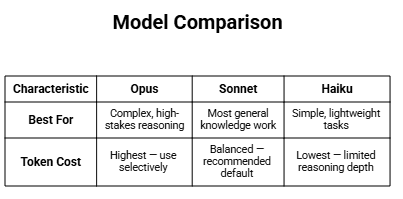
Claude Cowork Safety and Control: What Anthropic Built In
Safety in agentic AI is not the same as safety in conversational AI. When an AI can take actions — move files, send emails, interact with apps — the stakes of a mistake are different. Anthropic has published detailed safety guidance for Cowork, and several layers of control are built directly into the product:
Permission-Based Access: Cowork can only interact with folders and applications you explicitly authorize. Nothing is accessible by default.
Deletion Protection: Claude will not permanently delete any file without displaying a permission prompt and receiving your explicit approval. You must actively confirm deletions.
VM Isolation for File Operations: Most file and code work runs inside an isolated virtual machine, containing potential errors within a sandbox rather than on your live desktop.
Computer Use Permissions: When computer use is active, Claude asks for permission before accessing each new application. Sensitive apps (investment platforms, cryptocurrency) are blocked by default. You can add additional apps to a blocklist. Full details are in Anthropic's computer use safety guide.
Prompt Injection Monitoring: Cowork's system scans for signs of prompt injection when Claude interacts with your screen — a guard against malicious content in web pages or documents attempting to hijack Claude's actions.
Local History Storage: Conversation history is stored locally on your device, not on Anthropic's servers. This means Cowork activity is not subject to Anthropic's standard data retention policies — but it also means it is not captured in Audit Logs, Compliance API, or Data Exports, which is why regulated workloads are out of scope.
Transparency Throughout: Progress indicators, step counters, and reasoning displays let you follow what Claude is doing at every stage. You can jump in to steer, redirect, or stop the agent mid-task at any point.
Memory Control: All memory Cowork accumulates about your working patterns can be viewed, edited, and deleted at any time. You are never locked in to what the agent has learned.
Claude Cowork vs Other AI Tools: Zapier, Copilot, Claude Code, and More
Claude Cowork vs. Claude Chat
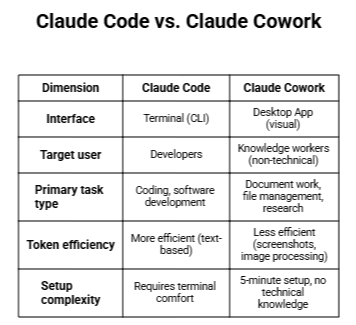
Claude Cowork vs. Claude Code
Claude Cowork vs. Zapier and Make
Traditional workflow automation tools like Zapier and Make require you to configure flows: define triggers, map fields, connect services step by step. If something falls outside the configured flow, it does not work. Cowork accepts natural language descriptions of goals and determines the steps itself. It also works with local files — something API-to-API automation tools fundamentally cannot do.
Claude Cowork vs. Microsoft Copilot
Microsoft Copilot is deeply integrated into Microsoft 365 but largely confined to it. Cowork works across your entire software stack — any app with a connector, and any app accessible via computer use. Cowork also has direct local file system access, which Copilot does not. However, for organizations already deeply committed to the Microsoft ecosystem, Copilot's native integration may outweigh Cowork's breadth.
Claude Cowork vs. OpenClaw (Open-Source)
OpenClaw is an open-source AI agent that went viral in early 2026. It is powerful but requires significant technical setup: Node.js, WebSocket configuration, and extensive customization. Cowork's Dispatch is Anthropic's answer to the same use case — accessible in 5 minutes with no technical knowledge. The trade-off: OpenClaw supports Linux and is more customizable; Cowork's computer use is macOS-only and more locked down, but significantly safer and easier to deploy.
How Ruh AI Is Adapting Claude Cowork for Vertical AI Deployment
One of the most telling indicators of a platform's potential is how forward-thinking companies build on top of it. Ruh AI is doing exactly that — taking the agentic foundation that Cowork represents and adapting it for vertical-specific, production-grade AI deployment across sales, marketing, finance, and healthcare.
The Ruh AI Approach: From General Agent to Specialized AI Employee
Where Claude Cowork is a horizontal platform — capable across any knowledge work task — Ruh AI focuses on building purpose-built AI employees that combine agentic capability with deep domain context. Rather than deploying a general desktop agent and hoping it fits a specific workflow, Ruh AI encodes the institutional knowledge, role context, and operational constraints directly into the agent's behavior from the start.
This mirrors the logic behind Cowork's own Skills and private plugin marketplace system — but taken further, into fully productized AI agents designed for specific business functions.
Applying Claude Cowork's Agentic Architecture Across Sectors
Ruh AI's work spans the same sectors where Claude Cowork is most impactful:
Financial Services: Ruh AI's research on AI employees in financial services examines how autonomous agents are being deployed for data processing, client reporting, and regulatory document management — tasks that map directly to Cowork's file system and connector capabilities, but require financial-domain context to do reliably.
Healthcare: The AI augmentation model in healthcare that Ruh AI documents is grounded in the same principle Anthropic builds into Cowork: consequential decisions remain with the human; the agent handles the assembly work. This human-in-the-loop architecture is the right model for healthcare AI, and Ruh AI has mapped out how it plays out in practice.
Marketing Operations: Ruh AI's analysis of how AI eliminates campaign bottlenecks in marketing operations aligns with exactly the kinds of workflows Cowork handles best — multi-source research compilation, asset processing, and structured deliverable generation at the cadence marketing teams require.
Customer Experience: The framework Ruh AI applies to customer journey mapping with AI provides a blueprint for where in a customer-facing workflow an agent like Cowork should be deployed — and where human touchpoints must be preserved.
Why Ruh AI's Research Matters for Claude Cowork Users
For teams implementing Claude Cowork, Ruh AI's body of work provides something Anthropic's own documentation does not: real-world deployment context for specific industries and functions. The Ruh AI blog covers practical AI implementation challenges — from prompt engineering for production agent systems to how organizations should structure their AI implementation strategy — that are directly applicable to getting Claude Cowork to work reliably in an enterprise context.
If you are building agentic workflows on top of Cowork or exploring how AI employees can be deployed across your organization, reaching out to Ruh AI is a logical next step — they are working at the intersection of this infrastructure and the specific business outcomes it is being deployed to deliver.
Who Should Use Claude Cowork in 2026?
Cowork is best suited for:
Knowledge workers with high document volume. Analysts, researchers, legal professionals, finance teams, operations teams — anyone who regularly processes large batches of documents, reports, or data files and whose work is below their cognitive ceiling but above what can be scripted.
Teams who need consistent, repeatable output formats. Organizations that produce the same types of documents regularly — weekly reports, monthly analyses, client briefings — can use Skills to encode those formats once and reproduce them consistently.
Professionals who work across many apps. If your day involves pulling information from Gmail, a spreadsheet, a web source, and a PDF and assembling it into a document, Cowork's connector ecosystem and file system access can collapse that workflow into a single task.
Enterprise teams who want to encode institutional knowledge. The private plugin marketplace capability lets organizations build Cowork plugins that reflect their specific processes, not generic ones. For a structured approach to doing this well, Ruh AI's complete AI implementation guide for organizations is the most thorough framework available.
Cowork is not suited for:
- Users who need it for regulated or compliance-sensitive workloads
- Teams requiring guaranteed reliability right now (research preview caveats apply)
- Workflows that involve sensitive personal, financial, or healthcare data via computer use
- Free-tier Claude users (Cowork requires a paid subscription)
- Developers who would be equally served by Claude Code with better token efficiency
Claude Cowork Requirements and How to Get Started
Requirements
- Claude Desktop app installed on macOS or Windows
- Paid Claude subscription: Pro ($20/month), Max ($100/month or $200/month), Team, or Enterprise — see Claude pricing
- Active internet connection throughout every session
- For Dispatch: both Claude Desktop (macOS or Windows) and the Claude mobile app (iOS or Android), paired via QR code — see the Dispatch setup guide
- For computer use: macOS only; must be enabled in Desktop app settings — see Claude's computer use documentation
Getting Started
Download and install the Claude Desktop app
Sign in with your paid Claude account
Switch to the Cowork tab in the mode selector (alongside Chat and Code)
Grant access to the folders you want Claude to work with
Browse and connect the connectors relevant to your work in Settings > Connectors
Describe your first task and review Claude's approach before letting it run
The Claude Desktop app must remain open while Claude is working. If you close the app, the session ends. For a full guided walkthrough, DataCamp's Cowork tutorial is one of the most detailed third-party guides available. For enterprise deployment strategy, the Ruh AI implementation guide covers how to structure rollout across teams and functions.
The Future of Knowledge Work: What Claude Cowork Signals for the Industry
It is tempting to describe Claude Cowork as simply a better productivity tool. But something more fundamental is happening.
For most of computing history, the implicit assumption has been that software amplifies human effort — you still do the work, but faster and with better tools. Cowork challenges that assumption. For a growing category of knowledge work, the question is shifting from "how do I do this more efficiently?" to "do I need to do this at all, or can I describe the outcome I want?"
That is a different kind of leverage. And it is arriving not gradually, but at the pace of monthly software updates. The complete timeline of everything Anthropic shipped in early 2026 shows just how rapidly Cowork has evolved since its January launch — from basic file access to computer use, Dispatch, scheduled tasks, and private enterprise marketplaces, all within 10 weeks.
The industries most exposed to this shift — legal research, financial analysis, content production, operations management, HR administration — are also some of the largest employers of knowledge workers globally. The transition will not be seamless. It will create displacement in some roles and expand capacity in others. Anthropic's own economist noted during the February 2026 enterprise launch that the company was not yet seeing evidence of widespread labor market displacement — but also acknowledged that the technology is early.
What is clear is that the floor for what an individual knowledge worker can produce, without additional headcount or specialist tools, has risen substantially. A team of five that previously needed ten to handle a high-volume document workload can now handle more with the same headcount. That arithmetic compounds.
For individual workers, the productive response is not to ignore Cowork but to understand it — its capabilities, its limitations, and where it genuinely helps versus where it still falls short. The workers who will be most valuable in the next phase are not those who resist the tools but those who know how to direct them. Companies like Ruh AI are showing what it looks like when that direction is applied with genuine domain expertise — building AI employees that do not just automate tasks, but carry institutional knowledge into every execution.
If your organization is ready to move from experimenting with Claude Cowork to deploying AI agents that fit your specific workflows, Ruh AI's team works directly with companies navigating exactly that transition.
Final Thoughts
Claude Cowork is not the end state of AI in the workplace. It is a research preview with real limitations, inconsistent reliability on complex tasks, and a platform restriction on its most ambitious feature. It is early.
But it is also the most concrete example so far of what happens when agentic AI escapes the chat window and enters the file system. The tasks it handles best — high-effort, repeatable, below-ceiling knowledge work — represent an enormous slice of how professionals spend their time. The fact that those tasks are now delegatable, not just advisable, is a genuine shift.
The organizations and individuals who engage with that shift seriously — learning where Cowork is reliable, where it needs oversight, and how to build workflows around its capabilities and around its limitations — will be better positioned for whatever comes next in this space.
Companies like Ruh AI are leading the way in translating that shift into deployable, industry-specific AI systems. Whether you are looking to implement Claude Cowork internally or build vertical AI agents on top of the same agentic foundation, the Ruh AI team is worth talking to.
And given the pace of development so far, whatever comes next will arrive sooner than most people expect.
Frequently Asked Questions About Claude Cowork
When did Claude Cowork launch?
Ans: Claude Cowork launched as a research preview on January 12, 2026. Enterprise expansion with connectors and private plugin marketplaces came in February 2026. Dispatch and computer use were added in March 2026.
Does Claude Cowork work on Windows?
Ans: Yes, the core Cowork experience (file work, connectors, scheduled tasks) works on both macOS and Windows. However, the computer use capability (Claude navigating your screen) is currently macOS only. Windows support for computer use is in development.
Does Dispatch work if my computer is off?
Ans: No. Dispatch requires your desktop to be awake and the Claude Desktop app to be running. It is a remote control for a local session, not cloud execution. If the computer sleeps or the app closes, the session ends.
Is Claude Cowork safe for sensitive data?
Ans: Anthropic explicitly advises against using Cowork for regulated workloads. Cowork activity is not captured in Audit Logs, Compliance API, or Data Exports. Computer use should not be used with apps containing sensitive healthcare, financial, or government data. For general, non-regulated knowledge work, the safety model (VM isolation, permission-based access, deletion protection) is robust.
How much does Claude Cowork cost?
Ans: Cowork is included in paid Claude plans. Pro is $20/month, Max is $100/month (5x usage limits vs. Pro) or $200/month (20x usage limits vs. Pro). Team and Enterprise plans also include Cowork. Full details are on Claude's pricing page. There is no free-tier access.
How does Cowork compare to using Claude Code?
Ans: Claude Code is for developers working in a terminal — it is more token-efficient and better suited for coding tasks. Cowork uses the same underlying agentic architecture but through a visual desktop interface designed for knowledge workers who do not work in a terminal. For non-coding knowledge work, Cowork is the right tool; for software development, Claude Code is.
Can I use Cowork for legal or compliance work?
Ans: For general research and synthesis tasks, yes. For regulated workloads — those subject to HIPAA, SOX, financial compliance frameworks, or that require audit trails — Anthropic advises against it. Cowork does not appear in Audit Logs or Compliance APIs.
What is the difference between a Skill and a connector?
Ans: A connector links Claude to an external service or app via API (e.g., Gmail, Google Drive, DocuSign). A Skill is a saved, reusable workflow or file-handling capability within Cowork — either a built-in format handler (for xlsx, pptx, docx, pdf) or a custom process you encode once and trigger repeatedly. DataCamp's tutorial covers both in practical detail.
How is Ruh AI using Claude Cowork's agentic architecture?
Ans: Their work focuses on taking the general-purpose delegation model Cowork demonstrates and applying it with domain-specific context to sales, finance, healthcare, and marketing. Their blog covers practical AI deployment across all of these areas.