TL: DR / Summary
Without memory, AI agents are like amnesiacs, starting fresh with every interaction and unable to learn or maintain context. In this guide, we will discover the three essential memory systems that enable true intelligence: Short-Term Memory for immediate conversation flow, Long-Term Memory (including episodic, semantic, and procedural types) for learning and personalization across sessions, and Working Memory for real-time processing and task execution. Together, these systems transform basic AI from a reactive tool into an adaptive, intelligent assistant capable of complex reasoning and continuous improvement
Ready to see how it all works? Here’s a breakdown of the key elements:
- What Is AI Agent Memory? (The Simple Explanation)
- The Three Core Types of AI Agent Memory
- Comparing the Three Memory Types: A Quick Guide
- How to Implement AI Agent Memory (Practical Guide)
- Real-World Applications: Memory in Action
- Common Challenges and Solutions
- The Future of AI Agent Memory
- Key Takeaways: Building Memory-Enabled AI
- Conclusion: Memory Makes AI Truly Intelligent
- Frequently Asked Questions
What Is AI Agent Memory? (The Simple Explanation)
AI agent memory is the system that allows artificial intelligence to store, recall, and learn from past interactions. Think of it as the difference between talking to someone with amnesia versus someone who remembers your entire relationship.
Here's a real-world example: When you ask Siri or Alexa to "play that song again," the AI needs memory to know which song you mean. Without it, the assistant would be completely lost.
The Problem with "Memory-Less" AI
Most large language models (LLMs) like GPT-4 or Claude are stateless by default. According to IBM's research on AI agents, this means they treat every conversation as a brand-new interaction, like meeting someone for the first time, every single time.
Without proper memory systems, AI agents become simple reflex agents—systems that only react to immediate inputs without any learning capability. To understand different agent types and their capabilities, check out our guide on Model-Based Reflex Agents.
Here's what happens without memory:
- Your AI coding assistant forgets which programming language you're using
- Customer service bots ask for your account information repeatedly
- Chatbots can't maintain context beyond a few messages
- AI tools can't learn from mistakes or improve over time
How Memory Changes Everything
With proper memory systems, AI agents can:
- Recognize patterns across multiple conversations
- Personalize responses based on your preferences
- Maintain context throughout complex multi-step tasks
- Learn and adapt from past successes and failures (learn more about Learning Agents in AI)
- Collaborate effectively with other AI agents and humans
According to TechTarget's analysis, memory-enabled AI agents can improve task completion rates by up to 67% compared to stateless systems.
The Three Core Types of AI Agent Memory
Just like human memory, AI agents use different memory systems for different purposes. Understanding these three types is crucial for building intelligent systems.
Short-Term Memory (STM): Your AI's Notepad
What Is Short-Term Memory in AI?
Short-term memory is like a sticky note that your AI agent uses during active conversations. It holds information temporarily, typically for seconds to minutes, and gets erased once the task is complete.
Key Characteristics:
- Duration: Lasts only during current session
- Capacity: Limited to 5-9 pieces of information (similar to human working memory)
- Speed: Lightning-fast access
- Storage: Usually in RAM or temporary buffers
How Short-Term Memory Works
Imagine you're chatting with an AI customer support agent:
You: "I need help with my order." AI: "I'd be happy to help! What's your order number?" You: "It's #12345." AI: "Thanks! I see order #12345 was placed on December 10th. What seems to be the issue?"
The AI remembered your order number from just moments ago—that's short-term memory in action. Once you end the chat, that information disappears.
Technical Implementation
Developers typically implement STM using a rolling buffer or context window. Here's how it works in simple terms:
[Message 1: User question] → Store in buffer [Message 2: AI response] → Store in buffer [Message 3: User follow-up] → Store in buffer [Message 4: AI answer] → Store in buffer ... [Buffer gets full] → Delete oldest messages, keep recent ones
Platforms like LangChain provide built-in memory management that handles this automatically.
Real-World Applications
1. Chatbots and Virtual Assistants
According to research from MongoDB's AI team, conversational AI relies heavily on STM to maintain dialogue flow. When you're talking to ChatGPT, it remembers your last 3-5 exchanges that's short-term memory keeping the conversation coherent.
2. Real-Time Decision Systems
Self-driving cars use STM constantly. The AI needs to remember:
- That car that merged into your lane 3 seconds ago
- The speed limit sign you just passed
- The pedestrian approaching the crosswalk
This information is only relevant for moments, then gets discarded.
3. Task-Specific AI Tools
When using AI coding tools like GitHub Copilot or Ruh.AI, short-term memory tracks:
- The function you're currently writing
- Variables you just defined
- The error message you need to fix
Limitations of Short-Term Memory
The Overwriting Problem
With limited capacity, STM constantly overwrites old information. If you're having a long conversation, the AI eventually "forgets" what you discussed 10 messages ago.
No Persistence
Close your browser tab? All that context is gone. Start a new session tomorrow? The AI has no memory of your previous conversation.
Context Window Constraints
Most AI models have token limits. For GPT-4, that's about 8,000 tokens (roughly 6,000 words). When you hit that limit, older messages get pushed out—permanently.
Long-Term Memory (LTM): Building Lasting Intelligence
What Is Long-Term Memory in AI?
Long-term memory is the permanent storage system that allows AI agents to remember information across sessions, days, or even years. This is where AI truly becomes "intelligent" capable of learning, adapting, and personalizing experiences.
Key Characteristics:
- Duration: Days to years (essentially permanent)
- Capacity: Virtually unlimited (depends on storage)
- Speed: Slower than STM (requires database queries)
- Storage: Databases, vector stores, knowledge graphs
The Three Types of Long-Term Memory
Just like humans have different memory types (remembering a birthday party vs. knowing how to ride a bike), AI agents use three distinct LTM systems:
1. Episodic Memory: Remembering Specific Events
What it stores: Specific past experiences and interactions
Think of episodic memory as your AI's diary. It records individual conversations, decisions, and outcomes as discrete "episodes."
Real-World Example:
A financial advisor AI using episodic memory:
Episode 1 (Dec 1, 2025):
- User asked about retirement planning
- Recommended index funds
- User was interested in low-risk options
Episode 2 (Dec 15, 2025):
- User returned to discuss 401k
- Reference Episode 1: User prefers low-risk
- Recommended specific bond funds
The AI remembers your specific conversation from two weeks ago and uses that context to provide better advice today.
Use Cases:
- Customer service agents recalling previous support tickets
- Healthcare AI remembering past patient visits
- Personal assistants tracking your preferences over time
According to research from ADaSci, episodic memory improves customer satisfaction scores by 43% in AI-powered support systems.
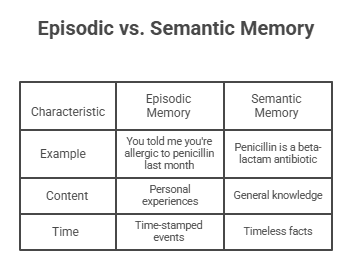
2. Semantic Memory: Storing Facts and Knowledge
What it stores: General knowledge, facts, rules, and definitions
Semantic memory is like a reference library. It contains structured information that doesn't change frequently.
Examples of Semantic Memory:
- Medical AI knowing symptoms and diagnoses
- Legal AI understanding case law and regulations
- Educational AI storing math formulas and historical facts
How It's Different:
Implementation:
Semantic memory typically uses knowledge graphs or vector databases. Companies like MongoDB provide specialized database solutions for storing and retrieving semantic information efficiently.
Real-World Example:
A legal AI assistant like those developed by firms using Ruh.AI might store:
- Precedent cases: Brown v. Board of Education established...
- Legal definitions: Discovery refers to the pre-trial phase...
- Procedural rules: Federal courts require filing within 30 days...
When a lawyer asks a question, the AI searches this semantic database to provide accurate, authoritative answers.
3. Procedural Memory: Learning Skills and Workflows
What it stores: Step-by-step processes, skills, and learned behaviors Procedural memory is your AI's muscle memory. It's knowing how to do something, not just knowing that something is true.
Think about:
- How you tie your shoes without thinking?
- How you type on a keyboard automatically?
- How you ride a bike even after years of not riding?
AI procedural memory works the same way.
Real-World Example:
An AI project manager learns a workflow through repetition:
Task: "Launch a new product"
Procedure stored in memory:
- Create project timeline
- Assign tasks to team members
- Schedule status meetings
- Track deliverables
- Notify stakeholders of completion
After performing this workflow multiple times, the AI automates it—no longer needing step-by-step instructions.
Use Cases:
- Robotic process automation (RPA)
- AI code completion (like in Ruh.AI)
- Workflow optimization systems
- Manufacturing AI controlling assembly lines
How Long-Term Memory Is Stored
Unlike short-term memory that lives in temporary buffers, LTM requires permanent storage:
Storage Solutions:
- Traditional Databases: PostgreSQL, MySQL for structured data
- Vector Databases: Pinecone, Weaviate for semantic search
- Knowledge Graphs: Neo4j, FalkorDB for relationship mapping
- Cloud Storage: MongoDB Atlas for scalable solutions
Retrieval-Augmented Generation (RAG)
When an AI needs to access LTM, it uses a technique called RAG:
- User asks a question
- AI converts question to vector embedding
- System searches vector database for relevant memories
- Retrieved information is added to AI's prompt
- AI generates response using both its training and retrieved memories
This is how platforms like Ruh.AI can provide context-aware coding suggestions based on your project history.
For more on how AI agents work together using shared memory, explore our guide on Multi-Agent AI Collaboration.
Working Memory: The Processing Center
What Is Working Memory in AI?
Working memory is the active workspace where AI agents process information in real-time. It's the bridge between short-term and long-term memory—taking inputs, manipulating them, and deciding what to remember long-term.
Human Analogy:
Imagine solving a math problem in your head:
- You see: "What's 15% of 80?"
- Your working memory: Holds "15", "80", "percentage" while calculating
- You process: 80 × 0.15 = ?
- You solve: 12
- Decision: Maybe store this if it's important, otherwise forget
AI working memory does exactly this with data.
Key Characteristics
- Duration: Active only during processing
- Capacity: Small but flexible (can hold multiple pieces temporarily)
- Function: Manipulates and transforms information
- Integration: Pulls from LTM, updates STM
Working Memory in Action
Example: AI Writing Assistant
When you ask an AI to "write a product description for eco-friendly water bottles," here's what working memory does:
Working Memory Process:
- Receive: Task = "write product description"
- Load from LTM:
- Brand voice guidelines
- Previous product descriptions
- Eco-friendly terminology
- Hold in STM:
- Product = water bottles
- Key feature = eco-friendly
- Process & combine:
- Apply brand voice + product features + eco messaging
- Generate: Final description
- Update LTM: Store successful description pattern
Why Working Memory Matters
According to Princeton University's CoALA research, working memory is what enables agentic reasoning—the ability for AI to break down complex tasks into manageable steps. This cognitive capability is explored in depth in our article on Reasoning Agents.
Without working memory:
- AI can only respond to direct questions
- Complex multi-step tasks become impossible
- No ability to hold intermediate results
With working memory:
- AI can plan and execute workflows
- Handle dependencies between tasks
- Make decisions based on partial information
Comparing the Three Memory Types: A Quick Guide
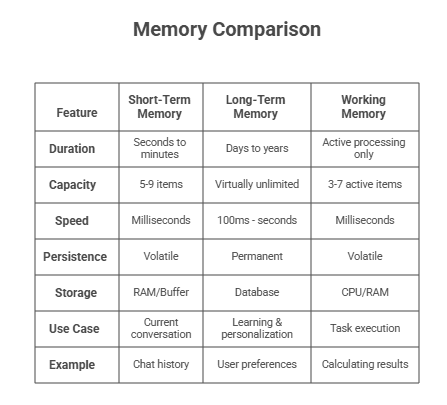
When to Use Each Memory Type
Use Short-Term Memory when:
- Context only matters for the current session
- Fast response time is critical
- Information has no long-term value
- Examples: Live chat, real-time alerts
Use Long-Term Memory when:
- Information needs to persist across sessions
- Personalization is important
- AI needs to learn from history
- Examples: Customer profiles, knowledge bases
Use Working Memory when:
- Processing complex multi-step tasks
- Combining information from multiple sources
- Making real-time decisions
- Examples: Data analysis, code generation
How to Implement AI Agent Memory (Practical Guide)
Step 1: Choose Your Framework
The easiest way to add memory to AI agents is using established frameworks:
Popular Options:
LangChain (Most Popular)
- Best for: General-purpose AI applications
- Memory support: Extensive built-in options
- Documentation: Excellent
LangGraph (Advanced)
- Best for: Complex multi-agent systems
- Memory support: Hierarchical memory graphs
- Difficulty: Intermediate to advanced
Letta (formerly MemGPT) (Specialized)
- Best for: Memory-first applications
- Memory support: Human-like memory simulation
- Use case: Personal AI assistants
Step 2: Set Up Storage
You'll need somewhere to store long-term memories:
For Beginners:
- MongoDB: Great balance of features and ease-of-use
- Free tier available
- Works with most frameworks
For Advanced Users:
- Pinecone: Vector database for semantic search
- Weaviate: Open-source vector database
- Redis: For high-speed caching
Step 3: Implement Memory Types
Simple Short-Term Memory Example:
python
from langchain.memory import ConversationBufferMemory

#Create memory that stores last 5 messages
memory = ConversationBufferMemory(
    memory_key="chat_history",
    return_messages=True,
    max_token_limit=1000
)

#Use with your AI agent
agent = initialize_agent(
    tools=tools,
    llm=llm,
    memory=memory  #Memory automatically tracks conversation
)
Adding Long-Term Memory:
python
from langchain.memory import VectorStoreRetrieverMemory
from langchain.vectorstores import FAISS

#Create vector store for long-term memory
vectorstore = FAISS.from_texts(
    texts=["User prefers Python", "User works in healthcare"],
    embedding=embeddings
)

#Create retrieval-based memory
memory = VectorStoreRetrieverMemory(
    retriever=vectorstore.as_retriever(search_kwargs={"k": 3})
)
Step 4: Optimize Performance
Memory Management Best Practices: 1. Prune Regularly
- Delete irrelevant or outdated information
- Use relevance scoring to keep only important memories 2. Prioritize Retrieval
- Most recent memories first
- High-importance items weighted higher
- Context-relevant results only 3. Handle Privacy
- Encrypt sensitive information
- Implement user data deletion
- Follow GDPR/compliance requirements
Real-World Applications: Memory in Action
Customer Service at Scale
The Problem: Traditional chatbots ask for your information every single time you contact support. Modern AI agents, however, can leverage memory to create seamless experiences as demonstrated by solutions like SDR Sarah, an AI-powered sales development representative.
The Memory Solution:
A customer service AI with proper memory:
- Remembers your name, account details (episodic)
- Knows product specifications, policies (semantic)
- Follows established support workflows (procedural)
Results from implementations:
- 62% reduction in resolution time
- 78% improvement in customer satisfaction
- 40% decrease in repeat contacts
To learn more about how AI SDRs use memory for sales automation, read our article on AI SDR: The Future of Sales Development.
Healthcare Diagnostics
The Challenge: Medical AI needs to remember patient history while applying current medical knowledge.
Memory Implementation:
An AI diagnostic assistant uses:
- Episodic: Past appointments, test results, symptoms
- Semantic: Medical literature, drug interactions, protocols
- Working: Analyzing current symptoms against history
Impact:
- Earlier diagnosis detection by combining patient history with current symptoms
- Reduced medication errors through interaction checking
- Personalized treatment plans based on past responses
E-Commerce Personalization
How Memory Powers Recommendations:
Netflix, Amazon, and Spotify use sophisticated memory systems: User watches sci-fi movies → Episodic memory stores System learns: User genre preference → Semantic memory updates Algorithm prioritizes sci-fi in feed → Procedural memory executes
Business Impact:
- 35% increase in click-through rates
- 28% boost in purchase conversion
- Higher customer lifetime value
AI Coding Assistants (Like Ruh.AI)
Why Memory Matters for Code:
When you're building software with AI assistance through platforms like Ruh.AI, memory becomes crucial for maintaining context and delivering intelligent code suggestions.
Short-Term Memory:
- Current function context
- Variable names in scope
- Recent error messages
Long-Term Memory:
- Your coding style preferences
- Project architecture patterns
- Previously solved similar problems
Working Memory:
- Processing requirements into code
- Combining multiple code patterns
- Debugging logic flow
Developer Productivity Gains:
- 45% faster code completion
- 67% fewer syntax errors
- Better architectural consistency
The shift from traditional coding to AI-assisted development represents a fundamental change in how we interact with technology. Learn more in our comparison of Traditional vs Agentic Browser Automation.
Common Challenges and Solutions
Challenge 1: Token Limits
Problem: Context windows fill up quickly with memory Solutions:
- Use summarization to condense older memories
- Implement relevance filtering
- Store full details in database, summaries in context
Challenge 2: Memory Overload
Problem: Too much irrelevant information slows down AI Solutions:
- Score memories by importance (1-10 scale)
- Set expiration dates for time-sensitive data
- Use semantic similarity to retrieve only relevant memories
Challenge 3: Privacy and Security
Problem: Storing personal data creates liability Solutions:
- Encrypt all stored memories
- Implement user data export/deletion features
- Use anonymization where possible
- Regular security audits
Challenge 4: Cost vs. Performance
Problem: More memory = higher storage and retrieval costs Solutions:
- Use tiered storage (hot/warm/cold data)
- Implement caching for frequently accessed memories
- Consider cost-effective storage like MongoDB over premium vector databases for simpler use cases
The Future of AI Agent Memory
What's Coming Next?
1. Autonomous Memory Management
Future AI agents will manage their own memories—deciding what to remember, what to forget, and how to organize information without human intervention. This is part of the broader trend toward Intelligent Automation.
2. Multi-Agent Shared Memory
Imagine multiple AI agents working together with shared knowledge:
- Sales AI shares customer insights with support AI
- Development AI shares code patterns with testing AI
- Marketing AI shares campaign data with analytics AI
This collaborative approach is detailed in our guide on AI Orchestration in Multi-Agent Systems.
3. Emotional Memory
AI systems that remember not just facts, but emotional context:
- User frustration levels during past interactions
- Satisfaction patterns across time
- Preference intensity and confidence
4. Continuous Learning
Memory systems that improve automatically:
- Reinforcement learning from outcomes
- A/B testing different memory strategies
- Self-optimizing retrieval algorithms
Industry Predictions (2025-2027)
According to Gartner's 2025 Strategic Technology Trends report:
- 60% of enterprises will implement memory-enabled AI agents by 2026
- Memory management will become a specialized role in AI engineering
- Standardized memory formats will emerge for agent interoperability
Key Takeaways: Building Memory-Enabled AI
The Essentials to Remember
1. Memory is Non-Negotiable
If you want AI that goes beyond simple tasks, memory isn't optional—it's fundamental.
2. Different Tasks Need Different Memory
- Customer chat? Short-term memory
- Personalization? Long-term episodic
- Knowledge Q&A? Semantic memory
- Automation? Procedural memory
3. Start Simple, Scale Smart
Begin with basic conversation memory, then add:
- Vector storage for semantic search
- User preference tracking
- Workflow automation
4. Balance Cost and Capability
More memory isn't always better. Optimize for:
- Retrieval speed vs. storage size
- Relevance vs. comprehensiveness
- Privacy vs. personalization
Your Next Steps
For Developers:
- Start with LangChain's built-in memory classes
- Experiment with vector databases (Pinecone free tier)
- Implement basic episodic memory for your use case
- Monitor performance and optimize retrieval
For Business Leaders:
- Audit your current AI systems for memory capabilities
- Identify use cases where memory would add value
- Calculate ROI: time saved + satisfaction improvement
- Start a pilot project with memory-enabled agents
For AI Enthusiasts:
- Build a simple chatbot with conversation memory
- Try Ruh.AI or similar platforms with built-in memory
- Experiment with different memory architectures
- Join AI communities to share learnings
Conclusion: Memory Makes AI Truly Intelligent
We started this guide with a simple question: Why do AI agents keep forgetting?
Now you understand that memory isn't just a technical feature, it's the difference between a tool that follows instructions and an intelligent system that learns, adapts, and improves.
The three memory types work together:
- Short-term memory keeps conversations flowing
- Long-term memory enables learning and personalization
- Working memory processes information intelligently
As AI continues evolving, memory systems will only become more sophisticated. The agents that remember—and remember well—will be the ones that truly transform how we work, communicate, and solve problems.
Whether you're building customer service bots, developing AI-powered applications with platforms like Ruh.AI, or just curious about how AI thinks, understanding memory is your foundation for success.
Want to implement memory in your AI projects? Start building with Ruh.AI or explore more guides on our blog. Have questions? Contact our team for expert guidance on implementing AI agent memory systems.
Remember: The best AI doesn't just process information—it learns from it, grows with it, and uses it to become more helpful over time.
Frequently Asked Questions
Q: Do all AI agents need memory?
A: No. Simple reflex agents (like thermostats) don't need memory. But any AI that needs to learn, personalize, or maintain context absolutely requires memory systems.
Q: How much does memory implementation cost?
A: It varies widely. Basic memory using MongoDB or PostgreSQL can start free. Advanced vector databases might cost $70-200/month. Enterprise solutions run $1,000+ monthly.
Q: Can I add memory to existing AI systems?
A: Yes! Most modern AI frameworks support adding memory through APIs or plugins. LangChain, for example, can add memory to any LLM with a few lines of code.
Q: How do I handle GDPR with AI memory?
A: Implement user data deletion APIs, encrypt stored memories, provide data export functionality, and maintain audit logs of data access.
Q: What's the difference between AI memory and a database?
A: A database stores data. AI memory stores data plus retrieval mechanisms, relevance scoring, and integration with AI decision-making processes.