TL: DR / Summary
Intelligent Automation (IA) merges AI's decision-making with robotic tools to automate complex, judgment-based tasks, learning and adapting beyond simple rules.
In this article, we will see, in the middle, after describing it, that its core benefits, such as major efficiency gains and error reduction, are transforming industries by augmenting human work, not replacing it, with implementation starting with focused pilots and evolving toward hyperautomation.
Ready to see how it all works? Here’s a breakdown of the key elements:
- What is Intelligent Automation?
- The Building Blocks: What Makes Intelligent Automation Work?
- How is Intelligent Automation Different from Regular Automation?
- Understanding Single vs. Multi-Agent Automation Systems
- Why Should You Care About Intelligent Automation?
- Where is Intelligent Automation Being Used Right Now?
- How Does Intelligent Automation Actually Work? (Step-by-Step)
- What Are the Challenges? (Being Honest Here)
- The Future of Intelligent Automation: What's Coming Next?
- Getting Started: What Should You Do Next?
- The Bottom Line
- Frequently Asked Questions About Intelligent Automation
What is Intelligent Automation?
Intelligent automation is like giving your computer a brain and hands.
More technically, it's the combination of artificial intelligence (AI) and automation tools that work together to handle complex business tasks that normally need human thinking and decision-making.
Think of it this way: regular automation is like a dishwasher; it does one job really well, following the same steps every time. Intelligent automation is more like a smart assistant that can learn your preferences, make decisions, and handle unexpected situations.
Intelligent automation uses technologies like AI, business process management, and robotic process automation to streamline and scale decision-making across organizations.
A Real-World Example
Let's say you run an insurance company. When a customer files a claim:
Old way: An employee reads the claim form, checks policy details, verifies documents, calculates the payout, gets manager approval, and processes payment. This takes days. Intelligent automation way: The system reads the claim (even handwritten ones), pulls up the right policy, checks everything against rules, calculates payment, routes unusual cases to humans, and processes standard claims automatically. This takes hours sometimes minutes.
The difference? Speed, accuracy, and your employees can focus on helping customers with complex problems instead of shuffling paperwork.
The Building Blocks: What Makes Intelligent Automation Work?
Intelligent automation isn't just one technology. It's like a recipe that combines several ingredients to create something more powerful than any single tool.
1. Artificial Intelligence (AI) - The Brain
AI is what makes automation "intelligent." It can:
- Learn from examples and improve over time
- Recognize patterns in data
- Make predictions about what might happen next
- Understand context (not just follow rigid rules)
According to IBM's research, AI has moved from experimental to mainstream, with businesses across industries using it for practical applications.
Modern intelligent automation systems increasingly rely on AI employee architectures that can handle complex workflows autonomously while collaborating with human workers.
2. Robotic Process Automation (RPA) - The Hands
RPA uses software robots that mimic human interactions with digital systems, performing keystrokes, navigating applications, and carrying out defined actions. These digital workers can:
- Log into applications
- Copy and paste data
- Fill out forms
- Move files around
- Send emails
Think of RPA as a tireless digital employee who never makes typos or forgets steps. When combined with AI, these capabilities expand dramatically through what many organizations are now calling digital workforce platforms.
3. Machine Learning (ML) - The Learning Ability
Machine learning helps systems get smarter over time without being explicitly programmed for every scenario. ML algorithms use large volumes of historical data to train automation systems on inputs and outputs, developing more precise and efficient workflows without human intervention.
It's like how you learned to ride a bike—through practice and adjusting based on what works.
4. Natural Language Processing (NLP) - The Communication Skills
NLP lets computers understand and respond to human language, whether written or spoken. These powers:
- Chatbots that actually understand your questions
- Email systems that know which messages are urgent
- Voice assistants that can handle customer requests
Google's NLP research shows how these systems can now understand context, sarcasm, and even emotions in text.
5. Computer Vision - The Eyes
Computer vision helps automation systems "see" and understand images, documents, and videos. This technology can:
- Read text from scanned documents or photos
- Identify objects in images
- Verify signatures
- Inspect products for defects
6. Business Process Management (BPM) - The Orchestra Conductor
BPM provides the big-picture view, connecting different departments, systems, and tasks into smooth workflows. It ensures all the pieces work together harmoniously.
In advanced implementations, this often involves AI orchestration across multi-agent systems where different AI agents coordinate to complete complex business processes.
How is Intelligent Automation Different from Regular Automation?
Great question! Here's a simple comparison:
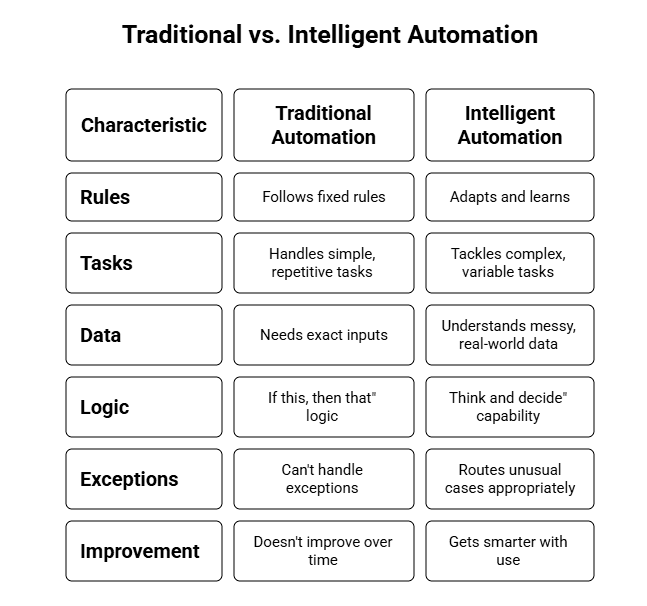
Example: Traditional automation can copy data from one system to another if it's always in the same format. Intelligent automation can read invoices from dozens of different suppliers—each with different layouts extract the key information, and route them correctly, learning to handle new formats it hasn't seen before.
Understanding Single vs. Multi-Agent Automation Systems
As intelligent automation evolves, organizations are moving beyond simple single-task bots to more sophisticated architectures. Here's what that means:
Single-Agent Systems: One AI handles one specific task from start to finish. Think of a chatbot that only answers customer questions about shipping.
Multi-Agent Systems: Multiple AI agents work together, each handling different parts of a complex process. For example, one agent processes customer orders, another manages inventory, and a third handles shipping logistics—all coordinating automatically.
The choice between single-agent and multi-agent AI systems depends on your specific business needs, with multi-agent approaches offering greater flexibility for complex workflows.
Within multi-agent systems, organizations can choose between competitive and collaborative approaches. Collaborative systems work together toward shared goals, while competitive systems might bid for resources or tasks, optimizing overall efficiency.
For enterprise-scale operations, hierarchical agent systems provide the structure needed to manage hundreds or thousands of automated processes, with supervisor agents coordinating teams of worker agents.
Why Should You Care About Intelligent Automation?
You might be thinking, "This sounds cool, but why does it matter to me?" Here are the real-world impacts:
For Businesses
1. Serious Cost Savings
Companies implementing intelligent automation see 30-200% ROI in the first year,** with potential for even higher returns long-term**. That's because automation can work 24/7 without overtime, vacation days, or coffee breaks.
However, it's important to understand the** true cost of AI employee adoption**, which includes not just software licensing but also training, integration, and change management expenses.
2. Faster Everything
Tasks that took days now take hours. Processes that took hours now take minutes. According to research, employees spend 10-25% of their time on repetitive tasks that could be automated—imagine redirecting all that time to innovation and growth.
3. Fewer Mistakes
Humans are amazing, but we make errors when we're tired, distracted, or bored by repetitive work. Robots aren't prone to human error or distraction, allowing them to carry out tasks faster and with greater accuracy.
4. Happier Customers
Intelligent automation provides 24/7 support to customers through automatic responses, chatbots, and recommendations. No more "please call back during business hours."
For Employees
You're Not Being Replaced—You're Being Upgraded
Here's what worries people most: "Will a robot take my job?" The reality is more nuanced and actually more positive.
Intelligent automation reduces the number of resources needed to complete routine tasks, allowing businesses to accomplish goals faster while employees focus on high-value strategic work.
Think about it: Would you rather spend your day copying data between spreadsheets, or solving interesting problems, working directly with customers, and developing new ideas? Intelligent automation handles the boring stuff so you can do the meaningful work that requires human creativity, empathy, and judgment.
Research from McKinsey shows that automation actually creates new job categories and opportunities, particularly for people who can work alongside these systems.
Where is Intelligent Automation Being Used Right Now?
The applications are everywhere. Let's look at real examples across different industries:
Healthcare
Hospitals use intelligent automation to:
- Schedule appointments and send reminders automatically
- Process insurance claims faster
- Analyze medical images to help doctors spot issues
- Manage patient records and billing
Impact: The healthcare industry could potentially save $100 billion through AI and big data applications, helping redirect resources to patient care.
Banking and Finance
Banks rely on intelligent automation for:
- Detecting fraudulent transactions in real-time
- Processing loan applications
- Answering customer questions through chatbots
- Generating financial reports
- Ensuring regulatory compliance
According to Deloitte, financial institutions are among the earliest and most aggressive adopters of intelligent automation.
Retail and E-commerce
Online stores use it to:
- Recommend products based on your browsing history
- Manage inventory automatically
- Handle customer service inquiries
- Process returns and refunds
- Predict demand for products
Ever wondered how Amazon seems to know what you want to buy? That's intelligent automation at work.
Manufacturing
Factories deploy intelligent automation for:
- Predicting when machines need maintenance (before they break)
- Quality control inspections
- Supply chain optimization
- Inventory management
- Safety monitoring
Human Resources
HR departments use it for:
- Screening resumes and scheduling interviews
- Onboarding new employees
- Processing payroll
- Answering employee questions about benefits
- Analyzing employee satisfaction
Interesting stat: 45% of HR departments are now focusing on intelligent process automation to improve efficiency.
Customer Service
Companies across all industries use intelligent automation to:
- Route customer inquiries to the right department
- Answer common questions instantly
- Analyze customer sentiment in feedback
- Draft personalized responses
- Escalate complex issues to human agents
With intelligent automation, robots can instantly sort customer feedback using sentiment analysis programs, categorizing comments as positive, negative, or neutral.
How Does Intelligent Automation Actually Work? (Step-by-Step)
Let's walk through the journey of implementing intelligent automation in simple steps:
Step 1: Discovery - Finding the Opportunities
First, you need to figure out which processes are good candidates for automation. This involves:
- Mapping out current workflows
- Identifying repetitive, time-consuming tasks
- Calculating potential time and cost savings
- Prioritizing based on impact and feasibility
Tools like process mining analyze how work actually flows through your organization (not just how you think it flows) to spot bottlenecks and inefficiencies.
Step 2: Design - Planning the Solution
Once you know what to automate, you design how it will work:
- Define the rules and decision points
- Choose which AI technologies to use
- Plan for exception handling
- Ensure integration with existing systems
Many modern platforms offer low-code or no-code tools, meaning you don't need to be a programmer to create automations. Microsoft's Power Automate and similar tools make this accessible to regular business users.
Step 3: Build - Creating the Automation
This is where the actual automation is constructed:
- Training AI models with sample data
- Configuring software robots
- Setting up workflow rules
- Testing with real scenarios
- Refining based on results
For organizations implementing multiple AI agents, understanding multi-agent AI collaboration in 2025 becomes crucial for ensuring different systems work together seamlessly.
Step 4: Deploy - Putting It to Work
Rolling out the automation to real users:
- Starting with a pilot group
- Monitoring performance closely
- Gathering feedback
- Making adjustments as needed
- Scaling to more users and processes
Step 5: Optimize - Making It Better
The best part about intelligent automation is that it keeps improving:
- Machine learning models get more accurate
- The system identifies new optimization opportunities
- Users suggest enhancements
- New capabilities are added over time
What Are the Challenges? (Being Honest Here)
Intelligent automation isn't magic, and it's not without challenges. Here's what organizations commonly face:
Technical Challenges
Integration Headaches: Getting new automation tools to work with old legacy systems can be tricky. Your 20-year-old database wasn't built to talk to modern AI.
Data Quality Issues: AI systems are only as good as the data they learn from. If your historical data is messy or biased, the automation will inherit those problems.
Security Concerns: Automating processes means giving systems access to sensitive data. Robust security measures are essential.
Organizational Challenges
Change Resistance: People naturally resist change, especially when they're worried about their jobs. Change management and preparing your organizational culture are critical parts of any intelligent automation implementation.
Skills Gap: You need people who understand both the business processes and the technology. These hybrid skills are in high demand.
Initial Investment: While the ROI is strong, getting started requires upfront investment in software, training, and possibly consultants. Understanding the complete cost structure of AI employee adoption helps set realistic budgets.
Choosing the Right Vendor: With so many options available, selecting the right platform and partner can be overwhelming.
The Future of Intelligent Automation: What's Coming Next?
The field is evolving incredibly fast. Here's what experts see on the horizon:
Generative AI Integration
Tools like ChatGPT are being woven into automation platforms. According to McKinsey's research, generative AI could be a key driver of innovation and growth, enabling:
- Automated creation of content and reports
- More natural conversations with customers
- Faster development of new automations
- Better analysis of complex documents
Agentic Automation
The next evolution involves AI "agents" that can handle end-to-end processes with minimal human oversight, making autonomous decisions within defined parameters. This builds on emerging concepts in AI employee architecture that business leaders need to understand.
Hyperautomation
This concept from Gartner involves automating everything that can possibly be automated in an organization, creating a comprehensive ecosystem of connected, intelligent processes.
Edge AI
Moving AI processing closer to where data is created (like in factories or retail stores) for faster, more efficient automation.
Getting Started: What Should You Do Next?
If you're thinking about intelligent automation for your organization, here's a practical roadmap:
1. Start Small
Don't try to automate everything at once. Pick one annoying, time-consuming process and automate that first. Learn from it, then expand.
2. Get Leadership Buy-In
Executives need to understand both the potential and the investment required. Use concrete examples and ROI projections. Business leaders should familiarize themselves with what AI employees can and cannot do to set realistic expectations.
3. Involve Your Team
The people doing the work every day know where the pain points are. They're your best source of ideas—and they'll be more supportive if they're involved from the start.
4. Choose the Right Partner
Look for proven platforms with strong support. Companies like UiPath, Automation Anywhere, and Microsoft offer robust solutions with different strengths.
Consider exploring comprehensive digital workforce platforms that provide end-to-end automation capabilities rather than point solutions.
5. Invest in Training
Your team needs to understand both how to use the tools and how to work alongside automation. This isn't optional—it's essential.
6. Measure and Iterate
Track metrics like time saved, error reduction, cost savings, and employee satisfaction. Use this data to continuously improve.
The Bottom Line
Intelligent automation represents a fundamental shift in how work gets done. By combining the analytical power of AI with the execution capability of automation tools, organizations can:
- Accomplish more with existing resources
- Reduce errors and improve quality
- Respond faster to customers and market changes
- Free employees to do more meaningful, satisfying work
- Gain competitive advantages in their industries
The technology has moved beyond the experimental phase. With 80% of executives already pursuing intelligent automation initiatives, it's becoming less about whether to adopt these technologies and more about how quickly and effectively you can implement them.
The businesses thriving tomorrow will be those that successfully blend human creativity and judgment with the speed and consistency of intelligent automation. The good news? The tools are more accessible than ever, and the roadmap is well-established.
Whether you're a business leader exploring options, an employee wondering about your future, or simply someone curious about where technology is heading, intelligent automation is worth understanding. It's not science fiction—it's happening right now, reshaping industries and creating new possibilities.
The question isn't whether intelligent automation will transform your industry. It's whether you'll be leading that transformation or catching up to it.
Ready to explore intelligent automation for your organization? Visit Ruh.ai to discover how digital workforce solutions can transform your business operations, or explore our blog for more insights on AI automation and multi-agent systems. Have questions? Get in touch with our team to discuss your specific automation needs.
Frequently Asked Questions About Intelligent Automation
What is intelligent automation in simple terms?
Ans: Intelligent automation combines AI with automation tools to handle complex business tasks that normally require human thinking and decision-making. Unlike traditional automation that follows fixed rules, it can learn, adapt, and make decisions based on context—like a smart assistant versus a basic calculator.
What is the difference between intelligent automation and AI?
Ans: AI is the "brain" that enables machines to think and learn. Intelligent automation is the complete system that combines AI with technologies like RPA and BPM to actually execute tasks and complete business processes. Think of AI as the intelligence, and intelligent automation as that intelligence put into action.
What are the 4 types of automation?
Ans:
- Basic Automation: Simple, rule-based tasks (scheduled emails, data backups)
- Process Automation: Complete workflows across multiple systems
- Integration Automation: Connecting applications to share data automatically
- Intelligent Automation: AI-powered automation handling complex, variable tasks
What is meant by intelligent process automation (IPA)?
Ans: IPA is another term for intelligent automation—they're essentially the same. It emphasizes automating complete business processes (not just tasks) using AI technologies. IPA combines RPA, machine learning, and natural language processing to handle end-to-end workflows that previously required human judgment.
What are three examples of intelligent automation?
Ans:
- Insurance Claims: Reads forms, validates policies, assesses damage photos, calculates payouts, and auto-approves standard claims
- Customer Service Chatbots: Understands questions, accesses information, provides answers, and transfers complex issues to humans
- Invoice Processing: Extracts data from various formats, matches purchase orders, routes approvals, and learns new vendor formats
Is ChatGPT considered AI or machine learning?
Ans: ChatGPT is both! It's an AI system built using machine learning techniques, specifically deep learning with neural networks. Machine learning is the method used to train AI systems. When integrated into business processes, tools like ChatGPT become part of intelligent automation systems.
What is the main purpose of intelligent automation?
Ans: To improve business efficiency by automating repetitive tasks, reducing errors, enabling faster decision-making, scaling operations without increasing costs, and providing better customer experiences. Ultimately, it makes organizations more competitive while making work more meaningful for employees.
What is the 30% rule in AI?
Ans: The "30% rule" typically refers to the expectation that organizations can reduce operational costs by approximately 30% through hyperautomation by 2024. Some also use it to describe the threshold where 30% of processes should be automated to see transformative impact. The actual percentage varies by industry.
What are the 4 stages of process automation?
Ans:
- Discovery: Identifying which processes to automate and prioritizing opportunities
- Design & Development: Planning the solution, selecting technologies, and testing
- Deployment: Rolling out to users, starting with pilots and scaling gradually
- Optimization: Monitoring performance and continuously improving
Organizations with multi-agent systems may add an orchestration stage for coordinating AI agents.
What is the difference between AI and intelligent automation (IA)?
Ans: AI enables machines to simulate human intelligence—learning, reasoning, and problem-solving. Intelligent automation combines AI with execution tools like RPA and BPM to not just think but also act.
Simple analogy: AI is like a brilliant consultant. IA is that consultant plus a team of workers implementing solutions automatically.
What is the main purpose of intelligent process automation?
Ans: To transform business operations by eliminating manual work, improving decision quality with AI insights, increasing speed, ensuring consistency, and enabling scalability. The goal is creating an agile organization where technology handles routine work and humans focus on innovation and problem-solving.
Will intelligent automation replace human workers?
Ans: No, it's designed to augment workers, not replace them. While it eliminates repetitive tasks, it creates opportunities for employees to focus on strategic work, build relationships, solve complex problems, and manage automation systems. Research shows automation creates new job categories, especially for those skilled in working alongside AI.
How much does intelligent automation cost?
Ans: Costs vary by scope:
- Small implementations: $10,000-$50,000
- Medium deployments: $100,000-$500,000
- Enterprise solutions: $500,000-$5 million+
Most organizations achieve 30-200% ROI in the first year. See our guide on the true cost of AI employee adoption for detailed breakdowns.
Can small businesses use intelligent automation?
Ans: Yes! Cloud-based platforms offer pay-as-you-go pricing, low-code tools, pre-built templates, and scalable solutions. Small businesses can start with one or two processes and expand as they see results. The key is choosing the right platform and starting with high-impact, low-complexity processes.
How do I know if my business is ready for intelligent automation?
Ans: You're ready if you have: repetitive processes consuming significant time, data in digital form, executive support, clear pain points (slow processes, frequent errors), and growth goals requiring scalability. You don't need perfect processes—automation can help discover and fix inefficiencies.
What skills do employees need to work with intelligent automation?
Ans: Core skills include process understanding, basic technical literacy, data awareness, problem-solving, and adaptability. For automation managers: low-code platform skills, change management, analytics capabilities, and collaboration skills. Most modern platforms are designed for business users, not just programmers.