TL;DR / Summary
AI is reshaping construction faster than most teams realize. The best teams in 2026 are using AI to predict delays 60+ days in advance, catch safety hazards before anyone gets hurt, and reduce labor costs by 15-20%. The tools exist now. The question is which ones matter most for your operation.
What you'll learn:
- Why the top construction firms are already standardizing on AI—and what happens if you don't
- The exact 10 tools reshaping how projects get built, scheduled, and delivered
- A framework for choosing which tools solve YOUR biggest pain point first
- Real ROI numbers: how much construction leaders are actually saving in 2026
- How to avoid the implementation mistakes that waste 6+ months and $200K
The numbers upfront: Construction cost overruns average $40B annually across the industry. Labor shortages are cutting productivity by 18-22%. Safety incidents cost $40B more. AI tools are addressing all three simultaneously, and the payoff window is closing fast—early adopters now will have 30-40% competitive advantage over the next three years.
Why AI Construction Tech Tools Are Now Non-Negotiable
The construction industry is hitting a ceiling. You can't hire your way out of a labor shortage. You can't manage your way out of a 25% schedule variance. You can't inspect your way out of climbing safety costs.
Most construction teams — general contractors above all — still operate on the same model they did in 2015: manual scheduling, reactive problem-solving, spreadsheets, and paper on jobsites. That model worked when projects were smaller and timelines were longer. It's breaking now.
AI construction tools fix three specific problems at the same time:
First, cost overruns. Construction projects average 20-30% cost overruns due to schedule delays, material waste, and labor inefficiency. AI predictive systems detect cost drivers 60+ days before they hit your budget, leaving time to course-correct. Procore's AI Predictive Analytics, for example, flags missing materials and schedule conflicts before they cascade into full-blown delays.
Second, safety incidents. The construction industry records roughly 5,500 fatal and non-fatal injuries annually. Beyond the human cost, each recordable incident costs $40K in direct expenses (medical, workers' comp) and $150K+ in indirect costs (downtime, investigation, compliance fines). Computer vision systems like Strafer AI catch PPE violations, fall risks, and near-misses in real-time—reducing incident rates by 40% on average.
Third, labor constraints. Across the U.S., construction faces a 500K+ skilled worker shortage. You can't hire people who don't exist. But you can optimize the crews you have. AI resource scheduling eliminates idle time, prevents over-hiring, and matches crew skills to upcoming work phases, recovering 20-30% of lost productivity per crew.
AI construction tools are no longer a nice-to-have advantage. They're the difference between projects that finish on time and teams that lose money.
The 10 Best AI Construction Tech Tools for 2026
Here are the 10 platforms reshaping how construction teams operate. Each addresses a different layer of the construction workflow.
1. Procore with AI Predictive Analytics
Procore dominates project management in construction—it's on 4+ million projects globally. The AI layer sits on top of that data. It ingests historical project data, real-time schedule updates, material orders, and budget actuals, then forecasts project completion dates with 85%+ accuracy 60+ days out. It flags material shortages before your supplier runs out. It predicts cost overruns before they hit your bottom line.
The ROI is straightforward: if Procore AI catches one major schedule delay before it happens, it pays for itself for the year.
2. Touchplan AI Scheduler
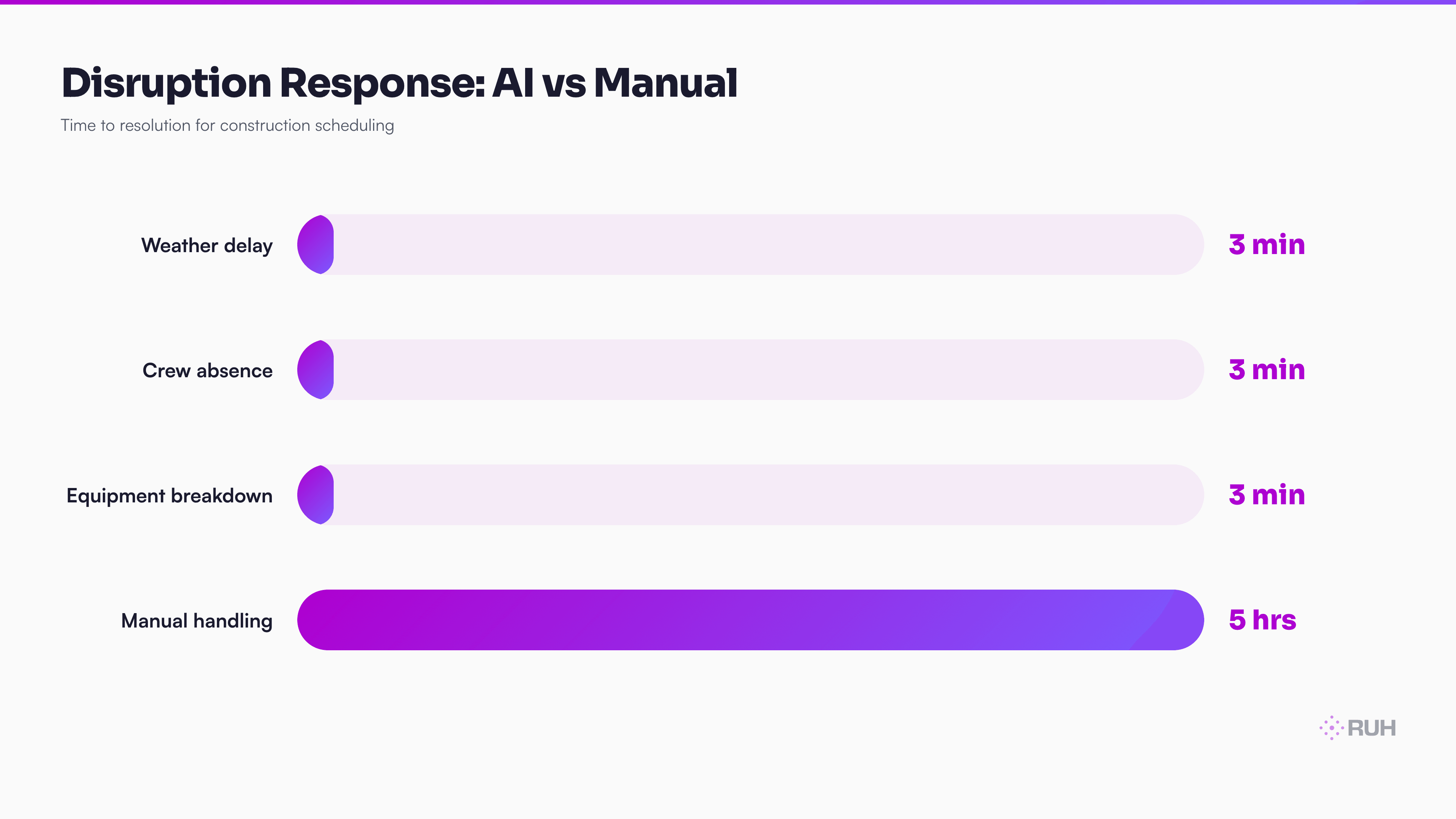
Touchplan is a visual scheduling tool—teams drag tasks and resources around a timeline. The AI layer automatically rebalances the schedule when variables change. Weather delay? Crew member called in sick? Equipment breakdown? Instead of manually re-sequencing 40 tasks (4-6 hours of manual work), the AI does it in seconds and flags the trades most impacted so you can communicate proactively.
Teams using Touchplan AI report reducing schedule conflict resolution from hours to minutes—a direct labor savings and faster decision-making.
3. Doxel Computer Vision Platform
Doxel deploys drones to your jobsite automatically. The system flies a 15-minute scan every 24 hours, captures 500+ high-resolution images, and uses computer vision to compare actual site conditions against your BIM (Building Information Model). It flags work that's behind schedule, materials not delivered, and sequences out of order.
Accuracy is 95%+. The alternative—manual progress photos and superintendent field notes—catches maybe 60% of deviations and takes 8+ hours weekly to log.
4. Bridgit Bench AI Workforce Optimizer
Bridgit Bench focuses on the labor side. It tracks crew skills, availability, certifications, and past performance, then uses machine learning to predict which crews will perform best on upcoming phases. It eliminates idle time by matching skills to work before the phase starts, not after crew shows up on Monday with no assignment.
Construction firms using Bridgit report 15-20% reductions in labor costs through elimination of idle time and over-hiring.
5. Alice AI Adaptive Scheduling
Alice is pure machine learning applied to daily crew assignments. It pulls real-time data—weather, equipment status, task interdependencies, crew skill profiles—and continuously adjusts which crews work on which tasks each day. If rain stops concrete work, Alice shifts crews to interior framing. If a subcontractor no-shows, Alice reassigns their tasks to crews with capacity.
The system makes decisions continuously, not just at the beginning of the week. Teams using Alice eliminate 30-40% of reactive scheduling chaos.
6. Fieldwire with AI Clash Detection
Fieldwire is a digital site plan tool—it lets teams mark up blueprints, photos, and BIM models in real-time from the jobsite. The AI layer runs automated clash detection: it identifies missing work between trades, coordination gaps, and conflicts that would cause rework in the field.
A single trade clash (e.g., MEP running through a structural opening) costs $8K-$15K in rework when caught on-site. Catching it in the BIM before construction saves that entire cost. Fieldwire's AI detects 70-80% of clashes automatically, reducing rework by 15-25%.
7. Autodesk Construction Cloud AI Suite
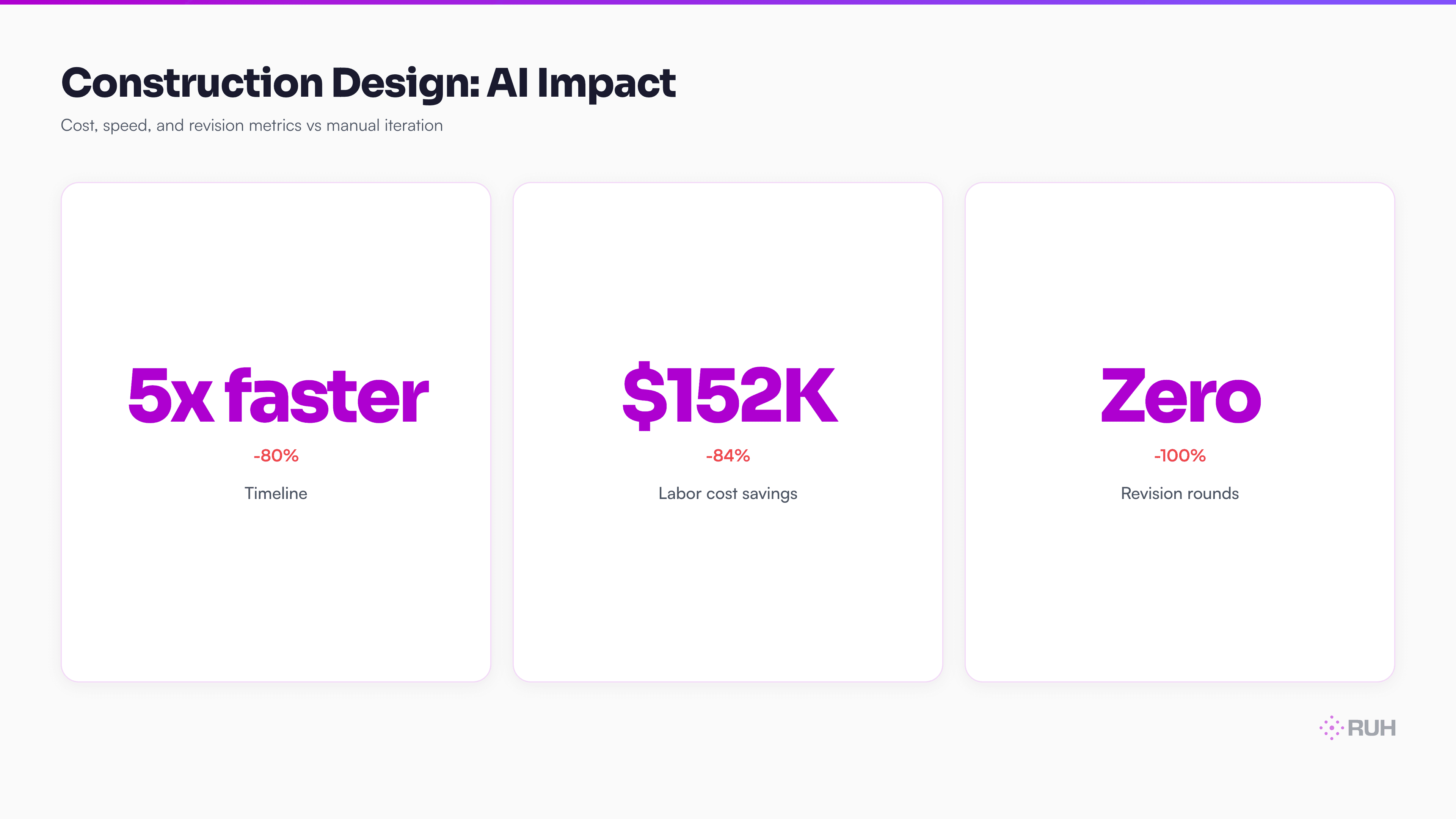
Autodesk's cloud platform includes generative design capabilities. Feed the system your BIM, constraints, and objectives, and it generates optimal prefabrication sequences, cutting layouts, and installation sequences. This moves design iteration from weeks (human-led) to days (AI-led).
On a $200M project, shaving 2-3 weeks off design iteration saves hundreds of thousands in labor and indirect costs.
8. Strafer AI Safety Platform
Strafer deploys cameras across your jobsite and runs continuous hazard detection. It identifies PPE violations (hard hat, vest, eye protection missing), fall risks (workers near unprotected edges), and near-misses (improper tool use, unsafe positioning). When hazards are detected, the system alerts the safety team in real-time.
OSHA recordable incidents fall 30-40% on jobsites using Strafer, which also reduces workers' compensation premiums by 5-8% — a direct cut to general conditions spend.
9. Bridger Supply Chain AI
Bridger predicts material delivery disruptions 30 days in advance by monitoring supplier lead times, logistics networks, port delays, and global supply chain data. When it detects a disruption risk, it alerts your procurement team and automatically sources alternatives.
Construction projects stall for material shortages. Bridger prevents that. A single 2-week delay for missing materials costs $150K+ in idle crew wages and equipment rental. Preventing one delay pays for Bridger's annual cost 10x over.
10. Komatsu AI Fleet Management
Komatsu's system monitors heavy equipment autonomously. It tracks utilization (which machines are idle), predicts maintenance failures before they happen, and optimizes equipment allocation across jobsites. It also enables autonomous operation for certain tasks (dozing, grading, hauling) on projects with high material movement.
A single heavy equipment breakdown costs $20K-$50K in lost productivity. Preventing breakdowns through predictive maintenance is the entire ROI case.
How to Choose the Right AI Tools for Your Team
Not every team needs all 10 tools. Most teams should start with 2-3 that directly address their biggest operational bottleneck.
Step 1: Identify your #1 pain point. Is it schedule delays? Labor costs? Safety incidents? Rework? Material shortages? Pick ONE. The tool that solves that problem delivers the fastest ROI and builds team buy-in for the next tool.
Step 2: Check integration depth. Most construction teams run Procore, P6, or an ERP system. Verify that the AI tool integrates cleanly with YOUR stack. Integration takes 2-4 weeks; if the vendor says "we're working on it," move on.
Step 3: Pilot before scaling. Deploy the tool on a single project phase or one project division first. Run it parallel to your existing process for 4-6 weeks. Measure impact on your specific metric (delay reduction, safety incidents, labor cost per unit). Only scale if the pilot numbers are real.
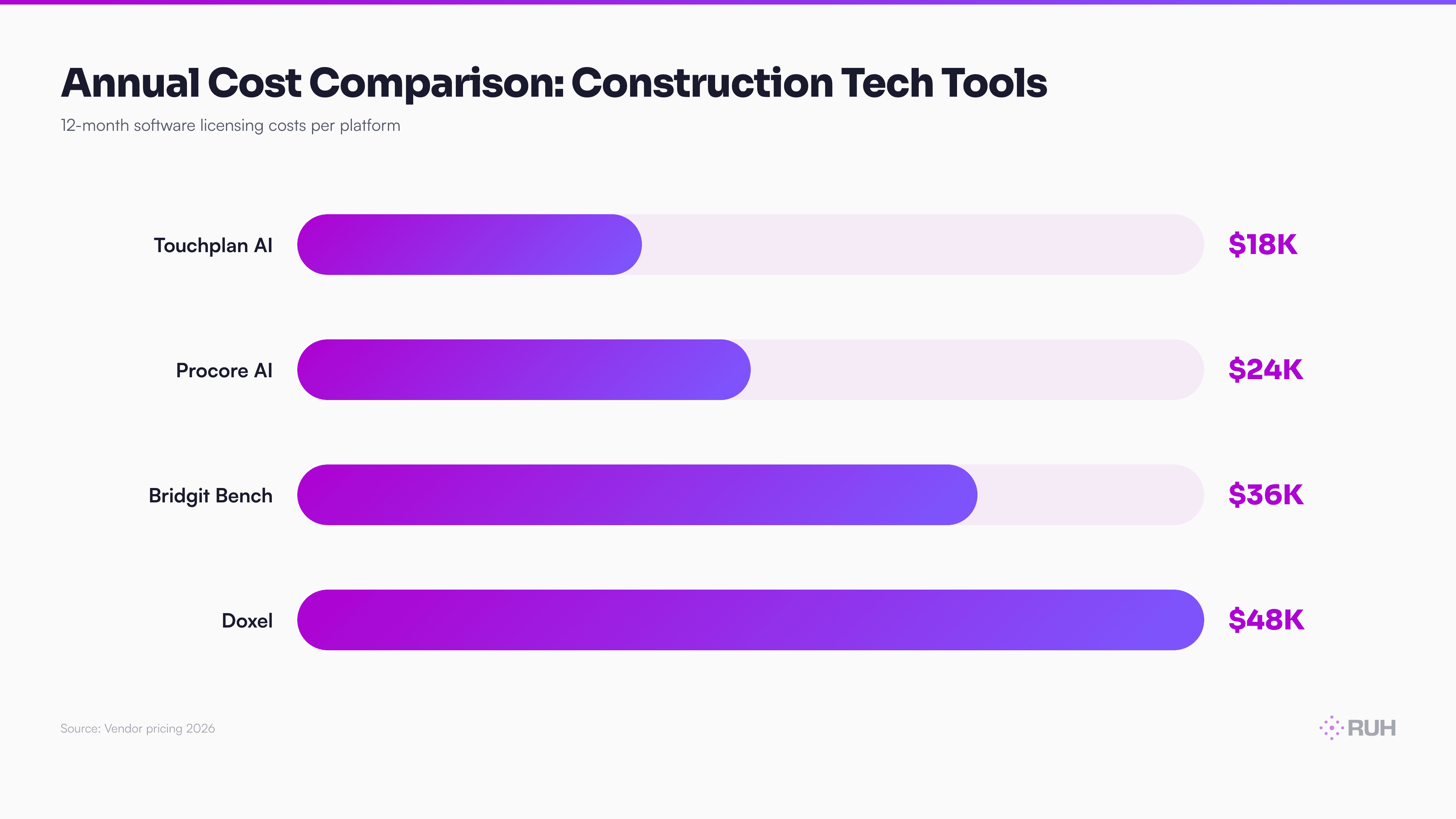
Step 4: Account for true cost of ownership. The software license is 25-40% of total cost. Add training (2-3 weeks for your team), integration labor ($15K-$50K), data cleanup (often underestimated), and change management overhead (2-3 months longer than vendors estimate). True cost is 2-3x the software price.
Implementation Best Practices for AI Construction Tools
Deploying AI tools successfully requires discipline on four fronts:
Data preparation takes 60% of the effort. AI models train on historical data. If your data is messy, incomplete, or inconsistent, the AI will be unreliable. Before launch, clean your historical project data, standardize field definitions across projects, and establish a single source of truth. Expect this phase to take 4-8 weeks for a 50+ project portfolio.
Assign a dedicated AI champion on-site. Pick a field superintendent or project manager who owns adoption full-time. This person troubleshoots data gaps, coaches crews on the new workflow, and feeds feedback to your implementation team. Without this person, adoption stalls at 40-50%.
Set specific, measurable KPIs before launch. Don't say "reduce schedule variance." Say "reduce schedule variance from ±15% to ±5% by month 6." Define success metrics for cost, safety, labor, and rework BEFORE you flip the switch. Measure against baselines. This justifies continued investment and informs the business case for the next tool.
Budget for change management conservatively. Training, job aids, feedback loops, and team coaching typically take 8-12 weeks longer than vendors estimate. Plan for 2-3 months of active change management, not 2-3 weeks. Teams that rush this phase waste 6+ months in slow adoption.
Expected ROI: What Construction Leaders Are Actually Seeing in 2026
If you're evaluating these tools, you want real numbers. Here's what construction leaders are reporting:
Schedule predictability: Companies using AI forecast tools reduce schedule variance by 50-60%. On an 18-month project, that's 15-30 fewer delay days. For a $100M project, each delay day costs $150K+ in crew and equipment carrying costs. Preventing 20 delay days = $3M+ in savings.
Labor efficiency: AI resource scheduling cuts idle time by 20-30% and prevents over-hiring. On a $50M project, typical crew costs are $18M. A 25% efficiency gain = $4.5M in labor savings. Minus the tool cost ($150K/yr), that's net $4.35M.
Safety compliance: Computer vision hazard detection reduces OSHA recordable incidents by 30-40%. Each recordable incident costs $40K direct + $150K indirect. Preventing 5 incidents/year = $950K in avoided costs. Workers' comp premiums often drop 5-8%, another $200K+ for a large company.
Rework reduction: Early clash detection and progress tracking reduce rework by 15-25%. On a $100M project, rework costs 10-15% of total project value. A 20% reduction in rework = $2M-$3M in avoided costs.
Combined payback: Most construction firms see 6-12 month payback across the full tool suite, with ongoing annual savings of $2M-$5M depending on project size and complexity.
The Honest Assessment: What Still Falls Short
AI construction tools are transformative, but they have real limitations. Understanding them prevents disappointment during implementation.
First, they require clean data. AI models train on historical project data. If you've never tracked schedule variance, material costs, or safety incidents systematically, the AI has nothing to learn from. Many teams discover during implementation that their data is 30-40% incomplete. This extends timelines by 6-12 weeks.
Second, they don't replace judgment—they augment it. An AI scheduler can recommend task sequences, but a superintendent still decides if a recommendation is safe or feasible. An AI safety camera can flag PPE violations, but a safety manager still decides if a violation warrants a work stoppage. Teams that treat AI recommendations as "decisions" rather than "inputs" create cultural friction.
Third, adoption is slow. Even after 8-12 weeks of training, field crews resist new workflows. Most teams see 60-70% adoption in month 1, climbing to 85-90% by month 3. A small percentage of crews never fully adopt. This is normal, expected, and accounts for slower-than-projected ROI in early months.
Fourth, integration is messier than vendors promise. Connecting a new AI tool to Procore, P6, and your ERP system invariably surfaces data gaps or API limitations. Plan 2-4 weeks longer than quoted for integration.
Finally, these tools are still evolving. A tool that works flawlessly in Q1 2026 might introduce a feature in Q2 that breaks your workflow. Vendor stability matters. Stick with platforms that have venture backing, paying customers, and 24/7 support.
How Ruh AI Fits Into This Picture
Here's where Ruh AI becomes relevant: many of these tools are great at what they do, but they create data silos. Procore knows about schedules. Doxel knows about progress. Strafer knows about safety. Bridgit Bench knows about labor. But none of them talk to each other automatically.
This is where Ruh Work-Lab changes the game. Work-Lab lets you build AI agents that sit between these tools and automate the handoff. For example:
The schedule-delay-detection agent: Doxel flags progress 3 days behind. This agent reads that signal, queries Procore for the impacted tasks, checks Bridgit Bench for crew availability, identifies which crews can absorb the delay, and proposes a revised schedule to the project manager—all in 90 seconds, not 4 hours of manual work.
The supply chain risk agent: Bridger AI predicts a material delay. This agent automatically notifies procurement, updates the Procore timeline, alerts affected trade contractors, and logs the change in your project documentation—zero manual handoffs.
The safety escalation agent: Strafer detects a PPE violation. This agent logs it, flags the crew, alerts the safety manager, and if it's a repeat violation, escalates to the project director with historical context.
These kinds of integrations are impossible without code (or they take 3 engineers 6 months to build). With Ruh Work-Lab, you can wire them in days. No Python, no API docs, no dev team required.
Explore Ruh Work-Lab and build your first AI agent today →
If you're already running 4-5 AI construction tools and want to stop manual data transfer between them, this is your answer.
Frequently Asked Questions
Q: Do I really need all 10 tools, or can I get by with 2-3? A: Start with 2-3 that address your top pain point. Most teams find 4-5 core tools sufficient for full operational coverage. Adding more than 5-6 tools creates integration overhead that outweighs the benefit. Procore AI + Touchplan AI + Strafer covers most teams' core needs (scheduling, resource allocation, safety). Add Doxel or Bridgit next based on where you're losing money.
Q: What's the learning curve for field crews? A: Most tools have a 2-4 week onboarding period for crews. Mobile-first interfaces (Fieldwire, Strafer) are easier to adopt than desktop-only platforms. Crews that see the tool reducing their manual work tend to adopt it faster. Early adoption rates are typically 70-80% by week 3 when the tool genuinely simplifies their day. The 20% who struggle with new tech usually adapt by week 6-8.
Q: Will AI tools replace project managers and superintendents? A: No. These tools replace firefighting, not expertise. A project manager spends 40% of their time reacting to delays, rework, safety issues, and resource conflicts—work that AI handles better. With AI handling the reactive work, your PM shifts to strategic decision-making: which crews are most at-risk, which phases should we front-load, how do we optimize for cash flow? AI makes better PMs, not unemployed PMs.
Q: What about data privacy and jobsite security? A: Leading platforms (Procore, Autodesk, Doxel, Strafer) offer on-premise or private-cloud deployment options. Before signing, verify with your legal and IT teams that the platform meets your data residency, encryption, and access-control requirements. Most enterprise-grade tools do, but it's not automatic.
Q: How long before we actually see ROI? A: Safety and scheduling improvements show in 3-6 months. Cost savings and labor efficiency usually show by month 6-12 depending on project length. If you're on an 18-month project, you'll see schedule variance improvements by the end of month 4. If you're on 4-week projects, metrics show faster but are noisier. The key is measuring from day 1 against a clear baseline.
Q: What if my projects are small or highly variable? A: Focus on single-use-case tools rather than enterprise suites. Smaller teams (under 50 people) see better ROI with Fieldwire (clash detection) or Strafer (safety) than with full Procore + Touchplan + Doxel. Start with the tool that prevents your most expensive failure mode, not the most feature-rich platform.
Implementation Checklist: Getting Started This Quarter
If you're ready to move, here's the sequence:
Week 1-2: Audit your biggest pain point. Quantify it. How much time does it waste monthly? How much money? Get agreement from leadership on the target metric.
Week 3: Run a proof-of-concept with your top 2 vendor choices. Most vendors offer 2-week trials. Run them parallel on a single project or phase.
Week 4-5: Evaluate POC results. Did the tool deliver on its primary promise? Was integration smooth? Did crews adopt it? Pick the winner.
Week 6-10: Implement on 1-2 projects. Assign your AI champion. Start data cleanup. Schedule training.
Week 11-12: Measure results against baseline. Share wins with the broader team. Build momentum for scaling.
This is more conservative than most vendors recommend, but it avoids the trap of rolling out a tool across 50 projects, discovering integration problems, and wasting 6 months in rework.
The Bottom Line
AI construction tools aren't the future. They're the operating standard in 2026. The top 10% of construction firms are already using 4+ of these platforms. The next 20% are experimenting. The rest are still operating like it's 2015.
The tools that deliver fastest ROI are the ones that solve your specific, quantified pain point. Not the flashiest, not the most expensive—the one that directly improves your number one bottleneck.
Start with 2-3 tools. Measure rigorously. Scale gradually. In 12 months, you'll have cut delays by 20-30%, reduced safety incidents by 30-40%, and recovered 15-20% in labor efficiency. That's a $2M-$5M net impact on a typical $100M+ construction firm.
The question isn't whether to adopt AI construction tools. It's how fast you can implement them before your competitors do.
Ready to Build Smarter?
Get started with AI construction automation today →
Explore how Ruh AI agents streamline construction operations →