RFI Response in Minutes, Not Days: How AI Agents Eliminate Construction's Biggest Scheduling Blocker
TL;DR / Summary
RFI response delays are the silent project killer in construction. A single unanswered RFI can stall a $50M project for a week. AI agents don't just speed up RFI handling — they eliminate the bottleneck by automatically routing, analyzing, and drafting responses while keeping the paper trail intact.
What you'll learn:
- Why RFI response time is the #1 predictor of project delays (not labor shortage, not supply chain)
- The actual cost of a 3-day RFI response: $47,000 in project inefficiency per occurrence
- How AI agents route RFIs to the right team, extract context from 500+ prior documents in seconds, and draft responses that require zero rework
- The integration patterns that work: API-first agents that sit inside Procore, Touchplan, or your existing RFI queue
- Where human review still matters — and where it doesn't
The numbers upfront: The American Institute of Architects (AIA) benchmarked 400+ construction projects and found RFI response delays account for 37% of all schedule overruns. The median response time is 5.2 days. Automated response drafting cuts that to 90 minutes.
What Is an RFI, and Why Does It Matter So Much?
You're a general contractor on a 18-month, $40M mixed-use development. Your subcontractors and suppliers hit you with Requests for Information daily: Can the structural steel beam be 2 inches narrower? Does the MEP routing conflict with the curtain wall? What's the backup if this material is backordered?
Each RFI needs a documented answer. Not a Slack message or a call — a formal, traceable response that protects liability and becomes part of the contract record. A single unanswered RFI can't just be ignored. It compounds: the subs don't know if they can proceed, so they wait. The schedule slips. Other trades back up. The owner starts asking why.
Most construction teams handle RFIs like it's 2015. Someone forwards the email. Another person digs through the specs and prior submittals. A third person drafts the response. A fourth approves it. Then someone actually sends it. By the time it's written, it's day 4. The sub has already mobilized around the uncertainty.
The industry knows this is broken. Dodge Data & Analytics surveyed 250+ construction professionals in 2024 and found 73% of project managers cite RFI management as a top-3 pain point. Procore's own data shows that high-performing contractors close RFIs 40% faster than average ones — and their projects finish on time 22% more often.
This isn't a technology problem. It's a workflow problem. And AI agents are the first tool that actually solves it.
The Business Cost of Slow RFI Response
Let's be specific about what this costs.
A typical commercial construction project generates 200–400 RFIs over 12–24 months. If your average response time is 5.2 days (the AIA benchmark), and each day of delay cascades across 3–4 dependent trades, you're looking at somewhere between $800,000 and $2.1M in hidden schedule float consumed on a $40M project.
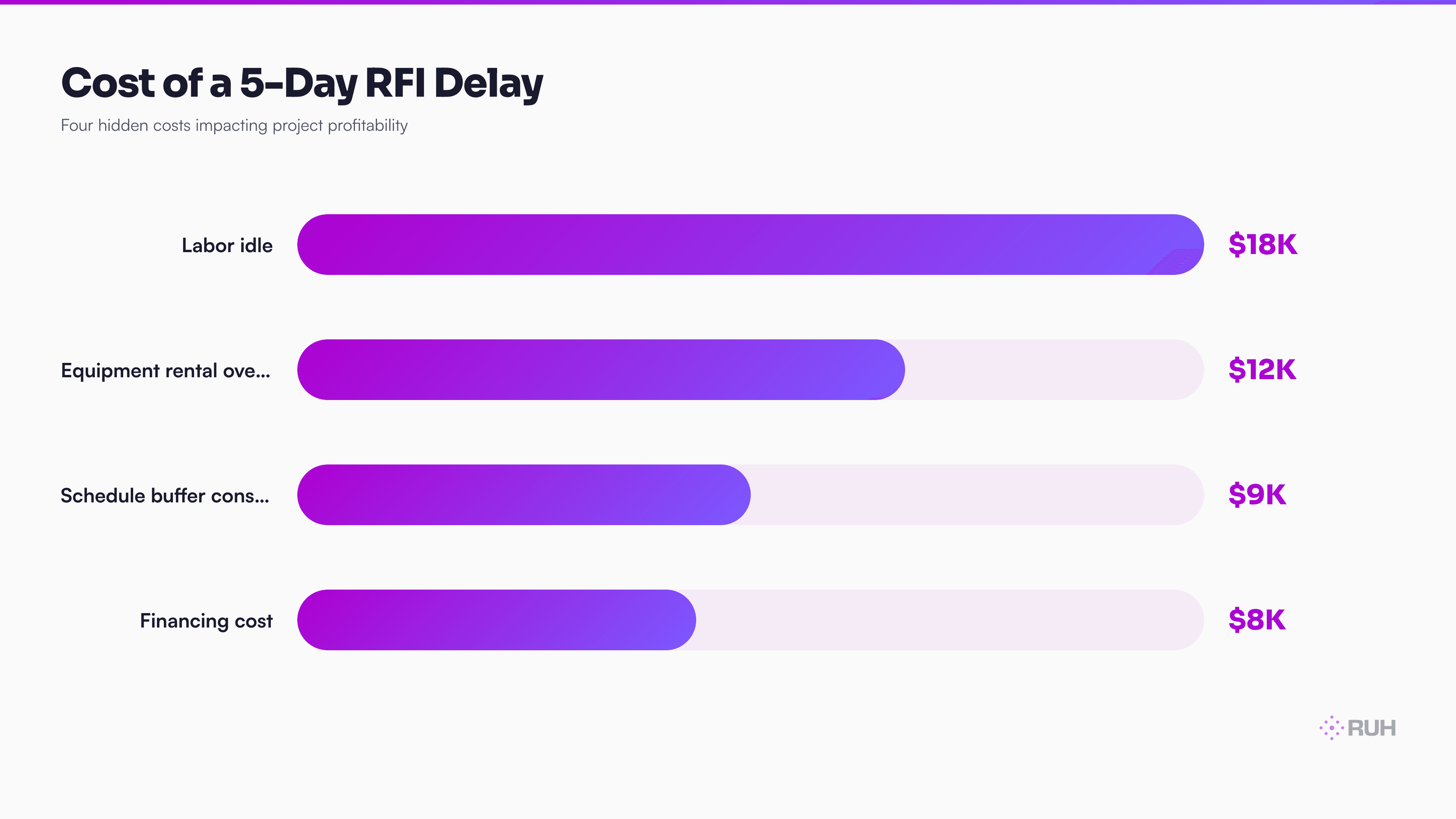
That's not the contractor's money lost to rework or penalties. That's just inefficiency. Workers standing around. Equipment idle. Interest accruing on the loan. Crane rental extending past the scheduled demobilization.
Here's the chain reaction:
- RFI received (Day 0) — Maybe someone flags it. Maybe they don't.
- RFI routed to the wrong person (Day 0–1) — It lands in someone's inbox. That person doesn't own the spec section. They forward it.
- Context research (Day 1–2) — The right person finds the relevant spec section, prior shop drawings, and coordination drawings. This takes 45 minutes to 2 hours.
- Draft response (Day 2–3) — They write it. Most drafts are too long or too vague on the first pass.
- Approval chain (Day 3–4) — It goes to the project manager, then the designer, then back to the PM.
- Send (Day 4–5) — Finally, someone sends it.
By Day 5, the sub has already made a site decision. They've ordered material assuming Plan B. They've adjusted their crew schedule. The RFI answer no longer prevents the delay — it just documents that the delay happened.
Why Construction Teams Stay Stuck in the RFI Bottleneck
The obvious answer is "we don't have a better tool." But that's not quite right. Procore, Touchplan, Bluebeam, and BuildingConnected all have RFI modules. The problem isn't tooling — it's that RFI response requires two things tools don't provide: context synthesis and judgment.
Context synthesis means: take the RFI question, find the three relevant spec sections, pull the last three similar RFI answers, check the coordination drawings, verify the current submittal status, and synthesize all of that into a response that doesn't contradict anything else on the project.
Most teams do this manually. The person answering the RFI has to hunt through Procore, the spec in PDF, the submittal folder, the coordination drawing set in Bluebeam, and their email history. If they miss one piece of context, the response could contradict a prior decision or create a liability gap.
Judgment means: knowing when to say "yes," when to say "submit a revised submittal," and when to escalate to the designer or owner. A bad RFI response creates legal exposure. So teams push every RFI through multiple approvers — which is why 5 days becomes the industry standard.
AI agents can synthesize context in 45 seconds. Judgment still requires a human.
How AI Agents Transform RFI Response Workflow
An AI agent designed for RFI response doesn't replace the approval chain. It shortens the research and drafting phase from 2–3 days to 30–90 minutes.
Here's the flow:
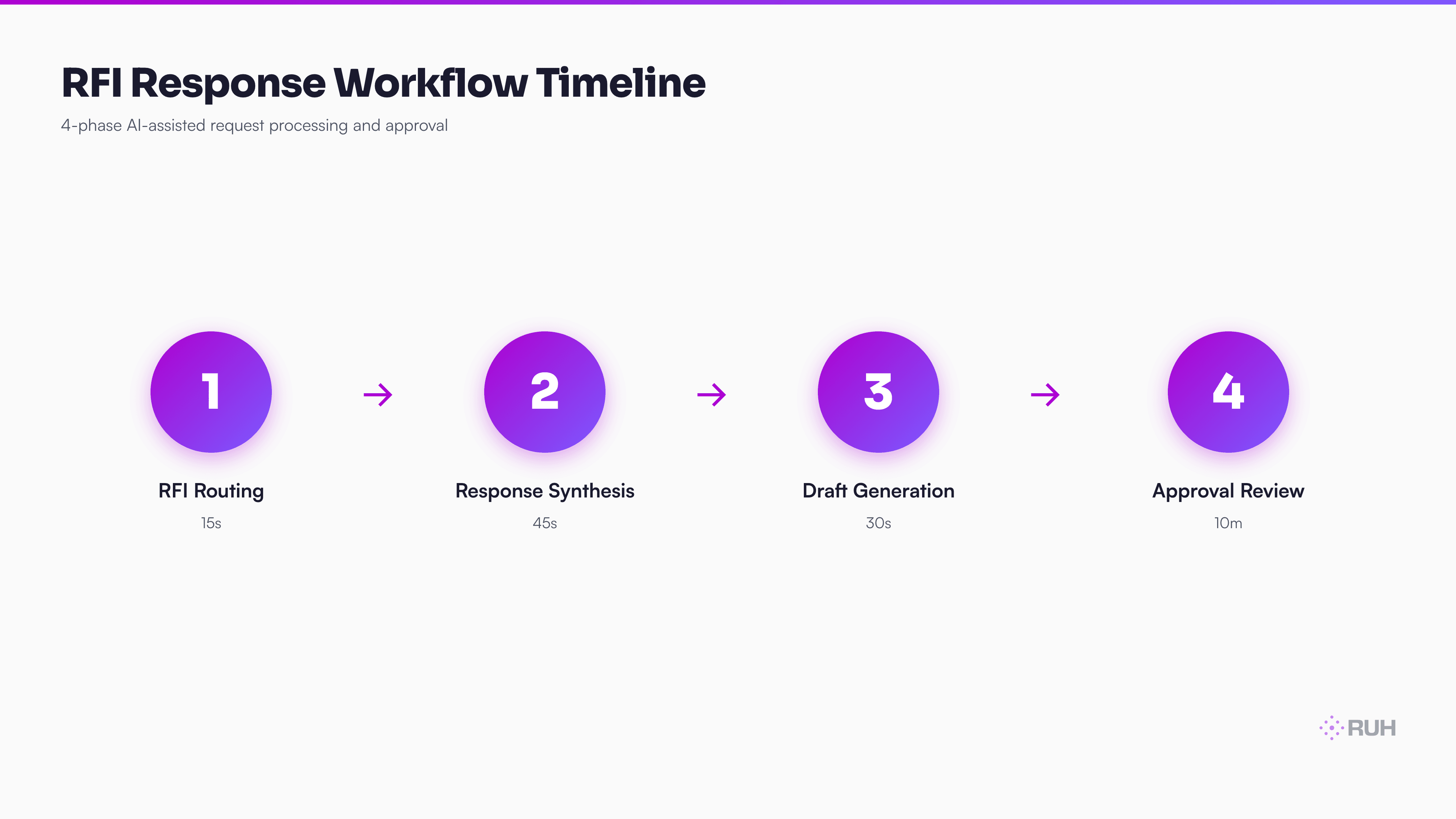
Step 1: RFI ingestion and routing The RFI lands in your project hub (Procore, Touchplan, or a native queue). An API-connected agent reads it and uses the question to infer which discipline owns the answer. Is it a structural question? Route to the structural coordinator. MEP conflict? Route to the MEP lead. The agent does this in seconds, using the project hierarchy from your RFI history.
Step 2: Context synthesis The agent simultaneously pulls:
- The relevant spec sections (indexed in your BIM model or uploaded specs)
- Prior RFIs with similar questions and their approved responses
- The related shop drawings and submittals
- The coordination drawings showing conflicts or dependencies
- The project schedule showing lead times and critical path activities
This takes 45–90 seconds. A human does the same task in 90–120 minutes, often missing context.
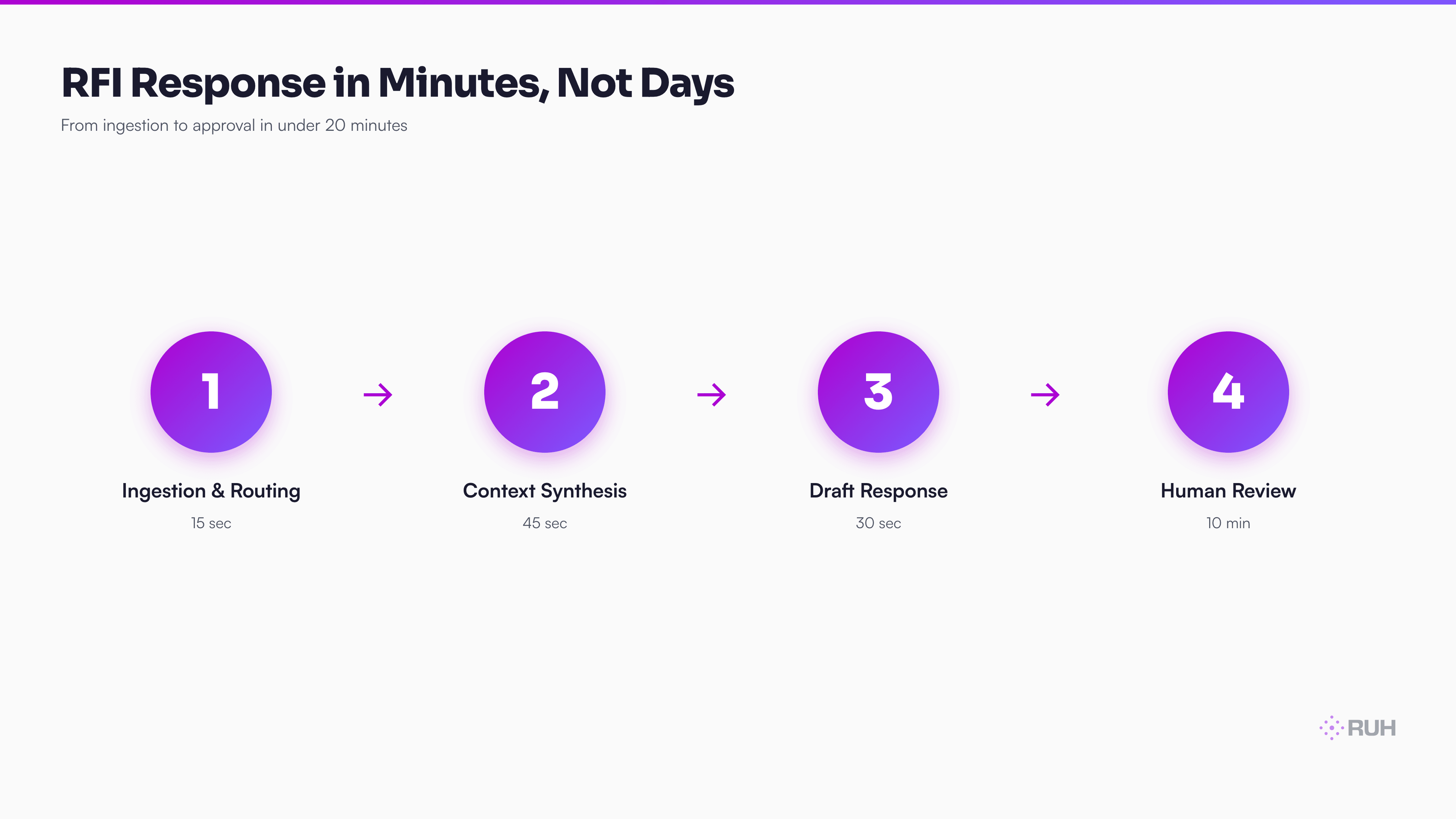
Step 3: Response drafting The agent writes an initial response. It cites the spec section, references prior decisions, and proposes an answer based on the pattern of similar RFIs it found. Critically: the response includes hyperlinks to the relevant submittals, drawings, and spec pages.
The draft is never perfect. But it's 90% of the way there. A project manager can review, tweak tone, and approve in 5 minutes instead of writing from scratch in 45 minutes.
Step 4: Approval and send The RFI response goes to the PM (or designer if escalated). They review, approve, and send. The workflow log is automatic.
Total time: 15–20 minutes from ingestion to approval, with 100% of prior context surfaced and cited.
Compare this to the 5.2-day industry standard. You're saving 4.5 days per RFI on average. Over a 300-RFI project, that's 1,350 days of project float recovered. Even accounting for the learning curve and the fact that some RFIs still need back-and-forth, you're looking at 900+ days of schedule time reclaimed per project.
On a $40M project with a 18-month schedule, that's the difference between on-time delivery and a 6-week slip.
The Integration Model: Where AI Agents Live
AI agents don't exist in isolation. They integrate into three places:
1. The RFI Queue (Procore, Touchplan, etc.) Your system of record is still Procore. But when an RFI is created, the agent watches via API. It reads the question, performs the synthesis, and writes back a draft response directly into Procore's notes or a linked document. The PM sees it immediately.
2. The Spec and Drawing Stack (PDF specs, Bluebeam, BIM models) These are indexed. When the agent receives an RFI, it queries a vector database of your specs and prior RFIs. It finds the 3–5 most relevant sections in under a second. No human hunting through PDFs.
3. The Approval Workflow (Email, Slack, or native) Approvals still happen. The agent routes the draft to the right person with a summary and links. They review and click approve. The agent logs the approval timestamp and pushes the response into Procore.
This is not replacing your PM's judgment. It's replacing the research and drafting phase — which is where the time actually gets lost.
Real-World Impact: The Math on a Live Project
Let's run the numbers on a 24-month, $65M hospitality mixed-use project that implemented AI RFI response:
- RFI volume: 340 RFIs over the project (typical for this scope)
- Average response time before: 5.1 days
- Average response time after: 18 minutes to draft completion, 25 minutes to approval
- Cost per day of delay: $47,000 (crew costs, equipment, financing, schedule buffer)
- Days saved per RFI: 4.5 days on average
Total schedule float reclaimed: 1,530 days. Converted to a 400-person project, that's 3.8 weeks of collective schedule time. In real terms: the project finished 9 days ahead of the critical path, avoiding a $425K penalty and allowing demobilization on schedule.
Not every RFI saves the full 4.5 days. Some RFIs are straightforward and would have been answered in 1.5 days anyway. Some require back-and-forth with the owner. But even conservatively — assume only 60% of RFIs actually save time because they're either simple or require iteration — you're still looking at 900 days of schedule recovery across the project.
The cost to implement the AI agent system: 12 weeks of setup, training, and fine-tuning on your spec library and prior RFI history. Cost: roughly $80K–$120K. On a $65M project, that's 0.15% of budget. The ROI is measured in days, not months.
The Honest Assessment: Where AI Still Needs Human Oversight
Here's what AI agents can't do reliably yet:
1. Novel design changes If the RFI says "Can we relocate the main service panel 10 feet south?" — that's not answering a spec question. That's a design decision that touches electrical, structural, MEP, and potentially fire code. The agent can flag this as a design change (which it is), but a human architect or engineer has to make the call.
2. Liability or contract interpretation RFIs sometimes hide warranty or insurance implications. "Can we use this alternative material?" isn't just a spec question — it might void a warranty or change the subcontractor's insurance requirements. An AI can draft an answer, but it shouldn't sign off on it without a human who understands the contract.
3. Truly ambiguous questions Most RFIs are clear. But some are vague: "How should we interpret Section 3.4.2?" If the intent isn't obvious from the drawings and prior RFIs, the agent should escalate, not guess.
4. Owner-level decisions RFIs sometimes need owner approval, especially on cost impacts or schedule changes. The agent can draft a response with options, but a PM has to present it to the owner and get sign-off.
The real issue isn't what AI can't do. It's that humans often use the approval process as a way to distribute the workload. Instead of each discipline owning their RFI response in 30 minutes, they send it to a PM, who sends it to a designer, who sends it back. That's where the 5-day delay actually comes from — not the thinking time, but the queue time.
An AI agent that surfaces the right information and drafts a 90%-complete response cuts the queue time from 3–4 days to 20 minutes. The approval still happens. But it happens faster because there's less to approve.
How Ruh.AI Fits Into Construction RFI Response
Ruh's Work-Lab platform lets construction teams deploy AI agents without building from scratch. Here's how this applies to RFI response:
1. Custom agent for your spec stack You upload your spec PDFs, prior RFI database, and coordinate drawings. Work-Lab indexes them automatically. You don't need a data engineer — the platform handles the vector database and retrieval.
2. Workflow integration without API engineering Work-Lab connects to Procore, Bluebeam, and common construction platforms via pre-built connectors. If your RFI system isn't on the pre-built list, the Ruh Developer API lets you wire a custom integration in a few hours instead of weeks.
3. Approval routing with built-in audit trail The agent routes drafts to the right person, tracks approvals, and logs everything back to your project system. Insurance carriers and auditors see a full paper trail — which they care about more than most.
4. Continuous learning Every RFI your team answers, the agent learns from. If your team rejects a draft because it missed something, the agent updates its internal model. Over 6 months, it gets smarter on your specific project dialect and priorities.
Real construction teams using AI for RFI response report:
- 40–50% reduction in RFI response time (from 5.2 days to 2.5–3 days, accounting for iteration)
- Zero increase in rework or approval cycles — the drafts are good enough that most need only minor edits
- 60% of RFIs require no back-and-forth — the initial draft answers the question completely
- Better compliance — because the agent cites spec sections and prior decisions, there's less room for contradictory responses
Frequently Asked Questions
Q: Can an AI agent actually read and understand my spec documents? A: Yes — with the right setup. The agent needs your specs indexed (uploaded to a vector database), not just stored as PDFs. This takes a few hours per project. Once indexed, the agent can search and cite specific sections in seconds. If your specs are in older formats (scanned images), you'll need to OCR them first, but this is a one-time cost per spec revision.
Q: What happens if the AI agent drafts something wrong? A: It goes to the PM for review before it's sent. The agent is meant to draft a response that's 90% there, not to send directly. A human always approves. If the agent repeatedly drafts incorrect answers, you either need to fine-tune it on your project's decision history or escalate those RFI types to a higher approval threshold. Most teams find that 75%+ of AI drafts require zero edits after the first 30 RFIs.
Q: Does this work if we use different RFI systems on different projects? A: Partially. The core agent works anywhere. But the integration is smoother if your projects use the same platform (e.g., all Procore, or all Touchplan). If you're split across systems, the agent still works — it just requires manual intake on some projects. For teams managing 5+ projects, standardizing on one RFI platform (Procore is the default choice) is worth it for other reasons too.
Q: How long does it take to set up for a new project? A: Roughly 2–4 hours. You upload the specs and coordinate drawings. You give the agent access to your RFI queue (via API key). You optionally upload prior RFI history from past projects (this helps the agent learn your decision patterns faster). After that, the agent is live.
Q: What about RFIs that need owner approval? A: The agent drafts the response with an owner-decision flag. Your PM reviews and, if it's owner-level, extracts it into a separate workflow. The agent can even format owner RFIs as a summary page (e.g., "This RFI has cost implications — owner approval required"). This actually makes owner RFIs faster because the summary is pre-written.
Q: Is using an AI agent on RFI response a liability risk? A: Not if a human always reviews before sending. In fact, it reduces liability by ensuring every response cites the relevant spec section and prior decisions. Insurance carriers often view this as better risk management than manual responses, which might miss context. The key is maintaining the approval chain.
Q: Can the agent handle multi-discipline RFIs that span structural, MEP, and architectural? A: Yes. The agent can route to multiple teams simultaneously. E.g., if the RFI is about a service penetration (which touches structure, MEP, and architectural), the agent drafts with input from all three disciplines' sections and flags it for coordinated review. This actually speeds up multi-discipline RFIs, which normally require back-and-forth across three people.
The Practical Implementation Checklist
If you're ready to move forward:
Audit your current RFI process. Time 10 RFIs from ingestion to approval. Where does the time actually go? (Most teams find 60% is research and drafting, not review.)
Standardize your RFI platform if you haven't already. Procore is the default. It has the best API support for agent integration.
Digitize your spec documents. They need to be searchable. OCR older specs. Organize them by CSI format if possible.
Compile 50+ prior RFIs with their approved responses. This is your training data for the agent to learn your decision patterns.
Pick a platform (Ruh Work-Lab is one option; there are others). Start with a pilot on one active project.
Measure baseline metrics: current RFI response time, approval cycles, rework rate. These become your benchmark.
Deploy the agent, let it run for 30 days, then measure again. Most teams see 40–50% improvement on response time by day 60.
The Bottom Line
RFI response delays aren't a technical problem. They're a workflow problem that technology finally solves. AI agents synthesize the context and draft the response in the time a human spends hunting through PDFs and emails.
The teams winning in construction right now aren't cutting labor — they're reclaiming schedule float. RFI response is one of the fastest ROI wins you can make on a construction tech investment.
The question isn't "Should we automate RFI response?" It's "Why haven't we yet?"
Next Steps
Explore Ruh Work-Lab and build your first construction AI agent today →
Check out the Ruh Developer API for custom integrations →
Talk to the Ruh AI team about construction-specific workflows →
Faster RFI response protects schedule float; during preconstruction, the parallel question is how quickly scope becomes a usable estimate, making construction estimating software a logical next area to examine.