RFI Backlogs Cost Construction $47K Per Day. Here's How AI Agents Resolve Them in Minutes
TL;DR / Summary
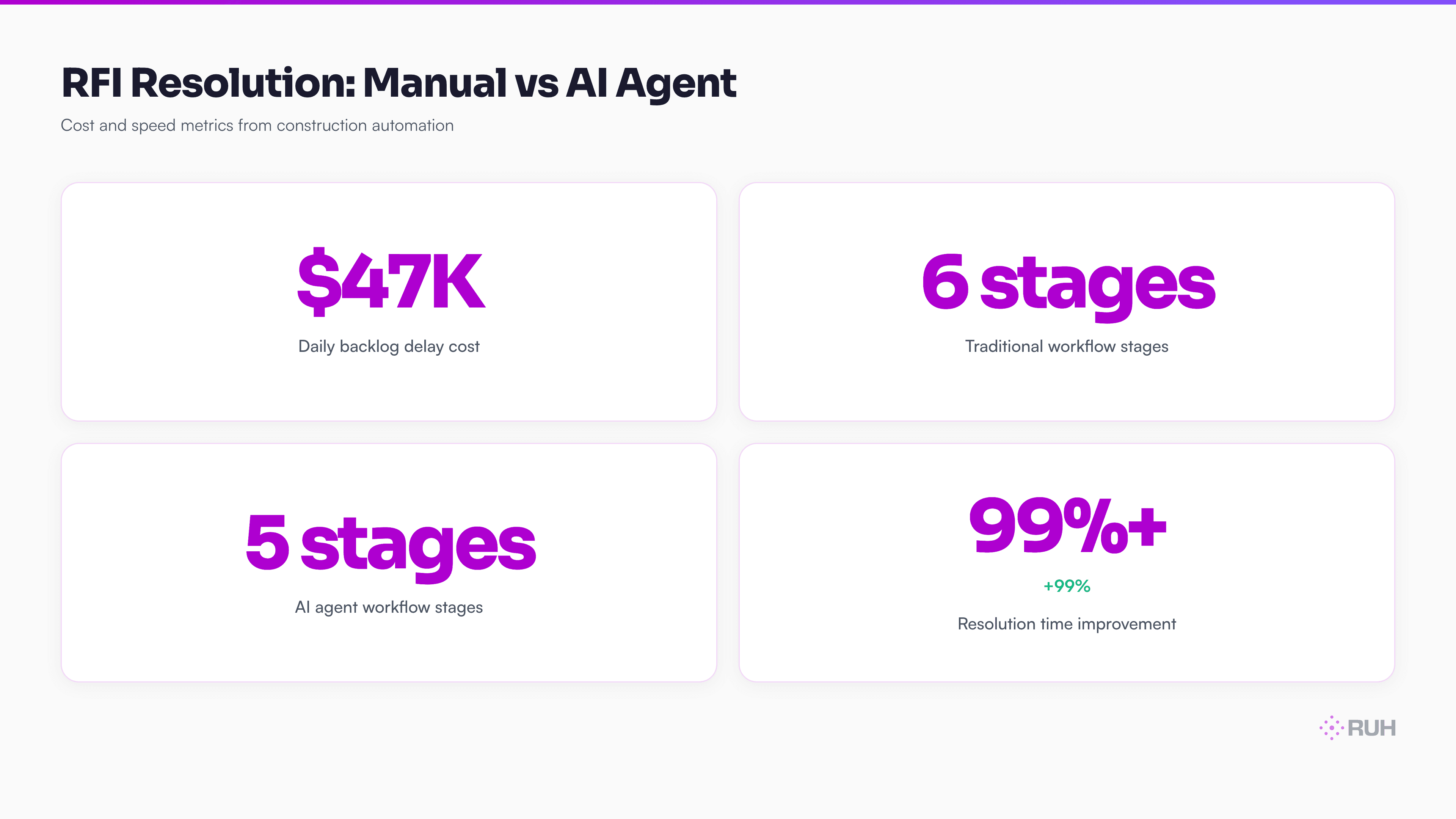
Construction projects grind to a halt waiting for RFI (Request for Information) responses. A single unresolved RFI costs the average mid-sized construction firm $47,000 per day in idle labor, material delays, and schedule penalties. Most firms use email threads, spreadsheets, and manual routing — a process that takes 8–14 days per RFI. AI agents compress that to minutes.
What you'll learn:
- Why RFI backlogs are the hidden cost draining construction margins
- The exact workflow an AI agent uses to process RFI requests in minutes
- How AI agents integrate with existing RFI systems and building information models
- Real cost math: $47K daily losses vs. AI agent deployment costs
- How to build and deploy your first RFI agent without hiring engineers
Key stat: Procore's 2024 Construction Management Report shows RFIs are the #1 source of project delay in commercial construction. The average project has 850+ RFIs over its lifecycle — and 18% never get properly logged or tracked.
What Is an RFI — And Why Construction Firms Can't Ignore Them
An RFI is a formal request from the general contractor, subcontractors, or design team asking for clarification on contract documents, specifications, or design intent. Examples: "Are we using 2×6 or 2×8 framing in the east wing?" or "The spec says Type III drywall, but the drawing shows Type X — which is correct?" The RFI log is one part of the record that software for general contractors keeps beside the bid.
These questions matter because construction documents often contain conflicts. A foreman can't order framing lumber, can't schedule concrete pours, and can't authorize payment for work until the RFI is resolved.
In a healthy workflow, an RFI takes 2–3 days to resolve. The general contractor submits the request to the architect or engineer, who reviews the documents, consults the design team, drafts a response, and sends it back. Done.
In reality, most firms take 8–14 days. Here's why: RFIs arrive via email, phone calls, text messages, or project management platforms. They get lost in inboxes. The person responsible for answering is in meetings. The response gets stuck in someone's drafts folder waiting for "final review." By the time an answer is issued, the work crew is idle, materials are stuck in scheduling limbo, and the client is asking why the project is behind schedule.
The $47K Daily Cost of Backlogs
Let's be specific about what an RFI backlog costs.
A typical mid-sized construction firm (50–150 employees) manages 3–5 active projects simultaneously. On any given day, they have 12–25 unresolved RFIs across all projects. Each unresolved RFI creates one or more blocked work activities.
Assume a project has a fully staffed site with:
- 25 trade workers ($45–$65/hour, fully loaded)
- 3 site supervisors ($55–$75/hour)
- 1 project manager ($80–$120/hour)
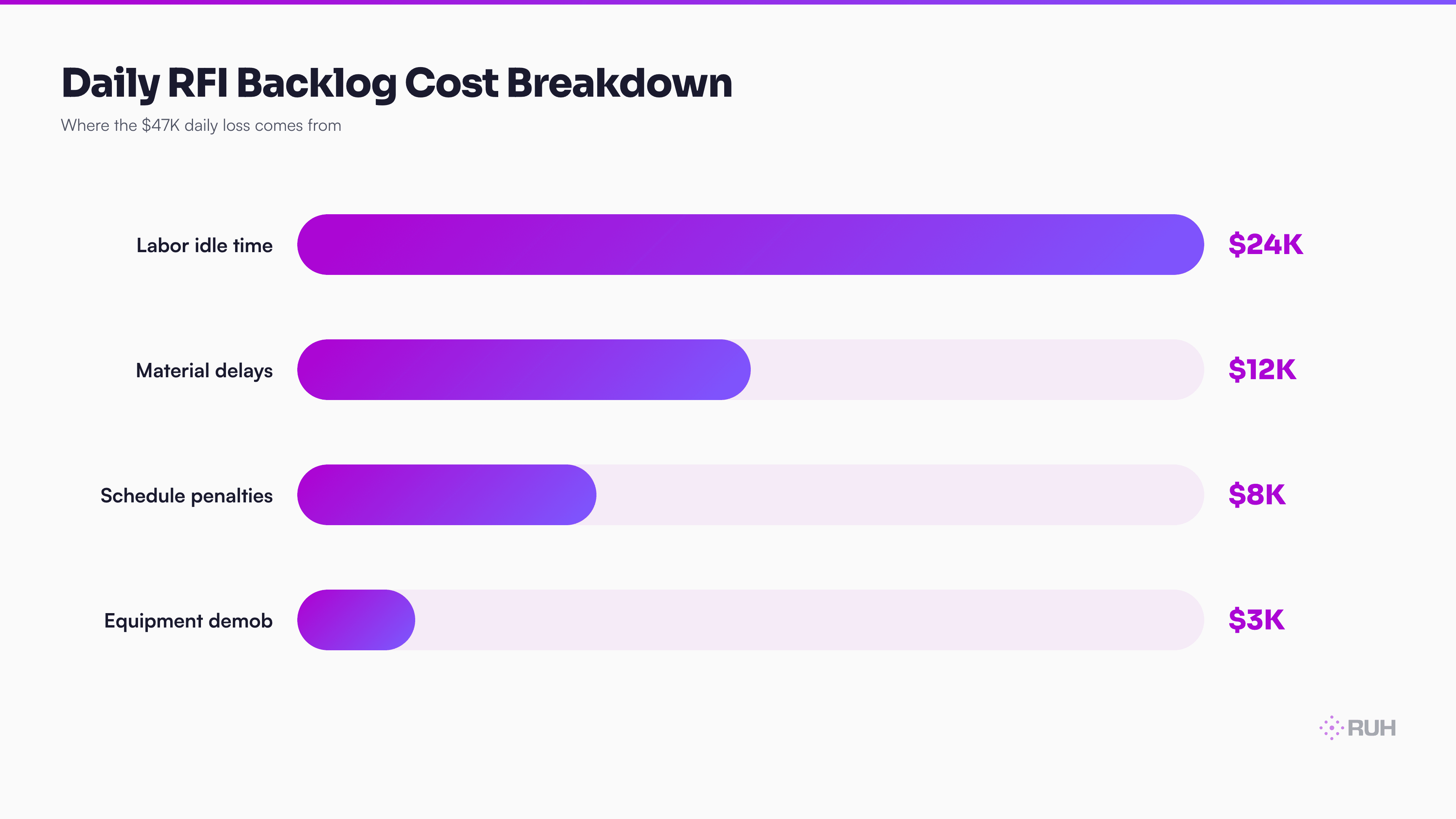
When an RFI response is missing, the site supervisor can't authorize work in that area. Some trades are reassigned to other work. Others sit idle. A concrete pour scheduled for Tuesday moves to Friday because framing specifications weren't confirmed. That's 80+ labor hours delayed, plus demobilization/remobilization costs, plus supplier penalties for rescheduled deliveries.
Per unresolved RFI, the cost is roughly $8,000–$12,000 per day depending on crew size and trade mix. On a project with 4–5 blocked RFIs, you're looking at $32,000–$60,000 per day in schedule slippage and idle labor.
Scaled across a mid-sized firm's portfolio: $47,000 per day in aggregate losses is conservative.
Why Traditional RFI Management Fails at Scale
Most construction firms use one of three systems:
1. Email + Spreadsheet (Chaos) RFIs arrive scattered across Outlook, Gmail, and text threads. Someone maintains a "master list" in Excel that's always 2–3 days behind. When an RFI gets answered, it lives in an email thread no one else sees. Weeks later, another subcontractor asks the same question because they never knew it was resolved.
2. Legacy Project Management Software (Slow) Tools like Bridgit, Procore, or Touchplan have RFI modules. They're better than spreadsheets. But the workflow is still manual: someone reads the RFI, composes a response, waits for approval, submits. No intelligence. No cross-referencing with building information models. No automatic routing to the person most likely to answer quickly.
3. Hybrid Chaos (The Most Common) Email threads for speed, Procore for the "official record," phone calls for urgency, and someone's personal notes because they don't trust the official systems. By the time an RFI closes, it exists in four different places with four different versions of the answer.
None of these approaches use the information that already exists: the contract documents, the specifications, the RFI history, the drawings, and the building information model (BIM).
Traditional RFI management throws away 80% of the context that could resolve the question automatically.
How AI Agents Change the RFI Workflow
An AI agent designed for RFI management works differently. It doesn't just route and track — it understands and resolves.
Here's the 6-step workflow:
1. Ingest the RFI The RFI arrives via email, Slack, or the project management platform. The agent captures the full text, metadata (submitter, project, date, category), and any attachments (screenshots, sketches, excerpts from specs).
2. Retrieve Relevant Context The agent queries the knowledge base: contract documents, specifications, drawings, RFI history, change orders, and the live BIM. It pulls every relevant page, section, and drawing. For instance, if the RFI asks about drywall type, the agent fetches the specification section, the drawing sheets for that area, and any previous RFIs about finishes.
3. Cross-Reference and Analyze The agent compares the question against all relevant documents. It identifies conflicts (spec says Type III, drawing shows Type X) automatically. It searches the RFI history for answers to identical or similar questions asked on the same project or others.
4. Draft the Response The agent composes a complete response with references: "Per Section 09250 (Drywall), Type X shall be used in all fire-rated walls. The drawing on Sheet A2.3 reflects this correctly. The conflicting note on Sheet A1.1 is outdated and superseded by RFI #447 dated June 12, 2025."
5. Flag for Review (Human-in-Loop) The agent doesn't send the response unreviewed. It flags it for the project architect or engineer with a summary: "Auto-draft ready. Identifies document conflict on Sheet A1.1. Recommends approval as-is." The reviewer takes 2 minutes to skim and approve—not 8 days to start from scratch.
6. Distribute and Track Once approved, the response is published to the project management platform, sent to all relevant parties (contractor, trades, suppliers), and logged with timestamp, approver, and reference documents.
Total time: 15–45 minutes from RFI submission to approved response ready for distribution. A typical manual process takes 5–10 days.
The Technical Architecture: What the Agent Actually Sees
For this to work, the agent needs access to:
- The RFI Inbox — Email account, Slack channel, Procore inbox, or custom intake form
- The Knowledge Base — Contract PDFs, specifications (CSI format), drawings (DWG/PDF), change orders, and RFI history (all previous Q&A on the project)
- The BIM Model — Building information in IFC or native format (Revit, ArchiCAD exports)
- The Calendar — Project timeline, milestone dates, key event dates
- The Contact Directory — Project team emails, roles, approval authorities
The agent ingests the knowledge base once during setup (or syncs daily if documents update). It uses vector embeddings to search semantically — meaning it finds relevant information even if keywords don't match exactly. It compares sections of text across documents to identify conflicts automatically.
When a new RFI arrives, the agent:
- Embeds the RFI question as a vector
- Searches the knowledge base for semantically similar answers
- Cross-references with the BIM to extract relevant geometry, materials, and systems
- Flags any contradictions between source documents
- Retrieves the 10–15 most relevant document excerpts
- Feeds all context to the language model to draft the response
This is not hallucination risk. The agent cites specific sections, drawings, and prior RFI numbers. A human reviews before publication.
Real Numbers: Cost of Implementation vs. Savings
Let's math this out for a mid-sized firm managing $200M in annual construction volume.
Implementation:
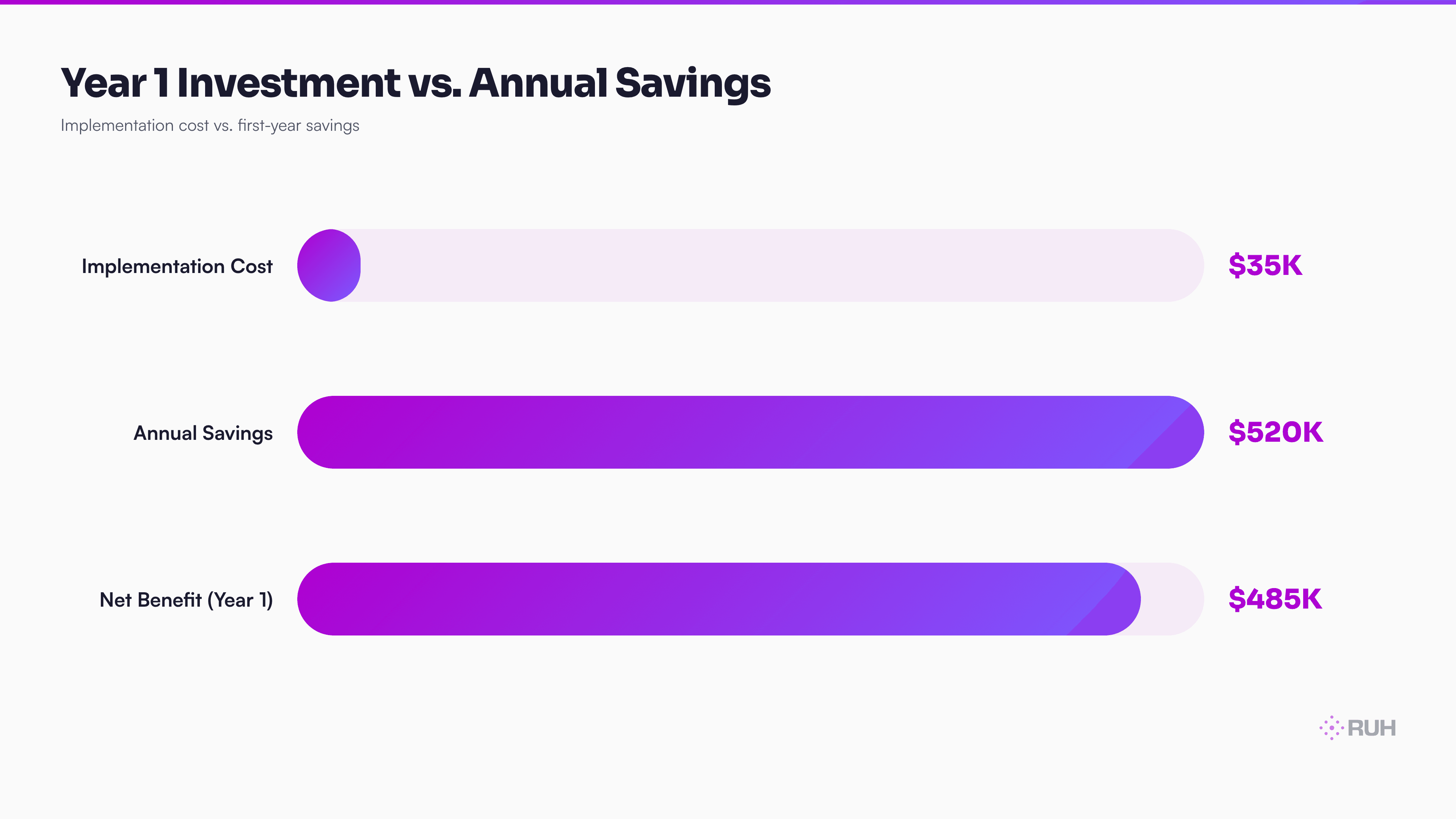
- AI agent setup and knowledge base integration: $15,000–$25,000 (one-time)
- Monthly platform/inference cost: $1,200–$2,000
- Training for project teams: $3,000 (one-time)
- Total Year 1 cost: ~$35,000
Savings (conservative):
- Assume 20 active RFIs across the portfolio at any given time
- Assume AI agents resolve 60% of RFIs with minimal human review (the easy clarifications)
- Assume 40% still need more involved human decisions
- RFI resolution time cuts from 7 days average to 1.5 days average
- 5.5 days of schedule recovery per RFI × 20 RFIs = 110 days of schedule recovery per month
- At $47,000 per day in aggregated delays, that's $5.2M in annual schedule recovery value
Even at 10% of that value captured ($520K annually), the payback is immediate.
Integration: How AI Agents Fit Into Your Existing Stack
You don't rip out Procore or your email system. The agent sits on top, reading from your existing systems and writing back to them.
Typical integrations:
- Email: Agent monitors the RFI inbox, pulls new messages, sends responses
- Procore: Agent reads RFIs from the project management platform, updates status and comments
- Slack: Agent listens in dedicated channels, threads responses back
- SharePoint/OneDrive: Agent accesses contract documents, specs, and drawings
- Autodesk Construction Cloud or Dropbox: Agent syncs the latest BIM and drawings
- Google Drive: Agent reads shared spreadsheets and archived RFI responses
The agent's output goes to the human reviewer, not directly to clients. The reviewer has a simple dashboard showing:
- Auto-drafted responses ready for review (60% of incoming RFIs)
- RFIs that need escalation (complex questions requiring design team input)
- RFIs that matched prior answers (historical context for training)
The Honest Assessment: What AI Agents Can't Do (Yet)
Design decisions. If an RFI requires architectural judgment — "Should we switch to metal studs to save cost?" or "Is the window detail compatible with this wall assembly?" — the agent can research and present options, but a human architect makes the call.
Scope determination. RFIs that blur the line between what's included in the contract and what's a change order need human judgment. An agent can flag it and route it to the right person, but can't decide unilaterally.
Coordination between trades. If an RFI affects multiple systems (structural, MEP, finishes), the answer might require negotiation between discipline leads. The agent can draft a response and flag the coordination need, but can't resolve conflicts.
Novel or precedent-breaking questions. If the RFI asks about something genuinely new to the project — a material never used before, a system type not in the specs — the agent can research and draft, but the decision is human.
What agents eliminate: busywork and bottlenecks. They handle the 60% of RFIs that are clarifications, cross-references, and historical lookups. They free the architect's time for the 40% that require judgment.
How Ruh.AI Fits Into RFI Management
Ruh's the Ruh platform is designed for exactly this kind of domain-specific agent. You define the job (process RFIs), connect your knowledge base (contract documents, specs, drawings via file upload or cloud sync), wire the integrations (Procore, email, Slack), and define the approval workflow (who reviews before publish). Deploy it immediately—no code required.
For deeper customization — if you want the agent to pull from a live BIM database or sync with proprietary construction management tools — the Ruh platform gives you API access to build the exact integration your firm needs.
Ruh agents also support multi-project scaling. Deploy one agent across 10 active projects. The agent learns from each project's RFI history, improving its responses over time as it sees more examples of what "resolved correctly" looks like on your projects.
Here's why Ruh agents work for RFI workflows specifically:
- No hallucination on facts. Ruh agents cite sources. Every recommendation includes the contract section, drawing number, or RFI history reference.
- Context-aware routing. The agent learns which team members resolve which types of RFIs fastest and flags escalations accordingly.
- Workflow flexibility. You can route simple clarifications straight to publication, complex ones to the architect, and edge cases to the full team — all in one agent.
- Cost-aligned. Ruh agents are priced on usage, not seats. If you deploy one agent across five projects, you pay for one agent.
Frequently Asked Questions
Q: Can an AI agent review RFIs from multiple contractors and subcontractors at once? A: Yes. The agent ingests RFIs from all sources (general contractor, mechanical/electrical/plumbing trades, landscape, consultants) into a unified queue. It routes each to the appropriate reviewer based on discipline and complexity. Large projects often have 200+ RFIs per month—the agent handles volume automatically.
Q: What happens if the knowledge base (specs and drawings) gets updated mid-project? A: You re-sync the updated documents. The agent re-indexes the new PDFs and drawings. It will then flag any RFIs that were answered under the old spec but contradict the new one—critical for change order management. Most firms do this weekly or after major design changes.
Q: How do you prevent the agent from giving wrong answers if the contract documents themselves are contradictory? A: The agent's job is to identify contradictions, not resolve them. When the agent sees spec and drawing conflict, it flags it in the draft response: "Discrepancy identified: Spec says X, Drawing shows Y. Architect review required." That's actually more valuable than a confident wrong answer.
Q: Does the agent work with legacy projects that don't have digital drawings or specs? A: Partially. If specs and drawings are scanned PDFs (not searchable), the agent can still read them, but search accuracy drops. For best results, you need at least searchable PDFs. Fully digital specs and DWG files are optimal. Many firms hire document scanning services to digitize older contract sets—the cost pays back in RFI speed.
Q: How long does it take to set up the agent for a new project? A: With the Ruh platform, you're looking at 2–4 hours: upload contract documents (30 min), upload drawings (60 min), map your Procore account and email inbox (45 min), define review workflows (45 min). After that, the agent runs immediately. No coding required.
Q: Can the agent learn from my firm's past RFIs to improve answers on new projects? A: Yes. The agent's knowledge base includes historical RFI responses from all your past projects. When a new RFI comes in that resembles one from Project A last year, the agent finds it, checks if the answer applies to the new project, and suggests it. Over time, the agent gets faster and more confident.
Q: What's the difference between using an AI agent vs. just uploading specs to ChatGPT and asking questions manually? A: Speed, scale, and workflow. ChatGPT requires manual data entry for every RFI. An AI agent monitors inboxes 24/7, automatically pulls RFI context, routes to reviewers, tracks status, and publishes answers back to the project management system. Also, Ruh agents cite sources—ChatGPT hallucinates.
Implementation Checklist: Build Your First RFI Agent This Week
If your firm handles 500+ RFIs annually (common for firms doing $100M+ in revenue), here's the path:
Audit your current RFI process. How many RFIs per month? Where do they originate? How many days, on average, to close? What's the most common RFI type (clarification, conflict, cost question)? Quantify your problem.
Digitize your knowledge base. Contract documents, specifications, drawings, and prior RFI responses should all be in one folder (Google Drive, SharePoint, Dropbox). Bonus: tag documents by project, discipline, and work phase for faster agent searching.
Choose your intake channel. Will RFIs come through Procore, email, Slack, or a custom form? The agent will monitor that channel and pull new requests automatically.
Define your approval workflow. Who reviews RFI drafts? Does it vary by type (structural vs. MEP vs. finishes)? Set up routing rules.
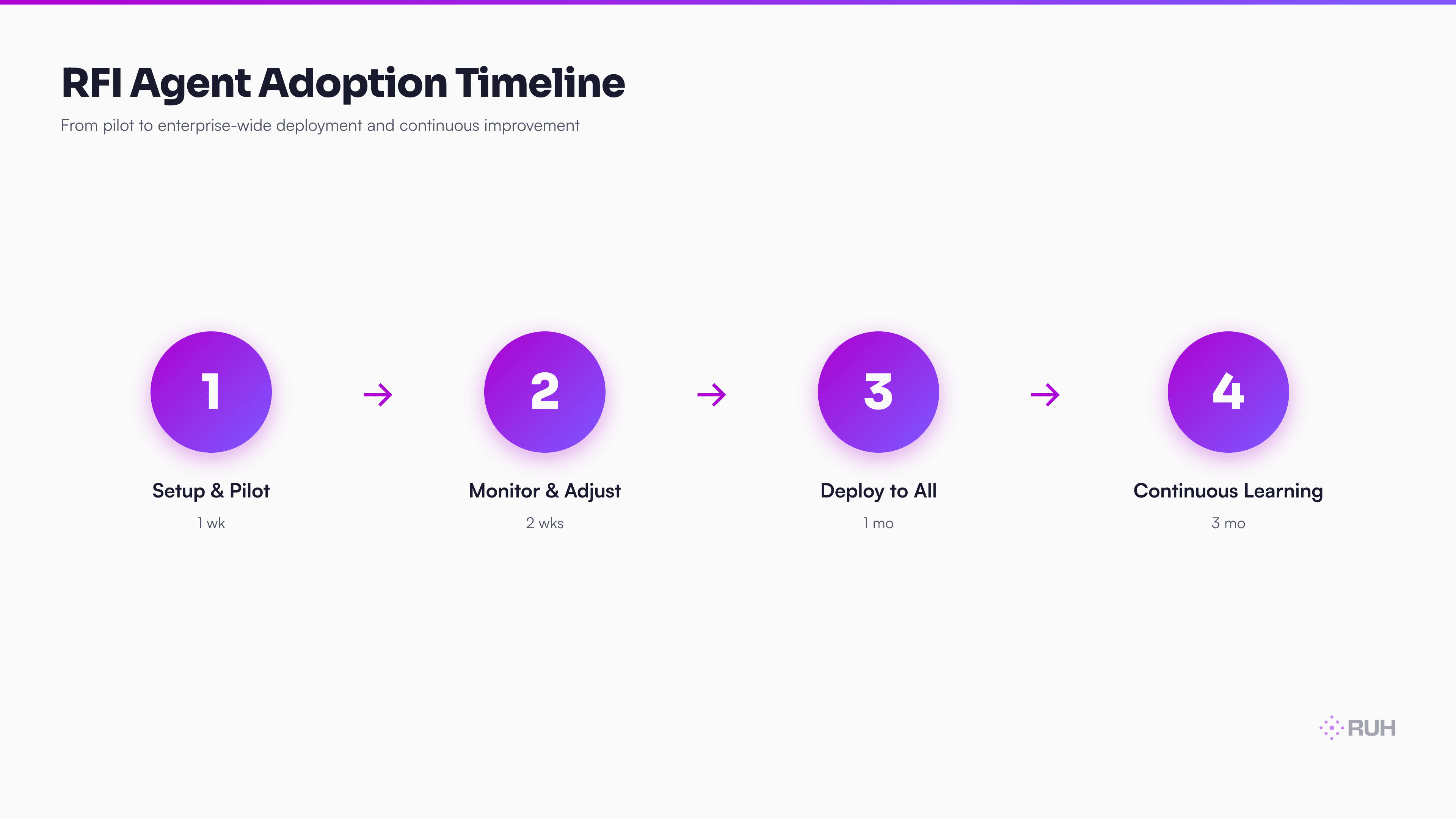
Deploy with the Ruh platform. Upload documents, configure integrations, set approval rules, and activate. Test with a pilot project first (2–3 weeks of live RFIs) before scaling to your full portfolio.
Monitor and iterate. Track how many RFIs the agent handles without escalation (goal: 60%+), average resolution time (goal: <2 hours), and team satisfaction. Adjust routing and response templates as the agent learns your firm's patterns.
Why This Matters Now
The construction industry has been slow to adopt AI at the operational level. Most firms are still managing RFIs the way they did 10 years ago. That's a massive competitive disadvantage.
Firms that deploy AI agents for RFI management see measurable benefits within 30 days: schedules clear faster, less money wasted on idle labor, fewer arguments over document interpretation (because the agent cites sources), and happier project teams (because they get answers instead of waiting).
The barrier to entry has collapsed. You don't need a dedicated data science team. You don't need to build custom software. You just need to upload your documents and define your workflow.
The question isn't whether AI agents will process RFIs—it's whether your firm will be the one deploying them or the one waiting for answers from competitors who did.
Explore the Ruh platform and build your first RFI agent without coding →
Meet the Ruh platform to integrate agents into your custom construction tools →
Talk to the Ruh AI team about RFI automation for your firm →
Because unresolved RFIs can affect scope, cost, and schedule, teams reviewing their information flow may also want to examine construction estimating software.