TL;DR / Summary
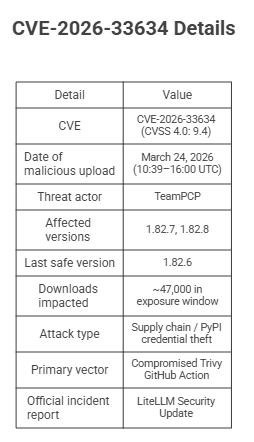
On March 24, 2026, threat actor group TeamPCP uploaded malicious versions of LiteLLM (1.82.7 and 1.82.8) directly to PyPI. They achieved this by first compromising Trivy — the very security scanner LiteLLM used to protect itself — and stealing the project's PyPI publishing token from its CI/CD pipeline. The malware stole SSH keys, cloud credentials, AI API keys, Kubernetes secrets, and cryptocurrency wallets from every affected machine. The last safe version is 1.82.6. This incident has been assigned CVE-2026-33634 with a near-maximum CVSS 4.0 score of 9.4.
Ready to see how it all works? Here’s a breakdown of the key elements:
What Is LiteLLM and Why Did Hackers Target It?
LiteLLM Supply Chain Attack at a Glance
How LiteLLM Was Hacked: The Full Attack Chain Explained
How the LiteLLM Malware Works: A Technical Breakdown
How Much Harm Did the LiteLLM Hack Cause?
The Broader TeamPCP Campaign: LiteLLM Was Not the First Target
How to Check If You Were Affected by the LiteLLM Hack
Immediate Steps to Remediate the LiteLLM Supply Chain Compromise
How to Prevent the Next PyPI Supply Chain Attack: Strategic Defences
Key Takeaway: What the LiteLLM Hack Means for AI Infrastructure Security
LiteLLM Hack FAQs: What Developers Need to Know
What Is LiteLLM and Why Did Hackers Target It?
LiteLLM is an open-source Python library that acts as a unified API gateway for AI and LLM providers — OpenAI, Anthropic, Google, Hugging Face, and over a hundred others. Developers use it to route model calls through a single interface, which means it sits directly in the path of some of the most sensitive API keys in an organisation's stack.
With approximately 3.4 million downloads per day (Snyk), LiteLLM is deeply embedded in the AI development ecosystem. Downstream frameworks like DSPy, CrewAI, OpenHands, and Cursor MCP Plugins all pull it as a transitive dependency. That scale — combined with its privileged access to AI credentials — made it exactly the kind of high-value target TeamPCP was hunting. This is precisely why AI platforms that integrate across multiple LLM providers and enterprise tools — like Ruh AI, which connects agents, workflows, and business data end-to-end — must treat supply chain hygiene as a first-class security concern, not an afterthought.
As security researcher Jacob Krell noted, LiteLLM "is the backbone of modern AI infrastructure, acting as a universal proxy for LLM APIs. Its popularity makes it an ideal infection hub" (ReversingLabs).
LiteLLM Supply Chain Attack at a Glance
How LiteLLM Was Hacked: The Full Attack Chain Explained
What makes this breach remarkable is not just its scale — it is the cascade of events leading to it. The attackers never directly touched LiteLLM's source code. The GitHub repository remained clean throughout. Instead, TeamPCP exploited a chain of trusted tools, each one a stepping stone to the next.
Step 1: How Hackers Poisoned the Trivy Security Scanner (The Meta-Attack)
Trivy is a widely-used open-source vulnerability scanner developed by Aqua Security. Thousands of organisations integrate it into GitHub Actions CI/CD pipelines to scan container images and filesystems for known vulnerabilities.
In late February 2026, TeamPCP identified a misconfigured pull_request_target GitHub Actions workflow in the Trivy repository. This trigger, when misconfigured, allows code from untrusted pull requests to access privileged secrets — including Personal Access Tokens — that belong to the repository. The GitHub Security Lab has documented this exact class of vulnerability as one of the most dangerous and widespread in GitHub Actions. The attackers exploited this flaw to exfiltrate Aqua Security's internal credentials.
With those stolen credentials, on March 19, 2026, the attackers force-pushed malicious code to the vast majority of version tags in the trivy-action repository. Any project pulling these tags was now unknowingly running a credential-stealing payload every time it ran a security scan.
The irony is stark: the tool meant to catch supply chain compromises had become the entry point for one. As Endor Labs noted, this was "a meta-attack" where a defensive tool was turned into a credential harvest platform (Endor Labs).
Step 2: How TeamPCP Stole LiteLLM's PyPI Publishing Token via CI/CD
LiteLLM used trivy-action in its own GitHub Actions CI/CD pipeline to scan for vulnerabilities on every build. When LiteLLM's pipeline ran the now-poisoned version of Trivy, the malicious payload inside the scanner silently exfiltrated the PYPI_PUBLISH token from the runner's environment variables.
This was a long-lived API token stored as a GitHub secret — exactly the class of credential that PyPI's Trusted Publishers (OIDC) system was designed to eliminate. With a Trusted Publisher setup, there would have been no persistent token to steal: credentials would have been short-lived, scoped, and rotated per workflow run. The LiteLLM team has since opened a GitHub issue to migrate to Trusted Publishers to prevent this exact attack vector.
Step 3: Publishing Malware Directly to PyPI — Why Integrity Checks Failed
Armed with the stolen publishing credentials, TeamPCP did not commit any malicious code to LiteLLM's GitHub repository. The source code on GitHub remained entirely clean, meaning any developer auditing the repository's commit history would find nothing suspicious.
Instead, they uploaded malicious versions 1.82.7 and 1.82.8 directly to the Python Package Index (PyPI), completely bypassing code reviews, pull request approvals, and standard audit trails (Wiz).
They went a step further: the malicious code was injected during the "wheel" build process, and the package's RECORD file was regenerated to match the new contents. This meant that pip install --require-hashes integrity checks passed cleanly — the hashes matched exactly what PyPI advertised as legitimate. As Endor Labs explains, defenders should compare distributed artifacts against the tagged source commit — not just the registry's own RECORD hashes, which the attacker regenerated. To any developer running pip install litellm, the update was indistinguishable from a genuine release.
Step 4: Information Warfare — How TeamPCP Suppressed the Vulnerability Disclosure
When a community member discovered the malware and opened GitHub issue #24512, the attackers — who had compromised the maintainer account krrishdholakia — used that privileged access to close the issue and mark it "not planned" (Help Net Security).
Within 102 seconds of the initial public disclosure appearing elsewhere, a coordinated botnet posted 88 comments from 73 unique compromised developer accounts, flooding the discussion thread with nonsensical spam. A broader analysis identified over 121 unique accounts participating in the flood in total. These were not freshly created fake profiles — they were previously compromised legitimate developer accounts, with a 76% account overlap with the botnet deployed during the earlier Trivy disclosure (Snyk).
The volume of spam triggered GitHub's interface to group comments behind a "show more" button, effectively burying the technical warnings from legitimate researchers. Security professionals described this as "information warfare applied to vulnerability disclosure."
How the LiteLLM Malware Works: A Technical Breakdown
Two Delivery Vectors That Made This Attack Unusually Dangerous
Version 1.82.7 injected malicious code directly into litellm/proxy/proxy_server.py — the core proxy module, loaded whenever the LiteLLM proxy is used.
Version 1.82.8 added a far more aggressive second vector: a 34,628-byte file named litellm_init.pth placed in Python's site-packages/ directory. In Python, any .pth file in site-packages is automatically processed on every interpreter startup — no import litellm statement is required. As Datadog Security Labs explains, this means that on a machine with 1.82.8 installed, every single Python process that starts — a test runner, a script, a data science notebook, a web server — triggers the malware payload. The payload was also double Base64-encoded to evade static analysis.
The Fork Bomb Bug That Accidentally Exposed the Attack
The .pth mechanism introduced an unintended bug that ultimately accelerated discovery. To run its payload, litellm_init.pth used subprocess.Popen to spawn a child Python process. Because that child process also started Python — and therefore also processed the .pth file — it spawned another child, which spawned another, and so on. This exponential recursive loop, a classic fork bomb, consumed 100% of CPU, exhausted RAM, and crashed systems.
It was a coding mistake by the attackers (Kaspersky). Had they included a simple guard to prevent re-execution in child processes, the malware might have operated silently for weeks. The first public disclosure came from research scientist Callum McMahon, who noticed the malware causing havoc on his local machine after a Cursor MCP plugin pulled in LiteLLM as a transitive dependency.
What Credentials and Secrets Did the LiteLLM Malware Steal?
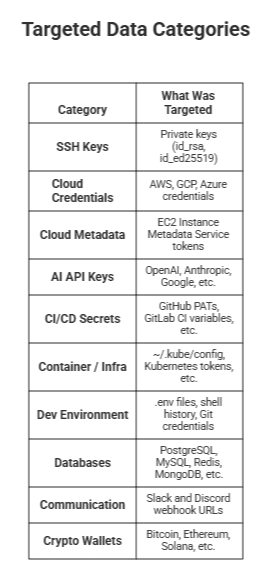
The malware was a comprehensive infostealer targeting virtually every category of sensitive data on a developer's machine:
How the Malware Exfiltrated Data and Established Persistence
All harvested data was bundled into an archive named tpcp.tar.gz, encrypted with AES-256 + RSA-4096, and sent to the attacker-controlled domain models.litellm.cloud — a lookalike domain designed to blend into network logs (the legitimate LiteLLM domain is litellm.ai). Exfiltration was confirmed by Upwind.
For persistence, the malware installed a backdoor script at ~/.config/sysmon/sysmon.py and registered it as a systemd service named sysmon.service with the deliberately bland description "System Telemetry Service." This backdoor polled checkmarx.zone every 50 minutes for second-stage payloads.
In Kubernetes environments, the malware used harvested tokens to deploy privileged pods — named node-setup-{node_name} using alpine:latest — to every node in kube-system. These pods mounted the host filesystem to install the backdoor directly on cluster nodes, and used the Kubernetes API to enumerate all secrets across every namespace. The official Kubernetes RBAC documentation makes clear that overly permissive service account bindings are exactly what enables this class of lateral movement. For teams running AI employees and automation agents — such as Sarah, Ruh AI's AI SDR, which operates 24/7 across sales workflows — deploying those agents on infrastructure with properly scoped RBAC is not optional; it is the minimum security baseline.
How Much Harm Did the LiteLLM Hack Cause?
The direct blast radius was approximately 47,000 downloads within the exposure window. But the actual harm extends well beyond that number:
The .pth auto-execution problem means any machine with version 1.82.8 installed was compromised the moment any Python process started — regardless of whether LiteLLM was actively used. Developers who installed the update but never ran their LiteLLM code were still at risk.
Transitive exposure meant users of DSPy, CrewAI, OpenHands, and Cursor MCP Plugins who never installed LiteLLM directly could still have received the malicious version as an automatically resolved dependency.
The credential scope is what makes this breach particularly severe. LiteLLM, by its nature as an AI API gateway, sits on machines and in CI/CD environments holding the most sensitive credentials in an organisation's stack: cloud master keys, Kubernetes cluster admin tokens, and API keys for every AI provider. Any AI tool that operates at this level of access — including autonomous AI agents like Ruh AI's AI SDR, which integrates with CRMs, email, and business data at scale — must be deployed on infrastructure where supply chain integrity and credential isolation are actively enforced. The 2026 Software Supply Chain Security Report by ReversingLabs documents this escalation in AI infrastructure targeting as a defining trend of the current threat landscape.
Kubernetes lateral movement means that for any team running LiteLLM inside a Kubernetes cluster with permissive RBAC policies, the breach could have propagated from a single infected pod to a full cluster compromise. According to Wiz, LiteLLM is present in 36% of all cloud environments.
The campaign is not over. Endor Labs assessed that TeamPCP's pattern of using each compromise to unlock the next target continues — and on March 27, 2026, The Hacker News reported that TeamPCP had already pivoted to compromising the telnyx Python package.
The Broader TeamPCP Campaign: LiteLLM Was Not the First Target
LiteLLM was not TeamPCP's first target — or their last. The attack was the culmination of a systematic campaign across five ecosystems (Datadog Security Labs):
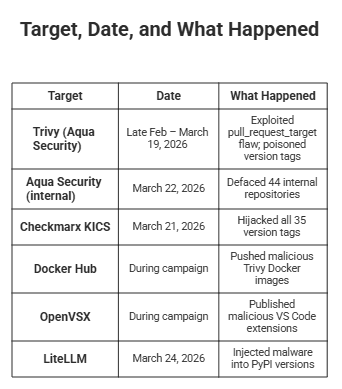
The choice of security tools as primary targets was deliberate. As Sysdig's Threat Research Team has documented, vulnerability scanners and security GitHub Actions are implicitly trusted and require elevated read access to environment variables, configuration files, and runner memory — exactly the access needed to harvest publishing tokens.
Technical attribution proof: All three primary targets (Trivy, KICS, and LiteLLM) shared identical 4096-bit RSA public keys for encrypting stolen session tokens, consistent use of tpcp.tar.gz as the exfiltration archive, and identical persistence files (sysmon.py, sysmon.service, "System Telemetry Service") across every ecosystem (Kaspersky).
How to Check If You Were Affected by the LiteLLM Hack
Step 1 — Verify your installed version:
bash
pip show litellm | grep Version
If the output is 1.82.7 or 1.82.8, treat your machine as fully compromised. See the official LiteLLM security update for the complete impact scope.
Step 2 — Check for malicious file artifacts:
bash
#Look for the .pth startup hook

find /usr -name "litellm_init.pth" 2>/dev/null
find ~/.local -name "litellm_init.pth" 2>/dev/null

#Check for the persistence backdoor

ls ~/.config/sysmon/sysmon.py
ls ~/.config/systemd/user/sysmon.service


# Check for exfiltration remnants in /tmp/

ls /tmp/tpcp.tar.gz /tmp/session.key /tmp/payload.enc /tmp/session.key.enc /tmp/pglog /tmp/.pg_state
Step 3 — Check your network logs for any outbound connections or DNS queries to models.litellm.cloud or checkmarx.zone. Also check for traffic to scan.aquasecurtiy.org (note the deliberate typo). Any hit on these domains confirms active compromise.
Step 4 — Check for Kubernetes lateral movement:
bash
kubectl get pods -n kube-system | grep node-setup
Pods named node-setup-{node_name} using alpine:latest are malicious. Also check for any repository named docs-tpcp appearing in your GitHub organisation — this is another TeamPCP indicator of compromise.
Immediate Steps to Remediate the LiteLLM Supply Chain Compromise
Critical: Simply removing the package is not enough. If you ran 1.82.7 or 1.82.8, every credential on that machine must be treated as stolen. Review the full LiteLLM incident report for the official remediation guidance.
In order of priority:
1. Uninstall and pin to the safe version:
bash
  pip uninstall litellm
   pip install litellm==1.82.6
2. Rotate every credential that was present on the machine, including SSH keys, AWS/GCP/Azure access keys, all AI provider API keys, GitHub Personal Access Tokens, Kubernetes service account tokens, HashiCorp Vault tokens, Terraform credentials, database passwords, .env secrets, and cryptocurrency wallet seed phrases.
3. Remove persistence artifacts:
bash
 rm ~/.config/sysmon/sysmon.py
   systemctl --user disable sysmon.service
   rm ~/.config/systemd/user/sysmon.service
4. Audit Kubernetes — delete any node-setup-* pods in kube-system, review RBAC policies for overly permissive service account bindings, and review all namespace secrets for signs of unauthorised enumeration.
5. Review your CI/CD pipelines — audit all GitHub Actions workflows for residual credential exposure and any remaining references to unpinned trivy-action tags. The PyPI blog's post-mortem on the Ultralytics supply chain attack is a useful companion guide.
How to Prevent the Next PyPI Supply Chain Attack: Strategic Defences
The LiteLLM attack exploited structural weaknesses that are widespread across the industry. These three actions directly address the root causes.
1. Pin GitHub Actions to Commit SHAs — Not Mutable Version Tags
Tags are mutable — as this attack demonstrated, they can be silently overwritten. A pinned commit SHA cannot be changed after the fact. Instead of:
yaml
uses: aquasecurity/trivy-action@v0.69.4
Use the full immutable SHA:
yaml
uses: aquasecurity/trivy-action@<full-commit-sha>
The GitHub Security Lab's guidance on preventing pwn requests and GitHub's own changelog on pull_request_target hardening both detail why this is the most important single control for CI/CD security.
2. Migrate PyPI Publishing to Trusted Publishers (OIDC) — Eliminate Long-Lived Tokens
This attack succeeded because a long-lived PYPI_PUBLISH token was stored as a GitHub secret — one that could be exfiltrated by any compromised step in the pipeline. PyPI's Trusted Publishers eliminates this entirely: instead of a stored token, GitHub Actions exchanges a short-lived OIDC identity token with PyPI at publish time. There is no persistent secret to steal.
As the PyPI blog explains, this approach means credentials "never need to be stored or shared, rotate automatically by expiring quickly, and provide a verifiable link between a published package and its source." Switching takes under 15 minutes and is the single highest-impact remediation available to any Python package maintainer.
3. Enforce Least-Privilege RBAC in Kubernetes
The malware's ability to enumerate all secrets across all namespaces was only possible where service accounts had been granted excessive permissions. The official Kubernetes RBAC documentation is clear: assign permissions at the namespace level, use RoleBindings rather than ClusterRoleBindings where possible, and never grant service accounts the ability to list or watch secrets cluster-wide. As Google Cloud's GKE RBAC best practices note, "the principle of least privilege reduces the potential for privilege escalation if your cluster is compromised."
4. Additional Hardening Measures
Audit pull_request_target workflows— use tools like zizmor to automatically detect insecure workflow patterns
Implement egress filtering on CI runners — unexpected outbound connections to lookalike domains should be blocked, not just logged
Enable PyPI package integrity monitoring — Datadog's Supply-Chain Firewall (SCFW) transparently wraps pip install and blocks known malicious packages
Generate SBOMs — maintain a Software Bill of Materials so when the next compromise drops, you can answer "are we affected?" within minutes, not days (Bernát Gábor's Python supply chain security guide covers this in depth)
Key Takeaway: What the LiteLLM Hack Means for AI Infrastructure Security
The LiteLLM compromise is a textbook illustration of why supply chain security requires defending not just your own code, but everything your pipeline trusts. The security tool responsible for finding vulnerabilities became the vulnerability. The integrity check designed to verify package authenticity was bypassed by legitimate credentials. The maintainer account meant to manage disclosures was used to suppress them.
As Cory Michal, CISO of AppOmni, summarised: "What makes it especially notable is that the LiteLLM compromise appears to have been downstream fallout from the earlier Trivy breach — meaning attackers used one trusted CI/CD compromise to poison another widely used AI-layer dependency. This is exactly the kind of cascading, transitive risk security teams worry about most" (ReversingLabs).
No single control would have prevented this attack in isolation — but migrating to PyPI Trusted Publishers, pinning Actions to commit SHAs, and enforcing Kubernetes RBAC would have broken the chain at multiple points. The lesson is not to trust less — it is to verify everything, at every layer. For more analysis on how AI infrastructure threats are evolving in 2026, explore the Ruh AI blog — covering AI security, agentic workflows, and the future of AI-powered operations.
LiteLLM Hack FAQs: What Developers Need to Know
What sensitive data was exposed on machines that installed the compromised LiteLLM versions?
Ans: The malware ran a broad sweep of anything sensitive it could find: SSH private keys, AWS and other cloud provider credentials, Kubernetes configuration files and service account tokens, AI provider API keys (OpenAI, Anthropic, Google, and others captured straight from environment variables), .env files, shell history, database credentials, and even cryptocurrency wallet files and seed phrases. Because LiteLLM typically sits at the centre of an AI stack — between application code and every model provider — a compromised machine was likely holding more sensitive keys than average. See the official LiteLLM security update for the full impact scope.
How did TeamPCP manage to publish malware under the official LiteLLM name on PyPI?
Ans: The breach did not start with LiteLLM itself. TeamPCP first compromised Trivy — an open-source vulnerability scanner by Aqua Security that LiteLLM used inside its CI/CD pipeline. By exploiting a misconfigured pull_request_target GitHub Actions workflow in the Trivy repository, the attackers exfiltrated Aqua Security's credentials in late February 2026. On March 19 they used those credentials to poison Trivy's GitHub Action tags. When LiteLLM's build pipeline subsequently ran the poisoned Trivy version, the malware inside it silently extracted LiteLLM's PYPI_PUBLISH token from the runner environment — giving the attackers everything they needed to publish directly to PyPI under the legitimate LiteLLM project name.
How can I check whether my Python environment installed a compromised version of LiteLLM?
Ans: Run the following in any Python environment where LiteLLM might be installed:
bash
pip show litellm | grep Version
If the output returns 1.82.7 or 1.82.8, that environment must be treated as fully compromised — even if you never actively used LiteLLM in your code. Version 1.82.8 in particular installed a .pth startup file that triggered the malware on every Python interpreter start, with no import required. You should also check for litellm_init.pth in your site-packages directory and look for ~/.config/sysmon/sysmon.py as a persistence indicator.
Why was the litellm_init.pth file significantly more dangerous than malware injected into a normal Python module?
Ans: Normally, malicious code in a Python package only runs when you explicitly import that package. A .pth file works differently: Python automatically processes every .pth file in the site-packages directory on every interpreter startup — no import, no function call, no user interaction required. This meant that on any machine with version 1.82.8 installed, literally every Python process that started — a test runner, a data science notebook, an unrelated script — was silently triggering the credential harvester. The payload was also double Base64-encoded to slip past basic static analysis tools. Wiz's technical breakdown covers this mechanism in full detail.
How was the LiteLLM hack discovered, and what caused it to surface within hours of publication?
Ans: Discovery was actually accelerated by a bug in the malware itself. The .pth startup hook used subprocess.Popen to spawn a child Python process to run its payload. Because that child process also started Python — and therefore also triggered the same .pth file — it spawned another child, which spawned another, producing an exponential fork bomb. The resulting 100% CPU usage, RAM exhaustion, and system crashes were impossible to miss. Research scientist Callum McMahon was the first to raise the alarm after the payload crashed his machine while he was using a Cursor MCP plugin that had pulled in LiteLLM as a transitive dependency. Had the attackers included a simple re-execution guard, the malware could have operated silently for weeks. The full disclosure timeline is documented by Datadog Security Labs.
Is uninstalling LiteLLM 1.82.7 or 1.82.8 enough to be safe, or is there more required?
Ans: Uninstalling is necessary but nowhere near sufficient. If the malicious version ran on your machine — even briefly — you must assume every credential stored on that machine has already been exfiltrated, encrypted, and sent to the attackers. The remediation priority order is: (1) uninstall and pin to litellm==1.82.6; (2) rotate every key and secret that existed on the machine, including SSH keys, cloud access keys, AI API keys, GitHub tokens, Kubernetes service account tokens, and database passwords; (3) manually remove the persistence backdoor at ~/.config/sysmon/sysmon.py and disable sysmon.service; (4) audit any Kubernetes cluster the machine had access to for unauthorised privileged pods. The LiteLLM official security update includes community-contributed scripts for scanning GitHub Actions and GitLab CI job histories for the compromised versions. If your team needs expert guidance on securing your AI infrastructure or assessing your exposure, get in touch with the Ruh AI team.
Were developers running LiteLLM inside Docker containers protected from the breach?
Ans: Partially. According to the LiteLLM maintainers, the official ghcr.io/berriai/litellm Docker image was not affected because it pins dependencies in requirements.txt and does not pull unpinned PyPI packages. However, any custom Docker image that ran pip install litellm without pinning a version during the exposure window (March 24, 10:39–16:00 UTC) would have installed the malicious version. More critically, Docker isolation does not protect credentials that were mounted into the container — if cloud credentials, Kubernetes configs, or API keys were passed into the container as environment variables or volume mounts, those secrets would have been exfiltrated regardless of the Docker boundary. As Kaspersky's analysis notes, the exposure window was approximately three hours before PyPI quarantined the project.
For construction teams evaluating AI after the LiteLLM compromise, Ruh AI provides a concrete setting in which to ask how dependencies, secrets, and deployment boundaries are handled.