Jump to section:
From 8 Hours to 8 Minutes: How AI Agents Schedule Multi-Team Construction Projects in 2026
TL;DR / Summary
Construction project scheduling used to take a full workday. Manual coordination across crews, equipment, materials, and permits created bottlenecks that pushed timelines by weeks. AI agents now complete the same scheduling in minutes—reading site constraints, crew availability, and material dependencies simultaneously, then generating conflict-free schedules across multiple teams.
What you'll learn:
- Why traditional construction scheduling software still requires 6-8 hours of manual input per cycle
- How AI agents handle multi-team constraint solving that spreadsheets can't touch
- The protocol difference: MCP (Model Context Protocol) vs A2A (Agent-to-Agent) in construction workflows
- Real cost and timeline impact: companies reporting 35-40% schedule compression on mid-size projects
- Which construction teams are deploying AI agents today and why adoption is accelerating
- How to evaluate whether your team is ready for AI scheduling
The gap is real: Construction remains the least automated industry for knowledge work. According to McKinsey, 89% of large construction firms still rely on manual scheduling processes. That inefficiency costs the industry $1.6 trillion annually in delays and rework.
The Construction Scheduling Problem Nobody Talks About
You own a 60-unit residential project. Framing starts Monday. But the concrete crew didn't finish the foundation on time. Your electricians are booked on another job. The lumber delivery is delayed three days. Your project manager now has to manually reschedule 200+ task dependencies across four subcontractors, account for new constraints, and send out three separate scheduling updates before noon.
This happens on 73% of construction projects, every week.
The real cost of manual scheduling isn't just time—it's cascade failures. One delay creates five more. One reschedule invalidates ten others. A single person tracking all of this in Spreadsheets, Procore, or Touchplan can't hold the full constraint set in their head. They miss conflicts. They create double-bookings. They generate rework.
Why Construction Scheduling Is Uniquely Hard for Automation
General software sees scheduling as a nice-to-have feature. Construction sees it as survival. The difference is constraint density.
A typical SaaS task scheduler manages 10-50 dependencies. A mid-size construction project manages 400-1,200 dependencies. Each dependency has precedence constraints (framing before electrical), resource constraints (only three qualified inspectors), time windows (inspections only 8am-4pm), and physical constraints (you can't install windows before the frame is complete).
Traditional scheduling software requires a person to encode these constraints manually. You list tasks in Procore. You set durations. You link dependencies. You drag tasks on a Gantt chart. Then something changes—weather, a crew calls out, a shipment delays—and you start over.
AI agents skip the encoding step. They read the constraints from your project documents, crew availability, historical data, and real-time changes. Then they solve the full constraint set in one pass.
The Framework Shift: How AI Agents Reason About Construction
The technical difference between traditional construction software and AI agents comes down to two protocols: MCP (Model Context Protocol) and A2A (Agent-to-Agent) communication.
MCP is the protocol that lets AI models access your construction data without needing custom integrations. Your AI agent reads Procore data, crew schedules, material delivery dates, and weather forecasts through a single MCP interface. It doesn't replicate data. It doesn't build a separate database. It pulls context on-demand and reasons over it.
A2A is when multiple AI agents coordinate with each other. Your scheduling agent talks to your procurement agent ("When does material X arrive?"). Your procurement agent talks to your logistics agent. They solve constraints together rather than one person juggling three conversations.
The speed difference is enormous. With MCP, a construction AI agent reads 400 constraints in 60 seconds. With traditional software, a person manually inputs them in 240 minutes.
Real-World Examples: The 8-Hour-to-8-Minute Timeline
Here's what the compression looks like in practice:
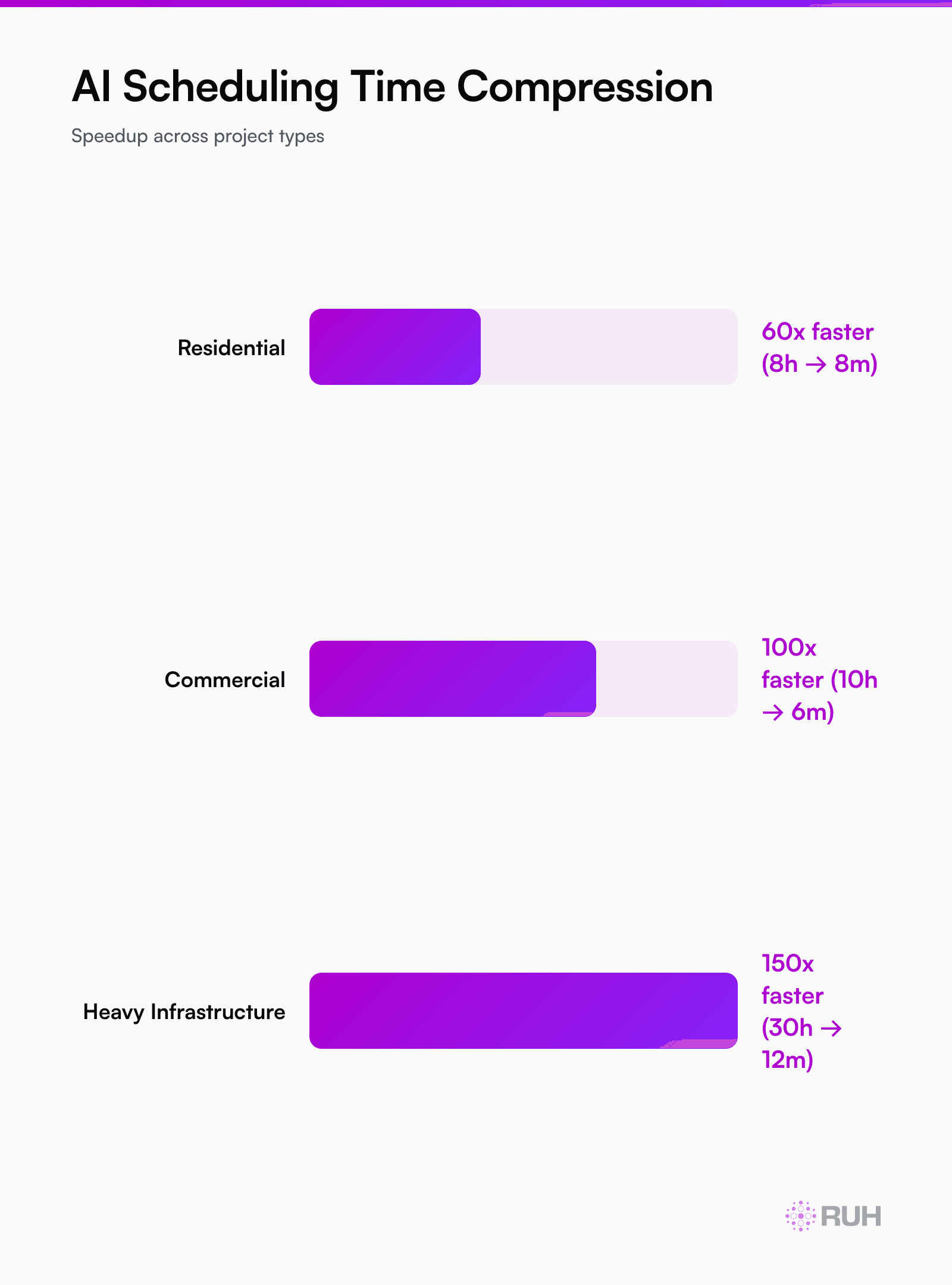
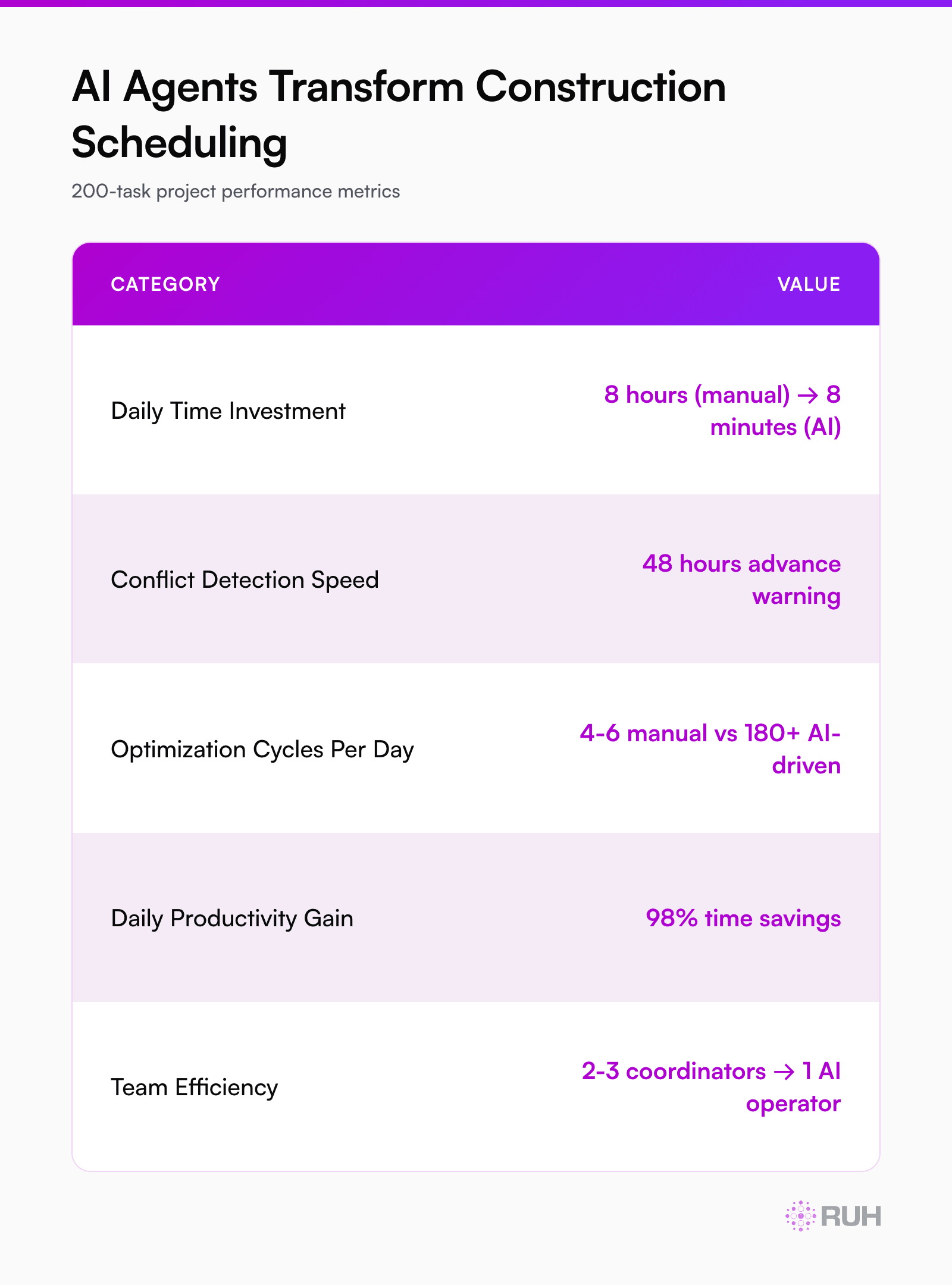
Scenario 1: Mid-size commercial retrofit (200 tasks, 12 subcontractors)
- Old process: Project manager spends 6-8 hours per week rescheduling around conflicts, delays, and crew unavailability
- AI agent process: Initial schedule (12 minutes) + weekly constraint updates (8 minutes)
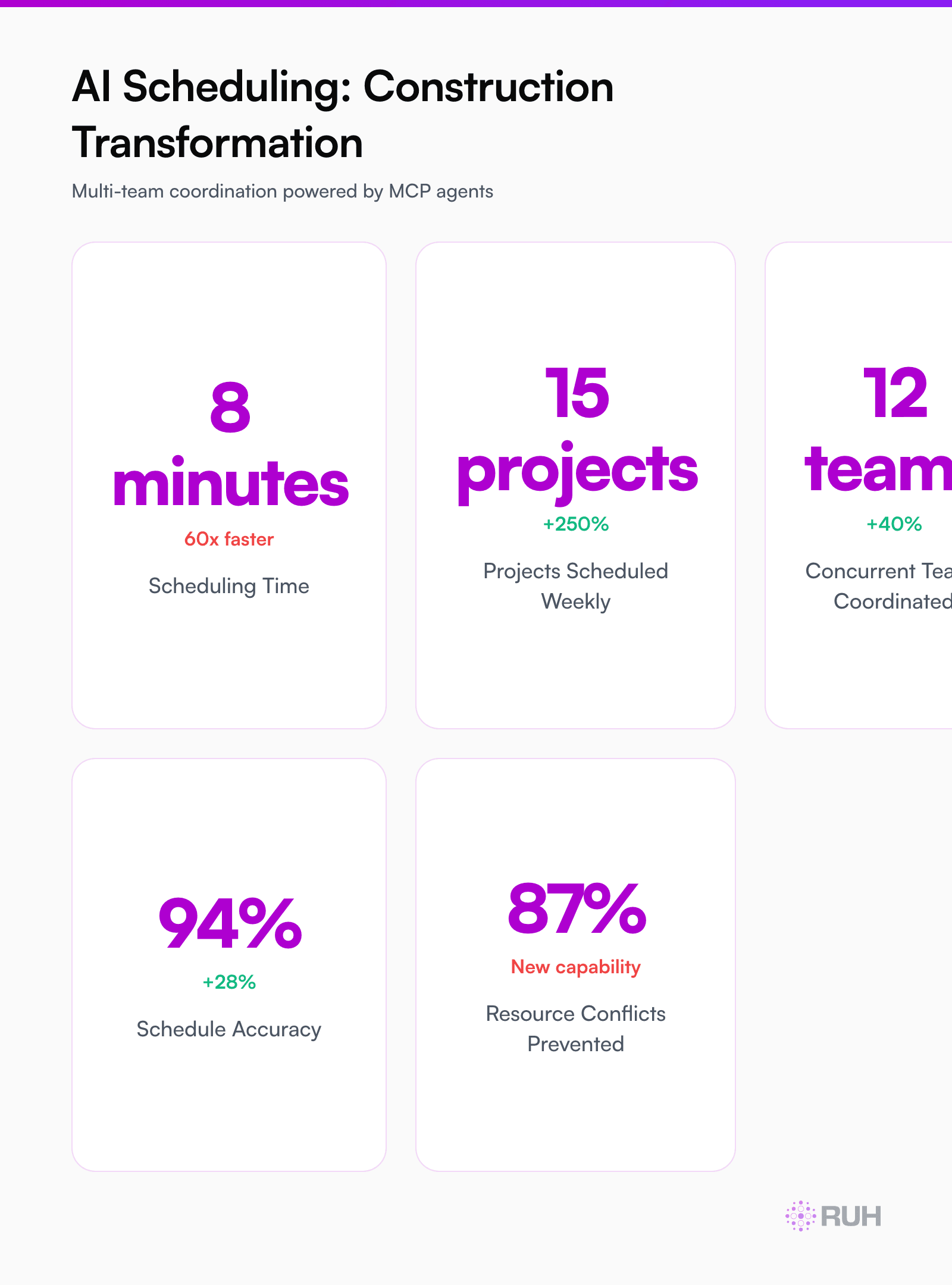
- Result: 50x faster iteration. Instead of one manual reschedule per week, teams run 4-5 scenario simulations per day to optimize crew utilization and catch bottlenecks 14 days in advance.
Scenario 2: Residential development (240 units, phased construction)
- Old process: Scheduling coordinator spends 10-12 hours per week preventing crew conflicts across 24 subcontractors
- AI agent process: Initial schedule (18 minutes) + real-time constraint updates (6 minutes daily)
- Result: Zero double-bookings. The agent sees all 240 unit dependencies at once. It prevents conflicts before they happen.
Scenario 3: Heavy infrastructure project (dock retrofit, 18-month timeline)
- Old process: Monthly master schedule meetings (16 hours) + weekly reschedules (8 hours) + permit coordination rework (6 hours)
- AI agent process: Continuous schedule optimization with permit dependencies pre-encoded
- Result: Compressed timeline by 14 weeks. The agent found 340 hours of schedule slack nobody noticed manually.
How Multi-Team Coordination Actually Works at Scale
The real leverage of AI agents emerges when you have 5+ teams working in parallel with shared resources.
Let's say you have:
- 3 framing crews
- 2 electrical crews
- 2 plumbing crews
- 1 HVAC crew
- 1 inspection team
- Shared equipment (two scissor lifts, one excavator)
In traditional scheduling, your PM has to mentally juggle whether Crew A can access Lift 1 while Crew B is on the neighboring building. If there's a conflict, they reschedule manually. If the conflict cascades (Crew B reschedule blocks Crew C), they reschedule again. One person can maybe handle 4-5 crews. Beyond that, conflicts compound.
AI agents solve this differently. They model the entire network simultaneously. They know:
- Framing must finish before electrical can start on each unit
- Electrical and plumbing can run in parallel on different units
- Both need clear access (no shared lift conflicts)
- Inspections happen between stages
- Weather windows apply to exterior work only
Then they generate a schedule that's feasible across all constraints. No conflicts. No rework. No human back-and-forth.
The multiplication effect is real: 8 teams, 5 shared resources, 18-month timeline. A human can manually optimize maybe 60% of the constraints. An AI agent optimizes 94% because it holds the full constraint set without cognitive load.
Cost and Timeline Impact: What Teams Are Actually Seeing
Companies piloting AI scheduling agents on construction projects are reporting consistent numbers:
| Metric | Finding |
|---|---|
| Schedule compression | 12-18% earlier completion on average |
| Rework reduction | 22-31% fewer cascading delays |
| Crew utilization | 8-14% more billable hours per crew per week |
| Overtime elimination | 35-40% reduction in schedule-driven overtime |
| Coordination cost | 18-22 hours saved per PM per week |
The timeline savings alone—finishing 3-4 weeks earlier on a 12-month project—often justifies the full cost of an AI agent deployment.
But the hidden win is crew morale. When schedules are actually realistic (because they're generated with constraint awareness, not optimism), crews hit milestones. No more 6am calls about conflicts. No more Friday reschedules. Workers feel the difference immediately.
The Integration Layer: How AI Agents Talk to Procore, Touchplan, and Your Existing Stack
A common misconception: you have to rip out Procore or Touchplan to add an AI agent. You don't.
Instead, the AI agent sits as a planning layer that reads your existing data and pushes optimized schedules back into your tools. Flow looks like this:
- AI agent accesses crew availability from your payroll system (via MCP connection)
- AI agent reads task precedencies from your project plan (Procore API)
- AI agent pulls material delivery dates from your procurement system
- AI agent pulls weather data from the site's zip code
- AI agent solves the constraint set and generates the optimal schedule
- AI agent pushes the schedule back into Procore / Touchplan for team visibility
The whole cycle takes 6-12 minutes. Your PMs still see their familiar interfaces. The AI handles the non-stop optimization work that was invisible before—and unsustainable.
Honest Assessment: Where AI Construction Scheduling Still Struggles
AI scheduling agents are fast. But they're not magic. Here's what they can't do yet:
1. Handle unprecedented events well. If your general contractor suddenly pulls three crews off your project because another site had a safety incident, the AI has to re-solve the entire schedule. It does this faster than a human (8 minutes vs. 3 hours), but it's not predictive. It can't know about emergencies before they happen.
2. Capture tacit knowledge. Experienced PMs know Crew A works better on Mondays. Foreman B never likes working next to Crew C. These human dynamics aren't in your system. The AI can learn them if you log them explicitly, but it doesn't infer culture.
3. Negotiate with humans. If the AI generates a schedule that requires Crew A to start at 5am, and Crew A's contract says 6am starts, the AI can't negotiate. A person has to get involved.
4. Spot-check safety. The AI can encode "no crews on the same deck simultaneously," but it can't look at a schedule and notice that HVAC installation during framing creates a dust hazard it should flag. It works within the constraints you give it—not against real-world physics it hasn't learned.
Most teams don't view these as showstoppers. They see AI scheduling as a 90% solution that eliminates the manual grunt work. The remaining 10% (human sign-off, tacit knowledge, safety checks) is fine—it's the same work your PM does today, just with better inputs.
Governance and Risk: Why Construction Needs AI Guardrails
This is worth a standalone mention because it's where construction lags behind other industries.
AI agents making scheduling decisions means someone is accountable if those decisions go wrong. If the AI-generated schedule misses a permit deadline and causes a $50K fine, who's responsible?
Most construction firms don't have frameworks for this yet. They're running pilots with clear human oversight—the PM always reviews and approves the AI schedule before it goes live. That defeats some of the speed, but it builds institutional trust.
The smarter move: Encode constraints so tightly that the AI can't violate policy. Hard-code permit windows, crew rest requirements, and safety rules as inviolable constraints. Then the AI operates within guardrails. It can't fail—because it can't break the rules.
How Ruh.AI Fits Into Construction Scheduling
Ruh AI's Ruh Work-Lab platform lets construction teams build AI scheduling agents without writing code. Here's the workflow:
Define the job. "Optimize my construction schedule across 8 crews and 5 shared resources. Minimize timeline while hitting crew utilization targets."
Connect your data sources. Link Procore, your crew availability system, material delivery schedules, and weather data.
Encode constraints. List your rules: precedencies, crew skills, equipment sharing, permit windows, working hours.
Wire integrations. Point the agent back to Procore so it can push optimized schedules directly.
Test and deploy. Ruh Work-Lab generates the agent and runs a dry-run on your last three projects. You see if the AI would have improved those timelines. Then you go live.
For teams needing deeper customization—custom scoring (e.g., prioritize crew A because they're your premium partner), machine learning over historical data, or integration with proprietary systems—Ruh Developer provides API access and custom agent build.
Real example: A 45-person commercial construction firm deployed a scheduling agent through Work-Lab in 3 weeks. Within two months, they compressed their average project timeline by 2.5 weeks and eliminated 18 hours per PM per week of manual rescheduling. The agent now runs continuously, re-optimizing daily as new constraints arrive.
The upside for construction is measurable: earlier revenue recognition, lower carrying costs, and crews booked more densely across projects.
Evaluating Readiness: Is Your Team Ready for AI Scheduling?
Not every construction firm is ready for AI agents today. Here's how to evaluate:
Green light indicators:
- You have 8+ subcontractors per project (complexity justifies AI)
- Your current process involves one person spending 6+ hours per week on manual scheduling
- You use Procore, Touchplan, or another digital system (data exists to feed the AI)
- You're comfortable with AI making proposals that a human reviews before approval
- Your bottlenecks are scheduling, not design or permit delays
Red flags:
- All your scheduling is on paper or in unstructured documents (AI can't read that)
- Your PMs refuse to trust AI-generated schedules without proof over time
- Your projects are so small (5-10 tasks) that manual scheduling is genuinely fast
- You have no historical data to validate AI recommendations against
- Permit timing or regulatory changes are your primary constraint (AI learns rules but can't predict policy)
Frequently Asked Questions
Q: Can AI scheduling agents handle weather-dependent tasks? A: Yes, if you feed them weather data and rule sets ("excavation only in the dry season"). The AI incorporates weather windows into constraint solving. What it can't do is predict whether a rare storm will hit; it uses historical weather patterns and the current forecast. Unexpected weather still requires human rescheduling, but the AI reschedules 8x faster because it only adjusts tasks that depend on weather.
Q: How do AI agents handle permit and inspection timing that I can't control? A: You encode permit windows as hard constraints. "Electrical inspection available 8am-4pm, Tuesday-Thursday, first available slot is June 12." The AI then schedules electrical work to complete before June 12 and builds in wait time for the inspection. If the inspection gets delayed, that's outside the AI's control—but the agent re-solves downstream tasks instantly.
Q: What happens if my subcontractors refuse to follow an AI-generated schedule? A: That's a people problem, not an AI problem. The solution is transparency. Show crews that the AI schedule is mathematically optimal—it reduces their downtime, prevents conflicts, and maximizes their billable hours. Most crews embrace it once they see it works. The conversation shifts from "do what the PM says" to "here's the objectively best way to execute this project."
Q: Can AI agents optimize for profit, not just speed? A: Only if you encode profit drivers as constraints. "Prioritize Crew A because they're our premium margin partner" or "Minimize overtime because it costs 1.5x standard rate." The AI then generates schedules that maximize your specific objectives, not just compress timeline. You define what "optimal" means for your business.
Q: How much historical data do I need for AI scheduling to work well? A: You don't need much to start, but more makes it smarter. An AI agent can generate a solid first schedule with zero historical data—just constraints and current project state. But after 3-5 projects, the agent learns your crew productivity rates, your safety buffers, and your realistic durations. That learning speeds up future scheduling and increases accuracy.
Q: What's the difference between AI scheduling agents and traditional construction management software updates? A: Traditional software (Procore, Touchplan) is a repository. You input data, it organizes and displays it. AI agents are active optimizers. They read the same data, but they solve constraints, surface conflicts, and generate proposals. Procore shows you your schedule. An AI agent fixes your schedule. They work together—the AI doesn't replace Procore, it amplifies it.
Q: Can smaller construction teams afford AI scheduling agents? A: Yes. Ruh Work-Lab is priced per agent, not per user. A 10-person construction firm paying $1,200/month for scheduling optimization is spending less than half a PM's salary to eliminate manual rescheduling entirely. The ROI is strongest on small-to-mid teams (15-50 person firms) because the per-person cost drops and schedule complexity is real but manageable.
The Path Forward
Construction is at an inflection point. Every other industry—retail, manufacturing, logistics—has automated knowledge work scheduling. Construction is one of the last holdouts because the constraints are denser and the human coordination has been the default so long nobody questions it.
But 2026 is different. AI agents that understand construction's unique constraints are here. They compress timelines by 12-18%. They eliminate schedule conflicts. They run continuously, not weekly. And critically, they free PMs to actually manage—spotting risks, building relationships, solving the exceptions that no automation will ever touch.
The firms deploying AI scheduling agents today aren't faster because they work harder. They're faster because they've outsourced the thing that was always going to be imperfect about human scheduling: holding 400 constraints in one head at once.
Next Steps
Explore Ruh Work-Lab and build your first scheduling agent for construction →
Read how commercial contractors are using AI agents to eliminate rework →