How to Build AI Agents Without Code: A Step-by-Step Guide Using Ruh Work-Lab
TL;DR/Summary
No-code AI agent builders have hit an inflection point in 2026 — with Gartner projecting 70% of new enterprise apps will use no-code/low-code platforms and McKinsey finding that broadly AI-adopting organizations grow revenue 2.5x faster — yet most teams remain stuck behind 3-to-6-month developer backlogs, 89-app tool fragmentation, and cost misconceptions that kill projects before they start. Ruh Work-Lab eliminates these barriers by treating agent building as orchestration rather than engineering: you define the goal, connect knowledge bases and 50+ integrations, design visual decision logic with confidence thresholds, and deploy production-ready AI agents that autonomously reason across multiple systems — not just follow scripted "when X do Y" workflows like traditional automation platforms. The economics are compelling: a hybrid human-AI model cuts support costs from $165,000 to roughly $100,000–$110,000 annually while boosting team productivity by 40% (per Accenture's 2025 workforce study), with a typical payback period of just 2 to 6 weeks. This guide gives you the complete six-step walkthrough — from defining your agent's job description to monitoring autonomous resolution rates — plus the six mistakes that stall most teams and the scaling strategy to go from one agent to an entire AI workforce.
Here's a breakdown of everything we cover:
- Why Non-Technical Teams Are Building AI Agents Without Code in 2026
- 5 Problems That Keep Businesses Stuck Without AI Agents
- The Work-Lab Mindset: Think Conductor, Not Coder
- Step-by-Step: Building Your First AI Agent in Ruh Work-Lab
- The Economics: Manual Process vs. AI Agent
- 6 Mistakes That Stall No-Code AI Agent Projects
What if you could deploy an AI employee that handles customer inquiries, processes invoices, and manages your CRM — all before lunch, and without writing a single line of code?
Six months ago, a mid-size e-commerce brand in Melbourne was losing two hours per day to manual order-status inquiries. Their dev team had a nine-week backlog. A roofing contractor in Phoenix was paying a full-time admin $52,000 a year to route leads from five different platforms into one spreadsheet. A boutique accounting firm in London needed client onboarding automated but couldn't justify a $40,000 custom integration project for a twelve-person office.
All three now run AI agents that handle those tasks autonomously. None of them wrote a line of code. None of them waited for a developer. They used a no-code AI agent builder — Ruh Work-Lab — and had agents running in production within a single afternoon.
This guide walks you through exactly how to build AI agents without code using a visual drag-and-drop interface. You'll learn why no-code AI agent platforms have hit an inflection point in 2026, how to reframe agent building as orchestration rather than engineering, and — most importantly — a step-by-step Ruh Work-Lab tutorial for building, testing, and deploying your first AI agent. We'll also cover the economics, the common mistakes that stall teams, and how to scale from one agent to an entire AI workforce.
Why Non-Technical Teams Are Building AI Agents Without Code in 2026
The shift isn't coming — it's already here. Gartner projects that by 2027, 70% of new enterprise applications will be built using no-code or low-code platforms. AI agents are following that same trajectory, and the teams deploying them fastest aren't engineering departments. They're operations leads, revenue teams, and customer success managers who got tired of waiting.
The bottleneck in most organizations isn't AI capability. The models are powerful enough. The APIs exist. The integrations are available. What's missing is developer bandwidth to wire it all together.
McKinsey's 2025 State of AI report found that organizations adopting AI broadly grew revenue 2.5x faster than those still in pilot mode — but the majority cited "lack of technical talent" as their primary deployment barrier. No-code AI agent builders eliminate that constraint entirely.
Here's the part nobody tells you about platforms like Zapier and Make: they're excellent at linear automations — "when X happens, do Y" — but they aren't building true AI agents. A Zapier workflow can send an email when a form is submitted. An AI agent can read the form submission, determine if it's a sales inquiry or a support request, pull the submitter's history from your CRM, draft a personalized response, and route the conversation to the right team — all without a predefined decision tree. That distinction — autonomous reasoning versus scripted automation — is what separates an agent from a workflow.
The businesses seeing the most dramatic ROI from their AI agent no-code platform aren't the ones with the biggest AI budgets. They're the ones that removed the developer dependency from agent deployment and put the power directly in the hands of the people who understand the workflows best.
5 Problems That Keep Businesses Stuck Without AI Agents
1. Developer Dependency Creates a Months-Long Bottleneck
The average enterprise waits 3 to 6 months in a development queue to get a custom automation built. That's not a technology problem — it's a resource allocation problem. Your dev team is shipping product features, maintaining infrastructure, and fixing bugs. Your request to automate invoice processing sits at ticket #47 in the backlog.
Meanwhile, that manual process bleeds cash daily. Industry benchmarks suggest a single manual data-entry workflow costs businesses between $18,000 and $35,000 annually in labor alone — and that's before factoring in error rates.
2. Tool Fragmentation Turns Employees Into the Integration Layer
Okta's 2024 Businesses at Work report found that the average company deploys 89 SaaS applications. Your sales team works across a CRM, an email platform, a dialer, a proposal tool, and a contract manager. None of them talk to each other natively. The "integration layer" is a human being copying data between tabs.
That predictability is exactly what AI automation thrives on. These aren't creative tasks requiring human judgment — they're structured, repetitive workflows where an AI agent outperforms a human on speed, accuracy, and cost every single time.
3. Failed DIY Attempts on Limited Platforms
Platforms like Voiceflow and Botpress excel at conversational agents — chatbots with personality. But when you need an agent that doesn't just talk but acts — pulling records from Salesforce, updating inventory in Shopify, routing exceptions to a human reviewer based on dollar thresholds — most conversational-first platforms hit a wall. They lack the depth for multi-system orchestration and autonomous decision-making logic.
Teams that invested weeks building on the wrong platform end up rebuilding from scratch. This compounds the frustration and delays deployment further.
4. Scaling Paralysis: One Bot Works, Ten Don't
You got a chatbot working for customer support. Great. Now you need agents across sales, HR onboarding, accounts payable, and inventory management. Rebuilding per department — each with different tools, different workflows, different edge cases — is unsustainable without a platform that supports reusable components, shared knowledge bases, and centralized management.
A true visual AI agent builder solves this by letting you clone, adapt, and share agent components across teams — not start from zero each time.
5. The Cost Misconception That Kills Projects Before They Start
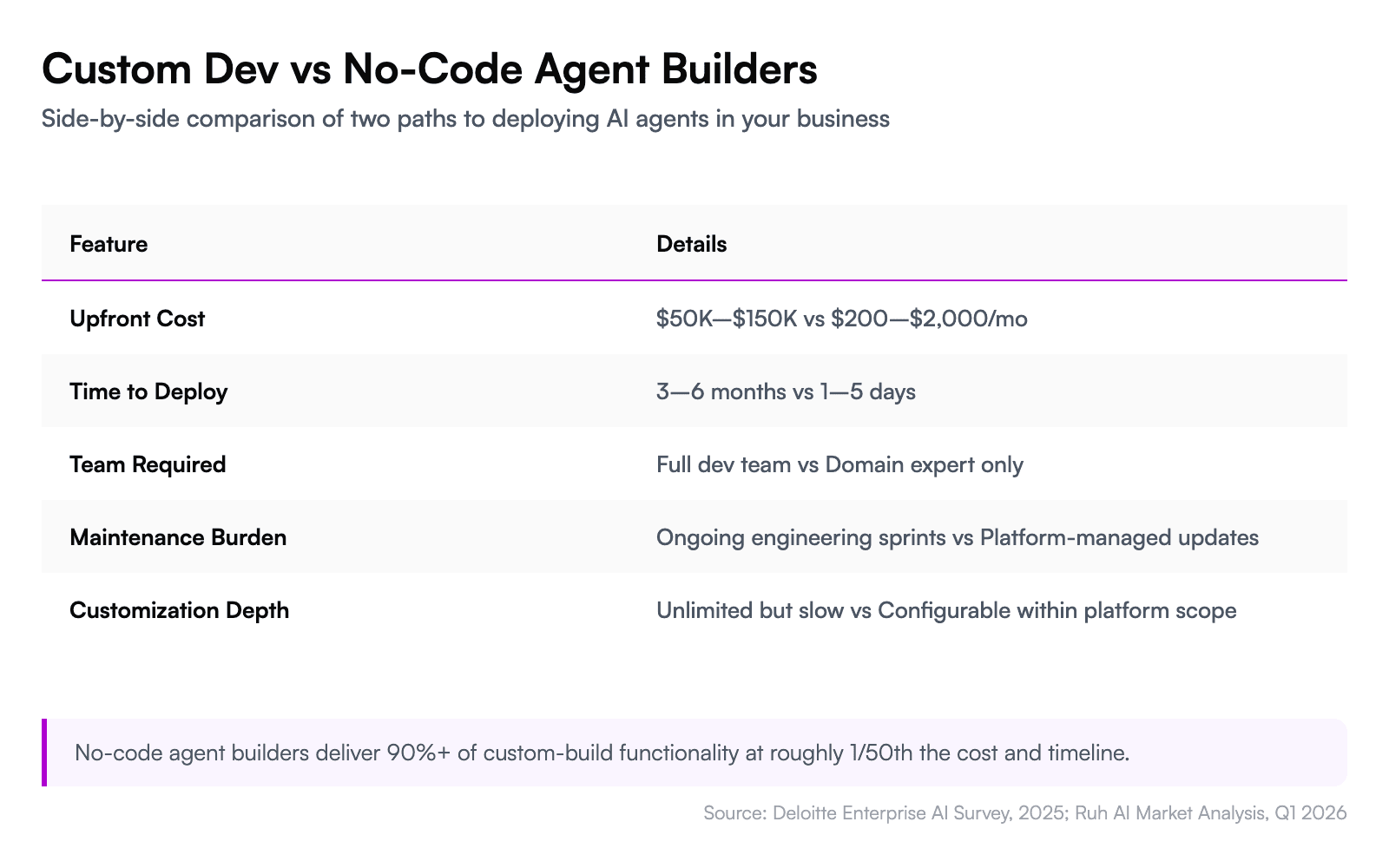
Leadership frequently assumes AI agent deployment requires a six-figure custom development budget. Deloitte's 2025 enterprise AI survey found that cost overestimation is the second most common reason organizations delay AI adoption — behind only "unclear ROI."
The reality is that no-code platforms have compressed what used to be a $50,000–$150,000 project into something a business analyst can build in days for a fraction of that cost.
The Work-Lab Mindset: Think Conductor, Not Coder
Before you open Work-Lab and start dragging components, you need a mental model shift. You're not programming. You're orchestrating.
Think of it like conducting an orchestra. You don't need to know how to play the violin, the trumpet, or the timpani. You need to know when each instrument should come in, how loud, and in what sequence. The musicians — in this case, AI models, APIs, and integrations — already know how to play. Your job is coordination.
This reframe matters because it changes how you approach agent design. Instead of thinking "how do I code this logic," you think "what decision does this agent need to make, what information does it need, and what action should it take?" That's a workflow question, not a technical one. The person best equipped to answer it is usually the one doing the work today — not a developer three departments away who needs a two-week briefing on your process.
Ruh Work-Lab is built around this conductor model. You define the goal (resolve a customer billing inquiry), the knowledge the agent needs (product catalog, billing policies, account history), the tools it can use (CRM lookup, payment system, email), and the guardrails that keep it safe (escalate anything over $500 to a human). The platform handles the reasoning, the API calls, and the execution.
Not coding, but orchestrating. Not building from scratch, but assembling from proven components.
Step-by-Step: Building Your First AI Agent in Ruh Work-Lab
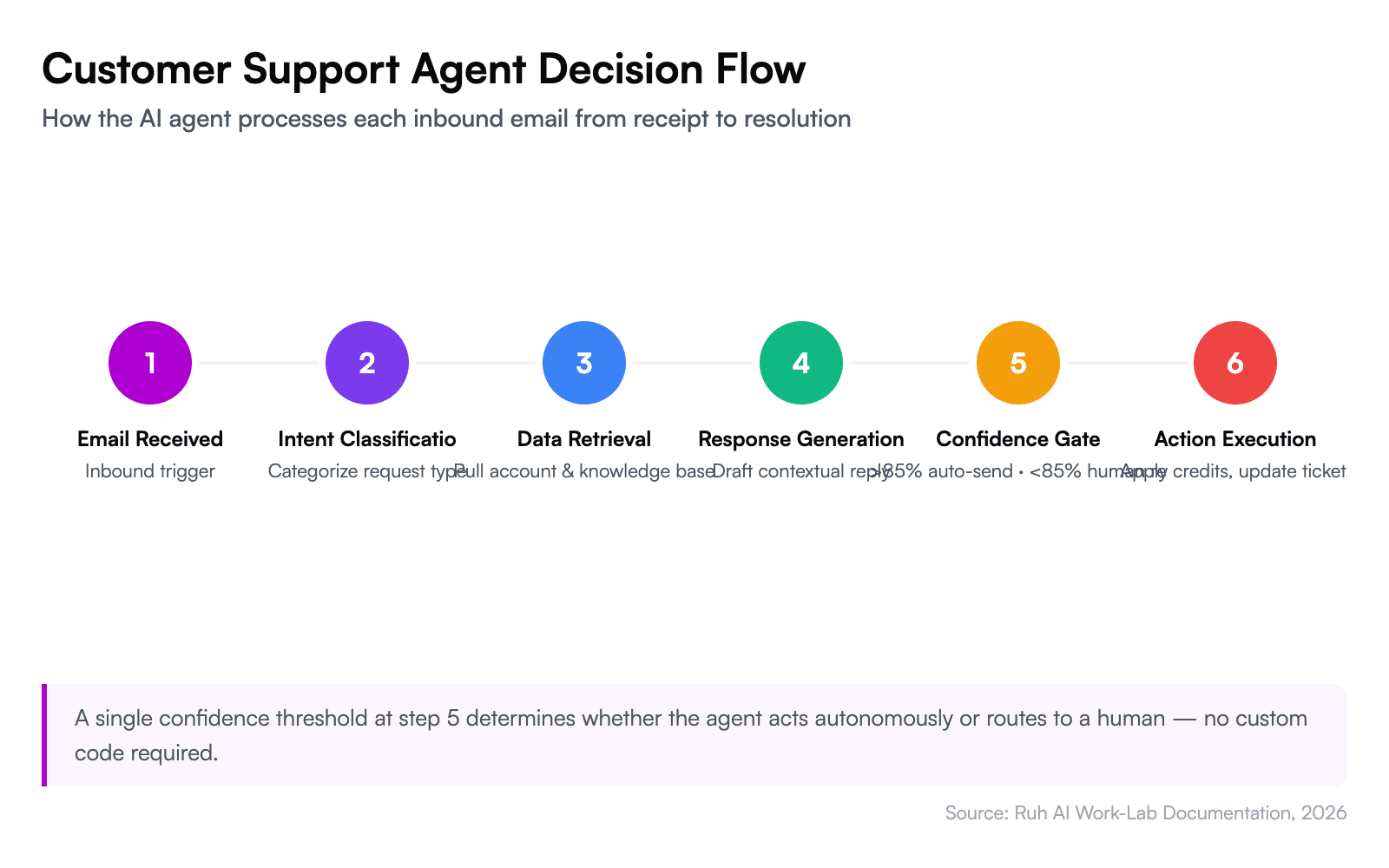
Here's the tactical walkthrough. We'll build a customer inquiry agent that reads incoming support emails, determines intent, pulls relevant account data, drafts a response, and either sends it automatically or queues it for human review based on confidence thresholds.
This is your complete Ruh Work-Lab tutorial — follow along to build AI workflows without coding in under two hours.
Step 1: Define the Agent's Job Description (10 Minutes)
Start in Work-Lab by selecting a preset template or starting from a blank agent. For this example, choose the "Customer Support" preset — it comes preconfigured with common intents like billing questions, order status, and technical troubleshooting.
Write the agent's job description in plain English. This isn't a prompt — it's a role definition:
- Role: Customer support agent for incoming email inquiries
- Goal: Resolve or triage 100% of inbound support emails within 2 minutes
- Boundaries: Never issue refunds over $200 without human approval. Never share internal pricing documentation.
The specificity here matters. Vague instructions ("help customers") produce vague agents. Specific instructions ("resolve billing disputes by checking the last 3 invoices and applying credit if the overcharge is confirmed and under $200") produce agents that actually work.
Step 2: Connect Your Knowledge Base (15 Minutes)
Your agent is only as good as the information it can access. In Work-Lab's knowledge panel, connect:
- Your product catalog or documentation — upload PDFs, paste URLs, or sync from Notion/Confluence
- Policy documents — refund policies, SLA terms, escalation procedures
- Historical tickets — past resolutions teach the agent how your team handles specific scenarios
Work-Lab indexes this content and makes it available to the agent at inference time. The agent doesn't memorize your docs — it retrieves relevant context per query, which means updates to your knowledge base are reflected immediately without retraining.
Step 3: Wire Up Integrations (20 Minutes)
This is where Work-Lab separates from chatbot builders. Navigate to the integrations panel and connect the systems your agent needs to act — not just respond.
For our customer support agent, connect:
- Email (Gmail, Outlook, or custom SMTP) — to read incoming inquiries and send responses
- CRM (Salesforce, HubSpot) — to pull customer account details and interaction history
- Payment system (Stripe, Xero) — to check invoices and process credits
- Ticketing (Zendesk, Freshdesk) — to create, update, or close tickets
Ruh's integration library includes 50+ prebuilt connectors. Each one surfaces the available actions as drag-and-drop blocks — you don't configure API endpoints or authentication manually.
Step 4: Design the Decision Logic (30 Minutes)
This is the core of your agent. In the visual workflow canvas, you'll drag and drop AI agent decision blocks to map out the logic:
- Email received → Agent reads subject and body
- Intent classification → Is this billing, order status, technical, or other?
- Data retrieval → Pull account info from CRM + relevant invoices from payment system
- Response generation → Draft a response using knowledge base context + account data
- Confidence check → If confidence > 85%, auto-send. If < 85%, queue for human review.
- Action execution → Apply credits, update ticket status, or escalate as needed
Each block in the canvas is configurable. You set the confidence threshold, the escalation rules, and the fallback behavior without writing conditional logic — you select from dropdowns and toggle switches.
Step 5: Test with Real Scenarios (20 Minutes)
Work-Lab includes a sandbox testing environment where you can feed your agent real or simulated inputs and watch it reason through each step. Run at least 10 test cases covering:
- A straightforward billing question (should auto-resolve)
- A complex multi-issue ticket (should escalate)
- An angry customer using ambiguous language (tests intent classification)
- A request that falls outside the agent's scope (should gracefully hand off)
Review each test's reasoning trace — Work-Lab shows you exactly why the agent made each decision, which knowledge base chunks it referenced, and where confidence dropped. This transparency is critical for trust. You're not deploying a black box.
Step 6: Deploy and Monitor (5 Minutes)
Once testing looks solid, hit deploy. Your agent goes live and starts processing real inquiries. Work-Lab's monitoring dashboard shows you:
- Resolution rate — percentage of inquiries fully resolved without human intervention
- Average response time — typically under 90 seconds for email-based agents
- Escalation rate — how often the agent routes to a human
- Customer satisfaction — tracked via post-resolution surveys
Start with the agent in supervised mode — every response gets queued for human approval for the first 48 hours. Once you trust its judgment, switch to autonomous mode with confidence-based auto-send.
The math is straightforward: if your support team handles 200 inquiries per day and the agent resolves 60% autonomously at an average handling cost of $7 per ticket, that's $840 saved daily — or roughly $250,000 annually.
The Economics: Manual Process vs. AI Agent
This isn't a technology problem — it's a math problem.
Forrester's 2025 analysis of AI-driven customer service found that organizations deploying AI agents reduced cost-per-resolution by 45–65% while maintaining or improving CSAT scores. The savings compound because AI agents don't need onboarding, don't take sick days, and handle volume spikes without overtime.
Here's a concrete breakdown for a mid-size business handling 150 support tickets per day:
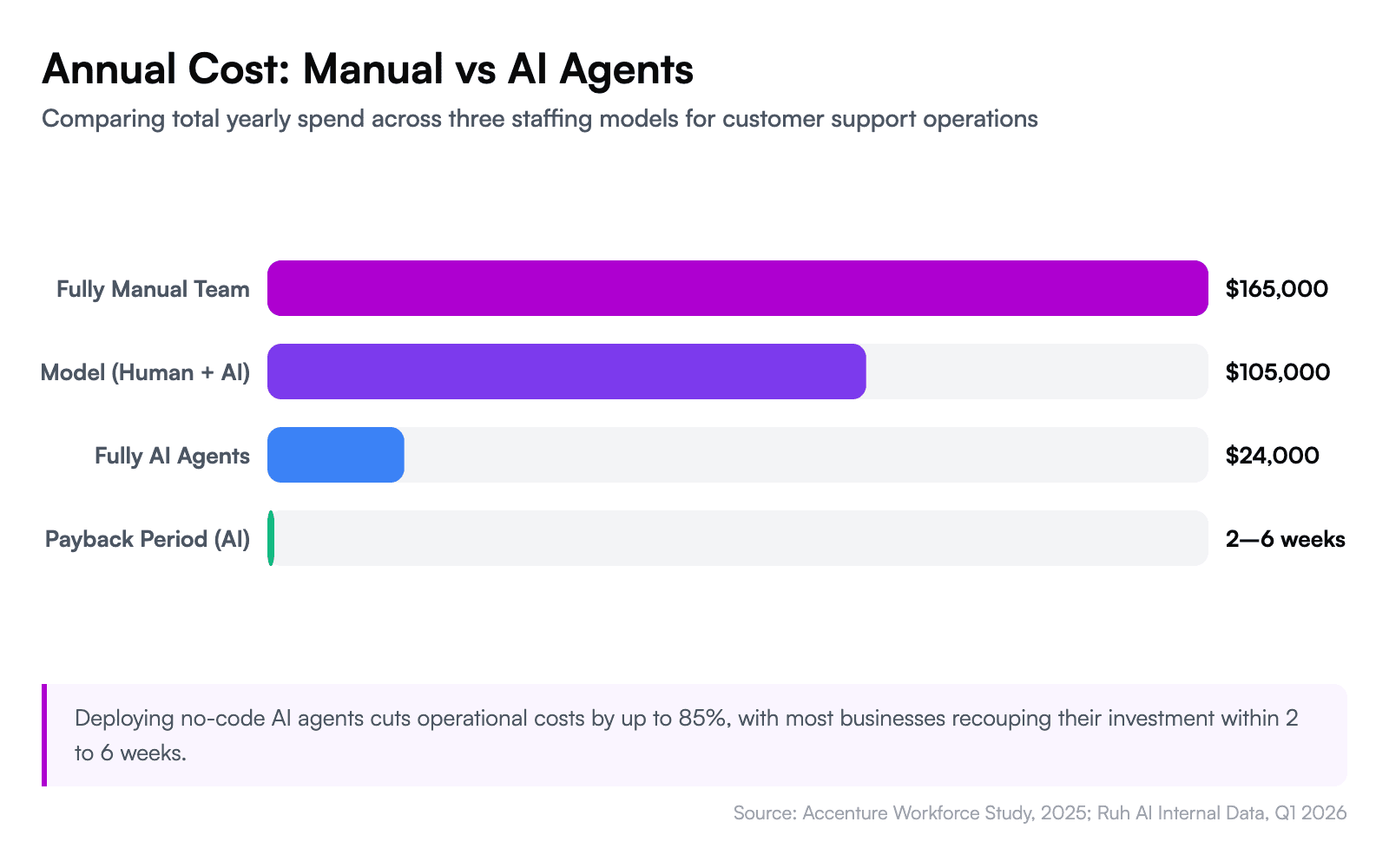
- Manual cost: 3 full-time agents × $55,000 salary = $165,000/year (plus benefits, training, turnover)
- AI agent cost: Work-Lab subscription + AI inference costs ≈ $18,000–$30,000/year
- Hybrid model (recommended): AI agent handles 60% of tickets, 1.5 human agents handle the rest = $100,000–$110,000/year total
The hybrid model is where most businesses land — and it's the smart play. Your AI agent handles the repetitive, high-volume inquiries while your human team focuses on complex cases that genuinely need empathy and creative problem-solving. Accenture's 2025 workforce study found that this human-AI collaboration model increases team productivity by 40% compared to either fully manual or fully automated approaches.
The payback period on a no-code AI agent is typically 2 to 6 weeks — not months, not quarters. That's because you're not paying for custom development upfront. You're paying a subscription, deploying in days, and seeing returns immediately.
6 Mistakes That Stall No-Code AI Agent Projects
1. Building the Agent Before Mapping the Workflow
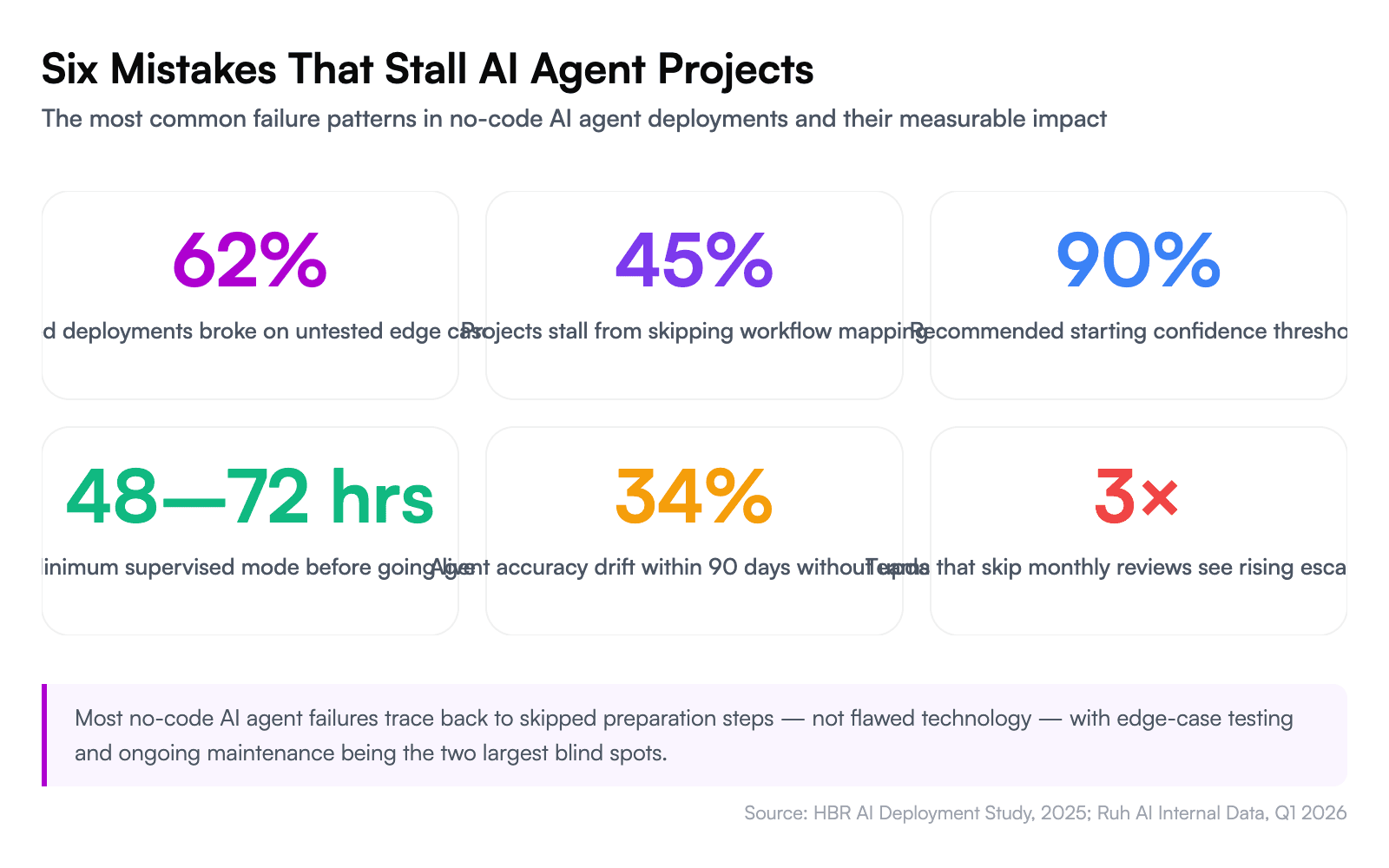
The most common failure: jumping into the builder before documenting the actual workflow. If you can't explain the process in plain English — every decision point, every exception, every escalation trigger — your agent can't execute it. Spend 30 minutes mapping the workflow on paper before opening Work-Lab.
2. Setting the Confidence Threshold Too Low
An agent that auto-sends responses at 50% confidence will embarrass you within a week. Start with a 90% threshold and lower it gradually as you review the agent's reasoning quality. A conservative agent that escalates too often is infinitely better than an aggressive one that sends wrong answers.
3. Ignoring Edge Cases During Testing
Ten happy-path tests aren't enough. Feed your agent the weirdest, most ambiguous, most hostile inputs you can imagine. Test the boundary between "auto-resolve" and "escalate." HBR's 2025 analysis of enterprise AI failures found that 62% of failed deployments broke down on edge cases the team never tested for.
4. Skipping the Knowledge Base
An AI agent without a knowledge base is just a general-purpose chatbot wearing your brand's logo. It'll give plausible-sounding answers that are wrong about your specific policies, pricing, and products. Every agent needs a curated, current knowledge base — not a dump of every document you've ever created, but a focused collection of the information that agent specifically needs.
5. Deploying Without Supervised Mode
Going from "zero" to "fully autonomous" on day one is reckless. Every agent should spend its first 48–72 hours in supervised mode where a human reviews every output. This isn't a lack of trust — it's quality assurance. You'll catch misconfigurations, missing knowledge, and intent-classification gaps that testing didn't surface.
6. Treating the Agent as "Set and Forget"
Your business changes. Policies update. New products launch. Pricing shifts. An AI agent that was perfectly calibrated in March will drift by June if you don't update its knowledge base and review its performance metrics monthly. Schedule a 30-minute monthly review of resolution rates, escalation patterns, and customer feedback.
Your AI Workforce Starts With One Agent
You don't need to automate your entire business this week. You need to automate one workflow — the one that's costing you the most time, money, or frustration — and prove the model works.
That proof of concept changes the conversation internally. When leadership sees a support agent resolving 120 tickets a day at 94% satisfaction with zero developer involvement, the question shifts from "should we invest in AI?" to "which department is next?"
From there, the playbook scales naturally. Your second agent might be an AI-SDR that qualifies inbound leads and books meetings while your sales team sleeps. Your third might be an internal operations agent that processes expense reports and routes approvals. Each one compounds the ROI — and each one is built the same way: define the job, connect the knowledge, wire the integrations, test, deploy.
The businesses that will dominate their categories over the next three years aren't the ones with the biggest AI R&D budgets. They're the ones that figured out how to deploy AI agents at the speed of business need — without waiting for a developer, without a six-figure project, and without writing a single line of code.
Not waiting, but building. Not coding, but orchestrating. Not experimenting, but deploying.
Explore Work-Lab's preset agent templates and build your first AI agent today →
Already have complex workflows that need custom logic? Ruh Developer gives you full API access and analytics on top of the no-code foundation.
Frequently Asked Questions
What is a no-code AI agent, and how is it different from a chatbot?
A no-code AI agent is software that autonomously reasons, retrieves data, and takes actions across multiple systems — built entirely through visual interfaces without programming. Unlike chatbots, which follow scripted conversation trees and primarily handle dialogue, AI agents execute multi-step workflows: reading emails, querying CRMs, processing payments, and making decisions based on confidence thresholds. The key distinction is autonomous reasoning versus predetermined responses. A chatbot answers the question it was programmed for; an agent figures out what the question means, gathers the context it needs, and acts on it.
How much does it cost to build an AI agent without code?
No-code AI agent platforms typically cost between $200 and $2,000 per month, compared to $50,000–$150,000 for custom-coded solutions. Deloitte's 2025 enterprise AI survey found that cost overestimation is the second most common reason organizations delay AI adoption. The total cost depends on usage volume — AI inference charges scale with the number of queries your agent processes. For a mid-size business, a hybrid model combining AI agents with human oversight reduces annual support costs from approximately $165,000 to $100,000–$110,000, with most teams seeing payback within 2 to 6 weeks.
Can AI agents built in Ruh Work-Lab integrate with my existing tools?
Yes. Work-Lab includes over 50 prebuilt connectors covering CRMs like Salesforce and HubSpot, payment systems like Stripe and Xero, email platforms, ticketing tools like Zendesk, and collaboration apps. Each connector surfaces available actions as drag-and-drop blocks — you select the action you need without configuring API endpoints or managing authentication manually. If your tool isn't in the library, custom webhook integrations let you connect any system with a REST API.
What's the difference between AI agents and traditional workflow automation like Zapier or Make?
Traditional automation platforms execute linear, rule-based sequences: "when X happens, do Y." They excel at predictable, single-trigger workflows but cannot reason through ambiguous inputs or make judgment calls. AI agents classify intent, retrieve contextual information from multiple sources, generate dynamic responses, and decide between actions based on confidence levels — all without predefined decision trees. If your process requires interpreting unstructured data, handling exceptions, or adapting behavior per situation, you need an agent, not a workflow.
How long does it take to build and deploy a no-code AI agent?
A functional AI agent can be built and deployed in a single afternoon — roughly 1.5 to 2 hours for the initial build following the six-step process: defining the role (10 minutes), connecting knowledge bases (15 minutes), wiring integrations (20 minutes), designing decision logic (30 minutes), testing (20 minutes), and deploying (5 minutes). Most teams then run 48 hours of supervised mode before switching to autonomous operation. Compare this to the 3-to-6-month development queue McKinsey identifies as the typical enterprise bottleneck for custom automation.
What is a confidence threshold, and how do I set the right one?
A confidence threshold is the minimum certainty score an AI agent must reach before it acts autonomously — below that score, it escalates to a human reviewer. In Work-Lab, you set this as a percentage using a simple toggle. Start at 85% for customer-facing actions like sending emails or issuing credits. For internal workflows with lower stakes, 70–75% works well. Monitor your escalation rate during the first two weeks: if the agent escalates more than 40% of cases, your knowledge base likely needs more context; if it almost never escalates, consider raising the threshold to catch edge cases.
Do I need to train or fine-tune an AI model to use a no-code agent builder?
No. No-code agent builders like Work-Lab use retrieval-augmented generation rather than model fine-tuning. You upload your documents, policies, and historical data to a knowledge base, and the agent retrieves relevant context for each query at inference time. This means updates to your knowledge base take effect immediately — no retraining cycle, no data science team, no GPU costs. The underlying language model already handles reasoning and language generation; your knowledge base simply gives it the specific information about your business.
When should I not use a no-code AI agent?
No-code agents are not the right fit for tasks requiring real-time sub-millisecond processing, highly regulated workflows demanding deterministic audit trails with zero probabilistic decision-making, or deeply custom logic that depends on proprietary algorithms. They also underperform when the knowledge base is sparse — an agent can only be as accurate as the information it can retrieve. If your process has fewer than 20 documented resolution patterns or relies heavily on tacit knowledge that hasn't been written down, invest in documentation before deploying an agent.
How do I measure whether my AI agent is actually working?
Track four metrics from day one: autonomous resolution rate (percentage of tasks completed without human intervention), average response time, escalation rate, and customer satisfaction scores. Forrester's 2025 analysis found that organizations deploying AI agents reduced cost-per-resolution by 45–65% while maintaining or improving satisfaction. Work-Lab's monitoring dashboard surfaces these metrics in real time. A healthy agent should resolve 50–70% of routine inquiries autonomously within the first month, with that rate climbing as you refine the knowledge base and adjust confidence thresholds based on the reasoning traces.
Can I scale from one AI agent to multiple agents across departments?
Yes, and this is where platform choice matters most. Scaling requires reusable components, shared knowledge bases, and centralized management — without these, you end up rebuilding per department. In Work-Lab, agents share a common integration layer and knowledge infrastructure, so connecting a new sales agent to the same CRM your support agent already uses takes minutes, not weeks. Accenture's 2025 workforce study found that teams using AI broadly across functions saw 40% productivity gains. Start with one high-volume, well-documented process, prove the ROI, then replicate the pattern across departments using your first agent as a template.