TL;DR / Summary
Construction admin doesn't have to consume 30-40% of your team's billable hours. AI bots automate invoice processing, compliance tracking, and document classification in 2-4 weeks, cutting processing times by 70-90% and delivering measurable ROI within 6 months.
What you'll learn:
- Why construction teams lose more money to paperwork than bad weather
- What AI bots actually automate (and what they don't)
- A three-phase implementation roadmap that avoids adoption friction
- How to measure ROI and justify investment to your leadership team
- Real challenges you'll face and how to solve them
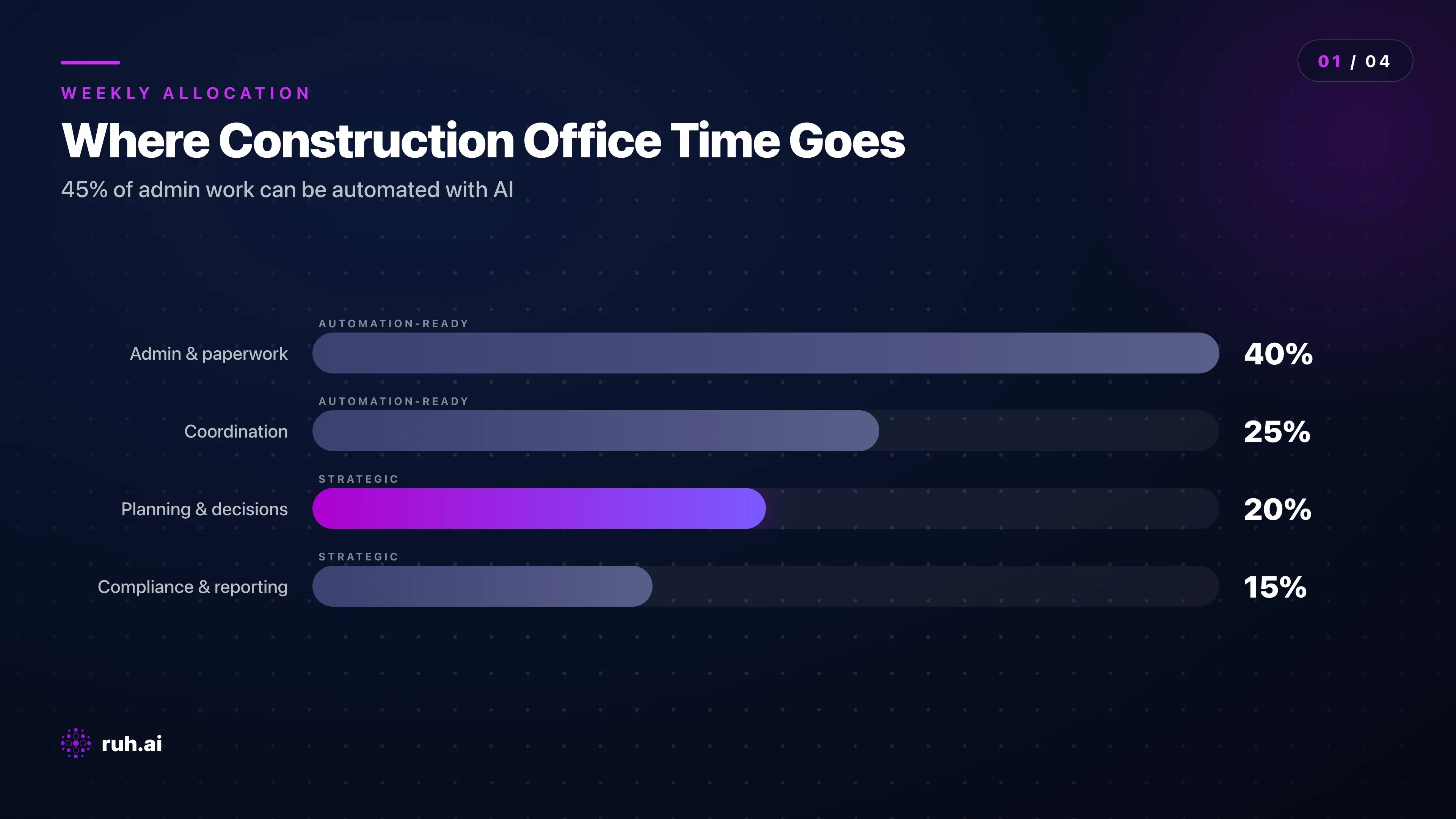
The numbers upfront: The Construction Industry Institute found that field supervisors spend 37% of their time on non-productive work — mostly documentation and coordination. For a 50-person crew, that's equivalent to 18-19 FTE doing nothing but paperwork. An AI bot deployment typically recovers 60-70% of that time at a cost of $15-30K per year.
Why Construction Admin Is Bottlenecking Your Business
Your field teams are good at building. Your office staff are drowning.
Invoice processing doesn't happen the day a bill arrives. It happens 3-5 days later because someone has to match the invoice to the purchase order, check the quantities against the contract terms, log it into Procore, and reconcile any discrepancies manually. Multiply that by 200-300 invoices per month for a mid-sized firm, and you've just lost 2-3 weeks of someone's time per month. That's not a process problem — that's a structural leak in your cash flow.
The admin tax in construction is catastrophic: according to Dodge Data & Analytics, construction companies report spending 30-40% of their annual hours on administrative work that generates zero revenue. For a typical general contractor with 50 office staff, that's roughly $2-3M per year in overhead that doesn't touch a single project.
Compliance tracking multiplies the problem. You have safety logs, equipment inspections, crew training records, material certifications, and regulatory audit trails scattered across email, spreadsheets, and fragmented tools. When an inspection happens or a client audit request lands, someone spends 2-3 days consolidating those records into a single coherent narrative. When something's missing, your job cost hits a snag or your firm faces a penalty.
Schedule conflicts eat another chunk. Your scheduling team manages crews, equipment, material deliveries, and subcontractor availability in a spreadsheet or tool like Touchplan — but there's no system flagging when a crew is assigned to two jobs simultaneously, or when a material delivery is scheduled but the crew isn't ready to receive it. Those conflicts come to light in the field, triggering rework, delays, and finger-pointing.
Construction administrative overhead isn't a nice-to-have problem to solve someday — it's actively killing your margins today. Every percentage point of time you recover is direct profit.
What AI Bots Actually Do in Construction Operations
Stop thinking about "automation." AI bots are decision-making systems, not just data movers.
Document processing and intelligent routing: An AI bot reads an incoming RFI, submittals packet, or permit and automatically classifies it by type, priority, and required action. It extracts relevant data (project number, deadline, responsible party) and routes the document to the right person without human triage. A human then reviews the bot's work and makes the final call — but they're not starting from scratch.
Example: Boral, an Australian building materials company, deployed AI document processing in their permitting workflow. Processing time per permit dropped from 4-6 hours to 20-30 minutes. The bot didn't replace the permit reviewer — it just removed the manual data extraction and filing work.
Invoice and payment reconciliation: The bot receives an invoice in any format (PDF, email attachment, printed scan), extracts the vendor name, invoice number, line items, quantities, and total amount, then matches it against your PO database and contract terms. It flags mismatches (unit price variance, quantities that don't match the PO, missing line items) and routes exceptions to a human. For matching invoices, it pre-approves them into your accounting system. Processing time drops from 15-30 minutes per invoice to 2-3 minutes for exceptions and near-zero for matches.
Compliance tracking and automated reporting: The bot monitors your compliance calendar — equipment inspections, training certifications, safety audits, regulatory deadlines — and automatically pulls evidence from your systems (photos uploaded by crews, timestamps from Procore, training transcripts from your LMS). When an audit request comes in, the bot assembles the compliance package in hours instead of days. It also proactively alerts you to upcoming deadlines before you miss them.
Schedule conflict detection and crew optimization: The bot monitors your master schedule across Procore, Touchplan, or your field management system and flags impossible assignments (crew double-booked, material delivery before crew is ready, equipment maintenance scheduled during active work). For larger firms with dozens of concurrent jobs, it can suggest rebalancing (moving crew from Project A to Project B based on actual progress vs. forecast) without any manual input.
The honest truth: AI bots work brilliantly on structured, repeatable tasks with clear decision rules. They fail on context-heavy judgment calls. A bot can classify a document 98% accurately. A bot cannot decide whether a change order is justified based on the full project narrative and client relationships — that's human judgment.
Selecting the Right AI Bot for Your Construction Firm
Not all AI bot vendors are built for construction.
Start by mapping your current admin pain. Which single process costs the most time and money? For most firms, it's invoice processing (high volume, time-intensive, directly tied to cash flow). For others, it's schedule conflict detection or compliance reporting. Pick that one process and measure it: How many invoices/documents per month? How many hours does it take today? What's the error rate and cost of rework?
That process becomes your ROI anchor. If you process 200 invoices per month, each taking 20 minutes, that's 67 hours per month. If a bot reduces processing time to 3 minutes per invoice with 2-3 exceptions per day requiring human review, you've recovered 55-60 hours per month. At $50/hour loaded cost, that's $2,750-3,000 per month or $33-36K per year. If the bot costs $18-25K annually, your payback is 6-8 months and you're cash-flow positive in year one.
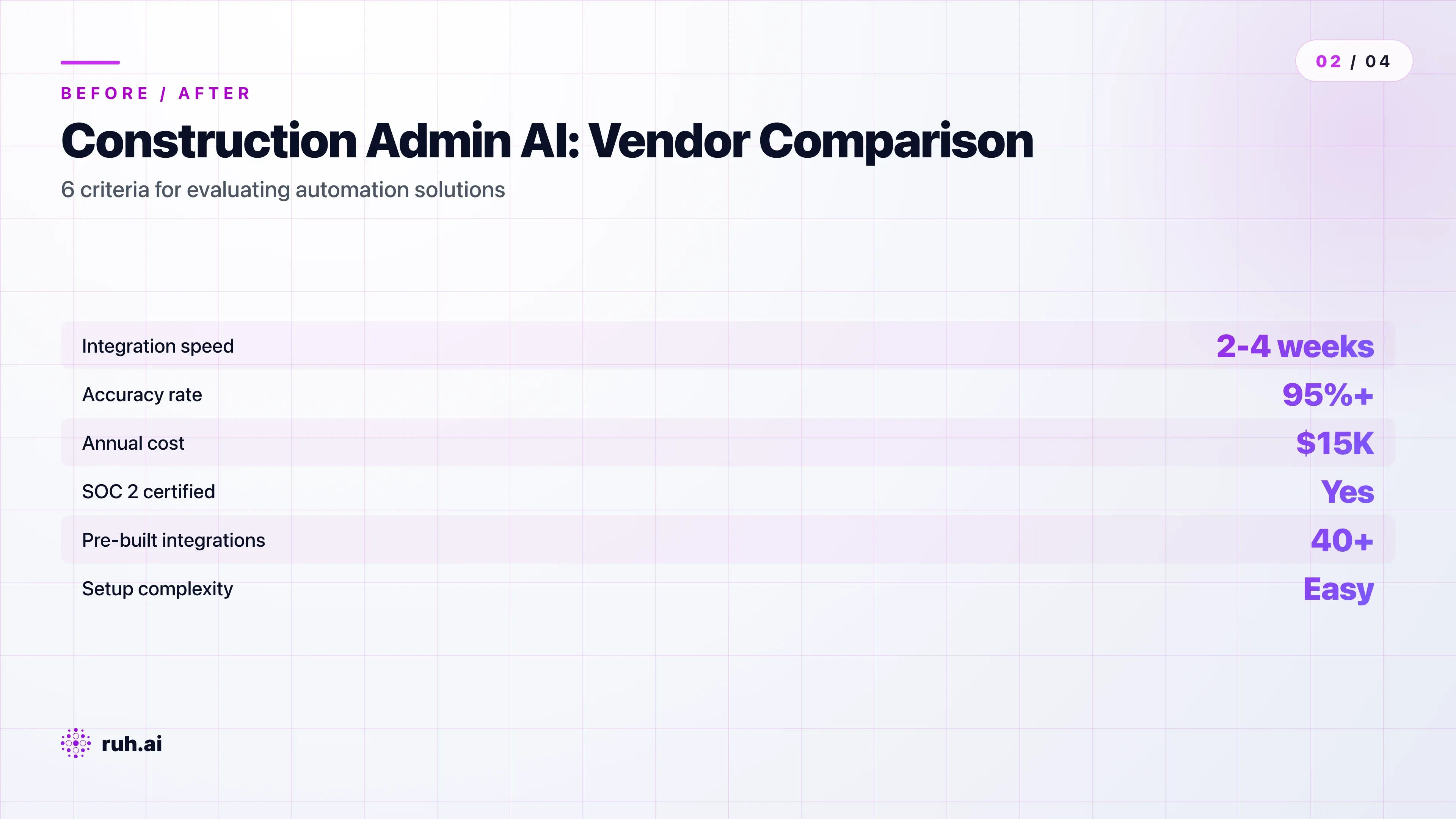
Integration matters more than features. A bot that integrates directly with Procore, Jonas, Touchplan, or your accounting system will be live in 2-4 weeks. A bot that requires custom API development will take 8-12 weeks and cost significantly more. Verify current integrations with your vendor — "we support REST APIs" is not the same as "we have a pre-built Procore connector."
Accuracy benchmarks are non-negotiable. You want 95%+ accuracy on real-world construction documents. "Our model achieves 99% accuracy on lab data" means nothing if it struggles with your handwritten notes, blurry site photos, or vendor-specific invoice formats. Ask vendors for accuracy metrics on their actual customer data — or better, run a 1-2 week pilot on a sample of your documents before committing.
Compliance and security matter. Your construction documents contain sensitive project data, client information, and sometimes personnel records. Verify that your vendor holds SOC 2 Type II certification (not just "certified by our own auditor"), encrypts data in transit and at rest, provides audit logging for compliance proof, and has a documented data retention and deletion policy. If you handle any Personally Identifiable Information (PII) — crew member SSNs, driver's license numbers — verify CCPA/GDPR compliance.
Implementing AI Bots: A Phased Approach
Phased rollout isn't optional. It's how you build team confidence and avoid adoption failure.
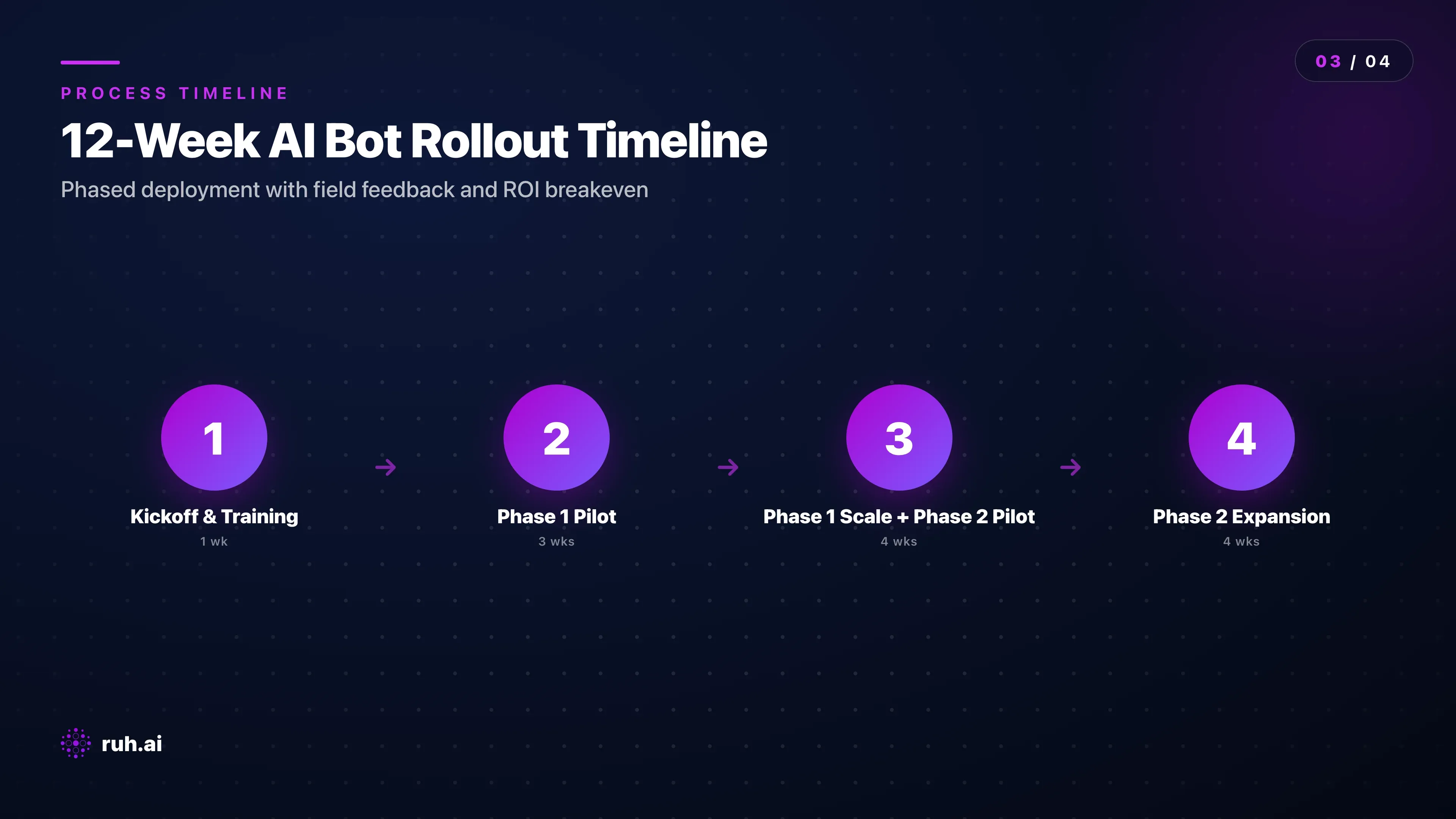
Phase 1 (Weeks 1-4): Pick one high-impact process and pilot it hard. Most firms start with invoice processing or timesheet automation because both are high-volume, low-complexity, and directly measurable. Deploy the bot on a subset of daily invoices — say, the 50% that come from your top 5 vendors. Have your accounting team review the bot's work for 2-3 weeks. During this phase, measure everything: how many exceptions did the bot flag? How many false positives? What was the bot right about that surprised you?
At week 3, bring in your field crews. Show them the time savings ("your timesheets now process in 1 day instead of 3"). Address the "will this replace me?" question directly: "We're using this time savings to hire a project coordinator, not eliminate your position." Honest.
Phase 2 (Weeks 5-8): Expand Phase 1 to full volume, then pilot Phase 2. Once invoice processing is running well on all invoices, start piloting document classification. Hand off 30-40% of your weekly document inflow to the bot and have your staff review classifications. Document classification is lower stakes than invoice processing — a misclassified submittals doesn't block cash flow — so teams are more relaxed about trusting the bot.
Phase 3 (Weeks 9-12): Add predictive analytics or compliance tracking (optional). Not every firm needs this. Small contractors might stop at Phase 2 and be completely satisfied. Larger firms with complex compliance requirements (if you manage 10+ concurrent jobs with different client requirements) benefit from automated compliance tracking.
The phased approach works because it builds confidence incrementally. Your team isn't asked to trust a black box on day one — they're asked to review the bot's work, see it improve, and gradually rely on it more.
Critical: Involve field crews in the design of Phase 1 and Phase 2. If you're automating timesheets, let crews test it for a week and give feedback. If you're automating RFI routing, ask the superintendents which data fields matter most. The bot will work better and adoption will be faster.
The Honest Assessment: What AI Bots Still Can't Do
AI bots are not magic, and pretending they are is how implementation fails.
AI bots cannot make judgment calls that require understanding complex project narrative or client relationships. If a vendor submits an invoice for 10% more than the contract price, a bot can flag it. A bot cannot decide if you should pay it anyway because the vendor had to source materials at inflated prices due to a supply chain issue and you want to keep the relationship. That's human judgment.
AI bots cannot handle highly irregular or handwritten documents. If 95% of your invoices arrive as clean PDFs but 5% arrive as handwritten time sheets on site, the bot will struggle with the handwritten ones. You'll need a fallback process.
AI bots cannot schedule around unpredictable factors. They can optimize scheduling based on crew availability and material delivery dates, but they can't account for "the client called and moved the inspection back two days" unless someone explicitly updates the system. If your jobs are highly dynamic, the bot's schedule optimization will drift within 1-2 weeks.
AI bots are not a replacement for project management discipline. If your data is messy (incomplete POs, outdated Procore records, fragmented compliance logs), the bot will produce garbage output. Deploying a bot is a forcing function to clean up your data — and that's often the hardest part.
The flip side: These limitations are not reasons to avoid AI bots. They're reasons to deploy them thoughtfully and keep humans in the loop. A bot that's right 95% of the time and wrong 5% is still a massive productivity boost if you design the 5% exception workflow well.
How Ruh.AI Fits Into Construction Automation
Ruh AI's approach to construction automation is different because it treats bots as AI employees, not just task runners.
Ruh Work-Lab lets you deploy AI agents without writing code. For construction, that means you can define a "Document Routing Agent" — configure it to understand RFI vs. submittals vs. permits, extract key data fields, and route to the right person — without hiring a developer. You define the logic through the UI, connect it to your document inflow (email, cloud storage, Procore), and it runs.
The difference from traditional RPA tools (which require developers and break whenever your document format changes slightly): Ruh agents use large language models to understand context and variations. A submittals packet from one vendor looks different from another vendor's packet, but Ruh's agent understands both because it's reading like a human would.
Ruh-R1, Ruh's proprietary AI model powering all agents, was trained on business logic and decision-making workflows — not just language patterns. That means it's better at understanding construction contracts, extraction compliance requirements, and flagging cost anomalies than general-purpose LLMs.
For firms that want a pre-built solution, Ruh can also deploy a custom construction administration agent through the Ruh Developer program. Define your invoice matching rules, compliance checklist, and scheduling conflict logic, and Ruh builds the agent specifically for your firm.
The honest pitch: Ruh isn't the cheapest AI bot option. But for construction firms that want to avoid the "bot breaks when we change our vendor invoice format" problem and want agents that improve over time based on your feedback, Ruh's approach pays for itself in implementation speed and maintenance cost.
Explore Ruh Work-Lab and start building without code →
Talk to the Ruh AI team about custom construction agents →
Measuring Results: Key Metrics and ROI Benchmarks
You can't improve what you don't measure.
Before deploying any bot, establish your baseline:
- Processing time per document or task (e.g., 22 minutes per invoice)
- Monthly volume (e.g., 200 invoices per month)
- Error rate and rework cost (e.g., 3% of invoices require correction, averaging $150 in rework per error)
- Staff hours consumed (e.g., invoice processing takes 73 hours per month from your accounting team)
- Opportunity cost (e.g., those 73 hours could be spent on reconciliation, forecasting, or other revenue-generating work)
After deploying a bot, measure the same metrics at weeks 2, 4, 8, and 12.
Typical results after 12 weeks:
- Processing time per document drops 70-90%. Invoices go from 22 minutes to 3 minutes.
- Volume handled per FTE increases 3-5x. One person can now manage what took 2-3 people before.
- Error rate drops 30-50% because the bot is more consistent and less prone to fatigue errors than humans.
- Staff hours freed: if you had 73 hours per month going to invoices, you now have 55-60 hours freed. You can redeploy that person or use those hours for higher-value work.
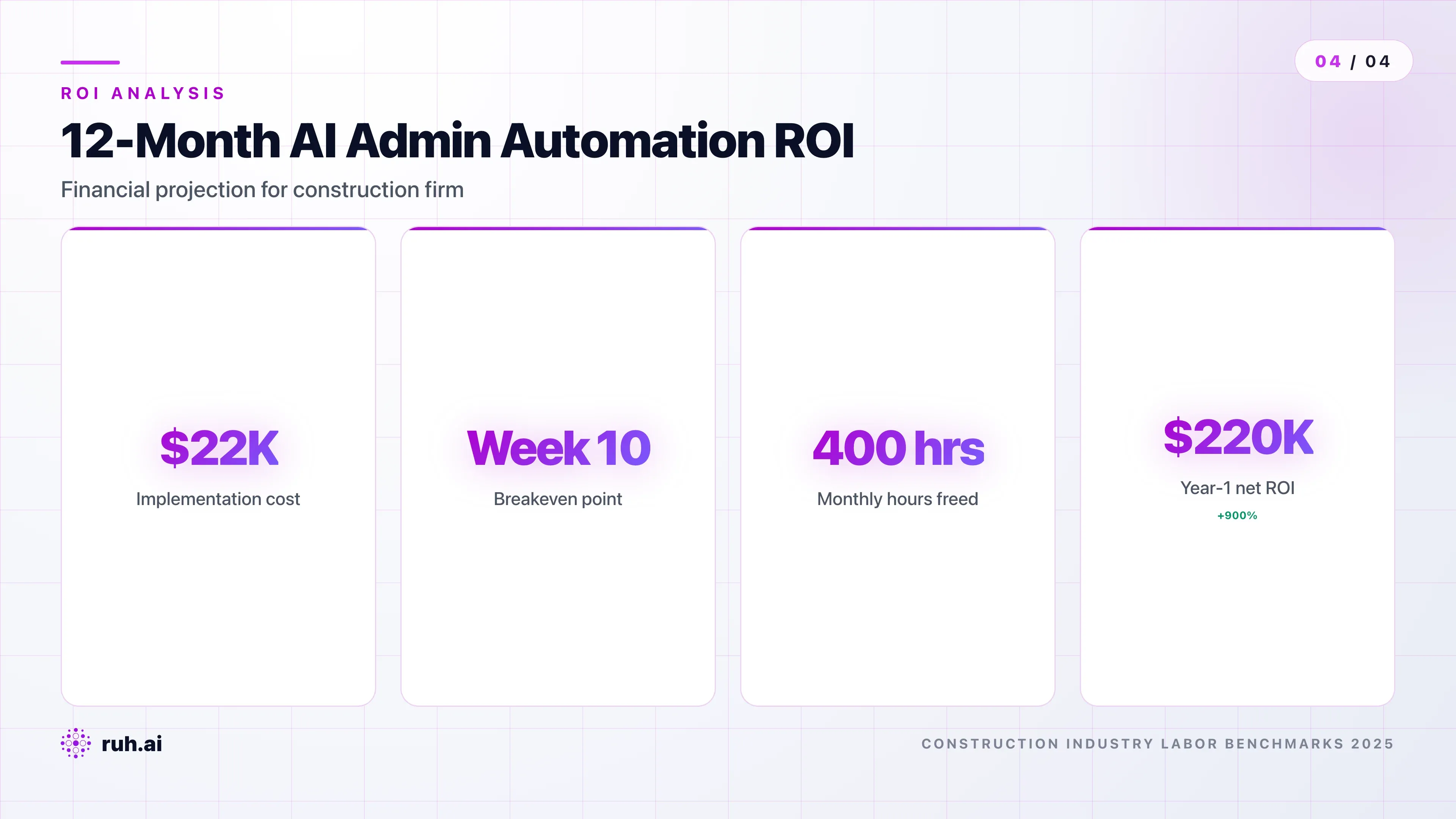
Financial ROI: At $15-25K annual bot cost and $50/hour loaded staff cost, most firms see payback in 6-8 months and full-year ROI of 200-400%.
The firms that struggle financially are those that redeploy freed-up staff into "busy work" instead of revenue-generating work. If you automate 60 hours per month of invoice processing and then assign those hours to manual data entry for reports, you don't get ROI. You need a plan for that freed-up time — whether it's higher-value projects, proactive planning, or reducing headcount.
Overcoming Common Implementation Challenges
Challenge 1: Field team resistance ("This will replace us").
Field teams aren't wrong to be suspicious. They've seen poorly-designed automation before. Address it head-on: "We're using the time this saves to hire a scheduler and a project coordinator. The goal is to get you out of the office faster and back to work that uses your skills."
Show them a pilot first. When superintendents see their timesheets processing in 1 day instead of 3, they become advocates. Make this tangible — don't just tell them, involve them.
Challenge 2: Data quality and training.
Your historical invoices and documents are inconsistent. Vendors use different formats. Handwriting is illegible. The bot will struggle on low-quality training data.
Build a 1-2 week data cleaning phase into your timeline. Identify the 500-1,000 most recent invoices or documents, and have your team clean them up: correct vendor names, standardize date formats, fix OCR errors. The bot trains on that clean data and performs much better.
Challenge 3: Integration complexity.
If your firm uses 5 different tools — Procore, Jonas, Wave Accounting, a custom timekeeping system, and email — integration becomes messy. A bot needs to pull data from all of them and write results back to at least two.
Modern AI bot vendors support REST APIs and webhooks. But you need an integration architect (either from the vendor or a consultant) to wire it all together. Budget 2-4 weeks and $5-10K for this work if you're connecting to more than 3 systems.
Challenge 4: Vendor lock-in and data portability.
Choose vendors that provide API access and data export. If the bot is storing your documents or processing data in a proprietary system, you need to be able to extract that data cleanly if you ever switch vendors.
Verify this before signing a contract — ask the vendor to show you a sample data export in JSON or CSV format. If they're evasive, walk.
Frequently Asked Questions
Q: Will AI bots replace our administrative staff positions? A: No. AI bots eliminate task work (invoice processing, document routing, schedule conflict detection) but create demand for higher-level work (process improvement, analytics, relationship management). Construction firms that deploy bots typically redeploy staff into scheduling, forecasting, or project controls roles rather than laying people off. The freed-up time is your competitive advantage — use it strategically.
Q: How quickly can we expect to see ROI from AI bot implementation? A: Most firms see measurable ROI within 4-8 months, with Phase 1 projects (invoice processing or timesheets) often breaking even within 6 weeks. The timeline depends on your baseline process (if you're starting with pure chaos, improvements are faster) and how quickly your team adopts the bot.
Q: How do AI bots handle sensitive project data and compliance? A: Enterprise AI bots include SOC 2 Type II compliance (third-party audited security standards), encryption for data in transit and at rest, and audit logging for regulatory proof. Ask vendors for their security documentation before you deploy. If you're handling Personally Identifiable Information (PII), verify that the vendor's data retention and deletion policies meet CCPA/GDPR requirements.
Q: Which construction management platforms integrate with AI bots today? A: Modern bots integrate with Procore, Jonas, Touchplan, Bridgit, and most platforms via REST API. Ruh AI specifically has pre-built connectors for Procore and custom integration support for other systems. Verify current integrations with your vendor — "we support APIs" is not the same as "we have a ready-made integration."
Q: Can we pilot an AI bot with just one process before full rollout? A: Yes — and you should. Most successful implementations start with a 2-4 week pilot on a single high-volume, low-risk process (invoices, timesheets, or document routing). Measure everything during the pilot, involve field teams in feedback, and expand only after you've proven ROI and adoption.
Q: What happens if the AI bot makes a mistake? A: The bot flags exceptions and humans review them. On invoice processing, a mismatched unit price or quantity variance gets flagged and routed to an accountant for review. For document routing, the bot suggests a classification and the relevant manager confirms it. The human is always in the loop for decisions — the bot just removes the data extraction and triage work.
Q: What's the typical cost of deploying an AI bot for construction admin? A: Implementation costs range from $5-15K (software setup, training, integration) and annual software licenses run $15-30K depending on document volume and feature complexity. Payback period is typically 6-8 months, so if you're processing high volume, the math works in year one.
Implementation Checklist: Getting Started This Week
Week 1:
- Pick your highest-impact, lowest-complexity process (invoice processing, timesheets, or document routing)
- Measure your baseline: volume per month, processing time, error rate, staff hours
- Identify 3 potential vendors and request demos focused on that process
- Check integration requirements with your current tools (Procore, Jonas, accounting system, etc.)
Week 2-3:
- Run a 2-week pilot with one vendor on 30-50% of your monthly volume
- Have your team review the bot's work daily and give feedback
- Measure accuracy and time savings during the pilot
Week 4:
- Decide: expand to 100% volume or try a different vendor
- Plan your Phase 2 rollout and communicate timeline to field teams
- Budget for data cleanup (1-2 weeks) if your historical data is inconsistent
The Real Competitive Advantage in 2026
Construction companies that deploy AI bots in 2026 are not investing in "cool technology." They're investing in reclaiming 20-30% of their operational margin from administrative overhead and freeing their best people to do work that actually scales revenue.
The firms that don't? They'll continue losing 30-40% of their billable hours to paperwork, watching their cash conversion cycles stretch, and struggling to compete with leaner operators who've automated the repetitive work.
The choice isn't whether to use AI in construction admin — it's whether you do it this year or next year. The financial gap between first movers and laggards is growing fast.
Ready to start your first AI bot project? Start with your highest-impact process, measure ruthlessly, and involve your team from day one. The implementation timeline is 2-4 weeks. The payback period is 6-8 months. The competitive advantage is permanent.
Explore Ruh Work-Lab and build your first automation without code →
See how Ruh's AI agents handle construction workflows →