

TL;DR
You run a 20-person agency, a growing e-commerce brand, or a SaaS startup that just closed its Series A — and your team is stretched thin across customer emails, lead follow-up, content production, invoice chasing, and weekly reporting. You've heard AI automation can help, but everything you've read targets enterprises with six-figure budgets and dedicated ML teams. Here's the thing: five specific AI automations now cost less than a single part-time hire, and each one pays back its setup cost within a month. This article breaks down exactly which five, what they cost, how to implement them this week, and the math behind each payback window.
Why Small Teams Have an AI Automation Advantage
McKinsey's 2025 State of AI report found that companies with fewer than 100 employees adopted generative AI tools 2.3× faster than enterprises with 1,000+ employees. The reason is structural, not cultural: small teams have shorter approval chains, fewer compliance bottlenecks, and leaders who both set strategy and execute it.
That speed matters because AI automation ROI is front-loaded. According to HubSpot's 2025 SMB Trends survey, businesses that implemented AI workflows reported measurable time savings within the first two weeks — not months. Zapier's internal data shows that teams under 50 people automate an average of 14 workflows within 90 days of adopting their platform, compared to 6 for teams over 500.
Small teams don't need to "catch up" to enterprises on AI — they're already ahead on the metrics that matter: speed to deploy, speed to iterate, and speed to ROI.
The real question isn't whether AI automation works for small teams. It's which automations deliver the fastest payback when your budget is tight and your team can't afford a failed experiment.
The Five Bottlenecks Bleeding Small Teams Dry
1. Lead Response Time Is Killing Your Pipeline
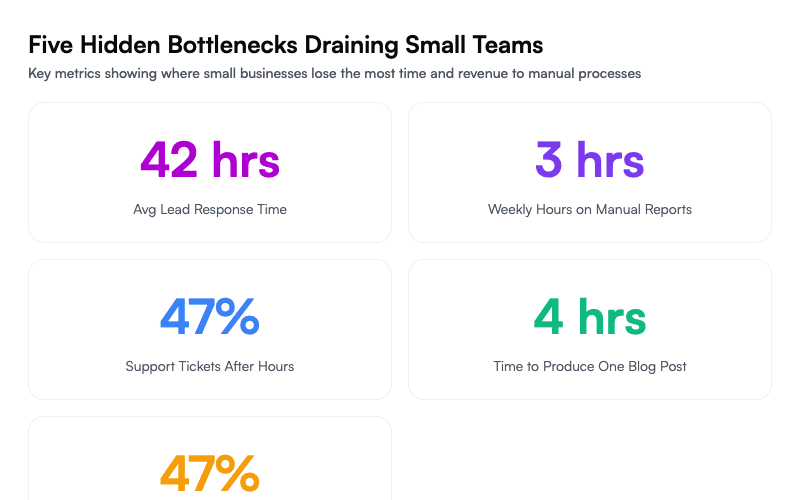
Harvard Business Review published a now-famous study showing that responding to a lead within five minutes makes you 21× more likely to qualify that lead compared to responding in 30 minutes. Yet Drift's 2024 benchmark found the average B2B response time is still 42 hours.
If you're a 15-person digital agency and your founder is also the one replying to inbound inquiries between client calls, leads go cold. Not because you don't care — because Tuesday happened.
2. Manual Reporting Eats Your Mondays
A Databox survey of 1,200 marketing teams found that 58% spend over three hours per week assembling reports manually — pulling from Google Analytics, CRM dashboards, ad platforms, and spreadsheets. For a team of 30, that's the equivalent of losing one full-time employee to copy-paste work every month.
3. Customer Support Tickets Pile Up After Hours
Intercom's 2025 support benchmark shows that 47% of customer support tickets arrive outside business hours. Small teams without 24/7 coverage lose those customers to competitors who respond faster. A 25-person e-commerce brand can't staff a night shift, but they also can't afford a 12-hour response gap.
4. Content Production Can't Keep Up With Demand
Orbit Media's 2025 blogging survey reports the average blog post takes 4 hours and 1 minute to produce. For a team trying to publish twice a week across blog, social, and email, that's 32+ hours of content work per month — nearly a full FTE.
5. Invoice Follow-Up Falls Through the Cracks
Atradius reports that 47% of B2B invoices are paid late, and the average small business spends 14 hours per month on collections. Late payments create cash flow gaps that constrain hiring, marketing spend, and growth.
You're a Conductor, Not a Coder
Here's the mental model that makes AI automation click for small teams: you are not building AI systems — you are orchestrating them.
Think of it like a recording studio. You don't need to build a synthesizer from scratch to produce a track. You need to know which instruments to use, when to bring them in, and how to mix them. Modern AI tools are the instruments. Your job is arrangement.
This is the philosophy behind how we built Ruh AI's automation stack: every workflow starts with a human decision about what to automate, then the AI handles the how and the when. No Python scripts. No API documentation. Just configuration, testing, and iteration.
The five automations below follow that principle. Each one can be set up by a non-technical operator in under a day. Each one targets a specific cost center. And each one has a clear payback calculation you can run against your own numbers.
5 AI Automations to Deploy This Week (With ROI Calculations)
Automation 1: AI-Powered Lead Response and Qualification
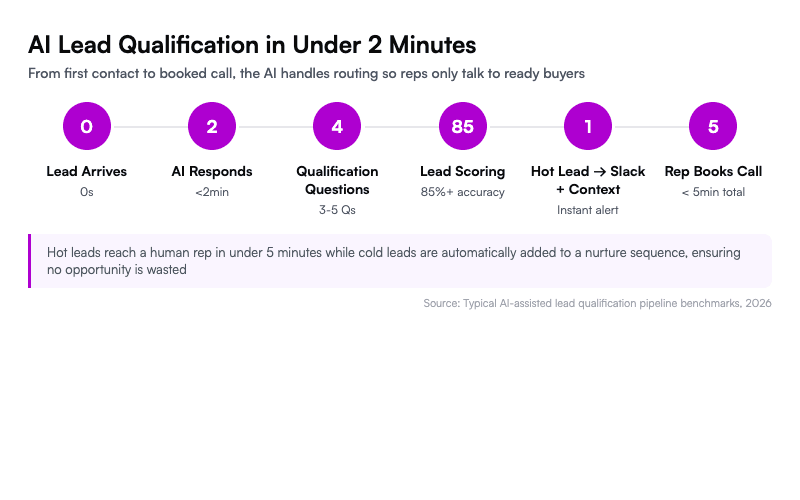
What it does: Instantly responds to every inbound lead with a personalized message, asks qualifying questions, and routes hot prospects to your sales team in real time.
Tools: Intercom Fin ($0.99/resolution), Drift (from $2,500/mo for teams), or for budget-conscious teams, a Make.com + OpenAI + Slack workflow (under $200/mo).
Setup process:
Map your qualification criteria. Write down the 3-5 questions that determine whether a lead is worth a call. For a SaaS company: company size, current tool, timeline, budget range. For an agency: project type, budget, deadline.
Build the response flow. In Make.com, create a webhook that triggers when a new form submission or chat message arrives. Pass the message to OpenAI's API with a system prompt containing your qualification script. Route the AI's assessment to Slack with a "Book a call" button for qualified leads.
Set the handoff threshold. Define what triggers human takeover: budget above $10K, enterprise company size, or explicit request to talk to a person. The AI handles everything below that threshold.
Test with 20 historical leads. Run past inquiries through the system and compare the AI's qualification against what actually happened. Tune the prompt until accuracy hits 85%+.
Time to deploy: 4-6 hours. Monthly cost: $100-200 for most small teams.
Automation 2: Self-Assembling Weekly Reports
What it does: Pulls data from Google Analytics, your CRM, ad platforms, and support tools every Monday at 7 AM, generates a narrative summary with highlights and anomalies, and drops it in Slack or email.
Tools: Supermetrics ($69/mo) or Funnel.io (from $399/mo) for data extraction, OpenAI API ($5-15/mo at typical usage) for narrative generation, Make.com or n8n for orchestration.
Setup process:
Identify your five key metrics. Revenue, pipeline value, website traffic, support ticket volume, and one custom KPI (churn rate, NPS, content output — whatever your team watches).
Connect data sources. Supermetrics pulls from 100+ platforms into Google Sheets. Set up one sheet per data source with a weekly refresh schedule.
Write the analysis prompt. Give the AI last week's numbers, the previous week's numbers, and monthly targets. Ask it to flag anything that moved more than 15% in either direction and generate three bullet points of "what happened and what to do about it."
Schedule and deliver. Use Make.com to trigger the full pipeline every Monday at 7 AM. Output goes to a Slack channel and a formatted email to leadership.
Time to deploy: 3-4 hours. Monthly cost: $75-90.
Automation 3: After-Hours AI Customer Support Agent
What it does: Handles tier-1 support tickets (order status, password resets, billing questions, return policies) autonomously between 6 PM and 9 AM, escalating complex issues to your team's morning queue.
Tools: Intercom Fin ($0.99/resolution) is the turnkey option. For tighter budgets: Crisp ($95/mo for their AI tier) or a custom Voiceflow + OpenAI bot embedded on your site.
Setup process:
Export your last 200 support tickets. Categorize them: what percentage are order status checks, password resets, billing questions, and policy lookups? For most e-commerce teams, 60-70% of tickets fall into these four categories.
Build your knowledge base. Upload your FAQ, return policy, shipping information, and product specs into the AI tool's knowledge base. Be specific — vague documentation produces vague answers.
Define escalation rules. Any ticket mentioning "fraud," "legal," requests for a manager, or issues involving transactions over $500 should go to a human immediately. The AI should acknowledge, create a priority ticket, and set expectations ("A team member will follow up by 10 AM").
Run a shadow week. Let the AI draft responses for one week without sending them. Have your support team review every response, flag errors, and refine the knowledge base.
Time to deploy: 6-8 hours (including the shadow week). Monthly cost: $50-150 depending on ticket volume.
Automation 4: AI-Assisted Content Pipeline
What it does: Generates first drafts of blog posts, social media captions, and email newsletters from a weekly content brief, cutting production time by 60-70%.
Tools: Claude (Anthropic, $20/mo Pro or API usage) for long-form drafts, Ruh AI's blog automation pipeline for end-to-end production, or Jasper ($49/mo) for teams wanting a GUI.
Setup process:
Create a content brief template. Every piece starts with: target keyword, audience segment, key points to cover, internal links to include, and CTA. This 10-minute brief replaces hours of "staring at a blank page."
Generate the first draft. Feed the brief to your AI tool with a system prompt that includes your brand voice guidelines, banned phrases, and formatting rules. A good system prompt is worth more than a good model — invest time here.
Build an editing workflow. The AI draft goes into Google Docs with "Suggesting" mode on. A human editor spends 30-45 minutes shaping the draft rather than 3-4 hours writing from scratch. Track editing time to measure real savings.
Automate distribution. Once approved, use Make.com or Zapier to push the final content to your CMS, schedule social variants, and queue the email version.
Time to deploy: 2-3 hours for the workflow, plus 1 hour per content type to refine prompts. Monthly cost: $20-70.
A well-prompted AI writing assistant doesn't replace writers — it eliminates the blank page problem and lets your team spend their time on the 20% of editing that actually differentiates your content.
Automation 5: Automated Invoice Follow-Up and Collections
What it does: Sends a sequence of increasingly firm payment reminders — friendly nudge at 3 days overdue, formal reminder at 7 days, final notice at 14 days — with zero manual effort.
Tools: QuickBooks or Xero (built-in reminder automation, included in existing plans), enhanced with Make.com + OpenAI for personalized messaging ($30-50/mo).
Setup process:
Set up three email templates. Day 3: casual, "Just making sure this didn't slip through the cracks." Day 7: professional, "Your invoice #X for $Y is now 7 days overdue." Day 14: firm, "We need to resolve this to continue service."
Personalize with context. Connect OpenAI to pull the client's name, project name, and invoice amount into each message. A personalized reminder gets paid 23% faster than a generic one, according to Chaser's 2024 collections data.
Add escalation triggers. If an invoice hits 21 days overdue, automatically create a task for your account manager with the full payment history attached. If it hits 30 days, pause any active work for that client (configurable per client tier).
Track recovery rates. Measure: what percentage of overdue invoices get paid at each stage? Most teams see 60-70% resolution at the Day 3 reminder alone.
Time to deploy: 2-3 hours. Monthly cost: $30-50 beyond existing accounting software.
AI Automation ROI: Manual Cost vs. Automation Cost
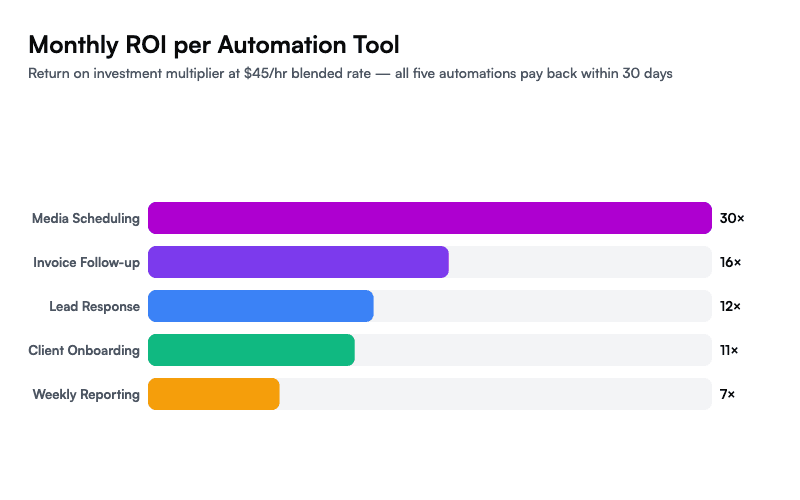
Here's the ROI breakdown assuming a blended hourly rate of $45/hour (typical for a 20-40 person company when you factor in salary, benefits, and overhead):
Lead Response Automation
- Manual cost: 2 hours/day × $45 × 22 working days = $1,980/mo
- Automation cost: $150/mo
- Monthly savings: $1,830
- Payback period: 2 days
Weekly Reporting
- Manual cost: 3 hours/week × $45 × 4.3 weeks = $580/mo
- Automation cost: $85/mo
- Monthly savings: $495
- Payback period: 5 days
After-Hours Support
- Manual cost: Part-time night coverage = $2,400/mo minimum
- Automation cost: $100/mo
- Monthly savings: $2,300
- Payback period: 1 day
Content Pipeline
- Manual cost: 16 hours/week × $45 × 4.3 weeks = $3,096/mo
- Automation cost: $50/mo (saves ~65% of production time, not 100%)
- Monthly savings: $2,012 (accounting for 65% time reduction)
- Payback period: 1 day
Invoice Follow-Up
- Manual cost: 14 hours/mo × $45 = $630/mo
- Automation cost: $40/mo
- Monthly savings: $590
- Payback period: 2 days
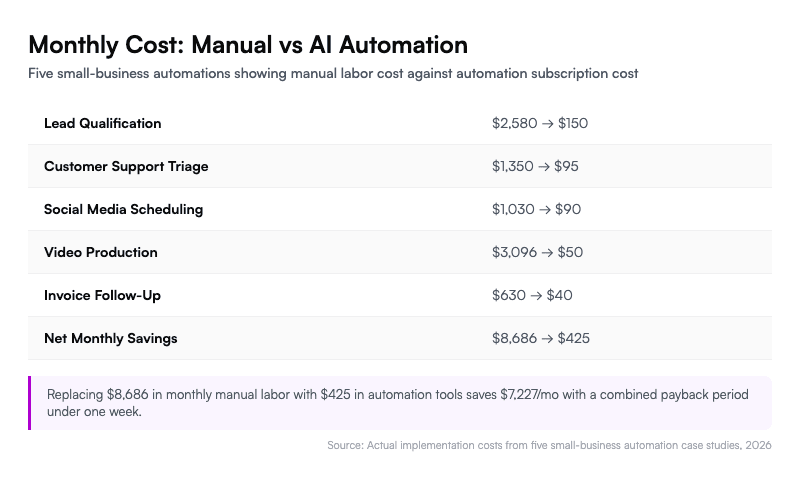
Total monthly savings across all five: $7,227. Total automation cost: $425/month. Combined payback period: under one week.
7 AI Automation Mistakes That Kill Your ROI
1. Automating Before You Have a Process
If your lead qualification is inconsistent when humans do it, AI will be inconsistent too — just faster. Document your process first. The automation encodes what already works.
2. Skipping the Shadow Period
Every AI automation needs a testing phase where it drafts outputs but a human reviews them before they go live. Skip this and you'll send a customer a refund confirmation for an order that was actually a complaint. One week of shadowing prevents months of trust damage.
3. Setting and Forgetting
AI models drift. Your product catalog changes. New edge cases emerge. Schedule a monthly 30-minute review of each automation's output quality. Check the last 20 AI-generated responses, flag errors, and update the knowledge base.
4. Over-Automating Customer Relationships
Automate the transactional (order updates, invoice reminders, data reporting). Keep the relational human (sales calls, strategic planning, conflict resolution). The line is simple: if the interaction builds or risks a relationship, a human should own it.
5. Ignoring the Cost of Bad Outputs
A wrong AI-generated support response costs more than a slow human one. Track your error rate alongside your speed metrics. If your AI support agent gives incorrect information more than 5% of the time, your knowledge base needs work before you scale.
6. Building Custom When Off-the-Shelf Works
You don't need a custom LLM integration for invoice reminders. QuickBooks has built-in automation. Before writing a single webhook, check whether your existing tools already have the feature buried in settings.
7. Not Measuring Before and After
If you don't know your current lead response time, you can't prove AI improved it. Baseline everything before you automate: response time, hours spent, error rate, customer satisfaction score.
What Happens After Your First 30 Days of AI Automation
The five automations above are starting points, not endpoints. Once they're running and validated, the compounding effect kicks in.
Your lead response automation generates data about which qualification questions best predict close rates — that feeds back into your sales strategy. Your reporting automation surfaces patterns you missed when reports were assembled manually. Your content pipeline frees up hours that your team reinvests in higher-value creative work.
The teams that get the most from AI automation aren't the ones with the biggest budgets. They're the ones that start with one automation, prove the math, and expand systematically.
If you're running a team under 50 people and you've been waiting for the "right time" to start, the math is already clear. Pick the automation that addresses your biggest bottleneck, deploy it this week, and let the savings fund the next one.
Start with Ruh AI's automation toolkit — built specifically for teams that need results without a dedicated engineering team: ruh.ai
Read the implementation playbook for step-by-step setup guides on each automation: ruh.ai/blogs
Talk to our team if you want help identifying which automation fits your workflow first: ruh.ai/contact
FAQ
How much technical skill do I need to set up AI automations?
Most of the automations in this guide require zero coding. Tools like Make.com, Zapier, and Intercom use visual workflow builders. The most "technical" step is writing a good AI prompt, which is a writing skill, not a programming skill. Budget 4-8 hours for your first automation and 2-3 hours for each subsequent one as you learn the patterns.
What's the minimum budget to start with AI automation?
You can start a meaningful automation for under $100/month. The invoice follow-up automation costs $30-50/month, and the content pipeline runs at $20-70/month. Start with the cheapest automation that addresses your biggest time drain, prove the ROI, then reinvest savings into the next one.
Will AI automations replace jobs on my team?
In teams under 50, AI automation almost never eliminates roles — it reallocates time. Your support person stops answering "where's my order?" 40 times a day and starts handling complex cases that actually need judgment. Your content marketer stops drafting from scratch and starts editing and strategizing. The work shifts from repetitive execution to higher-value decision-making.
How do I measure ROI on AI automation?
Track three metrics per automation: hours saved per week (compare time logs before and after), error rate (percentage of AI outputs that needed human correction), and outcome improvement (faster lead response → higher conversion rate, for example). Run the comparison for 30 days with consistent tracking before drawing conclusions.
What happens when the AI makes a mistake with a customer?
Every automation should have an escalation path. Define what triggers human intervention — transaction value, customer sentiment, specific keywords, or topic categories. During your shadow week, you'll catch most edge cases. After launch, monitor the first 100 interactions closely. Most teams find that AI error rates drop below 5% within two weeks of knowledge base refinement.
Can I use AI automation if my business handles sensitive data?
Yes, with guardrails. Use AI tools that offer data processing agreements (DPAs) and SOC 2 compliance — Intercom, OpenAI's API (with data opt-out), and Make.com all provide these. Never feed unencrypted PII into consumer-tier AI tools. For regulated industries (healthcare, finance), consult your compliance officer before processing customer data through any third-party AI service.
Which automation should I set up first?
Start with whichever one maps to your biggest measurable time drain. If your team spends Monday mornings building reports, start there — it's low-risk and high-visibility. If leads are going cold because nobody responds on weekends, the lead response automation has the highest revenue impact. The "right" first automation is the one where you already feel the pain.
Tags: AI Agents, Sales Automation, Sales Productivity, Digital Workforce
If estimating is the measurable time drain your construction team already feels, the same pain-first logic points to exploring an AI construction takeoff and cost estimator.