TL;DR Summary
In voice AI, every millisecond counts, with delays beyond 1.5 seconds breaking the natural flow of conversation. To achieve the sub-second responses users expect, you must systematically optimize the entire latency pipeline from speech detection and model inference to audio synthesis and network transmission. In this guide, we will discover 7 proven techniques used by leading platforms, including model quantization, speculative decoding, prompt caching, and edge computing, which can collectively reduce latency by 29% or more. By implementing strategic optimizations for components like LLM inference (the biggest bottleneck) and adopting platform-specific features from OpenAI, Anthropic, and ElevenLabs, you can build AI agents that feel truly responsive and human.
Ready to see how it all works? Here’s a breakdown of the key elements:
- Why Every Millisecond Matters in AI Agent Performance?
- Understanding AI Agent Latency: The Complete Pipeline
- 7 Proven Techniques to Optimize AI Agent Latency
- Troubleshooting Common Issues
- Conclusion: From Theory to Production-Ready AI Agents
- Frequently Asked Questions
Why Every Millisecond Matters in AI Agent Performance?
When an AI agent takes 3 seconds to respond, 40% of users abandon the interaction, according to Google's research on mobile page speed. In voice conversations, delays beyond 1.5 seconds feel robotic and unnatural, breaking the conversational flow that makes AI agents like Ruh AI's Sarah effective for sales development.
At Ruh AI, latency optimization is central to building AI agents that feel human. This guide shares proven techniques from production deployments at companies like Cisco Webex (~1.3s PSTN latency) and Cresta (sub-second voice agents), providing actionable strategies for achieving real-time AI responses.
Whether building customer service chatbots, AI SDRs, or autonomous agents, this guide provides the technical depth needed to deliver responsive, production-ready AI systems.
Understanding AI Agent Latency: The Complete Pipeline
What Is Latency in AI Agents?
Latency is the time delay between when a user submits input and when they receive the first meaningful response from an AI agent. For voice AI, this is the gap between when someone stops speaking and when the AI starts responding. For chat agents like Ruh AI's conversational solutions, it's the pause between hitting "send" and seeing the first word appear.
According to research published by Stanford, humans naturally pause for only 300-500 milliseconds between speaking turns. When an AI agent exceeds this natural rhythm, the interaction feels broken and frustrating directly impacting user engagement and conversion rates.
The AI Agent Latency Pipeline: Where Time Gets Lost
Every AI agent, from AI SDRs to customer service bots, processes requests through multiple components, each contributing cumulative latency:
1. Input Capture (Voice: 100-200ms | Chat: ~10ms)
- Voice Activity Detection (VAD): Detecting when users start and stop speaking
- End-of-Speech Detection: Determining when it's the AI's turn to respond
- Best Practice: ML-based VAD (like Silero VAD) reduces false triggers by 40%
2. Speech Recognition (Voice Only: 200-300ms)
- ASR Processing: Converting audio to text in real-time
- Streaming ASR: According to research from Google AI, streaming ASR reduces perceived latency by 50% vs batch processing
3. Turn Detection (Voice: 50-75ms | Chat: N/A)
- Context-Aware Detection: Understanding when users have truly finished speaking
- Production Benchmark: Cisco Webex achieves <75ms P99 turn detection using semantic models
4. Language Model Inference (250-1,000ms) - The Largest Bottleneck
Time to First Token (TTFT) by Model:
- Gemini Flash 1.5: ~200-350ms (Google Cloud benchmarks)
- GPT-4o: ~350-500ms (OpenAI documentation)
- Claude Sonnet: ~400-600ms (Anthropic performance data)
- Reasoning models: 1,000ms+ (not suitable for real-time applications)
5. Text-to-Speech (Voice: 100-500ms)
- First-Byte Latency: Time until TTS outputs audio
- Speed vs Quality: ElevenLabs Flash v2.5 achieves 75ms vs 300-500ms for higher-quality models
6. Network Transmission (50-500ms)
- WebRTC: 50-100ms (optimal for web-based agents)
- Cloud APIs: 100-200ms (standard REST/gRPC)
- PSTN: 400-500ms each direction (telephony networks)
Total Latency: Real-World Example
Voice AI Customer Service Agent on PSTN (Baseline):
- VAD Detection: 500ms (end-of-speech threshold)
- ASR (streaming): 250ms (speech-to-text)
- Turn Detection: 60ms (semantic understanding)
- LLM First Token: 400ms (GPT-4o inference)
- TTS First Byte: 150ms (speech synthesis)
- Network (round-trip): 400ms (PSTN latency)
TOTAL: 1,760ms (1.76 seconds)
After Optimization:
- VAD Detection: 500ms (required for natural pauses)
- ASR (streaming): 200ms (optimized model)
- Turn Detection: 50ms (faster semantic model)
- LLM First Token: 250ms (Gemini Flash + caching)
- TTS First Byte: 75ms (ElevenLabs Flash v2.5)
- Network: 180ms (regional co-location)
TOTAL: 1,255ms (1.26 seconds)
IMPROVEMENT: 505ms saved (29% faster)
7 Proven Techniques to Optimize AI Agent Latency
1. Model-Level Optimizations: Faster Inference Without Sacrificing Quality
A. Model Quantization (2-4x Speedup)
What it is: Converting model weights from high-precision (FP32) to lower-precision formats (FP16, INT8) to reduce computation time.
Impact According to NVIDIA Research:
- FP32 → FP16: 2x faster, ~0.5% accuracy loss
- FP32 → INT8: 3-4x faster, 1-2% accuracy loss
Implementation:
python
import tensorrt as trt
#Enable INT8 quantization
config = builder.create_builder_config()
config.set_flag(trt.BuilderFlag.INT8)
engine = builder.build_engine(network, config)
#Result: 3-4x faster inference
Real Result: Customer service chatbot reduced LLM inference from 800ms to 220ms (73% improvement).
B. Speculative Decoding (40-60% Faster Generation)
According to research from Google DeepMind, speculative decoding uses a small "draft" model to predict multiple tokens, then verifies them in parallel with the main model.
Impact: Reduces sequential token generation without changing your main model—achieving 5 tokens in 250ms instead of 1,000ms.
2. Inference Pipeline Optimizations
A. KV Cache Optimization (5x TTFT Improvement)
What it is: Caching key-value pairs from attention mechanisms to avoid recomputing shared prompt prefixes.
Impact from Georgian AI Lab Testing:
- First request: 800ms TTFT (no cache)
- Cached requests: 150ms TTFT (81% improvement)
- Cost savings: 80-90% reduction
Anthropic Claude Implementation:
python
import anthropic
client = anthropic.Anthropic()

message = client.messages.create(
    model="claude-3-5-sonnet-20241022",
    system=[{
        "type": "text",
        "text": "Your system prompt...",
        "cache_control": {"type": "ephemeral"}  # Enables caching
    }],
    messages=[{"role": "user", "content": "Question"}]
)
#Second request: 80% latency reduction
B. Response Streaming (Near-Zero Perceived Latency)
Psychological Impact: Users see first word in 400ms vs waiting 3+ seconds for complete response a 7.5x improvement in perceived responsiveness.
OpenAI Implementation:
python
response = client.chat.completions.create(
    model="gpt-4o",
    messages=[{"role": "user", "content": "Explain quantum computing"}],
    stream=True  # Critical for real-time feel
)

for chunk in response:
    if chunk.choices[0].delta.content:
        print(chunk.choices[0].delta.content, end="", flush=True)
3. Voice AI Specific Optimizations
A. Upfront Answer Generation (Cisco's Approach)
Technique: Start generating the AI's response while the user is still speaking.
How Cisco Webex Implements This:
- Generate 2-3 possible response openings as ASR produces partial transcripts
- Continue generating during user speech
- Select the best match when the user stops, and continue seamlessly
- Result: Response starts immediately after user finishes (perceived zero latency)
This technique is particularly valuable for AI sales agents, where conversational flow directly impacts conversion rates.
B. Semantic Turn Detection
Problem: Simple silence thresholds (600-800ms) cause false positives or high latency.
Solution: Context-aware detection combining:
- Voice activity (basic VAD)
- Linguistic completeness analysis
- Spelling/number pattern detection
- Prosody (pitch drop at sentence end)
Result: <75ms P99 turn detection with 40% fewer interruptions.
4. Infrastructure Optimizations
A. Hardware Selection Impact
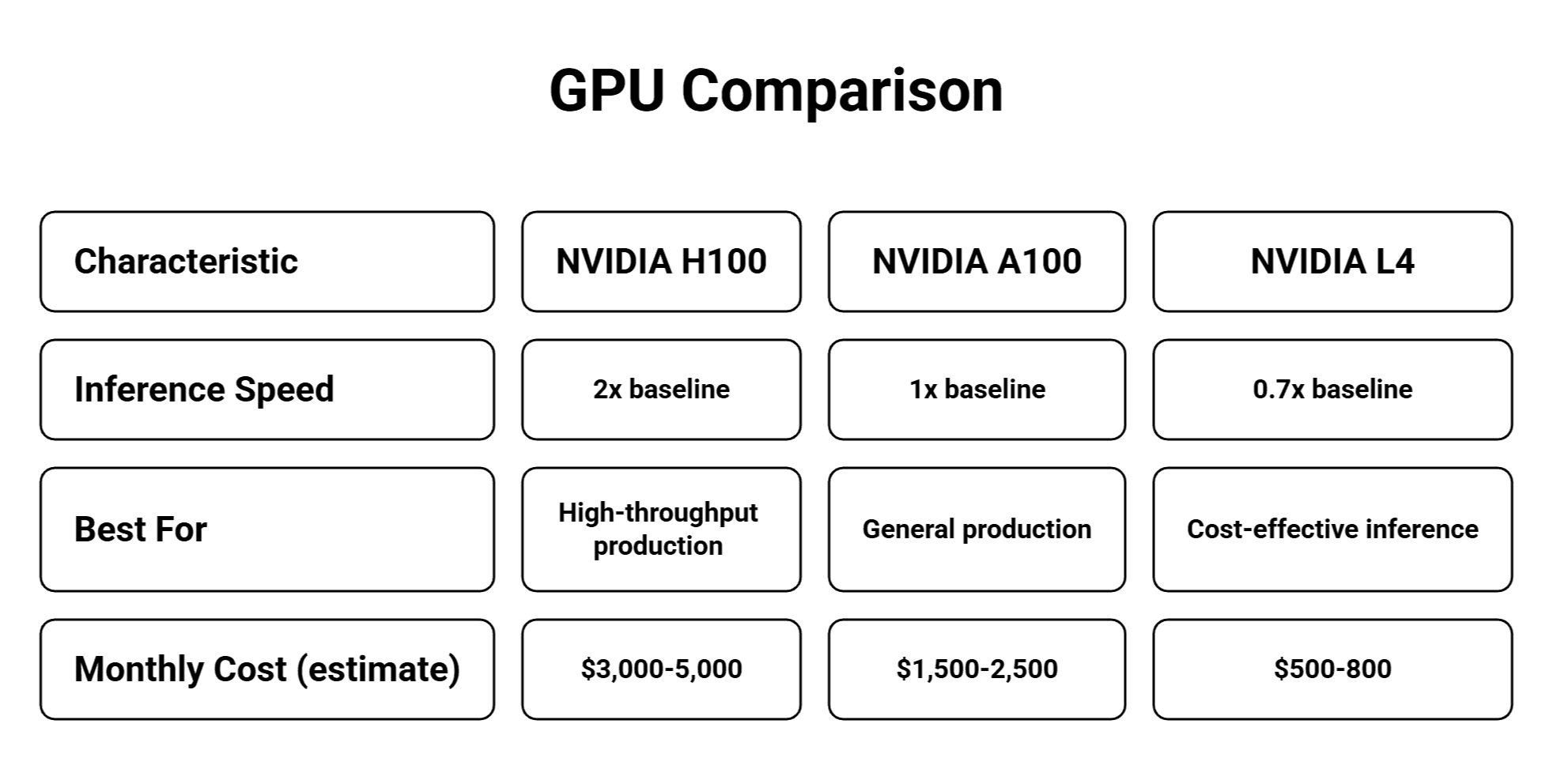
Source: NVIDIA Inference Performance Data
B. Edge Computing (10x Latency Reduction)
Deployment Comparison:
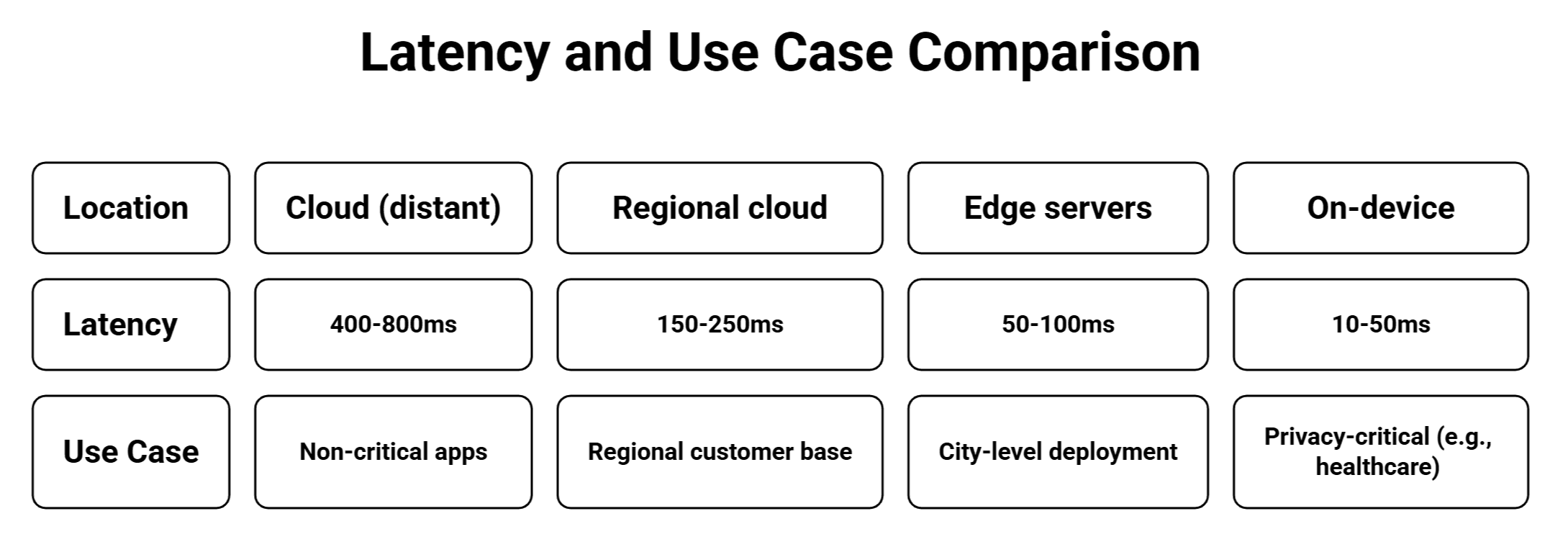
Case Study: AWS Local Zones reduced latency by 72% for Australian users (650ms → 180ms).
5. Platform-Specific Optimizations
OpenAI API (Best for General-Purpose AI Agents)
Key Features:
- Streaming (Critical for real-time):
python
response = openai.ChatCompletion.create(
    model="gpt-4o",
    messages=messages,
    stream=True,  # Reduces perceived latency by 7x
    max_tokens=200  # Limit for faster completion
)
- Predicted Outputs (50% TTFT Reduction): For code editing or templated responses:
python
response = openai.ChatCompletion.create(
    model="gpt-4o",
    messages=[{"role": "user", "content": "Fix syntax error"}],
    prediction={"type": "content", "content": original_code}
)
#Result: 50% faster for predictable outputs
When to use: General AI agents needing strong reasoning with 300-500ms tolerance. Anthropic Claude (Best for Conversational AI with Caching) Prompt Caching (80-90% latency reduction):
python
import anthropic
client = anthropic.Anthropic()

# First request: ~800ms
# Subsequent with same prompt: ~150ms (81% faster)
response = client.messages.create(
    model="claude-3-5-sonnet-20241022",
    system=[{
        "type": "text",
        "text": "Your system prompt...",
        "cache_control": {"type": "ephemeral"}
    }],
    messages=[{"role": "user", "content": "Question"}]
)
When to use: Customer service bots, AI SDRs with repeated prompts (90% cost + latency reduction).
AWS Bedrock (Best for Enterprise)
Latency-Optimized Inference:
python
response = bedrock.invoke_model(
    modelId='anthropic.claude-3-5-haiku-20241022-v1:0:latency-optimized',
    body=json.dumps({"messages": [{"role": "user", "content": "Prompt"}]})
)
#20-40% faster TTFT than standard mode
When to use: Enterprise deployments needing AWS integration, compliance, and optimized inference.
ElevenLabs (Best for Voice AI)
Flash v2.5 (75ms synthesis):
python
from elevenlabs import generate, stream

audio_stream = generate(
    text="Response text",
    voice="Adam",
    model="eleven_flash_v2_5",  # Fastest
    stream=True
)
#First audio chunk: ~75ms (ideal for real-time voice)
When to use: Voice AI applications like Sarah, Ruh AI's voice SDR.
6. Measurement & Monitoring
Essential Metrics
Time to First Token (TTFT):
python
import time
start = time.time()
response = client.chat.completions.create(
    model="gpt-4o", messages=messages, stream=True
)
ttft = time.time() - start
print(f"TTFT: {ttft*1000:.0f}ms")
#Target: <500ms chat, <300ms voice
P95/P99 Latency (More Important Than Mean):
python
import numpy as np
latencies = []  # Collect from all requests

mean = np.mean(latencies)
p95 = np.percentile(latencies, 95)
p99 = np.percentile(latencies, 99)
#Optimize for P99 (worst-case experience)
Monitoring Dashboard:
AI Agent Performance (Real-Time)
TTFT: 342ms (P95: 478ms )
Component Breakdown:
- ASR: 18% (320ms)
- LLM: 54% (958ms) 🔴 BOTTLENECK
- TTS: 15% (267ms)
- Network: 8% (142ms)
- Action: Implement LLM caching
7. Advanced Production Techniques
Hedging (40% P99 Improvement)
Send parallel requests to multiple backends, use first responder:
python
import asyncio

async def hedged_request(prompt, timeout_ms=500):
    task1 = asyncio.create_task(call_llm_1(prompt))
    await asyncio.sleep(timeout_ms / 1000)

    if not task1.done():
        task2 = asyncio.create_task(call_llm_2(prompt))
        done, pending = await asyncio.wait(
            [task1, task2], return_when=asyncio.FIRST_COMPLETED
        )
        for task in pending:
            task.cancel()
        return done.pop().result()
    return await task1
#Result: P99 improves 30-40% with 15% cost increase
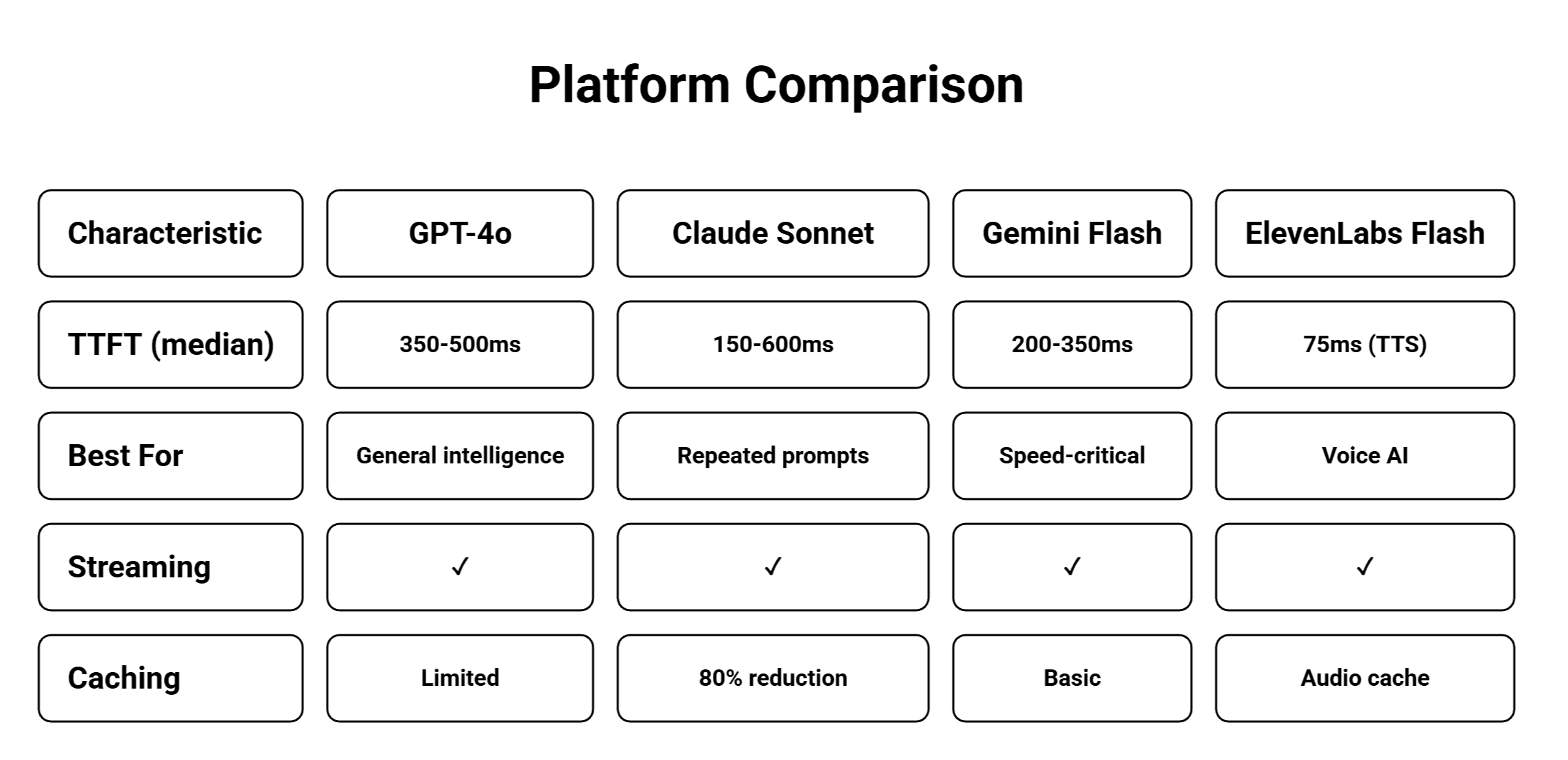
Platform Comparison Matrix
Troubleshooting Common Issues
High TTFT (>1 second)
Diagnosis:
python
#Measure component-by-component
start = time.time()
response = client.chat.completions.create(
    model="gpt-4o", messages=messages, stream=True
)
ttft = (time.time() - start) * 1000
print(f"TTFT: {ttft}ms")
Solutions:
- Switch to faster model (GPT-4 → GPT-4o-mini: 50% faster)
- Implement prompt caching (80% improvement)
- Reduce prompt length to <2000 tokens
- Enable streaming (perceived: <400ms)
Inconsistent Latency (High P99)
Symptoms: Median 400ms, P99 2000ms
Solutions:
- Implement hedging (parallel requests, use first)
- Warm caches (send dummy requests during idle)
- Regional failover (backup if primary slow)
Voice AI Feels Robotic
Solutions:
- Use semantic turn detection (context-aware)
- Adjust thresholds: Spelling=1000ms, normal=600ms, clear=300ms
- Implement upfront generation (start during user speech)
- Add prosody detection (pitch drops = sentence end)
Conclusion: From Theory to Production-Ready AI Agents
Optimizing AI agent latency requires systematically addressing bottlenecks throughout the entire pipeline from input capture to output delivery. At Ruh AI, these optimizations enable AI agents to deliver responsive, human-like interactions at scale. The most impactful improvements come from streaming (7x perceived improvement implementable in under an hour), prompt caching (80% latency reduction with two hours of work), strategic model selection (50-75% improvement by switching to faster models), and regional deployment (200-300ms savings through one day of infrastructure work).
Platform selection significantly impacts results:
- Speed-critical applications benefit from Gemini Flash paired with ElevenLabs, achieving 200- 350ms TTFT.
- Cost-effective solutions leverage Claude Haiku with caching for 150-400ms with 90% cost reduction.
- General-purpose needs are met by GPT-4o with streaming at 350-500ms, while enterprise deployments favor AWS Bedrock latency-optimized inference for 200-400ms with full compliance.
Voice AI demands special attention through upfront generation that starts preparing responses while users speak, semantic turn detection under 75ms without false positives, WebRTC over PSTN for 700ms savings, and streaming TTS for near-zero perceived latency.
Implementation follows a clear path: establish baselines in week one by measuring end-to-end latency and profiling components to calculate P50, P95, P99 metrics; capture quick wins in week two through streaming, prompt caching, and reducing prompt length below 2000 tokens; optimize infrastructure in weeks three and four by testing faster models, deploying regionally, and implementing connection pooling; then pursue advanced optimizations in month two and beyond including model quantization, hedging for P99 improvement, and edge deployment for sub-100ms requirements.
Explore Ruh AI's solutions to see these optimizations in action, meet Sarah, our voice AI agent built on these principles, read more insights, or contact us for implementation guidance.
Frequently Asked Questions
What is latency in AI?
Ans: Latency in AI is the time delay between submitting input and receiving the first meaningful output. According to MIT's research on human-AI interaction, this delay significantly impacts user perception and engagement. For Ruh AI's conversational solutions, latency encompasses input processing (speech recognition or text parsing), model inference (typically 250-1000ms and the largest component), and output delivery (text or synthesized speech). Research from Google on mobile performance shows that 53% of users abandon sites with load times exceeding 3 seconds, making sub-1.5-second responses critical for maintaining natural conversational flow in AI agents.
How to reduce agent latency?
Ans: Reducing AI agent latency requires targeting the biggest bottlenecks through model selection, caching, and infrastructure optimization. Switching from GPT-4 to Gemini Flash achieves 50-75% improvement (600-800ms to 200-350ms TTFT), while NVIDIA's research shows INT8 quantization provides 3-4x speedup with minimal accuracy loss. Anthropic's Claude caching delivers 80% latency reduction and 90% cost savings for repeated patterns, ideal for AI SDRs. Response streaming improves perceived latency 7x by displaying output as it generates (first word in 400ms vs 3+ second wait), while AWS Local Zones deployment achieves 72% latency reduction through regional infrastructure. Real-world implementations combining these techniques have reduced total latency from 1,800ms to 950ms—a 47% improvement directly impacting user engagement and conversion rates.
How can AI agents use real-time data to make better decisions?
Ans: AI agents leverage real-time data through Retrieval-Augmented Generation (RAG) and live API integrations. According to Stanford's research on RAG systems, agents query databases during conversations to provide current responses—when users ask about order status, the agent queries the order management API in real-time and returns current shipping information. Production systems like Ruh AI's Sarah connect to CRM systems, inventory databases, payment processors, and calendar APIs to deliver contextually relevant responses. The key to maintaining low latency is caching static data while fetching only dynamic information when needed. ElevenLabs' Conversational AI platform achieves sub-100ms latency while integrating multiple systems through optimized connection pooling and running API calls concurrently with LLM inference rather than sequentially.
How to solve latency?
Ans: Solving latency requires systematic measurement, targeted optimization, and continuous monitoring. Start by profiling the complete pipeline to identify bottlenecks—typically LLM inference accounts for 60-70% of total latency. Apply targeted solutions based on the bottleneck: for LLM issues, switch to faster models (Gemini Flash provides 60% improvement), implement prompt caching (80% reduction), or use INT8 quantization (3x faster). For network bottlenecks, regional deployment saves 200-300ms while WebRTC saves 700ms over PSTN for voice applications. For TTS issues, ElevenLabs Flash v2.5 synthesizes speech in 75ms versus 300-500ms traditionally. Cisco Webex's success demonstrates this approach—they identified LLM as the bottleneck, implemented upfront generation starting responses while users speak, and achieved approximately 1.3s PSTN latency despite network constraints, creating natural-feeling conversations on traditional phone networks.
What is latency in real time?
Ans: Real-time latency refers to acceptable delay thresholds for immediate, interactive responses—typically under 500 milliseconds for conversational applications. According to Carnegie Mellon University research, human conversation rhythm requires pauses under 500ms to feel natural, making this the critical threshold for voice AI like Ruh AI's agents. Different applications have varying requirements: voice AI needs sub-500ms for natural flow, chatbots tolerate up to 1000ms for engagement, autonomous vehicles require under 100ms for safety, and financial trading demands sub-10ms for competitive advantage. Physical constraints create unavoidable baselines—speed of light limits signals to 50ms coast-to-coast, PSTN networks add 400-500ms each direction, and displays refresh at 16ms per frame. According to Google Cloud's AI performance research, achieving real-time AI requires combining streaming (perceived sub-400ms latency), edge deployment (sub-100ms network latency), fast models like ElevenLabs Flash v2.5, aggressive caching (150ms vs 800ms), and comprehensive optimization through quantization and concurrent processing.
Voice AI's streaming, edge, and caching tradeoffs become especially tangible when responses must keep pace with field conversations, making Ruh AI a construction-oriented continuation of the latency discussion.